A fast fix for IE8 crashes, slowdowns

By | January 25, 2010, 5:30am PST

Is Internet Explorer 8 acting sluggish or crashing regularly? The problem might be a corrupted add-in. And one of the most likely candidates is the widely used Adobe Flash Player. In this post, I’ll explain how you can troubleshoot IE8 performance issues by completely removing the Flash Player and temporarily disabling all other add-ons.

Updating the Flash Player is also a great way to ensure that you’re running the latest version of the Flash plug-in. That’s a crucial step in making sure you’re protected from the many security holes that have plagued this omnipresent add-in.

Here are step-by-step instructions for how to get Flash absolutely up to date.

Step 1: Remove all traces of the currently installed Flash player. You cannot do this from Control Panel. Instad, visit this page at Adobe.com: How to uninstall the Adobe Flash Player plug-in and ActiveX control. Download the Windows uninstaller and save it your Downloads folder (or to the desktop, if you’re using an older version of Windows). Now close all running programs and run the uninstaller. When it finishes, you can continue.

Step 2: Restore Internet Explorer to its default settings. Open Control Panel and click Internet Options (under the Network and Internet category). At the bottom of the Advanced tab, click the Reset button:
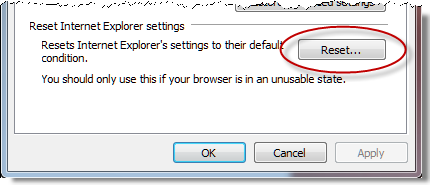
You’ll see one confirmation dialog box that lists the settings to be disabled. You also have the option to delete personal data, including cookies, history, search accelerators, and so on. I don’t recommend this unless you want a truly fresh start. Note that this will disable all currently installed Internet Explorer add-ons. We’ll re-enable them later.

This is a good time to stop and do some basic browsing to set a performance baseline. Sites that rely on Flash or other add-ins will be broken, of course. Don’t worry about that yet; instead, make a note of the browser’s responsiveness. If a bad add-on has been at the root of your problems, you should see an instant improvement.

Step 3: Reinstall the Flash Player. To do so, restart Internet Explorer (you’ll have to go through the two-step setup process again, because as far as IE is concerned you’re running it for the first time). Then visit the Flash Player page at adobe.com. Note that the option to install the Google Toolbar is selected by default (not cool, Adobe). [Update: If you already have the Google Toolbar installed, or if you are using Firefox, you might be offered a free McAfee product instead.] Clear that check box and click the big yellow Agree and install now button. Adobe will try to install its own download manager, an action that IE8 blocks, with this warning:

[Update 26-March: Adobe has hidden the standalone Flash installer even more deeply. I've updated these instructions to reflect the new location.]

The last thing you want at this point is yet another add-on to gum things up. Ignore the yellow information bar and scroll to the bottom of the page, where you will find a link that leads to this troubleshooting page. Scroll all the way to the bottom of that page and you will, finally, find a “Click here to download” link. Click that link and then click Run in the File Download box:

After you approve a single UAC prompt, the Flash player should install automatically.

Step 4: Re-enable previously installed Internet Explorer add-ons. To do so, click Tools, then click Manage Add-ons. That opens a dialog box that lists all available add-ons. To make the list easier to work with, right-click the Status heading and choose Group By, then click Status. Your disabled add-ons will appear at the top of the list, where you can go through them one by one and re-enable those that you’re confident are safe. I recommend starting with a conservative approach: leave most add-ons disabled and re-enable them only when they’re actually needed. When you’ve finished reviewing the list of add-ons, click Close and begin browsing again.

Leave a comment in the TalkBack section if you’ve tried this technique. Did it work for you?

Kick off your day with ZDNet's daily e-mail newsletter. It's the freshest tech news and opinion, served hot. Get it.

Topics

Ed Bott is an award-winning technology writer with more than two decades' experience writing for mainstream media outlets and online publications.

Disclosure

Ed Bott

Ed Bott is a freelance technical journalist and book author. All work that Ed does is on a contractual basis.

Since 1994, Ed has written more than 25 books about Microsoft Windows and Office. Along with various co-authors, Ed is completely responsible for the content of the books he writes. As a key part of his contractual relationship with publishers, he gives them permission to print and distribute the content he writes and to pay him a royalty based on the actual sales of those books. Ed's books are currently distributed by Que Publishing (a division of Pearson Education) and by Microsoft Press.

On occasion, Ed accepts consulting assignments. In recent years, he has worked as an expert witness in cases where his experience and knowledge of Microsoft and Microsoft Windows have been useful. In each such case, his compensation is on an hourly basis, and he is hired as a witness, not an advocate.

Ed does not own stock or have any other financial interest in Microsoft or any other software company. He owns 500 shares of stock in EMC Corporation, which was purchased before the company's acquisition of VMWare. In addition, he owns 350 shares of stock in Intel Corporation, purchased more than two years ago. All stocks are held in retirement accounts for long-term growth.

Ed does not accept gifts from companies he covers. All hardware products he writes about are purchased with his own funds or are review units covered under formal loan agreements and are returned after the review is complete.

Biography

Ed Bott

Ed Bott is an award-winning technology writer with more than two decades' experience writing for mainstream media outlets and online publications. He's served as editor of the U.S. edition of PC Computing and managing editor of PC World; both publications had monthly paid circulation in excess of 1 million during his tenure. He is the author of more than 25 books on Microsoft Windows and Office, including the recently released Windows 7 Inside Out.

Talkback Most Recent of 152 Talkback(s)

  • The fact that you can't uninstall Flash from the Control Panel...
    ...is damning.

    I could understand it if Flash was put out by some small developer who didn't have a lot of resources--but *Adobe*?

    They're rolling in money. They shouldn't have any trouble creating a real install/uninstall routine.

    Of course they aren't alone. Printer manufacturers (especially HP) are just as guilty with printer drivers, insisting on using their own bizarre installer routines instead of Windows built-in one.

    Bah, a plague on all their houses.
    ZDNet Gravatar
    wolf_z
    25th Jan 2010
  • ZDNet Blogger

    The other thing that bugs me ...
    ... is they insist on installing their own downloader add-in by default.
    ZDNet Gravatar
    Ed Bott
    25th Jan 2010
  • Save Their Servers
    Flash probably gets thousands of downloads of day since just about site has some sort of Flash ad or feature. I'm guessing this downloader is some kind of distributed platform which helps them save their servers from all the traffic. I don't care for it either, but I can see a use for it.

    I've also seen a similar download for Reader as well, which I can appreciate more since Reader is gargantuan in size these days.
    ZDNet Gravatar
    asdfaewf-23161102573290148203843898848973
    25th Jan 2010
  • ZDNet Blogger

    Then they should be transparent about it
    Right now the Download Manager is installed without informed consent and with only the most rudimentary notification.
    ZDNet Gravatar
    Ed Bott
    25th Jan 2010
  • You can uninstall it
    ...through CCleaner or a good registry cleaner. All kinds of programs show up in there that don't show up in Control Panel.

    M$ Control Panel has become something of a joke.
    ZDNet Gravatar
    Wintel BSOD
    25th Jan 2010
  • Funny
    Everything that shows up in Ccleaner, shows up in
    the CP as well on my machine...
    ZDNet Gravatar
    Cylon Centurion
    25th Jan 2010
  • Well you're a funny guy, Nicholas
    Considering things like OpenCandy, Windoze Genuine Advantage Validation Tool and Adobe's Download Manager don't show up in mine. Yet they show up in CCleaner. Funny that.
    ZDNet Gravatar
    Wintel BSOD
    26th Jan 2010
  • Various sites...
    Various sites that I have visited claimed, that I didn't have the latest version of Flash installed. They only shut up after I installed Adobe DLM!

    lehnerus2000
    ZDNet Gravatar
    lehnerus2000
    26th Jan 2010
  • ZDNet Gravatar
    msalzberg
    25th Jan 2010
  • Thought such sentiments myself
    Many times, replete with damn near the same expletive deletives. wink lol

    "The only, the only mistake we made was in thinking that maybe this time, the Acrobat team will do something right. That, dear readers, is our fault."

    For a company of this size, and with so many blue chips products in their catalog, this remains not only a mystery -- but a sin. sad
    ZDNet Gravatar
    klumper
    25th Jan 2010
  • It's enough to make you...
    move to linux and use that new GNU flash replacement.

    I already use Foxit, and am FINALLY RELIEVED!!

    Of that load of rubbish, at least!
    ZDNet Gravatar
    JCitizen
    26th Jan 2010
  • RE: A fast fix for IE8 crashes, slowdowns
    @Ed Bott Every company first creates software then creates its add ons to support their sales:)
    Custom Thesis
    Custom Book report
    Dissertation Help
    Custom Coursework
    ZDNet Gravatar
    lorisinclair
    8th Sep
  • Er... I see the Adobe Flash 10 and ActiveX plugin removal option in...
    ...the Programs and Features portion of the control panel along with Adobe Air, Reader 9.3 and Acrobat.com.
    ZDNet Gravatar
    Wolfie2K3
    25th Jan 2010
  • You CAN uninstall Flash from the Control Panel
    I've done it on many occasions myself.... the only time the Flash and Shockwave uninstallers don't work is when the installation registry entries get borked... then, you have to go the 'download the Adobe hard uninstaller' route.
    ZDNet Gravatar
    Lerianis10
    25th Jan 2010
  • Not the older ones...
    they will remain resident in your program files and still leave you vulnerable. Secunia PSI, will point to those file locations, and the offending .ocx file can be deleted manually, if no process is using it, that is!

    The new flash installers also uninstall SOME of the older versions, but it is inconsistent, in my experience.

    Java has the nearly identical problem, except at least they have an updater now.
    ZDNet Gravatar
    JCitizen
    30th Apr 2010

Talkback - Tell Us What You Think

Formatting +
BB Codes - Note: HTML is not supported in forums
  • [b] Bold [/b]
  • [i] Italic [/i]
  • [u] Underline [/u]
  • [s] Strikethrough [/s]
  • [q] "Quote" [/q]
  • [ol][*] 1. Ordered List [/ol]
  • [ul][*] · Unordered List [/ul]
  • [pre] Preformat [/pre]
  • [quote] "Blockquote" [/quote]

The best of ZDNet, delivered

ZDNet Newsletters

Get the best of ZDNet delivered straight to your inbox

Facebook Activity

White Papers, Webcasts, & Resources