ie8 fix
madison

A killer Windows 7 bug? Sorry, no

By | August 5, 2009, 1:20pm PDT

The blogosphere is abuzz over a newly publicized bug in Windows 7. I read about it yesterday on Chris123NT’s blog, where it was described as a “critical bug in Windows 7 RTM.” The story picked up momentum today when InfoWorld’s Randall Kennedy (the man behind the “Save XP” Astroturf campaign) published a sensational polemic: “Critical Windows 7 bug risks derailing product launch.” Tom Warren at Neowin called it “rather nasty” but sensibly concluded that it’s far from a “show stopper.”

My conclusion? It’s alarming behavior if you’re unaware of what’s happening. But when you look more carefully, it’s arguably a feature, not a bug, and the likelihood that you’ll ever crash a system this way is very, very small and completely avoidable.

You can go read Chris’s initial report to see the repro steps. Basically, you need to run the Windows Chkdsk command using the /r switch, which is designed to locate and repair bad sectors on a disk. According to the initial report, if you use this tool as described, “you should see your memory quickly gobbled away in the chkdsk.exe process until it either stops at or around 90% or it maxes completely out and crashes the computer.”

Let’s all take a deep breath, shall we? I’ve done a couple hours worth of testing this morning on the subject. There’s much less here than meets the eye. The idea that this bug is reproducible 100% of the time is incorrect, and in fact some of the seemingly alarming behavior is actually by design.

First, you won’t see this bug on your system drive. Why? Because if you try to run Chkdsk with this switch (either from the command line or from the graphical interface) you’ll be told that the drive is in use. Windows will politely offer to schedule the disk check to run the next time you reboot and before Windows loads. The disk check in this mode is quick and harmless.
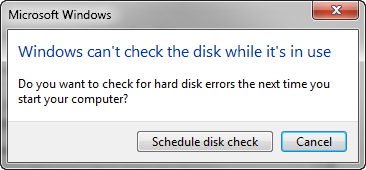
Most systems have a single drive, with a single partition. On such a system, you will never see this issue.
Second, if you try to run disk check on a non-system drive that is in use (one where you have recently worked with data files for example), you’ll be offered the opportunity to dismount the drive and continue the check. If you refuse, Windows politely offers to reschedule the check to run at startup, just as in the previous case.

Third, I’ve heard at least one observer speculate that this might affect you if you insert a removable drive and Windows prompts you to “scan and fix it.”

I tried doing exactly that, inserting several USB flash drives until I found one 4GB model that triggered this prompt. It produced the following dialog box:

Note that the second option, to “Scan for and attempt recovery of bad sectors” is the equivalent of the /R switch for Chkdisk. It’s not selected by default, and even when I clicked it, the disk check ran perfectly, without incident. I tried running Chkdsk /r from the command prompt on the same disk, with no excessive memory usage.

As a final stress test, I ran Chkdsk with this option on a 160GB portable USB hard drive, as prompted by the Scan and Fix dialog box. It did indeed exhibit what seemed like alarming behavior, rapidly consuming all but 50MB 500MB or so of the 6GB of RAM on my test system. (That green bar on the bottom means I’m using roughly 93% of available RAM.)

[Click image to see a larger version]

I allowed the process to run, and although it took roughly 15 minutes to complete the check, memory usage never hit the system’s maximum, other programs remained completely responsive, and I was even able to run a second instance of Chkdsk /R on another USB drive.

Oh, and the original report was slightly off base. The extreme memory usage appears to be in the Explorer.exe process, not in Chkdsk. Update: The original report noted, correctly, that high memory usage is observed in the Chkdsk.exe process if you kick off the disk check from a command prompt. If you perform the exact same operation from the more familiar graphical interface, the measurement in Task Manager is different, with Explorer.exe being credited with the memory usage. However, the end result is exactly the same. I repeated these tests using both the graphical and command-line methods on multiple drives to confirm.

[Click image to see a larger version]

Windows boss Steven Sinofsky took the rare step of visiting the original blog and posted a comment explaining the issue:

In this case, we haven’t reproduced the crash…. [T]he design was to use more memory on purpose to speed things up, but never unbounded — we requset [sic] the available memory and operate within that leaving at least 50M of physical memory. Our assumption was that using /r means your disk is such that you would prefer to get the repair done and over with rather than keep working.

While we appreciate the drama of “critical bug” and then the pickup of “showstopper” that I’ve seen, we might take a step back and realize that this might not have that defcon level. Bugs that are so severe as to require immediate patches and attention would have to have no workarounds and would generally be such that a large set of people would run across them in the normal course of using their PC.

My experience bears out that explanation perfectly. According to Sinofsky, Microsoft is now doing “overnight stress testing of 40 machines” to see whether the bug is reproducible. If so, I would expect a patch in short order. But based on my testing I have to agree this is interesting, but far from a “show stopper.”

Kick off your day with ZDNet's daily e-mail newsletter. It's the freshest tech news and opinion, served hot. Get it.

Topics

Ed Bott is an award-winning technology writer with more than two decades' experience writing for mainstream media outlets and online publications.

Disclosure

Ed Bott

Ed Bott is a freelance technical journalist and book author. All work that Ed does is on a contractual basis.

Since 1994, Ed has written more than 25 books about Microsoft Windows and Office. Along with various co-authors, Ed is completely responsible for the content of the books he writes. As a key part of his contractual relationship with publishers, he gives them permission to print and distribute the content he writes and to pay him a royalty based on the actual sales of those books. Ed's books written prior to fall 2011 have been distributed by Que Publishing (a division of Pearson Education) and by Microsoft Press. As of November 2011, Ed is a partner in the independent publishing company Fair Trade Digital Exchange, which exclusively publishes his books.

On occasion, Ed accepts consulting assignments. In recent years, he has worked as an expert witness in cases where his experience and knowledge of Microsoft and Microsoft Windows have been useful. In each such case, his compensation is on an hourly basis, and he is hired as a witness, not an advocate.

Ed does not own stock or have any other financial interest in Microsoft or any other software company. He owns 500 shares of stock in EMC Corporation, which was purchased before the company's acquisition of VMware. In addition, he owns 350 shares of stock in Intel Corporation, purchased more than two years ago. All stocks are held in retirement accounts for long-term growth.

Ed does not accept gifts from companies he covers. All hardware products he writes about are purchased with his own funds or are review units covered under formal loan agreements and are returned after the review is complete.

Biography

Ed Bott

Ed Bott is an award-winning technology writer with more than two decades' experience writing for mainstream media outlets and online publications. He's served as editor of the U.S. edition of PC Computing and managing editor of PC World; both publications had monthly paid circulation in excess of 1 million during his tenure. He is the author of more than 25 books on Microsoft Windows and Office, including the recently released Windows 7 Inside Out.

237
Comments

Join the conversation!

Just In

RE: A killer Windows 7 bug? Sorry, no
JACOBSONR 14th Oct
Good day to confirm this comment I would appreciate T h e b e s t o f Z D N e t d e l i v e r e d your website very nice to everyone Yes, Oracle is the only one with shared-disk architecture, but that is there advantage. It means you can add or remove nodes and the database lives on. In a shared nothing architecture, if you lose a node, you lose the system. I'm sure Oracle appreciates EMC highlighting their advantage.I also desire to signal in your RSS feeds. Thank you as soon as once again and maintain up the great operate Awesome post! Thank you very much || thanks for nice content this is really benefit to me.
0 Votes
+ -
What, pray tell, is the purpose of RAM if it isn't for it to be used by something? Bragging about unused RAM is like bragging about how your grocery getter has 500HP even though you never use more than 50HP.

use more memory on purpose to speed things up, but never unbounded

Exactly right. If there is a bug where it demands more than that, fair enough, but it isn't a bug to use everything but 50MB of RAM if getting that RAM means that the job finishes faster.

Yawn, I guess when ABMers have nothing to complain about, they'll just make stuff up.
0 Votes
+ -
It's not the unused RAM thing
Lerianis10 5th Aug 2009
It's the massive amount of usage by this thing
that is ticking some people off. I can understand
the justification that if this pops up, most
people would want to 'get the freaking scan done
and breathe somewhat easier' that they are saying,
but almost 5 GB's? No, it shouldn't use that much
memory.
0 Votes
+ -
Contributr
Why not?
Ed Bott Updated - 5th Aug 2009
It's not the default check disk setting. The user has to specifically choose to run a radical diagnostic and repair option, presumably because they believe there is something seriuously wrong with the disk that requires immediate repair.

Meanwhile, you can continue to work with the machine as I've been doing here. No crash, no slowdown for simple tasks.

I don't understand the scenario where you would want to do this task in the background while doing other demanding things.
0 Votes
+ -
Yup
rdhalsteatzd 5th Aug 2009
I almost always run the check and repair option "on non system disks", but the problem as I see it is things like auto updates that may start while the system is running and try to gobble up even more memory. That ends up duping a *lot* of stuff to the swap files and retrieving it which slows everything. So...I always choose to let the system do the cleaning house on a reboot while I switch to another machine. Most of these machines are running 5 or more major tasks at the same time so running this on an on-line machine is not a safe option. OTOH I never paid much attention to how much memory it was using. However I do have to admit I prefer XP Pro by a wide margin over Vista U and Win 7 and I've been running Win 7 on 2 out of 5 machines since it became available. I particularly dislike the native handling of the network in Win 7, but I can manually get around that. It did take me a while to figure how to do that which turned out to be fairly simple:-))
0 Votes
+ -
In recent years I find I've been less tolerant of Microsoft's missteps - but this is so much overblown rhetoric about an issue that is highly unlikely to impact 99.9% of the population, and will impact no one on a regular basis.
0 Votes
+ -
/r is now radical???
jasonp@... 6th Aug 2009
Wow, who knew that Microsoft was introducing radical diagnostic and repair options...especially since these radical options have been around since the DOS days. Come on Ed...words matter, especially in print. There is nothing radical about running chkdsk with a /r flag. We can agree that this really isn't a big problem, but to use this kind of verbiage to describe a process most of us have been using since the 1990s really makes you come off sounding like a nutball.
0 Votes
+ -
Contributr
Chkdsk /r is a last-resort tool. As the description says, it is designed to identify bad sectors and recover data. I don't recommend it.

In the 21st Century, with SMART technology in use on virtually every drive, this command is really unnecessary and potentially dangerous. It's a relic of a bygone era. If I thought I had a drive that was failing, my first goal would be to back everything up, immediately. Then I would restart the PC and run a full-fledged diagnostic utility, preferably the one recommended by my drive manufacturer.
0 Votes
+ -
I rather run hard drive tools from manufacturer then chkdsk. It seems every time I run chkdsk it fixes or says it did my issue only having the issue resurface on reboot.

So I don't take any chance if I think the hard drive has issues I will run the tools from manufacturer of the drive then look up the code and go from there.
0 Votes
+ -
Gee, I use chkdsk /f on occasion
Wintel BSOD 6th Aug 2009
Never had an issue. At least not with XP.

Win7 should at least be able to do this if XP safely if XP can.
0 Votes
+ -
Sounds to me like your HDD is about to die!
de-void-21165590650301806002836337787023 10th Aug 2009
ChkDsk can only do so much, marking known bad sectors appropriately. But if you run CHKDSK and the next time you reboot your machine complains again that your HDD has bad sectors, back-up everything on the drive that you can't restore from CD/DVD and replace the drive.
0 Votes
+ -
Bad sectors
blaacksheep 6th Aug 2009
The only time the /r switch is of use is if you have bad sectors on your drive. If you are even running a drive with bad sectors the first thing you should do is backup your data to a good drive. The only time I've ever gotten bad sectors was with a faulty power supply that most likely caused a head crash while the drive was churning away. Bad sectors are an end of life signal for your hard drive and will only get worse causing more data loss.
0 Votes
+ -
Whats the problem
rbettencourt@... 6th Aug 2009
I am like you ED I do not see a problem. For one I never run the chkdsk cmd without scheduling a reboot. Whats is the point to check a drive you think is failed and still be working on that PC? If it is a removable drive that I suspect a problem I will run my diag program and rewrite 1 or 0 to it 35 times (gutman i believe) I would not trust chkdsk to fix problems with my drive might as well refreseh it and be sure your data is safe.

I think the main problem these people have is they freak when their babys use all that memory they bought. In fact I think I will try this on my desktop and see how much of my 8GB is used up. I have never seen more than half used at any time and this might be a great way to test mu memory.

Thanks for the truth.
0 Votes
+ -
it isn't even that
Macintoshtoffy 6th Aug 2009
Most people can understand that applications can get bigger, that as
operating systems become more complex and take on more
responsibility it gets bigger in size. That isn't what people are
complaining about.

Windows Vista is almost like Firefox/Mozilla - the problem is that as you
do more the memory usage increases but when one closes tabs, the end
user expects the memory to be reclaimed when these applications are
closed because what ends up happening is the hard disk starts to thrash
because the memory isn't being flushed.
0 Votes
+ -
Not quite
de-void-21165590650301806002836337787023 10th Aug 2009
Most modern browsers incorporate new techniques for sand-boxing each page containing HTML that either runs script or which incorporates some kind of add-in (e.g. Flash).

Most Windows browsers take advantage of Windows' ability to separate each running process from one another. Thus, if you open IE/FF/O/C and open 10 pages in 10 tabs, chances are you'll see around 8-10 processes listed in task manager.

Close those tabs, however, and you'll see all but perhaps 2-3 processes die and their resources release.

Why are there 2-3 processes left running? Sometimes because add-ins don't close properly (esp. Flash & Yahoo toolbar). But also most browsers keep a master process and a page process running so that they can respond more quickly when you choose to browse again.
0 Votes
+ -
So then how much?
payton@... 6th Aug 2009
So, how much ram should it use? Can you specify
exactly what algorithms should be used to get the
job done as quickly as is possible? Not all fast
algorithms are memory efficient. Actually,
algorithm efficiency is usually dependent on
available memory to do more and more processing in
a manner the full realizes the available
resources.
0 Votes
+ -
Bogus.
sporkfighter 7th Aug 2009
I don't run Windows anymore, but I can tell this is bogus. Nobody should "keep working" with a corrupt disk. If you suspect a disk error, you need to fix the disk error first, then continue working. And if you're going to fix the disk first, any sane person would fix it fast.
0 Votes
+ -
chkdsk /r??
johnmarks@... 24th Aug 2009
if your disk is bad enough to use chkdsk /r on it, then when it runs, you had better not have any files in use, or you run the very great risk of corrupting important system or application files. If my disk structure was in shuch bad shape to require chkdsk /r, I have found it better to run it from a third party boot cd that can log on to the windows installation running from the cd. This way, no files will be in use when you run the command. I want the chkdsk to be the only program running and I want it to use all of the memory it is designed to use.
0 Votes
+ -
Good question
Cylon Centurion 5th Aug 2009
I never understood that myself. Drives me nuts.

Unused RAM is wasted RAM.

0 Votes
+ -
I understand your confusion
frgough 5th Aug 2009
When using an operating system that can only effectively do one thing at
a time, any process that doesn't use all available ram is inefficient.
0 Votes
+ -
What are you talking about?
NonZealot 5th Aug 2009
Windows multi-tasks just fine. What an odd comment for you to make.
0 Votes
+ -
I have to agree with Zealot...
vulpine@... 6th Aug 2009
Windows has always been good at multi-tasking, but like any
OS it is possible to set too many things running
simultaneously. My own wife tends to have 8 or more
applications with 30 or more windows open at the same time--
talk about saturation! And she complains when things slow
down. Maybe I need to get her a 16-core Mac Pro totally
maxed out on RAM.

Then again, knowing her she'd have 30 applications running
with 300 windows open.

0 Votes
+ -
That was the point...
mojorison67@... 7th Aug 2009
I believe that was his point. If you write programs to use most/all of the RAM and you are running multiple programs there are going to be problems.
0 Votes
+ -
ChkDsk isn't a normal app
de-void-21165590650301806002836337787023 10th Aug 2009
... especially when run with the /r repair option.

When you run ChkDsk /r, you're essentially trying to reclaim data lost in a corrupted sector. When this happens your HDD is nearing it's demise and is going to need to be replaced ASAP.

When you DO run ChkDsk /r, you want it to run as quickly as possible so you can get your data off the failing HDD as soon as possible.

If ChkDsk can scan and repair your currently damaged data in 1/10 of the time by using more RAM, GREAT!.

When running ChkDsk /r, you shouldn't be running ANY other apps anyhow and you should be preparing for the worst.
0 Votes
+ -
I find myself wondering, if you're actually in Windows running chkdsk /R on a dismounted drive, why would Windows use all but 50MB of available memory? Maybe 50% of available memory would be better. It's probably not a life or death (so to speak) situation.


If it's in the pre Windows boot stage, certainly you'd want to use all available, since you're probably trying to repair the boot drive.
0 Votes
+ -
As stated in the article
tikigawd 6th Aug 2009
MS assumed people would want to get the repair done quickly and be able to return to normal duties...
0 Votes
+ -
re: As stated
Badgered 6th Aug 2009
As stated in the article MS assumed people would want to get the repair done quickly and be able to return to normal duties...

I read it, and I get what their assumption is... I just don't understand why. Obviously it's not a boot drive, so IMO it isn't as critical and could be run as a background process using less resources.
0 Votes
+ -
It normally is the data on the drive (bootable or not) that distinguishes the critical level of a drive/volume.
0 Votes
+ -
As in all things, context is key
CrunchyFerrett 6th Aug 2009
For the average user, the system drive IS the data drive. Despite a wide acceptance of removable media (Flash media, External backup drives, etc) most people still use "My Documents" as their primary data storage location.

Second note: Again, for most users, if the system drive goes down, your backup solutions aren't really relevant. Most (and again, I say most) users don't have multiple systems or the technical know-how to access their externally stored data on another system.
0 Votes
+ -
Whether ZDNet Tech Update readers would shrug something off is NOT the right standard.

Another truism about users is that most are "unaware of what?s happening," and OS designers should take that into account.

If this indeed is a "feature" then the OS should inform a user invoking it that while such behavior is possible, it is by design (and offer a "Don't warn me about this again" checkbox).

A robust OS does not "alarm" its users, regardless of technical sophistication. Period.
0 Votes
+ -
Clarification
Badgered 6th Aug 2009
It normally is the data on the drive (bootable or not) that distinguishes the critical level of a drive/volume.

Oddly enough, I was waiting for someone to bring that up. You are right of course... the data itself may or may not be critical on a non boot drive. What I meant was, not critical to starting and using your OS.
0 Votes
+ -
DUH!
Dr.Who 6th Aug 2009
Because if you can't BOOT your system, your non-boot drive is USELESS! Much like you and your thinking! Joe User doesn't have or know which "drive" he\she boots from or where he data is stored. Before you post crap like this, put yourself in Joe User's shoes and ask yourself "If I were Joe, would I know?" For Techies, you people can be REALLY STUPID.
0 Votes
+ -
As with many things
tikigawd 6th Aug 2009
people can always come up with scenarios that make certain design assumptions and decisions not seem like the best solution.
The question is how many people are adversely affected by said assumptions.

I don't know why MS decided to go this route. But I'm pretty sure that if it does turn out to be a real bane for enough people they'll just change their assumption, and hence, the way chkdsk chks your dsk.
0 Votes
+ -
Not as critical...?
Wolfie2K3 6th Aug 2009
Could be even MORE critical...

What if it's your data drive? Your OS can always be reinstalled. But if you don't have a good backup of your data and your drive is failing...

Need I go on?
0 Votes
+ -
re: Critical
Badgered 7th Aug 2009
I'll refer you to this post, up just a few from here....

http://talkback.zdnet.com/5208-12354-0.html?forumID=1&threadID=67595&messageID=1284977
0 Votes
+ -
So... back up your data
tikigawd 8th Aug 2009
If it's THAT critical and you don't have backups then don't cry if you lose it for whatever reason
0 Votes
+ -
Contributr
I agree ...
Adrian Kingsley-Hughes 5th Aug 2009
... there's a lot of RAM being consumed here, but I've yet to see a crash. If you've got the RAM, can't see why you wouldn't want to make use of it, especially since the system remains usable.

If someone can show me a reproducable crash, I'd like more details. I wouldn't be surprised if it isn't some other app (such as an AV app) at the root of the problem.
0 Votes
+ -
Contributr
As far as I know...
zwhittaker 5th Aug 2009
at least with x86 builds, it can't exceed roughly 2GB memory anyway, can it? I'm not sure of the in's and out's of it (nor could I care less, I'm not an ubergeek) but it can't use up too much memory - as far as I thought.
0 Votes
+ -
Contributr
Actually, it's 3 to 3.5 GB for X86
Ed Bott 5th Aug 2009
So if you install 4GB or more on an X86 machine, you're wasting some.
0 Votes
+ -
Well, not quite.
BrandonLive 5th Aug 2009
An x86 system has 4GB of *physical* address space to divvy up. Since some of that is used for things besides RAM (like GPU memory, some I/O stuff, etc), you end up with a maximum of 3-3.5GB of physical memory being addressed.

Separate from that, there is virtual address space. Every application gets its own completely separate virtual address space, which is managed by the OS. Windows divides this space into two sections - one typically called the "user" space and another called the system or "kernel" space. The "user" area is where the process itself can allocate memory for whatever purpose it wants. This "virtual memory" can really be physical memory, swapped out / pagefile-backed memory, or other kinds of memory like a memory-mapped file or even video memory.

The "kernel" memory space is shared between all processes.

On an x86 system, Windows divides the 4GB virtual address space into 2GB sections, one user and one kernel. This is true even if you only have 1GB of RAM. Even if you turn off the page file. You will *always* have a 4GB virtual address space and it will always be divided in two.

On current x64 versions of Windows, there is a 16TB virtual address space, divided into 8TB sections.

The upshot of this all is that on a 32-bit platform, the application should be unable to allocate more than 2GB of memory (no matter how much it wants to).
0 Votes
+ -
Contributr
Thanks
Ed Bott 5th Aug 2009
Very helpful.

And for those who don't know Brandon, he's a Microsoft developer and knows this stuff intimately.
0 Votes
+ -
You can use more than 2G on x86
rpmyers1 5th Aug 2009
It's 3 if you boot with a special switch (unlikely), and if it recognizes PAE you can page in memory, much like EMS.
0 Votes
+ -
I Thought
jdbukis@... 6th Aug 2009
That pae was only an option for server versions of windows anyway?
0 Votes
+ -
It was added with XP SP2
LiquidLearner 6th Aug 2009
and is turned on by default if you are using DEP.
0 Votes
+ -
Unless
LiquidLearner 6th Aug 2009
you specifiy the /3GB switch in the boot.ini correct? That allows the user space to grow to 3GB and keeps the kernal space down to 1 is my understanding, for use when you have an app that needs that application. Granted you have to go out of your way to enable it, but the option is there. Not that it would matter, even if you were maxxed at 3.5GB that would leave 500 MB free on a x86 system.
0 Votes
+ -
Contributr
Excellent point Brandon ...
Adrian Kingsley-Hughes 6th Aug 2009
... especially on the subject of GPU RAM ... that can really cut into your available physical memory.
0 Votes
+ -
As I understand it ...
mwagner@... 6th Aug 2009
... Windows absolutely has to have 2MB of free RAM to swap. (At least with 32-bit x86 code.)

In reality, any time you exceed 85% of your RAM capacity, your OS will begin to thrash about because of the overhead associated with pre-emptive multitasking.

On x86 systems, 32-bits restricts you to 4GB of addressable RAM. Depending on the hardware configuration, upwards of 500MB (or more) could be hardware addresses reserved by the BIOS for itself and for peripherals.
but why are we talking about 32bit still?
jk :-P
0 Votes
+ -
Thanks for the info
dfolk2 6th Aug 2009
Mr. Bott really is not credible on issues regarding problems in MS products. He has a long history of trying to explain away problems in MS products, frequently minimise them, and be sure to publicise MS's typically self serving and often very distorted spin on the problem. But I have found you, Adrian, to be believable, credible, and to have well researched the conclusions in your writing. Readings Ed's article, I had no idea if there was a significant problem or not, but if you concur with his conclusion, I am inclined to give that opinion some weight.
0 Votes
+ -
Thanks Adrian.
No More Open Source Software!! 6th Aug 2009
If YOU say it's not a bug, then it's surely not.
Well, considering you've gone out of your way to paint everything Microsoft as toxic lately.

0 Votes
+ -
Please, Adrian...do your OWN research! I ain't gonna do it for you!
No More Microsoft Software Ever! 10th Aug 2009
I wouldn't want to be accused of being OPEN SOURCE folk!
0 Votes
+ -
Good day to confirm this comment I would appreciate T h e b e s t o f Z D N e t d e l i v e r e d your website very nice to everyone Yes, Oracle is the only one with shared-disk architecture, but that is there advantage. It means you can add or remove nodes and the database lives on. In a shared nothing architecture, if you lose a node, you lose the system. I'm sure Oracle appreciates EMC highlighting their advantage.I also desire to signal in your RSS feeds. Thank you as soon as once again and maintain up the great operate Awesome post! Thank you very much || thanks for nice content this is really benefit to me.

Join the conversation!

Formatting +
BB Codes - Note: HTML is not supported in forums
  • [b] Bold [/b]
  • [i] Italic [/i]
  • [u] Underline [/u]
  • [s] Strikethrough [/s]
  • [q] "Quote" [/q]
  • [ol][*] 1. Ordered List [/ol]
  • [ul][*] · Unordered List [/ul]
  • [pre] Preformat [/pre]
  • [quote] "Blockquote" [/quote]
ie8 fix
ie8 fix

The best of ZDNet, delivered

ZDNet Newsletters

Get the best of ZDNet delivered straight to your inbox

Facebook Activity

White Papers, Webcasts, & Resources
ie8 fix
ie8 fix