Does your PC have what it takes to run Windows 8's Hyper-V?

Summary: If you're planning to test the beta of Windows 8 when it arrives early next year, you'd better start thinking about your hardware now. One of the killer features of the new operating system, Hyper-V virtualization, is picky about hardware. Here's what to look for.
Are you planning to test Windows 8 when the beta release arrives in February? If so, you'd better start thinking about your hardware now.
You might have your eye on a surplus PC as a Windows 8 test bed. A two-year-old PC seems like a perfect candidate for a test bed—after all, the system requirements for Windows 8 are unchanged from those of Windows 7. But if you go that route, you might find that you're unable to use one of the most significant new features in Windows 8.
I'm talking about Hyper-V, the virtualization technology that is being built into a desktop version of Windows for the first time. Windows 7 offered similar capabilities through the use of an add-on program called Windows Virtual PC. Hyper-V integrates this capability directly into the operating system, using technology that has proven itself in the server versions of Windows for more than three years. The average consumer will never need it, but it’s a godsend for IT professionals, developers, security researchers, and enthusiasts.
On a test PC running the Windows 8 Developer Preview, I've been using Hyper-V extensively, and it's been rock-solid. At the moment, for example, I have Windows Server 2008 R2, Windows 7 Enterprise, and a second instance of Windows 8 running in isolated virtual machines on a Windows 8 host. I used VMs, for example, to document the setup process for Windows 8 for my new book, Ed Bott's Windows 8 Head Start; without this capability, I would have no way to capture screen shots showing how the installation and repair features work.
So what's the catch? Hyper-V runs only on a 64-bit version of Windows 8, and only if the host machine is equipped with a 64-bit processor that supports a feature called Second Level Address Translation (SLAT). Some older Intel documentation refers to this feature as extended page tables (EPT). The AMD equivalents are Rapid Virtualization Indexing (RVI) and nested page tables (NPT), respectively.
Here's how you can find out whether your CPU supports this feature.
If you've already installed the Windows 8 Developer Preview, you can find out by trying to enable Hyper-V (the feature is disabled by default). In the Turn Windows features on or off dialog box, select the Hyper-V box and then click or tap OK. If your CPU doesn’t support Hyper-V, the Hyper-V Core check box will be grayed-out and unavailable, and you’ll see the following error message if you move the mouse pointer over that item:
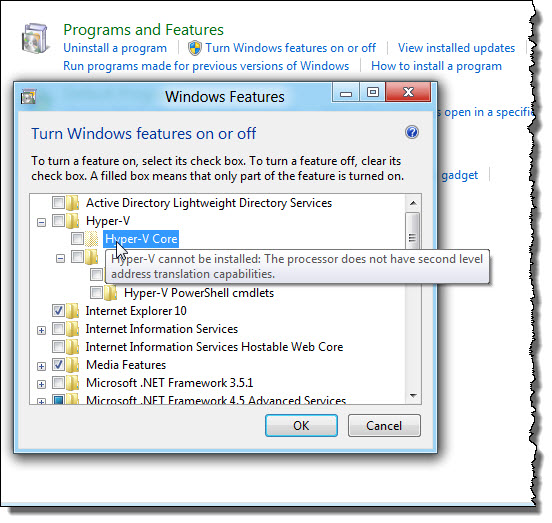
If you haven't yet installed Windows 8, you can use Coreinfo (part of Mark Russinovich's essential Sysinternals collection) to check. Open a Command window as an Administrator and run the utility with the –v switch to see the output shown here.
The asterisk to the right of EPT means this CPU does indeed pass the test.
Or you can look up the CPU to check whether it supports the required feature.
AMD has put together a comprehensive list here.
Among Intel processors, any model based on the Nehalem architecture supports SLAT. Older CPUs don't. Just look at the CPU name: if it begins with i (i3, i5, i7), it supports SLAT. Core2 and older processors (beginning with Q, E, and so on) don't include this support.
If your memory is sharp enough, you might recall a similar hardware compatibility issue that arose during the development of Windows 7. In that case, the issue was far trickier, with even some then-current high-end CPUs not supporting the required virtualization technology. Thankfully, this compatibility issue is much more straightforward, and no secret decoder ring is required.
Of course, you can always use third-party virtualization software if you prefer, and indeed I often recommended it over the much more limited Windows Virtual PC. But based on my experience with Windows Server and now with Windows 8, Hyper-V is in a completely different league. If you need virtualization, it's well worth testing.
Kick off your day with ZDNet's daily email newsletter. It's the freshest tech news and opinion, served hot. Get it.
Talkback
None of my systems support - boo
RE: Does your PC have what it takes to run Windows 8's Hyper-V?
Ed's list of capable processors was a pretty good quick litmus, but isn't entirely accurate - for example, there were some oddity processors in Intel's product line that did support SLAT (VMX for Intel, SVM for AMD). This list of oddities includes some of the later Core2 and Core2-Quad processors.
Note also that some machines require hardware-assisted virtualization support to be enabled in the BIOS; even if the processor itself supports this feature, it won't show up unless you turn it on in the BIOS.
At the end of the day, run http://live.sysinternals.com/coreinfo.exe on your machines to find out if they will support Hyper-V on your PC's and servers.
RE: Does your PC have what it takes to run Windows 8's Hyper-V?
Coreinfo v3.02 - Dump information on system CPU and memory topology
Copyright (C) 2008-2011 Mark Russinovich
Sysinternals - www.sysinternals.com
Intel(R) Core(TM)2 Quad CPU Q8300 @ 2.50GHz
Intel64 Family 6 Model 23 Stepping 10, GenuineIntel
HYPERVISOR - Hypervisor is present
VMX - Supports Intel hardware-assisted virtualization
EPT - Supports Intel extended page tables (SLAT)
Thanks
RE: Does your PC have what it takes to run Windows 8's Hyper-V?
no, SLAT is NOT supported. You have a "-" which mean NO support. Support is indicated by an "*".
RE: Does your PC have what it takes to run Windows 8's Hyper-V?
SLAT is needed because of modern GPUs on desktop PCs. On Windows 8 Server you can run Hyper-V without SLAT:
"Client Hyper-V on Win 8 Client will require 64-bit SLAT capable systems.
Windows Server 8 Hyper-V does not require SLAT so your servers running WS2008 R2 will run WS8 Hyper-V just fine (note: WS2008 R2 RemoteFx does require SLAT and that will remain the same for WS8)"
http://blogs.msdn.com/b/virtual_pc_guy/archive/2011/01/17/using-hyper-v-for-a-high-end-desktop-computer.aspx
http://blogs.msdn.com/b/virtual_pc_guy/archive/2009/11/16/understanding-high-end-video-performance-issues-with-hyper-v.aspx
RE: Does your PC have what it takes to run Windows 8's Hyper-V?
This seems like the most important post made here. Are you sure of the ability to run HV 3.0 without SLAT for Win 8 Server? And HV 3.0 under Win8 Client will not work at all without SLAT? I have a few different test boxes right now now run HV 2.0 under WS2k8R2 just fine without SLAT. I like to think I could use Win 8 Client on those boxes but it is sounding like that may not be possible. Just trying to verify.
RE: Does your PC have what it takes to run Windows 8's Hyper-V?
those are quotes from a MSFT employee in the Technet forum:
http://social.msdn.microsoft.com/Forums/en-US/windowsdeveloperpreviewgeneral/thread/7f227684-0227-43ed-94e3-8e56c6b0d3c6
Servers have no highend GPU, so SLAT is not required there.
RE: Does your PC have what it takes to run Windows 8's Hyper-V?
BTW, congrats on your new job, Ed.
RE: Does your PC have what it takes to run Windows 8's Hyper-V?
The Hypervisor bar runs underneath the host OS also because the Hypervisor provides information to the host OS allowing it to gather stats and info on, for example, the amount of memory allocated to the different VM's.
Alternatively, I *COULD* have referenced this far more comprehensive Hyper-V archiecture diagram ...
http://www.microsoft.com/download/en/details.aspx?displaylang=en&id=3501
... but that would have not helped $5ri understand the fundamental architecture of Hyper-V.
Sometimes, one has to omit a little unnecessary detail to eplain things clearly. But then, I am sure you know that, right?
RE: Does your PC have what it takes to run Windows 8's Hyper-V?
Why not HYPER-V on *every* W8 non-ARM machine? That would allow MSFT to execute a clean cut of the umbilical cord to the heavy weight of its legacy.
And that is a killer point, indeed.
RE: Does your PC have what it takes to run Windows 8's Hyper-V?
While my dream hasn't (yet) come to pass, I'm still delighted to see Hyper-V being made available on (some? which?) the client OS. Now that Win8 has Hyper-V (optionally) integrated, I can't help but wonder if they'll use its ubiquity and the by-then ubiquitous hardware support to make my dream come true in Win9 ;)
IT Decision makers don't even have this on their radar.
7 will become the Windows XP and that might be a problem if it sticks around as long (ten years now for XP).
Consumer markets is a different ball game.