Fixing Windows Vista, one machine at a time

If the "Vista sucks" movement has a public face, it's the Sony Vaio. No one knows that better than my new friend Jeremy Toeman. In May 2007, this 15-year Windows veteran replaced his old, beloved, XP-powered Vaio with a newer Vaio that came with Windows Vista Business installed. Practically overnight, he told me, his experience went from "awesome" to "awful." The experience was so terrible, in fact, that after several months of struggling he finally surrendered, putting his $2500 Windows notebook in storage and replacing it with a MacBook last summer.
At first glance, Jeremy's machine is Exhibit A in the case against Windows Vista. As Jeremy documented in a series of posts, this gorgeous machine was ugly in action: slow to start, sluggish when performing everyday tasks, crash-prone, and overloaded with annoying and unwanted software. But is it really a hopeless case, or was this system done in by the rush to market and a sloppy OEM integration?
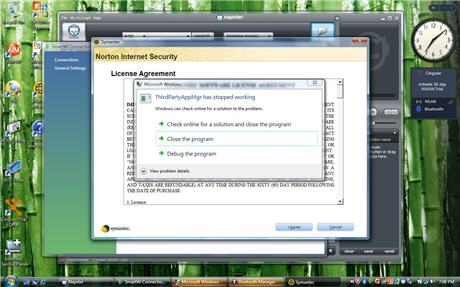
My instinct and experience says that even under these extreme circumstances, Windows Vista can be fixed. That's why, for the past two months, Jeremy and I have been collaborating on an experiment. After he sent me his Vaio in early March, I blew away all traces of the old installation and set up a pristine copy of Windows Vista Business, with up-to-date drivers and zero crapware. (This screen shot, from the accompanying image gallery, shows the blizzard of dialog boxes and icons that are part of the original, unpleasant experience.) The initial results were eye-opening and impressive. After my makeover, this machine was every bit as fast as its specs said it should have been.
Around the same time, Sony sent me a brand-new SZ770N Vaio, also with Windows Vista Business installed. The new model is in the same series as Jeremy's machine, and physically nearly identical. Not surprisingly, the CPU and graphics processor in the newer unit were both significantly faster than last year's model. Over the next two weeks, I played with both machines, switching between the original factory images and my own clean installs to see where the differences lay.
In this post and its accompanying image gallery, I'll give you a close-up look at what I had to do to turn Sony's messy, half-baked Windows installation into one that was worthy of their excellent hardware and that took full advantage of the new features in Vista. At the end of this post I'll share some of the lessons I learned about how Sony and its rivals can win their customers back.
Meanwhile, both units have left my office - one returned to Sony, the other sent back to Jeremy in the Bay Area. So you don't have to trust my observations about the differences in performance and overall experience. Over at his LIVEDigitally blog, Jeremy just posted his impressions (short version: " At long last, after 11 months, Ed Bott has turned my $2500 Vaio laptop into a usable computer"), along with an accompanying video that is truly must-see TV. His advice to "the PC manufacturers who are failing to deliver consumer-ready products" is spot on.
Page 2: Getting through a clean install
Page 3: Is the cleanup alternative worth it?
Page 4: The device driver snipe hunt
Next -->
With Jeremy's machine, the overriding question was simple: Cleanup or clean install? Using the Sony recovery partition, I reinstalled the original factory image of Windows Vista from early 2007 and began fiddling with it. . It only took a few minutes to decide that cleaning up this mess would be much more troublesome than just starting over. Because I've done so many clean Vista installs in the past two or three years, the process wasn't particularly difficult, but it had its share of frustrations and hassles.
Headache #1 would be a big hurdle for many people. Sony includes no installation media with its consumer systems, only a recovery partition. And when you use that option you get everything, with no way to say "Hold the crapware, please." For a mere $28.95, I could have ordered a set of recovery DVDs from Sony, but I wasn't interested in waiting, and I knew I had other options. I slipped a retail Windows Vista DVD (with SP1 already included) into the DVD drive, restarted the system, and kicked off a clean install. When the installer asked for a product key, I entered the one from the sticker on the bottom of the notebook (more on how that worked out in a few minutes).
The installation itself was as fast and uncomplicated as I've come to expect from a Vista install. After the installation was complete, I restarted and let Windows Vista do its thing. Next, I updated hardware drivers and installed the Sony utilities I needed (a process I'll discuss in more detail a little later). When all was said and done, I had a system that appeared to be working just fine. But a closer look revealed a few problems:
- Sony's SmartWi network connection utility killed the wireless connection at every startup, without fail, forcing me to wait until the boot process had completed and then reconnect to the wireless access point manually. The solution? Disable the Scheduled Task that automatically starts SmartWi.
- Sleep and resume worked perfectly, with one exception. If I closed the notebook lid to sleep and then reopened the lid to resume, the display resolution changed to a distorted 1024x768 instead of the proper 1280x800. The culprit, it turned out, was a Vista feature called Transient Multimon Manager, which is too clever for its own good. When I disabled the other default scheduled task, this one supplied by Microsoft, the problem vanished, as did an annoying video glitch at startup.
- I used a Bluetooth mouse with this system, but it lost its connection (as did all other Bluetooth devices) after resuming from sleep. Updating the Toshiba Bluetooth driver to the most recent version solved this problem.
- The most recent Sony-approved display driver for the notebook's Nvidia Go 7400 graphics subsystem was dated February 2007, but the driver itself showed a build date of December 2006. By Vista standards, this is downright ancient, and other Sony notebooks with the same graphics hardware have much more recent drivers. Sony's support engineers eventually delivered a later driver to me, but I had already used a community-inspired hack to load an even more recent driver and decided to stick with it instead.
That's the entire list of glitches I encountered. When I finished, every device had an up-to-date driver, and every system function worked as advertised, with no noticeable slowdowns. I used the system for a few days before deciding that it was safe to activate the clean install of Windows Vista. Because I had used the key from the sticker on the machine rather than the original OEM installation, activation over the Internet didn't work. (That's not a bug, it's a feature. For details, see the "Royalty OEM" section this post.) I called the toll-free activation hotline, entered a bunch of numbers at the automated prompt, exchanged some pleasantries with a cheerful Microsoft employee on the other side of the world, and was fully activated in less than six minutes. Success!
Next -->
When Sony sent me one of their newer Vaio models, it also included one of the first OEM builds with Windows Vista SP1 preinstalled. That made an enormous difference in terms of the out-of-box experience. Yes, the trialware apps were still annoying, but there were fewer of them and they didn't seem to have a major effect on system performance. In fact, even after a complete system restore from the recovery partition, everything felt snappy enough that i decided to use the cleanup option on this PC.
Crapware removal was tedious but relatively straightforward. I got rid of Webroot Spy Sweeper (a performance hog so notorious that Sony even delivers a Microsoft compatibility update specifically targeted at making it work properly), QuickBooks Simple Start, and AOL Toolbar 4.0. I also zapped the trial versions of Adobe Acrobat Professional (the Buy Online link led to an error page, so even if I wanted to purchase it, I couldn't), Office Small Business 2007, Norton 360, and Corel Paint Shop Pro Photo X2. The worst part of the process involved a few programs that didn't have explicit removal options in Control Panel. The Xdrive and AOL offers on the desktop, for example, required that I find the uninstaller and run it manually, a process that might have stumped the average user.
Getting rid of all that unwanted software was tedious, but the good news is that the uninstall routines all seemed to work properly. When all was done, this system, powered by a 2.5GHz T9300 Core 2 Duo processor with 3GB of RAM, was zipping along at impressive speeds. To give the system a real-world workout, I let my wife use it for a week. When the folks from Sony came calling, she didn't want to give it back.
So why was this system able to deliver when its year-old predecessor had so much trouble? Give the lion's share of the credit to Vista Service Pack 1 and a collection of device drivers that benefited from a year or more of development after Vista's release. Sony gets grudging approval for a less egregious (but still annoying) crapware load, as well as some tuning of the BIOS and other system components that allowed the system to start faster and perform better across the board.
Playing what-if games is always dangerous, but I suspect that if Jeremy had waited a year or so and bought this Vaio instead of the bleeding-edge model that drove him into the arms of Apple, he might have wondered why there was so much fuss about Vista.
Next -->
For a clean install or a cleanup, drivers are key. That's never been so true as now. A PC that was built a year ago is likely to have have been plagued with buggy drivers for video hardware, network adapters, and other crucial system components. Today, driver quality for Vista components across the board is noticeably better (although pockets of bugginess still exist). For a clean install, my challenge was to find the best driver for each system component, a strategy that required three separate search parties.
Phase 1, of course, was the assortment of drivers included as part of the default Windows installation and delivered as signed Optional updates through Windows Update. On Jeremy's Vaio, the default install left only a small number of unsupported devices.
A clean install also exposed the strengths and weaknesses of Vista's built-in troubleshooting tool, the Problem Reports and Solutions application. After completing a clean install, a full pass through the Important, Recommended, and Optional sections of Windows Update turned up a few additional drivers, including an update from Intel for the Wireless-N adapter.
Next stop was the Sony support website, which is a model of clarity and organization. Before selecting drivers, utilities, and other updates, I installed Sony's Download Taxi program, a sharp little download helper that made the process easier than it otherwise might have been. I downloaded and installed all the drivers and utilities from the Original group (ignoring several compatibility warnings that turned out to be bogus) and then installed the relevant downloads from the Updates group. The installation went smoothly, with one noteworthy exception: installing the Sony Notebook Utilities seemed to go for an inordinately long time with no feedback, and I'm glad I didn't get impatient and kill the process before it completed.
After all that, a pop-up balloon in the system tray told me that Vista had some solutions for problems that had been reported during installation. The five solutions it recommended were all signed drivers, three of which had not been delivered through Windows Update. By following the links, I found updated drivers for the UPEK's TouchChip fingerprint reader, the Toshiba Bluetooth stack, the Texas Instruments FlashMedia reader, and some Sony components.
Those drivers made it possible to enable all the hardware that had been languishing in the Unknown Devices category in Device Manager and also enabled several components (such as the built-in webcam), but it still wasn't good enough to get this system to peak performance. For that, I had to actively search for the best possible drivers. That was a particular challenge with the woefully outdated video drivers for the Nvidia Go 7400. Getting better performance required a trip to the forums at Notebook Review, downloading the Universal Extractor utility, and then a bit of tweaking to Sony's Nvidia drivers for a different model. The installation was successful, but it's certainly not a job for amateurs.
Next -->
And after all that, I had a Sony Vaio (two, actually) that performed exceptionally well, equal to any machine in their class. For Jeremy's machine, the final step was to install a few programs (iTunes+QuickTime, Firefox 2, Adobe's Flash and Reader utilities), and then use Windows Vista's Complete PC Backup to create a full image backup of the system configuration as installed. Although the complete installation occupied nearly 15GB of hard disk space, the backup used only two blank DVDs. When I sent the system back to Jeremy, I included those backup DVDs and a copy of the Windows DVD. In the event of disaster, he can get back to that pristine installation without having to go through the hassle I did.
Lessons learned?
Well, for starters, Vista doesn't suck. And neither does Sony's hardware. That four-pound machine with the carbon-fiber case is practically irresistible, as my wife continues to remind me.
But when you shovel Windows Vista and a mountain of poorly chosen drivers, utilities, and trial programs onto that beautiful hardware without thinking of the customer, the results can be downright ugly. That was certainly the case with the early-2007 vintage Vaio, and it's still true today, with too much crapware and not enough attention to quality or the user experience. What do PC makers like Sony have to do avoid losing customers? Here are some specific recommendations:
1. Make utility and driver updates easier. The Vaio Update program was a usability nightmare, and Download Taxi is still for geeks only. I will pay extra to the first company that can make its own updater work as well as Windows Update. Even better, why not work with Microsoft to integrate updates into the Windows Update framework?
2. Sell fewer models, and support the ones you sell. Sony and its rivals have dozens of separate models - too many to properly track and support. In the case of Jeremy's machine, many drivers were out of date the day he bought it (a situation that was true on the new 770 I received as well). He bought his SZ460 in May or June of 2007, and yet even today many of the drivers that would fix his issues are not available for his model (or not easily discoverable). It feels like Sony has just abandoned this particular model in terms of keeping things up to date.
3. Get rid of crapware for good. The amount of bundled trial software on both machines was terrible. On the 770, I was horrified at how much I had to remove. If I had bought this machine, I would have had to uninstall Microsoft Office (I already own a different version), uninstall Acrobat (again, I own a different version), uninstall the Spy Sweeper and Norton software (I prefer different security products), and uninstall Napster (I have a prepaid two-year Yahoo Music subscription. I don't need QuickBooks, but there it is. I don't want AOL, and so on and so on. During the hours it took to uninstall this unwanted software, I imagined what sort of insults I would hurl at the people who decided to stick me with this stuff without giving me a choice. I had time to come up with some really creative ones.
4. Give me the option to do a truly clean install. The recovery partition is perhaps the worst idea ever devised. I was able to reinstall the Windows portion of the image in as little as 20 minutes, but then I had to wait for hours as the same recovery program reinstalled all the stuff I didn't want and knew I would have to remove. It is truly a sickening feeling to watch the recovery process work and see all this stuff being reinstalled and not be able to stop it.
The bottom line is that both machines I looked at represent beautiful hardware designs and are sold at a premium price. The target market for the Vaio is a discerning professional who probably has lots of experience with computers and is willing to pay for excellent design. People like me, in other words, or Walt Mossberg of the Wall St. Journal, or Jeremy Toeman. Yes, I can undo a bunch of ill-advised, customer-hostile decisions that a product planner made without thinking about what I want. But I shouldn't have to do that. The out-of-box experience does not make me want to buy this computer or recommend it, and that's a shame, Sony.
Meanwhile, if you have a Vista computer that isn't behaving as it should, maybe it just needs a makeover, not a downgrade. Over the course of the next few weeks, I'm going to be expanding my Fixing Windows series to to move from this specific example to more general advice. I'll be covering speed-up tips, networking, search, and other areas with information that just might surprise you.