Microsoft to offer Family Pack for Windows 7 Home Premium

By | July 1, 2009, 9:40pm PDT

Summary: Every time the subject of OS licensing comes up, Apple’s defenders point to the OS X Family Pack as one of the biggest differentiators between their favorite OS and Windows. But it looks like that difference is likely to go away when Windows 7 is released. I’ve got the text of a near-final license agreement for Windows 7 Home Premium as proof.

Update: A few small retailers have inadvertently leaked details of Family Pack and Anytime Upgrade pricing. See my follow-up here: Windows 7 Family Pack, Anytime Upgrade prices leak

In two recent posts (Windows 7 versus Snow Leopard: How much do upgrades really cost? and Do you need more than Windows 7 Home Premium?), I took a closer look at the differences between Windows 7 editions and their counterparts from Apple. In the Talkback section of both posts, several commenters noted that Microsoft is still far behind its archrival in Cupertino. Until Microsoft comes out with a Family Pack license, they say, Apple will continue to have the upper hand.

Well, maybe the wait is over.

Thanks to a tip from Kristan Kenney, I took a close look at the agreements embedded in the License folder of the latest leaked builds of Windows 7. This is no longer a beta license agreement and is presumably very close to the final agreement that customers will accept. The agreements for retail copies of Windows 7 Home Premium contain this eye-opening clause:
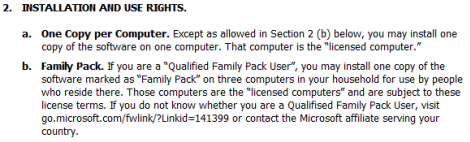
If you can’t read the screen shot, here’s the relevant section: “If you are a ‘Qualified Family Pack User’, you may install one copy of the software marked as ‘Family Pack’ on three computers in your household for use by people who reside there.” (And a proofreading note to Microsoft Legal: Fix the typo in the last sentence of that clause before RTM.)

When I first wrote about Windows 7 pricing last month, I speculated that Microsoft was likely to have a program like this up its sleeve:

What else can we expect to see? Back in early 2007, Microsoft offered a so-called Family Discount for Windows Vista, which allowed anyone with a Vista Ultimate license to purchase two Home Premium upgrades for $49.99 each. I expect to see an improved version of the Family Discount this time around. If Microsoft wanted to aim directly at its archrival Apple, it could sell three Home Premium upgrade licenses (to be used only in a single home) for $199 or less.

I’m going to go out on a limb and predict that Microsoft prices the Family Pack at $189, which is $10 less than Apple’s Family Pack (although Apple’s license is good for five Macs in a single household).

By the way, these same terms are also contained in the license agreement for Windows 7 Home Premium E (the one sold in Europe, sans Internet Explorer), as well as the N, K, and KN Home Premium versions, which are also deliberately gutted of one or more features to satisfy antitrust authorities. The Family Pack language  is not included in the license agreement for any other Windows 7 edition.

Just as with Apple’s Family Pack license (PDF), the deal will apparently be restricted to users in a single household and is not available for business users. Apple’s agreement specifically says: “The Family Pack License does not extend to business or commercial users.” No such clause is in the Windows 7 license agreement, but it’s probably contained in the definition of a “Qualified Family Pack User,” which is referred to in a link that isn’t yet live.

In some respects, this is an extension of Microsoft’s licensing efforts with Office 2007 Home and Student edition, which is licensed for use (PDF) on up to three computers in a single household. In that case, the product carried this restriction: “The software is not licensed for use in any commercial, non-profit, or revenue-generating business activities.”

Update: My colleague Mary-Jo Foley asks some interesting questions about the the Vista predecessor:

Microsoft ended up offering a Family Pack for Vista, but wouldn’t confirm its existence until just before the worldwide launch of Vista in January 2007. The company made the Vista Family Pack available to users who bought Vista Ultimate at retail. (But Microsoft may have phased out the Family Pack offer, as it no longer shows up when searching the Windows site.)

I’ve mentioned that offer several times in the past few years. There are some very big differences between that deal (which was called the Windows Vista Family Discount) and the one that appears to be on its way for Windows 7. As the original press release (linked above) made clear, the Vista Family Discount was a “limited-time offer for customers who buy retail copies of Windows Vista Ultimate.” In other words, it was a temporary discount on products that were otherwise licensed according to standard terms.

Also in that announcement was the news that it was a limited promotion that ran from January 30 through June 30, 2007. This deal, on the other hand, is actually named in the license agreement, which strongly suggests that it is a permanent addition to the list of retail packages and not a temporary promotion.

What price would you pay for a three-pack of Home Premium licenses?

Update, Noon Pacific time: Reached for comment, a Microsoft spokesperson says only, “We will continue to work with our partners and expect to have other great offers in the future as we lead up to and beyond general availability. We have nothing to announce at this time.”

Kick off your day with ZDNet's daily e-mail newsletter. It's the freshest tech news and opinion, served hot. Get it.

Topics

Ed Bott is an award-winning technology writer with more than two decades' experience writing for mainstream media outlets and online publications.

Disclosure

Ed Bott

Ed Bott is a freelance technical journalist and book author. All work that Ed does is on a contractual basis.

Since 1994, Ed has written more than 25 books about Microsoft Windows and Office. Along with various co-authors, Ed is completely responsible for the content of the books he writes. As a key part of his contractual relationship with publishers, he gives them permission to print and distribute the content he writes and to pay him a royalty based on the actual sales of those books. Ed's books are currently distributed by Que Publishing (a division of Pearson Education) and by Microsoft Press.

On occasion, Ed accepts consulting assignments. In recent years, he has worked as an expert witness in cases where his experience and knowledge of Microsoft and Microsoft Windows have been useful. In each such case, his compensation is on an hourly basis, and he is hired as a witness, not an advocate.

Ed does not own stock or have any other financial interest in Microsoft or any other software company. He owns 500 shares of stock in EMC Corporation, which was purchased before the company's acquisition of VMWare. In addition, he owns 350 shares of stock in Intel Corporation, purchased more than two years ago. All stocks are held in retirement accounts for long-term growth.

Ed does not accept gifts from companies he covers. All hardware products he writes about are purchased with his own funds or are review units covered under formal loan agreements and are returned after the review is complete.

Biography

Ed Bott

Ed Bott is an award-winning technology writer with more than two decades' experience writing for mainstream media outlets and online publications. He's served as editor of the U.S. edition of PC Computing and managing editor of PC World; both publications had monthly paid circulation in excess of 1 million during his tenure. He is the author of more than 25 books on Microsoft Windows and Office, including the recently released Windows 7 Inside Out.

Talkback Most Recent of 238 Talkback(s)

  • 3 Full copies or 3 Upgrade copies?
    The hard thing about comparing OS X with Windows is that you can only compare the Windows Upgrade version to the OS X in the retail chain because Windows Full, unlike OS X or Windows Upgrade, will let you legally install the OS on 'virgin' hardware without a prior license.

    Having said that does this '$189' family pack contain 3 copies of the upgrade or full versions?

    I would assume this is only for Windows 7 Home Premium Upgrade.
    ZDNet Gravatar
    mikefarinha
    1st Jul 2009
  • RE: Windows 7 Home Premium Upgrade
    I agree that it would be the upgrade, rather than 3 full versions. I'm more interested in what O/S I can u/g from, as none of our computers have Vista installed, only XPsp3 and Win7RC. The other thing of interest to me is will this also apply to 64 bit versions?
    ZDNet Gravatar
    RealAusTech
    2nd Jul 2009
  • ZDNet Blogger

    Upgrade conditions
    Microsoft has already made it clear that upgrades will apply to any version of Windows XP or Vista and that both 32-bit and 64-bit media will be in each pack.
    ZDNet Gravatar
    Ed Bott
    2nd Jul 2009
  • how about RC
    Does RC qualify for upgrade?
    ZDNet Gravatar
    nothingness
    2nd Jul 2009
  • You didn't really just ask that question?
    The RC is an "Evaluation Only OS" not a fully
    fledged OS that can be considered a purchased
    product. If you are using Windows 7 RC, and do not
    have another copy of Windows XP or Vista, then
    when the RTM comes out you will need to buy a full
    license.
    ZDNet Gravatar
    xXSpeedzXx
    2nd Jul 2009
  • Riddle me this, Bott-man...
    I have a Vista Ultimate license, but I wiped my drive and installed Win7RC fresh. Could I upgrade from Win7RC to Win7HP, and just enter my valid Vista license when the wizard prompts for it? That way I won't have to wipe to PC again?

    I think most of us have valid OS licenses, we just have Win7RC installed at the moment.
    ZDNet Gravatar
    MaxKorban
    2nd Jul 2009
  • "Most of us"
    I think most of us have valid OS licenses, we just have Win7RC installed at the moment.

    Who is "most of us." I certainly didn't wipe my main PC and install RC on it. I put RC in a VM.

    If you wiped your main PC and installed RC on it that's on you. MS clearly suggested you do not install an evaluation OS on your main computer. The sensible thing to do would have been to either install RC on another partition, on another hard drive, or in a virtual machine.


    Could I upgrade from Win7RC to Win7HP, and just enter my valid Vista license when the wizard prompts for it?

    That would be convenient, but I doubt it.
    ZDNet Gravatar
    tikigawd
    2nd Jul 2009
  • ZDNet Blogger

    The wizard never prompts you for an old license!
    You don't need to provide any proof of license. Most people qualify. If the Vista Ultimate sticker is on your PC, it's still got a license that qualifies it for an upgrade, even if you wipe the disk clean or installa different OS on it.
    ZDNet Gravatar
    Ed Bott
    2nd Jul 2009
  • @Ed: I have to ask...
    How does the the Windows disk know you had a valid copy if you
    wiped/replaced the drive? It's got to find out somehow, and if the
    data's not on the drive, you've got to tell it.
    ZDNet Gravatar
    vulpine@...
    2nd Jul 2009
  • @vulpine: It doesn't
    How does the the Windows disk know you had a valid copy if you wiped/replaced the drive?

    It doesn't. Microsoft trusts that if you purchased the upgrade, it is because you already own a license to a previous version.
    ZDNet Gravatar
    NonZealot
    2nd Jul 2009
  • I didn't ask you, Zealot...
    ... and the question still stands. How does it know you have a
    valid copy of Windows?
    Unless you tell it somehow?
    ZDNet Gravatar
    vulpine@...
    2nd Jul 2009
  • Wow, that was harsh!
    I just answered the question that you asked and you insult me? How nice. Regardless:
    How does it know you have a valid copy of Windows?

    The answer is that it doesn't. Microsoft trusts that you won't deceive them.

    How does Apple know that you aren't installing the family pack on more than 5 computers? The answer is that it doesn't. Make sense now that I've put it in terms of Apple?
    ZDNet Gravatar
    NonZealot
    2nd Jul 2009
  • @zealot: Nope, but then, I haven't installed Win7 yet.
    So I honestly don't know. I do know that the Upgrade version of
    Vista DID ask for verification. And we all know that with Vista, at
    least, Microsoft didn't trust a single user--not even inside their
    own campus.
    ZDNet Gravatar
    vulpine@...
    2nd Jul 2009
  • No it didn't
    I do know that the Upgrade version of Vista DID ask for verification.

    No, that isn't true. In fact, Vista did away with asking for verification.

    http://www.geekstogo.com/forum/Clean-install-using-Windows-Vista-Upgrade-t147142.html

    And we all know that with Vista, at least, Microsoft didn't trust a single user--not even inside their own campus.

    So you were wrong about Vista upgrade needing an old license key, hmm, kind of makes us wonder what else you are wrong about. happy
    ZDNet Gravatar
    NonZealot
    2nd Jul 2009
  • Must reinstall XP/Vista to upgrade over it
    Obviously you need to reinstall the licensed OS in order to upgrade to Win7 over it. All upgrades work this way, requiring the licensed OS to be in place to upgrade over it. I will do it on a separate partiion, drag my files over, make sure everything is good to go, and then delete the RC partition.
    ZDNet Gravatar
    gregrocker
    2nd Jul 2009

Talkback - Tell Us What You Think

Formatting +
BB Codes - Note: HTML is not supported in forums
  • [b] Bold [/b]
  • [i] Italic [/i]
  • [u] Underline [/u]
  • [s] Strikethrough [/s]
  • [q] "Quote" [/q]
  • [ol][*] 1. Ordered List [/ol]
  • [ul][*] · Unordered List [/ul]
  • [pre] Preformat [/pre]
  • [quote] "Blockquote" [/quote]

The best of ZDNet, delivered

ZDNet Newsletters

Get the best of ZDNet delivered straight to your inbox

Facebook Activity

White Papers, Webcasts, & Resources