My 10 favorite Windows programs of all time

I’ve been using Windows for nearly two decades, and during that time I’ve tried hundreds of programs. Most come and go, but a handful have stood the test of time for me by solving a particular problem particularly well.
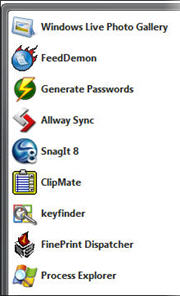
Most of the programs in this list are free; for those that aren’t a trial version is available. All of the programs in this list run on Windows XP Service Pack 2 and Windows Vista (and most run on other editions as well). I’ve devoted one full page to each program, with info and download links and enough details to help you decide whether it’s something you want to try. I’ve also provided screen shots for each program to help you see what I’m talking about.
Process Explorer (Sysinternals/Microsoft)The most amazing diagnostic tool ever, created by Microsoft Distinguished Fellow Mark Russinovich. If you use Task Manager, you should replace it with this free alternative, which does so much more.
RoboForm (Siber Systems) Create strong passwords, save them, and automatically fill them in using Firefox or IE. If you’re frustrated by passwords, this is your answer.
Keyfinder (Magical Jelly Bean Software) If you had to reinstall Windows tomorrow, do you know where your product ID is? If the answer is no, get this tiny free utility, which finds product IDs for dozens of popular programs (including Windows and Office) and lets you print or save the results.
ClipMate Clipboard Extender (ThornSoft Development) When I set up a new PC, this is the first program I install. It’s that good. I save thousands of keystrokes a year thanks to this gem of a utility.
FeedDemon for Windows (NewsGator Technologies)The best damn RSS reader in the Windows world. Period. And it’s now free.
Windows Live Photo Gallery (Microsoft) You’ll have to search for it, but this updated version of the Windows Photo Gallery that debuted in Vista is worth the hunt. If you’ve chosen to steer clear of Vista, no worries: It works in XP too.
Allway Sync (Usov Lab)This powerful tool synchronizes the contents of folders over a network or to external storage and is an ideal complement to most backup programs.
SnagIt (TechSmith) As a technology writer, I use this screen capture program nearly every day. Even after six years, I’m still discovering new tricks it can do.
IE7 ProIf you use IE7, you need this free add-on, which provides ad blocking, tab management, inline search, crash recovery, and all the other features Microsoft left out.
FinePrint (FinePrint Software) Over the years, I can’t even imagine how many trees I’ve spared with the help of this program. If you print more than a few pages a month, you have to try this.
Next -->
Process Explorer (Sysinternals/Microsoft) Info/Download
Price: Free System requirements: Windows 95 or later
You can think of Process Explorer as Task Manager on steroid. It provides system information, a hierarchical view of all running processes (including services), and an overwhelming number of technical details about how each process uses CPU and memory. It all runs in real time, making it an ideal troubleshooting tool
The main Process Explorer window contains two panes. The top pane shows all active processes, while the bottom pane shows either handles or DLLs. When you right-click any entry in the process list, you get a dialog box with an amazing amount of information about the process. You can kill, suspend, or restart a process any time. The search/filtering tools are superb.
Process Explorer is a must for anyone who is trying to pin down performance problems on any Windows version or is just curious about what’s going on under the hood.
Bonus: No installation required. You just copy this program and run it. When you close it, it leaves no traces behind.
Process Explorer image gallery
Next -->
RoboForm (Siber Systems) Info / Download Price: Free limited version; Pro version $30, extra licenses $10 System requirements: Windows 98 or later; supports IE and Firefox
The proper strategy, of course, is to assign each website and logon a unique, strong, randomly generated password that’s impossible to guess, and then to change it regularly. Creating and keeping track of all those passwords is impossible without some help. That’s where RoboForm comes in. This utility hooks into IE and/or Firefox (sorry, no support for Opera or Safari) and allows you to generate strong passwords, save credentials in individual files called “passcards” that can be encrypted, and then recall those credentials with a single mouse click (sorry, keyloggers) when you revisit that site again and have to logon. You can also save personal and financial details (bank accounts, credit cards) and fill those in when needed. You can copy everything (encrypted, of course) to a USB key for backup or for use when you’re away from home.
The free version of RoboForm is for personal use only and allows you to save only 10 passcards. For some people, that might be enough. If you’re serious about security, the Pro version is worth it for its ability to save and recall an unlimited number of passwords and to create multiple identities and profiles.
When I register at a new website, I use RoboForm to generate a super-strong random password, fill it in automatically, and then save the credentials for that site. For sensitive sites, I change passwords every month or two. I don’t have to memorize anything, and in fact I don’t even know most of my passwords. Jack Bauer could do his worst and I wouldn’t be able to tell him to how to break into my credit union account. Which is just fine with me.
The company is super responsive and pushes out updates regularly.
Next -->
Keyfinder (Magical Jelly Bean Software) Info/Download Price: Free System requirements: Windows 95 or later
It also uncovers Office product IDs and reveals Dell service tags and finds product keys for a handful of other programs, like Adobe Acrobat and TechSmith SnagIt (another of my favorites). If you look through the included config file you’ll see dozens of names and version numbers for familiar programs.
The point, of course, is to save this information so you can get to it quickly if you ever need to restore a license or reactivate a program. I save it as a text file on a USB key and also keep a printout in a locked file cabinet, along with receipts and manuals and other useful paperwork.
One nice little hidden feature (look on the Tools menu): You can edit the Registered Owner information for your machine, so it actually includes your name instead of Important Acme Customer or some such silliness. To do so in Windows Vista, you have to run the program as an administrator.
Next -->
ClipMate Clipboard Extender (ThornSoft Development) Info / Download Price: $35; discounts for multiple licenses; free with TrialPay System requirements: Windows 95 or later
The idea behind ClipMate is simple: Anything you cut or copy to the Clipboard gets saved in the ClipMate database where it can be recalled any time. This makes it easy to perform on-the-fly backups. If you’re working in a web-based editor and you’re worried you might lose all your editing if you accidentally navigate away from the page, just press Ctrl+A, Ctrl+C. Now all your work is on the Clipboard and will stay there for at least a few weeks (you can configure the default sizes and mark some clips to be spared when others are purged).
ClipMate can also manipulate the contents of the Clipboard, changing formats or cleaning out unwanted cruft. Once you memorize a few keystrokes you can strip away almost any sort of formatting. Ctrl+Alt+B, for example, removes stray linebreaks from the current contents of the Clipboard, and Ctrl+Alt+T removes all non-text formats. Or you can use the Clean Up Text dialog box, which offers a few dozen more options.
The program does magic with multiple Clipboard entries, too. You can copy a bunch of scattered sections from a document, then select the entries in ClipMate Explorer and merge them into a single clip for pasting. Or use PowerPaste to copy a group of items, one by one, and then past them into a target application in the same order. I use this feature to copy song titles from MP3 playlists and then paste them into a tag editor.
At $35, ClipMate’s price tag might scare some people off. But in my usage over the past decade I figure it’s paid for itself many, many times over. If you’re not convinced, check out the 30–day trial version, and if free is your only budget option then you can sign up for a free offer from a merchant through TrialPay.
Next -->
FeedDemon for Windows (NewsGator Technologies) Info/Download Price: Free System requirements: Windows 98 or later, IE6 or later
When describing what makes FeedDemoin awesom, I hardly know where to begin. I keep track of something like 300 news feeds, organized into two dozen folders. It’s easy to speed-read through a bunch of news items in a given category to make sure I’m on top of whatever’s happening that day. The fact that it’s all in a searchable archive means I can retrieve bits of related information that appear days or weeks apart.
The search feature is a big money-saver if you’re searching for the best price on a product. Subscribe to the RSS feeds of a bunch of sites that specialize in highlighting great deals and bargains. Keep a few months’ worth of history in FeedDemon’s cache. For a quick snapshot of price trends for a popular piece of hardware or an entire category, press Ctrl+F3 and start searching.
I also love the Clippings pane, where you can create virtual folders on any topic you want and then assign individual feed items or web pages to a topic for easy scanning later.
It’s easy to manage feeds. You can go to summary pages and see which feeds in your list of subscriptions are Dinosaurs that haven’t been updated in months. You can also see which feeds you read the most and which you never touch. Too many unread messages? Hit the Panic Button and get a fresh start.
The whole product has a level of fit and finish that is exceptional. But you probably won’t notice that until you’ve been using it for months, because mostly it just works.
(Also, a feature request for Nick: Can you integrate FeedDemon’s storage with Windows Vista’s Search index? Please? Because that would make it just about perfect.)
Next -->
Windows Live Photo Gallery (Microsoft) Info/Download Price: Free System requirements: Windows XP SP2 or later, or Windows Vista
Blame it on fallout from the U.S. Government’s successful antitrust prosecution and the subsequent consent decree, which severely limits what Microsoft can legally bundle with Windows. Ship a bare-bones utility in the OS and no one will complain. Deliver a decent upgrade and you’re on shaky ground. Provide at least three degrees of separation from that OS and you're OK again.
So you have to work to find this download. But it's worth the search. It resolves the biggest complaint about the original Photo Gallery - its oversimplified import path. The revised import wizard groups photos by date and time and lets you pick and choose which ones to import. It also adds a whizzy bit of technology that lets you stitch photos together into widescreen panoramas. Its tagging and basic photo editing features are mostly unchanged, which is just fine. All in all, this free download is one of the best programs Microsoft has developed in ages.
Windows Live Photo Gallery images
Next -->
Allway Sync (Usov Lab) Info / Download Price: Free for “moderate personal use”; Pro license is $10–30 System requirements: Windows 98 or later
The idea behind Allway Sync is pretty logical. You start with two folders that you want to keep in sync, such as data folder on your desktop PC and a backup folder on a server, or matching folders full of work files on a notebook and a desktop PC. In Allway Sync’s two-pane interface, you fill in the path for one folder in the left pane and the other folder in the right pane. Then you click Analyze. The result is a neat listing that shows which files are new, and which are changed. Click individual entries if you want to change the sync direction or skip a certain file or file type. Then click Synchronize to do the work.
It’s all fast and very easy. You can make it more complicated if you want, by setting options to define the direction of sync, include deletions, work with removable devices, and so on. I use the Automatic Sync feature to scan for changed files in my Current Work folder and back them up to a remote drive every 10 minutes.
I especially like this company’s approach to licensing. Anyone can use Allway Sync for nonprofit activity for free. For “moderate personal use” the program is also free. You can also evaluate it for 30 days without any cost. For business use, a full license is $30 (but is currently on special for $20) and extra licenses cost $10. At those prices I actually purchased a couple extra licenses just to support these guys.
Updates are frequent, and support is excellent.
Next -->
SnagIt (TechSmith) Info / Download Price: $40; discounts for multiple licenses System requirements: Windows 98 or later
I captured, cropped, and edited all the screen shots for this article with SnagIt 8. You can use the program to create simple screencasts, or capture the entire content of a web page, even if the page requires scrolling. You can save output in just about any graphics format known (including PDF), and you can convert files from any graphics format to any graphics format, one at a time or as a batch.
After you capture a screen shot, you can preview it and manipulate it with some easy to use editing tools and add special effects such as the torn and faded edges you see in some screens in this gallery. The preview window is actually an alternate view of SnagIt Editor, a standalone program that does just about everything you might want in an image editing package.
For anyone who uses Windows and writes or blogs about technology, this is a must-have tool.
Next -->
IE7 Pro (IE7 Pro) Info/Download Price: Free System requirements: Windows XP with IE7; Windows Vista
This nifty free add-on downloads and installs quickly and instantly adds the features Microsoft forgot to include in IE7:
Crash recovery What happens if IE crashes (thank you, cursed Flash player) and you had a dozen pages open in separate tabs? With this option, you’re given a menu of all your pages so you can reopen one or all.
Tab management Open new tabs, manage existing ones, auto-refresh a tab at an interval of your choosing, and reopen a page from the tab history.
Ad blocking The default settings do a good job of uncluttering ad-heavy pages and are easily customizable. There’s also a nice Flash-blocker; you can re-enable any Flash region on a page just by clicking it.
And more… User-agent switcher, mini download manager, on-the-fly spellchecking, inline search, mouse gestures, and bookmark backups, to name just a few features.
The developers of IE7 Pro update it regularly, and their only compensation comes from donations and spiffs they get from Google when you search through their ad-supported IE7 Pro Search page. I really can’t imagine using IE7 without this add-on.
Next -->
FinePrint (FinePrint Software) Info/Download Price: $50; discounts for multiple licenses System requirements: Windows 95 or later; x64 and server versions available
FinePrint represents a simple idea, executed really well. When you install the program, it sets itself up as a virtual printer. When you print from an application, the output gets piped through FinePrint and previewed in a window like the one I show in the gallery. From that preview window, you can delete pages (like the useless empty page that always seems to tag along when you print a web page), add headers and footers or watermarks, and specify the number of copies.
For big jobs, you can save huge amounts of paper by printing 2–up or 4–up (scaling full pages down so that 2 or 4 or more fit on a single side of a single sheet). You can also print two-sided jobs, and combine 2–up printing with duplex printing to make fold-and-staple booklets. The dead-simple setup wizard helps you set up these options so they work perfectly with your printer, even if it doesn’t support duplex printing natively.
Your most recent print jobs are auto-saved in FinePrint files that can be reopened and reprinted without having to open the original file. That’s a nice touch if you print out something created on a website, like a boarding pass or shipping label, and then discover that you need an extra copy.
Over the years, I can’t even imagine how many trees I’ve spared with the help of this program. And the people behind it are professional and dedicated, updating the software regularly.