OS X versus Vista, RAM division

Summary: Now that I have a recent-vintage MacBook for testing, I'm finally able to make some head-to-head comparisons between OS X and Vista. Because this system has a mere 1GB of RAM, I was curious to get a sense of how thrifty OS X Leopard is when it comes to memory usage. Vista gets a bad rap for demanding huge amounts of resources. Is that reputation fair or accurate? I put both systems to the test so I could see for myself. The results were surprising.
As I noted earlier this week, I’ve begun using a MacBook (the basic white model) and keeping a log of my experiences.
Yesterday, I received the adapter cable I needed to hook this machine to an external monitor so that I could use it in a desktop configuration. (A note to the thrifty: Don’t pay Apple $29 for this mini-DVI cable. Instead, go to Monoprice.com and pick up the generic adapter for $9.96. With shipping, it was still under $12, and it works just fine.)
Now that I have this system up and running on a full-sized screen, I'm ready to make some head-to-head comparisons with Windows. Because this system has a mere 1GB of RAM, I was curious to get a sense of how thrifty OS X Leopard is when it comes to memory usage. I was especially curious to see how Leopard compares to Vista, which as been slammed by critics as a resource hog.
To get started I opened Safari and opened a single web page, then began playing an MP3 track in iTunes. With those tasks running, I checked the results from Activity Monitor:
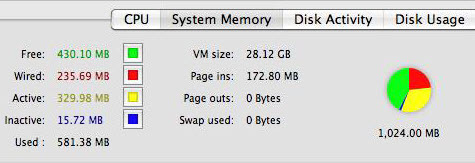
As you can see, the OS reports that 581MB is in use, with 430MB free.
Next, I launched a similar set of tasks on a system running Windows Vista Ultimate. To make the comparison fair, I used the System Configuration utility to disable all but 1024MB of memory in the system, which has 4GB of RAM. This system is using the full Aero interface (disabling it had no significant impact on the RAM footprint). I opened Windows Media Player and Internet Explorer, began playing the same MP3 tune and browsed to the same page that was open on the Macbook. Here’s what Task Manager showed for memory usage:
For those keeping score, the Vista machine is using 594MB of RAM, which is roughly 2% more than its Mac counterpart running the same set of tasks.
Vista gets a bad rap for lots of things, including its reputedly voracious appetite for memory. As you can see, Vista compares favorably to OS X in this regard and doesn’t deserve that reputation.
Kick off your day with ZDNet's daily email newsletter. It's the freshest tech news and opinion, served hot. Get it.
Talkback
Why must we try to compare apples to oranges?
Period.
And yet...
Actually ...
Vista needs more software running
lousy built in protection, OS X doesn't.
Unused RAM is useless RAM, i.e. an OS should absolutely
use as much of RAM as it ever can, for harddisk data, from
the network, etc.
Efficiency is more about a modular OS in which separate
parts of it is preferably loaded only once, something where
I know for a fact that the different UNIX really shine, i.e.
Vista will likely have gobbled up a lot more RAM at the end
of the day.
No...
indeed
Security by obscurity . . .
Must be a troll, perhaps, or maybe a newbie.
Or a MS Fanboi.
heh
Sandboxing and library location randomization were developed by linux people and soon used in OSX. ALL applications in OSX are sandboxed to one extent or another. Just because an OS does not use flashy names for its features, does not mean it does not have those features. Vista's security model is a bit neanderthal too, as it tries to accommodate the old(XP compatibility) and the new instead of having started with a proper security model like any other OS out there. Consider the amount of applications that have to bypass Vista's security features just to work properly.
Uh, no...
If by "soon" you mean in Leopard, then sure, you're right. That's when address space randomization of system libraries appeared in Mac OS X.
As for your comments on Windows security and backward compatibility, you're pretty far out of your depth and should probably do some reading before you try to make any further statements.
am i?
Applications need to access memory and devices via some HAL in the same way they used to in XP or they will not work in Vista. All you can really do is design a wrapper to add security around it. Note that this isn't for all applications, just complex or particular ones.
But hey, I'm not a genius and Microsoft hires people much smarter than me. So they probably did this much more efficiently.
Questions
You tell me. In my case, the only apps I can see that require that are those that interact with system functions, such as disk managers and security software. Most programs work just fine under standard accounts. A few need minor modifications. If you look up "shims" and Vista in your favorite search engine you'll see how that works.
Honestly, you're not making a lot of sense, just betraying your lack of knowledge.
and shimming is..
search in your favorite search engine: "run as admin" vista
Many standard programs that needed to do some file I/O would not work without a fix, or run as admin.
Granted, the apps that were still supported by their creators were patched. Older unsupported ones were not, and create a security risk.
Furthermore some older games do not work at all now. Or have serious graphics bugs that make them unplayable. The funny thing is my linux or mac can run them in wine perfectly. I'm not, however, saying Wine is perfect. far from it there are many apps that do not work. But having to play around like this is a real PITA for people.
So, isulzer...
'Some' is no good. Names please.
that ive used...
Google on the other hand gives me a bigger list. just type what i said into the search field.
Heck even visual studio needed to be patched to work in vista. And that's an app made by another MS team.
You are aware...
Or you can just install DOSbox which makes it dead easy. In fact I think DOSbox covers pretty much all those games.
wrong again
The game that was written for dos was its predecessor, x-wing. Strangely enough they made a windows 95 version with improved graphics. I had the box set with all the SW lucas arts games.
Unfortunately it wont work with wine due to lack of wine joystick support. bummer.
other games though work pretty damn well in wine. with minor glitches. Had this game not required a joystick, it would have worked perfectly.
@isulzer, Windows 95 is DOS.
not quite
This was a complete departure form previous versions of the OS.
*facepalm*
In any argument there's a time to admit your wrong when the evidence doesn't support your argument. Unfortunately, from reading your posts, this concept appears to have escaped you.
Shimming
Where did you pull that definition from? Shimming represents a wide range of specific configuration settings that report different information to a specific app to fool it into running properly. It does not patch the app. It does not change the running environment. It does not create a "wrapper."
Do some reading.