Secret links for Windows Live Essentials Wave 4 beta

Summary: I've been impressed with the Windows Live Essentials Wave 4 beta, especially with the new Photo Gallery and Movie Maker. But the one thing that's missing from the official download page is an offline installer. Never fear: I've found it.
I've been using the Windows Live Essentials Wave 4 beta for a while now and continue to be impressed with its pieces, especially the new Photo Gallery and Movie Maker.
One thing I've heard lots of complaints about, though, is the new installer, which consists of a small stub (roughly 1.15 MB in size) that then downloads the much larger main installer file and installs all the components automatically. Here's the download link:
Windows Live Essentials Wave 4 Beta
Notice anything missing? Unlike previous versions, there's no obvious way to download the full installer files so you can install on multiple machines. But it's there if you know where to look in the Windows Live Solution Center:
Windows Live Essential Offline Installer links for Wave 4 Beta
The page has links for the full setup files (wlsetup-all.exe) for English, Spanish, French, Japanese, Dutch, Portuguese (Brazil), and Chinese (Simplified). Oddly, the links aren't clickable. You have to copy and then paste them into a browser address bar to begin the download.
The other change I've noticed recently is that the web-based installer now offers the option to choose which programs from the Essentials package you want to install.
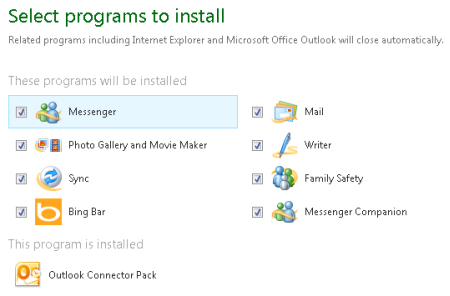
In previous builds, every program was installed, including the Bing browser toolbar and Family Safety. Although you could go back and remove the unwanted programs, that was a needless step. It's no longer required.
If you've used the Wave 4 beta, please leave any feedback in the Talkback section.
Kick off your day with ZDNet's daily email newsletter. It's the freshest tech news and opinion, served hot. Get it.
Talkback
Haven't had time to use the beta
RE: Secret links for Windows Live Essentials Wave 4 beta
@bobiroc, the biggest change is probably in Windows Live Messenger (which I don't use). It "wants to be" social, with access to your Twitter, Facebook, etc.
RE: Secret links for Windows Live Essentials Wave 4 beta
I have some mixed feelings -they really killed the tagging system in wave 4.
RE: Secret links for Windows Live Essentials Wave 4 beta
That said, I do like the Wave 4 applications and hope there are some tweaks to improve the few minor headaches before they go RTM.
Hmmm
Do you mean previous "waves"? I have been able to pick and choose what to install for as long as I can remember using WLE.
RE: Secret links for Windows Live Essentials Wave 4 beta
I agree with your assesment. However it does seem to me that since some bad press recieved even after all of the new security adjustments everything is now tied into WL Messenger.
Should one choose to not install Messenger with Wave 4 it would seem logical that all of the Whats New feeds could become disfunctional! Any thoughts?
RE: Secret links for Windows Live Essentials Wave 4 beta
Does it work in XP?
No
XP is no longer supported by WLE.
YAMA
RE: Secret links for Windows Live Essentials Wave 4 beta
Ya think ? Maybe ? Possibly?
RE: Secret links for Windows Live Essentials Wave 4 beta