WGA strikes Vista, Office 2007

Microsoft's Windows Genuine Advantage anti-piracy program was an add-on to Windows XP, Office 2003, and earlier versions of both programs. But the Genuine Advantage code is baked into Windows Vista and Office 2007, as I learned earlier today.
Over the weekend, one of my test copies of Windows Vista RC1, downloaded from Microsoft's servers and installed in a virtual machine with a legitimate product key, began behaving strangely. The new Windows Vista Welcome Center wouldn't open. Control Panel wouldn't display any icons. I couldn't reach Windows Update. I couldn't check the Windows Activation module to confirm that this copy of Windows Vista had been properly activated.
I tried normal troubleshooting techniques, including using System Restore to roll back the configuration and undo any recent changes. None of my efforts were successfuly, so I left the VM running and started working with a backup copy.
This morning, when I returned to the VM window, I was startled to see this dialog box:
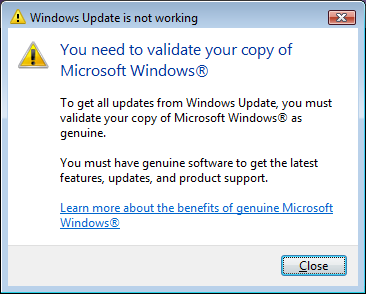
Apparently, something in Windows Vista's WGA code has decided that this copy of Windows isn't Genuine. And if you look at that dialog box, you'll notice that it doesn't offer any way to resolve the problem. Fortunately, the new Windows Easy Transfer utility worked, and I was able to use it to move all the data from this VM to a clean install. But this sort of problem without a solution shouldn't be occurring on a release candidate. I've heard reports that other beta testers have encountered similar errors with Vista RC1 but haven't been able to confirm the details yet. (If it's happened to you, send me an e-mail with details.)
A few minutes later, I checked my RSS reader and found this post from Excel guru John Walkenbach. The short version: He tried to download an Excel template using the new Office menu in Excel 2007 and was prompted with an Office Genuine Advantage dialog box. When he ran the validation tool, the resulting message informed him that his copy of Office 2007 was ineligible for updates because a copy of Office XP Professional installed on the same computer is "not genuine."
I opened my copy of Excel 2007, clicked to download one of the online templates, and received the same initial prompt John saw:
Update: John graciously sent me a screen shot showing the WGA failure message he received and gave me permission to reprint it here.
Fortunately, my copy of Office 2007 passed the validation test. But John's conclusion is right on the money:
Yes, their bogus software concludes that my copy of Office XP (not Office 2007) is not genuine. When I click the button in order to get genuine, I go to a Web site that tells me Office 2007 isn't activated (which is not true). I eventually find a page that will tell me more details -- but it doesn't work with Firefox, so I have to download a program. Eventually, I find out the reason why I can't download an Office 2007 template:
Microsoft Office XP Professional with FrontPage: Validation Failed.
The product key used to install Office has been blocked by Microsoft.Apparently, it checks every version of Office on your system. If any of them is suspect, you're locked out with no apparent way to resolve the problem -- short of buying a new copy or uninstalling the product. At no time does it ever suggest that the problem could be with their software.
And make no mistake about it: The Genuine Advantage software is wrong far more often than Microsoft is willing to admit. I'll have more details on that story tomorrow.
Update: If you think this is just a beta issue, think again. As I report in this follow-up post, Microsoft's support professionals admit that WGA problems "are coming up more commonly now."