ie8 fix
madison

Why malware networks are beating antivirus software

By | August 4, 2011, 3:00am PDT

Summary: This week I’m watching a gang of malware distributors preying on Windows users. How are traditional antivirus programs doing against this particular threat? The case study shows why signatures and scans offer imperfect protection.

The most consistent thing about the malware business is that it’s constantly changing. The field is dominated by gangs that use hit-and-run tactics. A new report by Blue Coat Systems, a security company that specializes in cloud-based services, provides some interesting (and rare) details about how the malware business ebbs and flows.

Between February and May 2011, for example, Blue Coat had 395 unique malware networks under observation. On any given day, their data show, “the number of unique malware networks … ranged from just under 100 … to fewer than 25 in operation.” The report specifically noted “a drop-off in mid-May as networks relocated and consolidated.”

Back in May, I observed the Mac Defender gang carefully. Lately, I’ve been watching a new round of attacks from a different network. Their product is a Trojan, aimed at Windows users. It arrives via e-mail, as a file attachment called RefundForm, in Zip format. It appears to be from a hotel. The subject line indicates it’s about a “wrong transaction” and the message body says the hotel overcharged the recipient’s credit card and says they need to fill out a claim form (attached) to get the money back
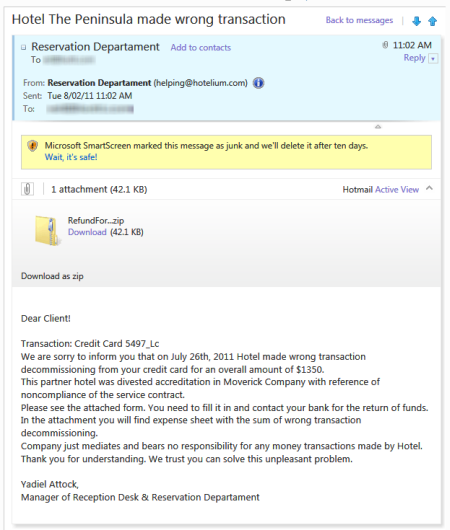
Now, this is terrible social engineering. The message is poorly written, and probably won’t fool a native English speaker. But it might be good enough to fool an unsophisticated Windows user whose English is less than perfect. Because the attached file is inside a Zip file, it can get past mail gateways that block executable files as attachments. The compressed attachment contains a Windows executable file, of course, not an Excel form, as the file icon tries to fool the recipient into thinking:

I first noticed this attack last week, on July 27, when several of these messages showed up in the Junk folder of an account I use for monitoring spam. (It’s from a domain I own but is redirected to a Hotmail server.) I saw multiple copies over the course of several days, including (in a remarkable coincidence) one that included the name of a resort I had actually visited earlier this year.

The copy shown in the screen above arrived Tuesday morning at 11:02AM. I copied the file attachment to my local hard drive and did some basic analysis.

First step: I uploaded a copy of the suspicious file to VirusTotal, which reported that I wasn’t the first to report this variant; 6 of 30 antivirus engines had detected it as malware when it was first submitted two hours earlier. When I asked for a reanalysis, it showed that the detection rate had gone up to 13 of 43 engines, presumably based on signatures that had been updated during that brief interval. (After 24 hours, 25 out of 43 engines said it was malware, although they couldn’t agree at all on what it is.)

Second step: I went to ThreatExpert and uploaded a copy of the suspicious file. It wasn’t able to identify the sample as a known threat, but a detailed report that arrived via e-mail a few minutes later contained suspicious details:

  • File system modifications: Running the file created a new executable, Dxdiag.exe, in the Startup folder. This is the same name as a Windows system tool and is a major red flag.
  • Memory modifications: Svchost.exe, a Windows system file that hosts system services, was modified, with new memory pages created in its address space. This is not something a legitimate program does.
  • Network access: The program attempted to make a connection to a remote host over port 80 and tried to run a pair of scripts from a server in Russia. It is most likely that these were attempts to download and install additional software, this time in the background.

These are all telltale signs of particularly aggressive malware. Indeed, Microsoft’s security team identified it as TrojanDownloader:Win32/Dofoil.G. Trust me, you do not want this thing running on any PC you own.

As a test, I kept the file attachment in a local folder and began checking it every few hours using the on-demand scanning tools in two current, high-end consumer antivirus programs running on Windows 7 desktop systems in my office. Before each check, I downloaded and installed the latest updates for each program. What happened?

See also:

Page 2: AV scanners miss the threat –>

Topics

Ed Bott is an award-winning technology writer with more than two decades' experience writing for mainstream media outlets and online publications.

Disclosure

Ed Bott

Ed Bott is a freelance technical journalist and book author. All work that Ed does is on a contractual basis.

Since 1994, Ed has written more than 25 books about Microsoft Windows and Office. Along with various co-authors, Ed is completely responsible for the content of the books he writes. As a key part of his contractual relationship with publishers, he gives them permission to print and distribute the content he writes and to pay him a royalty based on the actual sales of those books. Ed's books written prior to fall 2011 have been distributed by Que Publishing (a division of Pearson Education) and by Microsoft Press. As of November 2011, Ed is a partner in the independent publishing company Fair Trade Digital Exchange, which exclusively publishes his books.

On occasion, Ed accepts consulting assignments. In recent years, he has worked as an expert witness in cases where his experience and knowledge of Microsoft and Microsoft Windows have been useful. In each such case, his compensation is on an hourly basis, and he is hired as a witness, not an advocate.

Ed does not own stock or have any other financial interest in Microsoft or any other software company. He owns 500 shares of stock in EMC Corporation, which was purchased before the company's acquisition of VMware. In addition, he owns 350 shares of stock in Intel Corporation, purchased more than two years ago. All stocks are held in retirement accounts for long-term growth.

Ed does not accept gifts from companies he covers. All hardware products he writes about are purchased with his own funds or are review units covered under formal loan agreements and are returned after the review is complete.

Biography

Ed Bott

Ed Bott is an award-winning technology writer with more than two decades' experience writing for mainstream media outlets and online publications. He's served as editor of the U.S. edition of PC Computing and managing editor of PC World; both publications had monthly paid circulation in excess of 1 million during his tenure. He is the author of more than 25 books on Microsoft Windows and Office, including the recently released Windows 7 Inside Out.

Related Discussions on TechRepublic

Did you know you can take part in these discussions with your ZDNet membership?
144
Comments

Join the conversation!

Just In

RE: Why malware networks are beating antivirus software
beijing2008 Updated - 14th Sep
Thank you! Thank you! fake chanel bags
These products prioritise updates that destroy active malware. You cannot judge the effectiveness of a security program by how it deals with benign, unexecuted files.
0 Votes
+ -
Contributr
Benign?
Ed Bott 4th Aug
@ShanOw

This was not a "benign" file. If you read the ThreatExpert analysis you would see that it was exactly the opposite. In fact, I suspect one of the first programs it downloaded would have attempted to disable any running AV software.
0 Votes
+ -
Message has been deleted.
ParsonsJon Updated - 7th Aug
  • Flagged
0 Votes
+ -
Thank you! Thank you! fake chanel bags
@ShanOw
What? I'd much rather have a product that prevents the malware becoming active rather than tell the user it is "green is good". So yes, you can judge a programs effectiveness by how it deals with unexecuted files.
@wizard57m@...

Freezing a PC (via something like Faronics Deep Freeze) or white listing are the only proactive protections you can get with a Windows PC. With all AV SW you are at their mercy for reactive updates and protection (generally a few days late).

The problem with white listing and freezing is that they require more work and planning (But are well worth it). Security and productivity have always resided on opposite ends of a balance, one goes up and the other goes down.

Malware writers are paid on commission, they have financial motivation to work and they have small windows of opportunity to get that work done. In other words, they are highly motivated and no one is going to beat them with silly reactive protections.

Nothing from the AV world is going to prevent a current exploit from becoming active. White listing will, but that also requires an intelligent user.

Malware networks will always beat antivirus software, they win every time. The epitome of stupidity is thinking that somehow, a reactive protection will someday win... That is never gonna happen and offers no security.
0 Votes
+ -
@i8thecat3
Guess you have never heard of heurisitcs? Also, better AV
packages at least are able to add definitions for newly discovered malware within 24 hours. Ed Bott's experience
with Symantec should sound warning bells in his office...
I gave up on Symantec, as well as McAfee, a number of years
ago. Avira, AVG, F-Prot, heck even MSE score higher than
Norton or McAfee in recent tests.
Why, I remember the old Dr Solomon's antivirus that would
innoculate your executables to prevent changes...that's
proactive.
@wizard57m@... Some products use sandbox technology or heuristics (Comodo, Eset) to identify unknown threats.
@ShanOw That's kind of silly. Why would you let a spy into your base in the first place? :v
Years ago (Windows 98), I downloaded a .zip file containing an EXE (it was a no-CD crack for my copy of FF7-PC), and my AV software at the time screamed at me for the suspected threat before I ever unzipped or ran the EXE. While it was safe and from a trusted source, the point is my AV checked the file for me before I even had a chance to mess with it.
0 Votes
+ -
What? Their goal is to prevent them becoming active
Richard Flude Updated - 4th Aug
The signature model is wrong, impossible to keep up fast enough and for targeted attacks.

Good article Ed. Very informative.
@ShanOw
You shouldn't consider something that attempts disguising itself as an important system file a benign file plain
@ShanOw a Trojan exe is still a Trojan.
Good article Ed ... maybe now some of the folks that get cavalier about their behaviour because "they use XYZ anti-virus" will get the message.
@BrentRBrian Maybe some folks will stop crying "You're a shill for Microsoft!" because he mentions Apple malware.
@jgm@...
LOL grin
@jgm@... Although what makes me cringe was his insistence that Mac users were clueless because they didn't run AntiVirus (which, as he notes here, is utterly ineffective!)
0 Votes
+ -
@BrentRBrian: Anyone fool enough to think just having an AV makes them secure is not one to catch on quickly. Few of them are likely to read this, anyway.

No decent AV relies just on signatures anymore, but even the best heuristics catch only about 60% of unknown malware; most catch less than 50%.

I use AV, anti-spyware, and HIPS; and I use NoScript in Firefox for browsing (all free programs, and together they don't come close to using the resources Norton does). I think I'm pretty well protected, but I still use a great deal of caution (the most important component in security).

My AV is Avast, by the way; AVG is a pig, and less effective. Avira is better yet, but its updates are huge and I don't have a fast connection.
0 Votes
+ -
AV Software
mightofnight@... Updated - 4th Aug
We switch from Symantec to Sophos this year at work and it has made a world of difference! Also based on our experience i was not surprised to see Sophos as one of the first couple that detected this.
As long as the misconception continues that users ONLY need anti-virus, malware will be prevalent. I have worked in IT for over 20 years and have studied a lot of malware myself. Most anti-virus do not detect a few out of the following steps.
The most common malware attacks are browser related. Exploiting a hole in the browser and most commonly IE. The hole allows a dropper file to be injected into the filesystem that is not detected by nearly any anti-virus. The dropper file does not contain any viral code hence it evades anti-virus. The next step is usually several attacks from the dropper's payload. Often disabeling anti-virus, inserting keys into the registry, hiding component files in /users//application data/local or /roaming. Some even go as far as locking out features of windows like Taskmanager, regedit and even blocking executable names for cleaners like malware byte's Anti-malware (which happens to be the best from a tech's point of view). It's very easy to bypass some of the locks placed on the machine after a severe malware infection and most of the time you can defeat them by just changing the name of the installer for your cleaner to something like 001.exe or 001.com allowing you to defeat the malware and clean it out.
I must tell you though, Vundo is nasty and is not detected by a lot of antivirus or antimalware apps and the TDL rootkits are undetectable by all antivirus and nearly all anti-malware (except combofix and the TDL scanners). Machines infected with the TDL rootkits will run like garbage and have several types of rogue anti-virus installed along with garbage registry cleaners, optomizers and other junk that's useless. Removal and reboot starts immediate reinfection due to the TDL rootkit.
The community writes these while testing them on all commercial anti-virus to ensure detection evasion.
My final note, If any of you think AVG is adequate, think again. If you have AVG installed you might as well have nothing at all installed, it's about the same difference. Humor me, If you have AVG installed then remove it and try Avira. I can pretty much guarantee that it will find numerous things AVG didn't even see.
@Nate_K I have to laugh at these people who use AVG. They all swear that it works great for them. You can't convince them otherwise. Then they ask you why their computer is running slow and sending out strange emails all by itself.

I had one "friend" who actually threw out her computer because she swore it was broken. (I use quotes because I only hear from her when something is acting up.) Her hardware was fine. She was just infected with a ton of malware. Since she wouldn't pay for anything, I installed MS Security Essentials. As soon as she got the machine back, she took it out and reinstalled AVG.

Yup, the free AV sure saved her a lot of money.

You can't argue with those people. I have given up on them.
It's ineffective.

But it?s not a panacea and it shouldn?t be considered the primary layer of protection.

Yet this is exactly what security "experts" do.

Despite Norton?s slow response in this example, it?s my current favorite overall, precisely because it does more than just scan.

Precisely why it should be avoided.
0 Votes
+ -
Contributr
@ye

Anyone who calls AV software the #1 layer of protection is, by definition, not an expert in my opinion.
@Ed Bott: Anyone who calls AV software the #1 layer of protection is, by definition, not an expert in my opinion.

Despite that A/V software tended to be the number one recommended step to protecting oneself from malware. Any time an article about security came up the first thing recommended was "Always have up-to-date" A/V software.

Hardly anyone recommended better, proactive (as opposed to the reactive nature of A/V software) best practices such as using a limited user account (something I've advocated for years). That's starting to change as people realize how utterly useless A/V software tends to be. But it's taking a while to get there.
0 Votes
+ -
That's a step too far Ed
wolf_z 4th Aug
@Ed Bott

AV *is* the first layer of defense. It catches 90% of the crap out there. Sure there are a huge number of attack vectors that AV won't stop: browser exploits and trojans and that exploit no one knew existed.

But your article suggests AV is worthless, and that's a dangerous suggestion to make. AV may not be *enough*, but it's a damn sight better than nothing.

All the myriad layers of defense IT pros recommend: limited accounts, keeping your software updated, AV, firewalls, etc, etc, etc, none of it is *perfect* but together it offers a formidable defense. And AV is a large part of that defense.

Your advice amounts to the design philosophy of the Japanese Zero fighter from WWII. A light, nimble dogfighter with almost no armor, its only defense a skilled pilot and evasion.

AV (coupled with things like the Windows firewall and limited accounts) is much closer to the P-47 Thunderbolt. Heavily armored, heavily armed, ponderous and about as agile as a house--but in the end the Zero was no match for it.

Remember, most folks aren't computer literate, and certainly not college-graduate level computer literate like most IT folks.

They need easy defenses, and AV (while not perfect) is a huge part of that defense.
@wolf_z: It tends to cause problems and, as this article demonstrates, does a poor job of detecting real threats. I've been anti-malware software and malware free for years.
0 Votes
+ -
Contributr
Wrong
Ed Bott Updated - 4th Aug
@wolf_z

You obviously did not read to the end. Here, let me quote for you:

"Don't get me wrong: scanning is useful. It can block some threats, and it's effective at cleaning up some malicious downloads. But it's not a panacea and it shouldn't be considered the primary layer of protection."

I stand behind that. I test this stuff constantly. The current list of top threats for Windows all use techniques that are specifically designed to evade scanners.
0 Votes
+ -
First line of defense
Zeroangelmk1 4th Aug
@wolf_z Antivirus is *not* the first line of defense exactly for the reasons stated in this article, it is the *last* line of defense from the prevention side. Yes, best practice is like a Zero fighter, in that if you can't evade then you get hit and go down, but that's what fallbacks are for and AV software makes a good fallback assuming that you can design your IT infrastructure and educate your users to be proactive about these problems instead of just relying on antivirus. If your Zero gets shot down then you can always fall back to your Thunderbolt. It's rarely a good idea to put all your eggs in one basket.
@Ed Bott
+1
@Ed Bott

This is true. The User if the first line of defense. However, I'm not trying to be rude, but for you to recommend symantic makes me question your expert status. It is a bloated memory hog and scores much lower than AV's like AVAST, Malwarebytes, and AVIRA. Not to mention that Avast and Avira are free for home users. I have had much experience with it and McAfee in the past several years. Both are about as useless as a solar-powered flashlight. I think it is this "corporate brainwashing" that tries to make people believe that the Norton and Mcafee should be used. I remove a virus from someone's computer about every week or more. We won't even talk about the havic that the Norton firewall causes on a system.
@Ed Bott,
+1

I use Norton too, and I want to let everyone know that Norton Internet Security 2011 is NOT the same Norton you knew.

Regarding the final comment by ed, Norton uses reputation based file checking, so these malware files will be blocked because they have not established a reputation yet. Correct me if i'm wrong Ed, but to get Norton to even let you scan the file, you had to turn off the rep check feature, right? 'cause on my computer, Norton removes the file instantly after download if it has a low (or no) reputation score.

--
techdude
0 Votes
+ -
This is a great reason why I hope in Windows 8 they are creating a new program model that will isolate the OS from programs. It won't help in the short run, because of the need of backwards compatibility, but it will going forward and that's the right move. I suspect it would also make behavior based security monitoring simpler as well. Here's hoping!
0 Votes
+ -
@danwdoo

I know Rumor has it they are extending IE's SmartScreen filter to the OS itself. It looks to block programs from running that are unknown to the filter.

EDIT: I guess I should have chosen better words. :P
0 Votes
+ -
Contributr
You know that? Link?
Ed Bott 4th Aug
@Cylon Centurion

Would be interested in seeing confirmation of that. I have not heard that officially.
@Ed Bott ... Some of the leaked screenshots posted at Long Zheng's web site several months ago showed it in the Organize > Folder Options dialog.

It's certainly something that I'm anxiously looking forward to enabling for my users, assuming it really does become a feature.
0 Votes
+ -
@Ed Bott

I saw this over at istartedsomething

http://www.istartedsomething.com/20110408/windows-8-to-feature-native-smartscreen-file-checking/

I don't think it has been officially confirmed, but I haven't seen anyone write it off as a fake yet either.
@Cylon Centurion

Sandboxing is a good idea for a lot of things, but it can be gotten around. Protected memory areas are also good. There is also promise in using program limitations to resources.

All of these things are done in the industrial strength SE Linux versions. They run well on servers, but are a royal pain for user systems.

I would hope that Microsoft is studying and learning from what is available in the Linux space. Each of these approaches makes a virus writers life harder, and makes a Trojan or other Malware writers life much harder.

I am happy to see that Microsoft has picked up the virtual machine and operating system idea.

Each of these has been used in Linux for close to 10 years now. The bugs are mostly worked out. I for one have no problem with Microsoft copying ideas that work. The fewer infected systems there are, the better off we all are. This is true no matter what OS you use.
http://www.istartedsomething.com/20110408/windows-8-to-feature-native-smartscreen-file-checking/

Doesn't sound terribly effective with all the false positives that it generates. The article even says so.
@ScorpioBlue

It seems it won't be enabled by default, but at the same time it seems as if it'll work perfect for users who love to click "download" all the time.

In the world of security, nothing is perfect, but something is better than nothing.
@Cylon Centurion REALLY?! Wow, I can't imagine the backlash (or maybe I can). I assume you can switch that off?
@danwdoo
I also hope they will do something to fix issues with non-admin accounts. Too many programs install incorrectly when using non-admin accounts (they install into the admin account only) creating issues. Hopefully this will be resolved as well.
@danwdoo - I have to ask what's the "resolution" for this? If an application is written to require read/write access to HKLM *and* read/write access to the system folders during regular application execution, then the problem is with the application, not the OS.

The only "resolution" you should want is to get an updated version of the application that behaves responsibly for a standard user after install, or find a new application that provides similar functionality and capability for standard user accounts.
0 Votes
+ -
Contributr
@danwdoo

This has been fixed for two Windows versions now. If an app insists on writing to system areas of the registry or to the file system, those writes are deflected to virtualized areas in their profile, and the app only thinks it is playing in protected space.

Works very well.
@danwdoo
Last time I tried this on Win7, some programs failed to create start folders correctly and some of the app data was saved to the wrong account. I know ultimately it's the job of the apps to work correctly, but for average users, this is still too complicated so is hard to recommend. I'm assuming for the rumored new app model this should be a complete non issue going forward.
0 Votes
+ -
@danwdoo
I think you touched on a very pertinent point. I myself was guilty (for a while) of just running as an administrator. It seems the easiest thing to do. Let's face it, anyone using Windows since before Vista just considered it a necessity. Program compat with non-admin, and user education during installation steps to NOT be an admin should be implemented going forward. Yes, it's a pain to type in an admin p/w for installation, but it also creates a 'deep thought' moment instead of a willy-nilly install everything scenario.
and banning executables in AV programs and mail gateways. Obviously no help against buffer overruns, but we don't need to make it easy for them.
@rbethell
Quite agree, I was intrigued by the fact that edbotts software didn't check down the levels of Zip files. Perhaps it has something to do with the difference between home users and corporate systems. But with properly configured systems (that is NOT just AV software with default options) , daily update checks, weekly scans etc then it is quite reasonable to expect well above 90% protection. In around 16 years I have seen only nine attacks that I had to deal with manually. Perhaps a sign of the times where more people sit at home with a laptop surfing and writing rather than being in a controlled environment, that then there would be more instances of attacks being successful.
SB
Well I don't see them being beaten, you can't protect yourself from a new weapon if you don't know it exist. Norton is quite slow, but Microsoft and other AV companies are fighting the good fight.
@DreyerSmit
Norton is the only software that blocked this vulnerability at the start. These files when they first came out would not have a rep score, so norton would remove them instantly. To be able to scan the files, my guess is Ed had to turn off the DI component. I have Norton, and every executable has to establish a reputation before users can run it.
0 Votes
+ -
Microsoft Security Essentials
GoodThings2Life 4th Aug
Ed,

I'd be really interested in seeing your take on how well (or not well) Microsoft Security Essentials and Microsoft Forefront Client Security perform against these.
I would also be interested in knowing how well IE9/Windows Live SmartScreen filtering is doing against these threats.

Join the conversation!

Formatting +
BB Codes - Note: HTML is not supported in forums
  • [b] Bold [/b]
  • [i] Italic [/i]
  • [u] Underline [/u]
  • [s] Strikethrough [/s]
  • [q] "Quote" [/q]
  • [ol][*] 1. Ordered List [/ol]
  • [ul][*] · Unordered List [/ul]
  • [pre] Preformat [/pre]
  • [quote] "Blockquote" [/quote]
ie8 fix
ie8 fix

The best of ZDNet, delivered

ZDNet Newsletters

Get the best of ZDNet delivered straight to your inbox

Facebook Activity

White Papers, Webcasts, & Resources
ie8 fix
ie8 fix