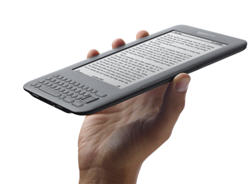
Is the next-gen Kindle evolutionary or revolutionary? It may not matter at Amazon's price points. The new Kindle is smaller, faster and cheaper. That's a good holiday combo.
When playing with the new Kindle a few things jump out at you. First, it's all screen since the frame around the device is much smaller (actually 21 percent) than its predecessor. It's also light---a critical point for those of us that haven't found any way to truly consolidate our devices. And the pages turn quickly. Is that enough to warrant a purchase? It is at Amazon's price points.
Overall, the new Kindle swung me back on to the side of e-readers in this never-ending debate about multifunction (think iPad) vs. mostly single function devices (e-readers). The latest Kindle (in white and graphite) is a handy extra gadget to carry around. For me, the e-reader vs. iPad debate doesn't necessarily apply since it's not a zero sum affair. There will be iPad/Kindle households depending on the family. Simply put, I'm looking to consolidate devices, but I'm also looking to consolidate paper.
That latter argument makes the Kindle a good pick. And at $139 for a Wi-Fi-only Kindle the price is right. A 3G/Wi-Fi Kindle will run you $189.
A few thoughts on the new Kindle based on my time with the device:
The good...
One hand reading is really easy. The 3G/Wi-Fi version of the latest kindle checks in at 8.7 ounces. It seemed as light as my phone. For giggles, I compared a few weights. The first Motorola Droid weighs 6 ounces and change. Droid X weighs 5.44 ounces. The iPhone 4 weighs 4.8 ounces. Overall, the latest Kindle is 15 percent lighter than its previous version, but feels less since the body around the 6-inch screen is smaller. But the real comparison for the latest Kindle is the Nook, which feels downright heavy at 11.6 ounces (the Wi-Fi only version), and the iPad, at 1.5 pounds.
The navigation. In the end, I was hoping that the latest Kindle would have a touch screen. Russ Grandinetti, vice president for Kindle content, said page turns would be slower with touch because of the way light interacts with the screen and the E-ink to get to the touch layer. However, Amazon has improved on the latest Kindle. The buttons on the side of the device are solely for turning pages. The home and toggle buttons are now below on the keyboard. Overall, getting around is easier. The navigation joystick also has been overhauled.
Page turns. Relative to the Nook, the Kindle page turns are blistering. Amazon treats page turns the way the NFL views 40-yard dash times---you just can't be too fast. Pages turn 20 percent faster than the previous Kindle. Simply put, the Kindle turns pages faster than I can. It's instant book gratification. I spent two weeks with the Wi-Fi Nook and found the page turn speed as well as navigation slowness to be an issue.
The screen has a higher contrast. The latest Kindle's screen has 50 percent better contrast than its previous E-ink screen. It shows.
The browser. Even though the Kindle is primarily for reading, I find myself browsing for real-time data from time to time. The latest Kindle has a Webkit browser. It's still odd seeing black and white Web pages, but the latest Kindle is a vast improvement when it comes to browsing.
The case. The Kindle's case---sold separately for a pricey $59.99---taps into the device's batter when needed to provide a built in light for nighttime reading. Looks handy, but the cover costs nearly half as much as the Wi-Fi-only Kindle.
Color. Even though nearly everything I read offline is all text---history and non-fiction---I still want color. Grandinetti, like a bevy of Amazon execs, says that color E-ink screens just aren't ready for prime time.
E-Pub. Amazon rivals make a big deal about the e-commerce giant failing to support open standards. Grandinetti says that Amazon is able to better optimize its own software and format with the hardware. Given the page turn speeds, I can buy that argument. Amazon also argues that content is DRM'ed anyway so the E-Pub support is a bit of a red herring. Add it up and Amazon says it’s far more important that e-books can be read anywhere at anytime. That's a valid argument given the popularity of Kindle apps for Android, BlackBerry and Apple's iOS. I'm in the camp that cares about portability more than the open format. I know many folks in this audience don't agree with that.
Third party apps. Amazon has made a few announcements about third party apps coming to the Kindle, but a few board games would be good. With the iPad, I'd probably do three things: Read, browse and play Scrabble. The Kindle could close a gap by providing word games for its book worm crowd.
Bottom line...
With the price points, the arguments against getting a dedicated e-reader tend to fall away. Amazon with $139 and $189 price points. Grandinetti says he envisions multiple Kindles in a household. That argument at $139 is quite believable. At $99.99 it's really believable. Simply put, e-readers may become a mass market device beyond the rabid reader set. If anything, e-readers will be book replacements and a way to consolidate your periodicals. Given the prices, I'll be getting one.
For education, the Kindle makes sense for history and English majors---based on physical book consolidation---but the lack of color would rule it out for science and engineering majors who would have to rely heavily on graphics.