ie8 fix

Between the Lines

Larry Dignan, Andrew Nusca and Rachel King

Windows finally gets native ISO support in Windows 8

By | August 30, 2011, 12:58am PDT

Summary: Microsoft just let the world know that Windows 8 will come with native support for ISO and VHD files in Explorer! But there’s a catch…

In a new post by Steven Sinofsky on the Building Windows 8 blog, we learn that Windows 8 will not only have native VHD, but also native ISO support in Explorer (finally!). Windows users can now rejoice at no longer having to use a third-party application to view ISOs.

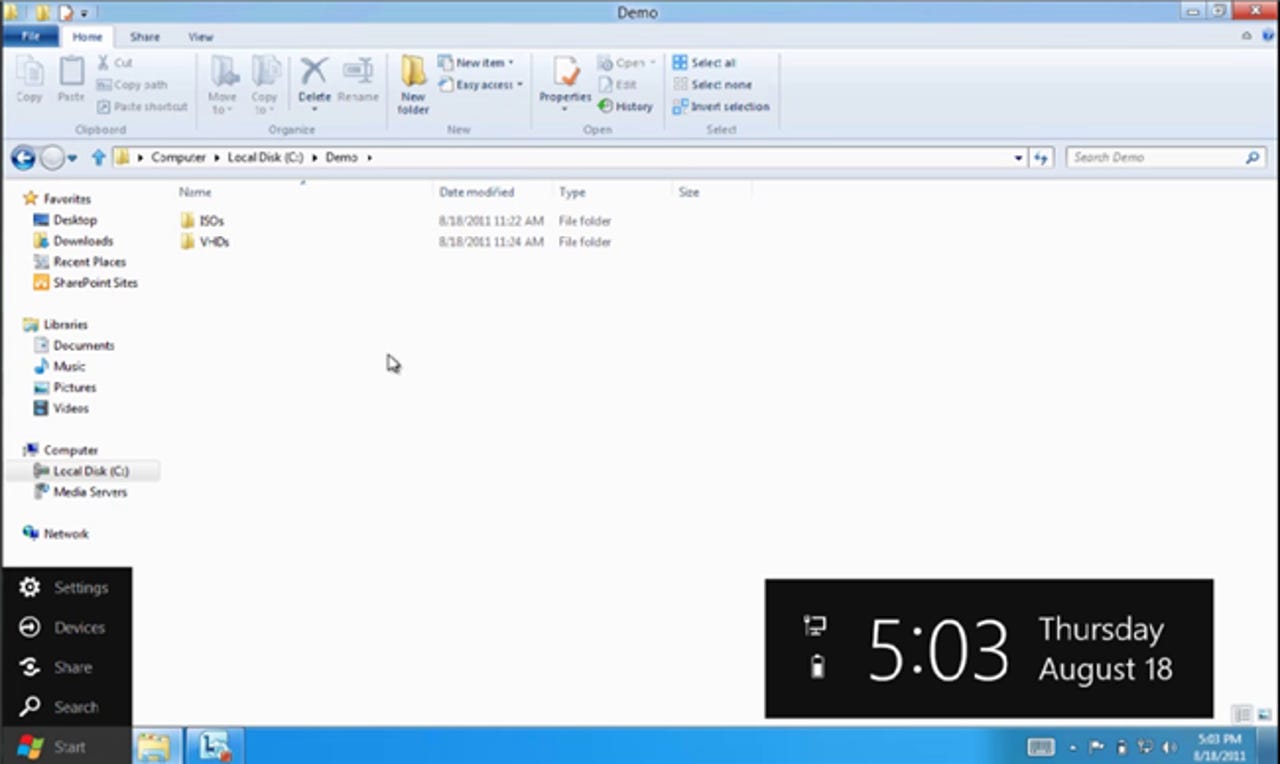
A video created by Rajeev Nagar, a group program manager on the Storage and File Systems team at Microsoft, explains the process and gives us another great glimpse of the new Ribbon UI in Windows 8, as well as the updated Taskbar — all this, after everything revealed in the previous videos:

But there’s a catch (you knew there had to be): Creating ISOs is not something that will be handled natively. From Steven Sinofsky:

In case you need a utility to create ISO images from existing optical media, there are many tools that give you that capability. One I use is the Oscdimg command line tool that is available as part of our automated deployment kit.

Personally, I think they should just build the functionality to create ISOs into Explorer as well — or, at the very least, include the Oscdimg command line tool with Windows 8. I’m not much for creating ISOs these days and I know Microsoft is aiming for Windows 8 to exist mostly on portable devices sans disc drives, but it seems a bit halfhearted to make dealing with ISOs a one-way street. Regardless, I appreciate the effort put into at least providing native support to view them in Explorer.

Touching back on the updated UI being shown in great detail, here’s a close-up screen shot (click on it for higher-res):

That time/date/power/Internet gadget (or whatever it is) looks rather interesting, but kind of “in the way” for my liking. We’ll undoubtedly find out all about it at BUILD in just 2 short weeks. For some great insight into everything Microsoft revealed from Windows 8 in their previous videos on the Building Windows 8 blog, take a look at my colleague Mary-Jo Foley’s latest write-up.

What are your thoughts about this functionality and the direction Windows 8 is heading in so far? Are you looking forward to it or dreading the new UI? Many folks out there still seem to dislike the Ribbon UI, so I’d be interested to hear from everyone on that front. Let us know your thoughts in the comments below!

-Stephen Chapman
SEO Whistleblower

Related Windows 8 content here on ZDNet:

Kick off your day with ZDNet's daily e-mail newsletter. It's the freshest tech news and opinion, served hot. Get it.

Topics

Stephen is a freelance writer based in Charlotte, NC.

Disclosure

Stephen Chapman

Stephen Chapman is a freelance writer and content strategist. All work that Stephen does for ZDNet is on a contractual basis.

It is left to Stephen's discretion whether or not to accept assignments from prospective clients who discover him through ZDNet. Such endeavors have no association with ZDNet and, unless otherwise agreed upon, are kept separate and private in the interest of all parties involved. You may freely contact him for consulting, training, and/or public speaking inquiries.

While Stephen may accept complimentary passes, waived fees, payment, and/or covered travel costs to industry-related events (conferences, expos, etc.) as an attendee or a speaker, acceptance of such offers is not considered payment for, or exclusive guarantee of, any particular blog coverage of the event attended.

Biography

Stephen Chapman

Stephen is a freelance writer based in Charlotte, NC.
56
Comments

Join the conversation!

Just In

RE: Windows finally gets native ISO support in Windows 8!
ben_myers@... 20th Sep
Whoopee! Did Microsoft port (appropriate) an existing Linux tool, or did they co-opt a 3rd party developer to get that wonderful (NOT!) command line tool to build ISO images?

Anyway, when are you guys going to stop being shills for the latest non-yet-in-shrink-wrap Windows, still in early stages and subject overhaul before we see it as OEM or retail software? I'm sick and tired of reading about not-yet-shipped Microsoft products only see that (OOPS!) what is shipped is very different than previously reported. Why not simply become the Microsoft rumor mongering adjunct to TMZ? ... Ben Myers
0 Votes
+ -
Only took 11 years.
itguy10 Updated - 30th Aug
I've had native ISO support since Mac OS X 10.0 back in 2000.

Linux has had it since, well, forever.

And the Ribbon has to go. Waste of space on a widescreen monitor to have some useless POS taking up a lot of precious vertical real estate.
@itguy10

The Ribbon is hardly a waste of space. Especially on bigger screens. Drop down menus are the things that have to go.
@Cylon Centurion

Really? Why do I need a ribbon for things I hardly use? I mean it barely makes sense in apps like Word and Excel but for Explorer windows it makes no sense.

As we have widescreens with less vertical real estate now anything that takes up that real estate is a waste.
I take it you really haven't read anything about how the ribbon works for the explorer, have you itguy?
@goff256
I agree with itguy10 particularly about losing so much of my screen to what is essentially a fancy menu. I want to see my data. If they must throw in the gew-gaws, put them off to the side.
Note what has been said in the article about hiding the ribbon. I will probably hide the ribbon myself because I use keyboard shortcuts. But I think it's high time that the Ribbon completely replaces menus in Windows.

Yes, the Ribbon does make sense in Word and Excel. I do not like needing to hunt through lots of menus to find commands. I can access them quickly with the Ribbon.
Note what has been said in the article about hiding the ribbon. I will probably hide the ribbon myself because I use keyboard shortcuts. But I think it's high time that the Ribbon completely replaces menus in Windows.

So I hit the ALT key and ribbon suddenly appears? That means the whole screen will have to drop down about 2 inches while I tab over. With a menu, only part of the GUI is obscured by the menu itself. The whole screen doesn't just pop up and down all the time. I'm not too thrilled about that.

Yes, the Ribbon does make sense in Word and Excel. I do not like needing to hunt through lots of menus to find commands. I can access them quickly with the Ribbon.

As long as the underscore appears above the button so I can use a keyboard shortcut instead of moving the godamm mouse and having to click on the actual button all the time, then I can live with that.
@itguy10: You've used the ribbon right? Like all places the ribbon appears it can be hidden and using QAT (Quick Access Toolbar) you never need to see it, just stick the shortcuts you need on to it.
@bradavon
Why not just make the toolbar that was already there configurable? Are there any independent studies that support the ribbon productivity religion with actual evidence? And no, MS studies crowing about their own products are not credible.
@itguy10

I think the ribbon is great. Aside from maybe a 10" or less netbook it does not take up much more space than the traditional file menu's. I have heard that argument over and over when people compare Office 2003 to to 2007/10 and takes a fraction of an inch more than the old pull down menus. Everything is at your fingertips and categorized and you do not have to search through menus and sub-menus.

As far as the ISO support goes you should know that MacOS and Linux do not have to jump through hoops to include a feature that is offered by third party. Microsoft has to prove that a feature they include is now considered a standard function of the OS which is why they are probably not including native ISO creation because it would cause companies like Roxio and Nero and other burner softwares to raise anti-trust cases. MacOS and Linux do not have to worry about organizations like EU trying to sue them for including things like a browser or a mail client or other softwares.
@bobiroc

Funny, on OS X there are CD burning apps as well. They sell quite well, too.

It's hilarious that MS delivers their software (in EA form) on .ISO's yet has no way to natively use them in their OS.

And for the Ribbon, on my copy of Office 2010 it takes up 3 "lines" at the top of my screen. It can only be configured to auto hide, not shrink. On Office 2003 on a widescreen I can shrink the Quick Access Icons to 0-2 lines. That gives me back precious screen real estate if I want it.
@itguy10

If you go and look at the Microsoft Blog you can see that almost no space is lost to the addition of the ribbon. With regards to the office 2010 suite I think the conversation is irrelevant since your mouse and/or touchpad has the ability to help you scroll up and down (as do your arrow keys) so you can see the words not currently on your screen. I fail to see how this is a big deal at all if the ribbon increases the functionality.

Yes you can buy CD burning programs on any computer but your market as a whole is smaller for Apple computers at this point. Microsoft (by not having ISO creation or mounting support) has most likely avoided lawsuits, and its not a large deal to go and download some software that burns and/or mounts a ISO do a virtual drive.

Since you use OS X none of this really matters to you anyway.
@itguy10: Funny, on OS X there are CD burning apps as well. They sell quite well, too.

Didn't stop the legal action against them.
0 Votes
+ -
RE: Funny
bobiroc 30th Aug
@itguy10

It's not funny it is sad that other OS makers can do what they want and include what they want. Never saw Apple get in trouble for including Safari or various forms of Linux for including Firefox and many other OpenSource Apps. Doesn't change the fact that it is the truth. Why do you think that Microsoft moved things like their MovieMaker and email client to the cloud and they cannot include a Anti-Malware solution with Windows. Heck Microsoft put Security Essentials as an OPTIONAL download for machines detected with not Anti-Malware protection and people cried foul then.

Your comment about precious real estate is funny. Either you are using a very small monitor or have it set for the lowest resolution or something. I am wondering if you are like other people that I know that complain about the ribbon and complain about that taking up so much space but insist on having many toolbars in their browser that take up a third or more of the screen in some cases because they find them useful. I get that at work too. The Office Ribbon is too much but they need their Google, Yahoo, Ask, and weatherbug tool bars.
@bobiroc
I'm looking at the screenshot and that is a lot more space than the traditional toolbar. You need new glasses.
0 Votes
+ -
RE: Better Glasses
bobiroc 30th Aug
@Nathan A Smith

Take a look at this picture comparing the Office 2003 Menu to the Office 2007 ribbon and tell me that extra line is "a lot more" space.

http://cybernetnews.com/wp-content/uploads/2006/09/OfficeComparison.jpg

You may have also missed the fact that you can minimize the ribbon and it only expands when you click on a category. So if think that is significantly more space you must have you monitor resolution set to the lowest setting and you are in need of the better glasses.
@Nathan A Smith: I'm looking at the screenshot and that is a lot more space than the traditional toolbar.

http://blogs.msdn.com/b/b8/archive/2011/08/29/improvements-in-windows-explorer.aspx
0 Votes
+ -
Take a look at this picture comparing the Office 2003 Menu to the Office 2007 ribbon and tell me that extra line is "a lot more" space.

@bobiroc

That is a lot more space. Especially on laptops and netbooks with small screens. Plus that's an Office picture, not a Windows Explorer picture which is the topic here.

Are you blind or what?
@ScorpioBlue

The Ribbon here is the same size as the ribbon in the screenshot. Plus, if you take a look at a full screenshot, you're actually saving space as the details pane at the bottom of Explorer is now gone.

Here you go:

http://blogs.msdn.com/cfs-filesystemfile.ashx/__key/communityserver-blogs-components-weblogfiles/00-00-01-29-43-metablogapi/8422.Figure-21-_2D00_-Real-Estate-comparison_5F00_2.png
0 Votes
+ -
RE: Are you blind or what?
bobiroc 31st Aug
@bobiroc

Nope.. Just like Cylon pointed out I look at the whole picture of things and not just what I want to see like you are doing.
The Ribbon here is the same size as the ribbon in the screenshot. Plus, if you take a look at a full screenshot, you're actually saving space as the details pane at the bottom of Explorer is now gone.

How can you call that an improvement?!? It's literally twice as much space being taken up at the top! Look at how clean and streamlined the Win7 Explorer is next to it.

As far as the details pane goes, that can easily be turned off by going into the Organize menu - Layout - and un-checking the details pane option, so you're not saving any space there either.

This is not an improvement and your response smacks of blind, fanboy adulation.
@itguy10 Microsoft has been under the watchful eye of every gov't around the world. They literally have taken out useful software because some company that make competing software has complained. By including ISO files, they are effectively killing companies that make ISO. Big deal? Not to you, maybe, but to others. If Mac were the main operating system in the world, you could say goodbye to things like Garage band, and all that great software. Every company in the world would sue you. Why do you think you get almost nothing in iOS?

I sort of laugh when I hear Mac people talking about OSx taking over where Windows fails. The problem is, once you get to be that big in the market, you no longer have options. Suddenly that backlit keyboard you love is made by three small companies, so you no longer can include it in your hardware or you'll kill their business. Its the main reason why big monopolies usually fall, and fall hard. they get stale because they legally can't keep up.
@A Gray OSX does not come with Garageband, that's in the iLife suite
@itguy10

In 11 years, Mac has discarded their platforms twice and none of their software is binary compatible. Quite frankly, Mac nor Linux has managed to achieve double digit market share. In the case of Linux desktops, single digit market share is a good day.

In that same time, Microsoft was sued because it bundled a media player and a browser into the OS. Imagine the wailing and gnashing of teeth if it was so brazen to include ISO support.
@itguy10

You can minimize it if you don't want to look at it all the time. It will then expand as you make a selection.

To minimize, right click anywhere on the ribbon. It's the bottommost selection.
@itguy10
You have some strong opinions on Windows for someone that doesn't use or like Windows. The ribbon is very welcome addition to those of us that use Windows. itguy? now that's funny.
@itguy10
I don't like the ribbon as well, except...you can minimize to look just like a regular menu bar. But even then I find it more difficult to try to pick items from it than a drop down text menu. Its best to just use keyboards shortcuts for everything anyway.
@itguy10 Ihave a touchsmart tm2 and I think having BOTH abilities will be fantastic! My fat fingers are going to love the ribbon and with no optical drive I use PowerISO all the time and being able to use Windows will be great
@itguy10

On the ISO point -- my thoughts exactly.
@itguy10
Did you miss the ribbon minimize button "^" on the right (the sam e one you have in the MS Office now)?
@itguy10

The older Mac System Software from at least System 7 from 1991 supported VHD. Only in the .img format though.
0 Votes
+ -
Reminds me of ...
johnfenjackson@... Updated - 30th Aug
... one of the less patient on my team who asked if he could attend management briefings only once a quarter. His reasoning: that the nanofacts released in mangement briefings were so insignificant that his time was better spent doing his job than listening to the weekly ramblings of management and marketing. He also pointed out that 12 nanofacts wouldn't get him very far on the way to a microfact.

The sad thing is that if I had granted him leave to appear only once every decade ... he wouldn't have missed much on the M$ front sad
0 Votes
+ -
You can kill the ribbon
A Gray 30th Aug
You can kill the ribbon. Its simply an options. Just like you can view your files in many different ways. The ribbon is there primarily for touch interfaces. I, for one, can't wait to have a touch slate that is a real computer where I can put anything I want on and don't need to buy software from only one source. Places like Steam and Good Old Games are a great place to purchase software.
0 Votes
+ -
What a double standard
croberts 30th Aug
not like hundreds of thousands of people weren't using daemon tools. The OS couldn't do it... wow, there was an app for that!

Funny that "there's an app for that" is a good thing on some platforms, and on others it's an opportunity to criticise the OS.
0 Votes
+ -
RE: Windows finally gets native ISO support in Windows 8!
LoverockDavidson_-24231404894599612871915491754222 30th Aug
That is cool. I like to mount the ISO files to play some older games so this feature will come in quite handy. Creating an iso is no problem since there have been 3rd party tools to do this for a long time. Add one more check mark to the benefits of running Microsoft Windows 8.
@LoverockDavidson_
Add one more check mark to the benefits of running Microsoft Windows 8.
...rolls eyes..
0 Votes
+ -
Message has been deleted.
JakeMathews Updated - 30th Aug
0 Votes
+ -
Too little, too late
Subridens 30th Aug
There are a dozen of FREE software packages for ISO mounting in windows and they probably offer more functionality. And most users don't use ISO's because they are not familiar with it. The implementation of this little feature has dragged on far too long. Mac and Linux have it already for years.

The Ribbon gives a more decorated appearance and in most cases a nice overview of functionality but what I've noticed is that lot of users don't get hang of it. They can't find the stuff they want, they stick to the horizontal/vertical approach of the classic menu bars. Only after a long time it goes better.

Anyway m$ has to come with really impressive stuff before I gonna spend another 100$ on a new OS.
@Subridens

Yes because having the tools and options at your finger tips is so much harder than having to hunt through menus and sub menus. That makes sense.

Also like it has been said before MacOS and Linux are not subjected to the same level of scrutiny as Microsoft. When they included native ZIP file support in XP they had to defend that it was considered a primary function of an Operating System. They continue to this day to get criticized for including a native browser and media player and were forced to move some of their other softwares up for optional download like Movie Maker, Photogallery, and the Live Mail client which was formerly known as Outlook Express and included with the OS.

If you do not like or want to use Windows then that is fine but the fact that you are grasping at straws to criticize them only shows your ignorance.
0 Votes
+ -
Native ISO support is no big deal
ScorpioBlue 30th Aug
PUH-lease. Why is this supposed to be some wonderful feature? We've been able to get along just fine with free 3rd party tools to do this for years. This is just catch-up ball and @bobiroc keeps making excuses for it.

I'd be more impressed if MS added a built-in spell checker to their IE9 browser, something other browsers have had for years. It's now an essential feature and not having one of those naively is pretty lame and cheap.

As @Subridens says, it's too little too late.
  • Flagged
0 Votes
+ -
Hardly a feature
happyharry_z 30th Aug
Really must be having a hard time selling Win 8 if this is all we have to look forward to.
@happyharry_z

Yeah those MS OS products have been a hard sell, they may never reach the market penetration of OSX or Linux.
@happyharry_z

One person's useless feature is another person's necessary feature.

Maybe you should learn not to speak for everybody.

Really will have a hard time selling me Win 8 if this is all I have to look forward to.

There I fixed your statement for you.
I don't mind the ribbon menus. They are keeping things consistent with Microsoft Office. If they make it optional like they do when they allow classic view, then I don't see why all the complaints. Besides, I've heard that Windows 8 is more about changing the OS it work with Mobile devices more than any changes to the PC interface, so with that, I'll probably just hang on to Win7 and wait it out.
Why doesn't Microsoft just fix the bugs in what it already sells instead of adding crap to eat up space and memory--most of which most people will never want or use? We know--there's no money in that! Sell crap and force the consumer to test it for you and then make him pay when you fix the bugs you should have fixed before!
@tkuwait: Why doesn't Microsoft just fix the bugs in what it already sells instead of adding crap to eat up space and memory--most of which most people will never want or use? We know--there's no money in that! Sell crap and force the consumer to test it for you and then make him pay when you fix the bugs you should have fixed before!

...in the new OS to justify moving to it. Just like we see people doing with Windows 7 over previous versions of Windows.
@tkuwait

What's the name of your perfect software that is bug free at launch and down the road again?

There are always bugs and glitches in software no matter who makes it. If you can find a software vendor (or hardware vendor) that has made nothing but glitch free products in the computer world (or any world for that matter) I will be happy to entertain your ideas.
Since MS didn't invent the ISO format, like FAT or NTFS, of course they never really care about supporting it. Their first priority should be making the best OS possible, but instead its always playing games to steer you to only MS technology, and lock you in - and you have to pay for that privledge. This is why Linux based desktop OSs are better for "real computing", with no BS, just maximum functionality out of the box. I run windows on top of Ubuntu now.
Trying to teach people to use the ribbon was a huge pain in the ass. Knowing that they will all find windows 8 instantly familiar makes me feel all fuzzy inside.

On a side note: did any of you people complaining about how big the ribbon is notice that it still allows you to see MORE files?
Yaaaay,ten years later,should been in WinME.
Whoopee! Did Microsoft port (appropriate) an existing Linux tool, or did they co-opt a 3rd party developer to get that wonderful (NOT!) command line tool to build ISO images?

Anyway, when are you guys going to stop being shills for the latest non-yet-in-shrink-wrap Windows, still in early stages and subject overhaul before we see it as OEM or retail software? I'm sick and tired of reading about not-yet-shipped Microsoft products only see that (OOPS!) what is shipped is very different than previously reported. Why not simply become the Microsoft rumor mongering adjunct to TMZ? ... Ben Myers

Join the conversation!

Formatting +
BB Codes - Note: HTML is not supported in forums
  • [b] Bold [/b]
  • [i] Italic [/i]
  • [u] Underline [/u]
  • [s] Strikethrough [/s]
  • [q] "Quote" [/q]
  • [ol][*] 1. Ordered List [/ol]
  • [ul][*] · Unordered List [/ul]
  • [pre] Preformat [/pre]
  • [quote] "Blockquote" [/quote]
ie8 fix

The best of ZDNet, delivered

ZDNet Newsletters

Get the best of ZDNet delivered straight to your inbox

Facebook Activity

White Papers, Webcasts, & Resources
ie8 fix