Review: RIM scores a hat trick with latest BlackBerry Bold and Touch lineup

RIM announced their full touchscreen lineup on August 3 that included three new device lines (five devices given that two of the forms have CDMA and GSM models). RIM sent me one of each form factor to test out last week and I can say without a doubt that these are the BEST BlackBerry smartphones ever released and if you are a BlackBerry user then you will want to upgrade to one of these models when they come to your carrier. Yes, QNX is the future of RIM smartphone, but I doubt we will see an expansive lineup of them until later in 2012 so don't think QNX phones should impact your decision too much. Check out my other post to see several reasons why you should still consider one of these new devices.
Let me begin this review of the Verizon Wireless Bold 9930, Sprint Torch 9850, and AT&T 9810 by making sure you understand I am not currently a BlackBerry user and have only had a couple of them in my personal collection over the last few years. After checking out these three new BlackBerry devices the probability of me picking up a Bold 9900 on either Verizon or T-Mobile is very high at the moment for several reasons that I will discuss in the Bold 9900 section of this review.
Make sure to check out my image gallery of the three models, some photos taken with the phones, and a few screenshots of BB OS 7. I also included a video walkthrough of each device in this post. One convenient thing about these three new BlackBerry devices is that they each are different enough in form factor to appeal to different end users so choosing one is not too difficult. Carrier availability also limits the Torch 9810 to just AT&T customers so that helps with your decision as well.
| Image Gallery: Check out hardware photos, screenshots, and images taken with the BlackBerry smartphones discussed in this article. | 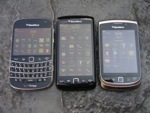 | |||||
Three form factor approach and appeal
These five new models come in three different form factors so it should be fairly easy for you to decide which is best for you as you look at your needs and usage patterns. The Bold 9930/9900 is focused on the traditional BlackBerry user with a front facing QWERTY keyboard and smaller display than the others. The Torch 9850/9860 is an all touch interface device that blows away the garbage that was the Storm line and I don't blame RIM for moving away from that brand. I do think they should have come up with a different name though as a completely different form factor has the same Torch branding. Both of these lines come in GSM and CDMA variants so we may see these on most carriers in the US at some time.The Torch 9810 is the update to the original Torch with the slide-up display revealing a full QWERTY keyboard so you get a smaller QWERTY keyboard than the Bold with a larger display. This device is only available as a GSM model and likely just available from AT&T in the U.S.
These are the common specifications across all three lines of new devices:
- 1.2 GHz single core processor
- Liquid Graphics technology for fluid animations, instant response times, and stunning graphics
- 5 megapixel camera with 720p HD video recording (Bold has EDoF lens)
- 8GB onboard storage with microSD card support up to 32GB
- 768 MB RAM (something like 256MB is used for GPU)
- 802.11 a/b/g/n WiFi and Bluetooth 2.1
- A-GPS receiver
- Optical trackpad, promixity sensor, accelerometer, compass
- BB OS 7 that provides voice-activated universal search, new web browser, huge collection of pre-installed apps, and much more
One of the slickest pieces of software that uses the augmented reality functionality of these devices is Wikitude. It is a BBM connected app so you can connect it with BBM and your friends. After you launch the app you point the camera at the world around you and people on various services located physically around you will have updates appearing right on your viewfinder. Thus you can find fellow users of Twitter, Flickr, BBM Chat, YouTube, LastFm, and more.
There is no support currently in the devices for WiFi hotspot functionality and that is a real shame since I know business people use this or use a MiFi. You can easily tether via USB though and I did that a few times with my MacBook Pro and the Bold 9930. I read that BB OS 7 supports this and imagine it is a carrier issue. Don't forget that you can also tether these to a PlayBook through the BlackBerry Bridge.
Let's take a look in detail at each device and then you can read more about my thoughts on BlackBerry App World and RIM on the last page.
Verizon Wireless RIM BlackBerry Bold 9930
Each of the three devices has specifications that are different to match their form factor. The Bold 9930 has the following specifications specific to this device:- 2.8 inch capacitive touch display at 640x480 pixels (287 ppi)
- Extended depth of focus camera, no autofocus
- 1230 mAh battery
- About 200 MB available for application storage
Specs do not mean everything on a phone so make sure to check the device out before writing it off due to no dual-core processor. The rather low amount of application storage is disappointing, but as I discuss on page 3 of this article available apps are limited and I don't think they are that important on a mobile phone. The battery in this device is smaller than previous Bold models, but I was still able to go a long full day of heavy usage so the OS must be helping with battery management.
All of these new BB OS 7 phones come with full versions of Documents To Go Premium edition, BlackBerry Balance integration (lets IT departments help you manage personal and business options), BlackBerry Protect, BBM 6, and more.
Walk around the hardware
If you want a device with the BEST physical QWERTY keyboard ever made then run down to your local Verizon Wireless store and order the BlackBerry Bold 9930 right now! The Bold 9930 can be purchased for $249.99 with 2-year contract or $509.99 with no contract. As I show a bit in my video, I can FLY on this keyboard even after just a few days of use. It is perfectly sized, has excellent feedback, has keys that are designed with good spacing and angles, and is just a sheer joy to use. With a keyboard like this you want to just start messaging everyone you know.The 2.8 inch display is gorgeous and it is so nice to use a display where you can't see the pixels. All of my phones now have these super high resolution screens and my tablets are starting to look dated with slightly fuzzy text.
The Bold is framed in metal and is the thinnest BB smartphone to date at just 10.5mm thick. You will find metal buttons for the camera, volume, and mute on the right side with a microUSB port and headphone jack on the left side. The lock button is on the top while a plastic area is on the bottom where the docking connections can be found. The back houses the camera and flash with a cool carbon fiber looking back cover hiding the battery, microSD card slot, and overseas SIM card for world phone capability.
The back cover houses the NFC chip and as you can read in CrackBerry.com's 9300 review it is available in the wireless connection settings on some devices. It is NOT available yet on the Verizon Bold 9930 and RIM stated that they are working with carriers to enable NFC on these devices. I am sure it will come in the future and am not too worried about it yet since I have no need for NFC at the moment. It is nice to see RIM thinking forward a bit though and I hope to see NFC rolled out and implemented in more places in the future.
The Bold 9930 feels FANTASTIC in your hand and I just could not put it down. The keyboard is a joy to use with all white backlighting and key color and a design that shows RIM is the leader in physical QWERTY keyboards.
Performance, software, and daily usage
After turning on the Bold 9930 I started tapping on the display and found the interface to be extremely fluid and the touch responsiveness to rival that of iOS and WP7. It is so much faster than any BlackBerry experience I have had before and even though many things look similar to BB OS 6, this is a fun device to use with performance that doesn't leave you frustrated or waiting at all.I've had music streaming, Facebook and Twitter updates going, email being pushed, BBM active, and more without any kind of lag or slowdown in the experience. As you can see in my video I did have a pause in performance when I had several apps open and then tried launching the music player. Keep in mind that some powerful apps were running, like Wikitude, along with BBM and other messaging services. The task switcher works well and everything will be familiar to long-time BB users with updates in icons, how you mange your home screen panels, and some changes in menu items. Check out the CrackBerry.com post on battery life of the 9900 and you can see it is quite good.
In typical Verizon fashion they did include some bloatware on the device with V CAST Music, V CAST Videos, V CAST Song ID, VZ Navigator, and VZWTones, but I just ignored them and did not access any of these apps or services. I like that Amazon MP3 is provided, but it doesn't seem to let me access music stored on the Amazon server so it only lets you make purchases so seems a bit limited. Podcast support is great and very useful to a podast listener like myself. Facebook and Twitter apps are included and these updated clients work well, including the pull down to refresh function in Twitter.
Overall, I really enjoyed the Bold 9930 and if I do end up getting one of these three devices, this will definitely be the model for me. The keyboard is so dang good I might buy it just for the keyboard and BBM service :)
Let's check out the Torch 9850 and 9810 »
Sprint RIM BlackBerry Torch 9850
The Torch 9850/9860 is the one form factor that is completely new and I personally think they should have also named it something other than the Torch. Unlike the two Storm all-touch models that had gimmicky screen technologies and were devices many came to hate, the Torch 9850 is a very well built and solid device that may appeal to those BlackBerry users who no longer care for physical QWERTY keyboards. I don't think giving up the full QWERTY keyboard for a full touchscreen display on a BlackBerry makes too much sense at the moment though since there just isn't that many touch optimized apps available for BlackBerry. If you want a full touchscreen device, then the iPhone 4, WP7, and many other Android devices make more sense as a purchase option.Walk around the hardware
In addition to the specs listed earlier, the Torch 9850 has a 3.7 inch capacitive touch display at 800x480 pixels WVGA resolution. I love the way the display front is a solid piece that wraps over the ends and sides to give it a slick look and feel. There are defined physical buttons for send/end, BlackBerry button, and back with the optical trackpad in the center below the display. The display looks fantastic and videos played well on the 9850.The Torch 9850 is narrow at 62 mm wide and feels like a phone in your hand. The construction is rock solid with a wonderful soft touch back cover and delightful curves all around the device. The camera, volume, and mute buttons on the right side are simply soft touch covered bumps that were a bit odd to press. You will also find the headphone jack on the upper right side. The microUSB port is on the left side. The top presses down to lock the display. The camera and flash are mounted on the upper back like the other two new smartphones.
Performance, software, and usage
Performance was flawless on the Torch 9850 and I enjoyed using it, so much more than the Storm devices. The onscreen keyboard is very good and combined with the predictive text engine I actually don't think my typing speed was that much slower than with the large Bold 9930 physical QWERTY keyboard. Then again, there is something to be said for the feel of a physical QWERTY keyboard.There is a rather extensive number of options for managing the software keyboard, including correction methods, word substitution, spell check, dictionary, and touchscreen sensitivity. There was no Sprint bloatware loaded on the device so you get a pure BlackBerry experience with this device.
I think the hardware on this new Torch is fantastic and it was a fun device to use. However, with few touch optimized devices I am not sold that there really is a place in the BlackBerry lineup for a device such as this and think RIM should stay focused on the physical QWERTY experience with BB OS 7.
AT&T RIM BlackBerry Torch 9810
I wasn't a huge fan of the BlackBerry Torch that was released last summer, but then when I spent a couple months using it while writing Wiley's BlackBerry PlayBook Companion I ended up enjoying the device. I am pleased to say this updated Torch 9810 was a pleasure to use with the same fluid and flawless performance seen on the other two new BlackBerry devices.Walk around the hardware
In addition to the specs common across all three devices, this new Torch 9810 has a 3.2 inch display at 600x480 pixels resolution (VGA) at 246 dpi and is GSM only with support for HSPA+ on AT&T. It is a bit chunky and heavy and honestly the touchscreen keyboard in BB OS7 is good enough that I am not sure you need both a physical and software keyboard on a single device. The original Torch never seemed to flow that great with both touch and keyboard controls and I think it will have this same limited appeal.The QWERTY keyboard is pretty good, but it is not very wide so things are squeezed on it. After using the fabulous Bold 9900 keyboard I could never go back to using a cramped one like their one on the Torch 9810.
Like these other new BlackBerry smartphones, the display looks great and the size is in between the two others so it will appeal to some. The buttons below the display are physical, but they are areas on a single piece cover that you press in to activate the button underneath. The slider mechanism feels solid and the keyboard is well lit up.
The only thing on the left side is the microUSB port while the headphone jack, volume buttons, and camera/convenience button are all on the right side. Lock and mute buttons are on the top like most current BlackBerry smartphones. The camera and flash are on the back with a silver grid back battery cover made of plastic. There is a lot of silver on the device and you won't see any fingerprints on it at all.
Performance, software, and usage
Similar to the other two new BB smartphones, the Torch 9810 performed extremely well. I saw a very strong HSPA+ signal everywhere I went with this device and was pleased with it, but again I just think it is too chunky and heavy.AT&T looks to be even worse than Verizon with loading up junk on the device and on the Torch 9810 you will find AT&T Live TV, AT&T Music, AT&T Navigator, AT&T Maps, YPMobile, AT&T Family Map, myAT&T, AT&T Code Scanner, and some demo games. Most of these services cost extra each month so be careful activating them on your device.
The Torch 9810 is launching on AT&T and from what I heard AT&T may not be getting the Bold 9900 until later this fall so you may want to wait for the Bold if you are interested in a physical QWERTY keyboard BlackBerry.
Thoughts on RIM and other reviews »
Thoughts on RIM and messaging
A major appeal of RIM BlackBerry devices has always been the power of messaging. I think this differentiation has been reduced quite a bit by other platforms and personally find others better for MY NEEDS. Let me be clear here that my small company has an Exchange server and does not have a BES (too small to implement for a couple people too) so I use BlackBerry devices via BIS. I HATE the way email I delete in Gmail on the web don't reconcile properly on a BlackBerry. There is no way I am going to manage individual email messages multiple times and with iOS, Android, and WP7 I don't have to.I love that iOS, Android, and WP7 sync my Exchange email natively and if RIM supported ActiveSync Exchange then a new BB smartphone would be in my hands for sure because of the other benefits they offer (reception, battery life, keyboard, etc.).
I created a couple of test emails with a name, address, phone number, and date in the body to see how different platforms handled it. iOS ruled with hyperlink options to map the address, call the phone number, add the number to an exiting contact, create a new contact, and create an event with the date. BlackBerry OS 7 was a close second with support for mapping the address, calling or texting the phone number, adding the number to a contact and creating a new contact. Windows Phone 7 and Android presented hyperlinks to call or text the number and map the address.
BBM is enjoyable and I like staying in touch with friends on the BB platform. However, the Facebook Chat integration in Windows Phone 7 is more useful for my family and friends and I imagine the iOS 5 iMessage service will be appealing since so many people are on iOS and moving to that platform.
If you are a BB user, then please let me know how RIM's platform differentiates and excels at messaging in today's world because I honestly don't see that as being the real appeal of the platform anymore.
Thoughts on BlackBerry App World and BB apps
I posted an article a couple of months ago where I stated that 3rd party apps aren't what makes or breaks a smartphone platform. I love applications on devices and have tried out hundreds on various platforms and devices. However, when it comes down to my daily usage and activities the important thing is that I have a phone with good battery life, solid email and messaging, social networking support, good RF reception, hardware that appeals to me, and a software experience that is fluid and does not make me wait or cause frustrations.It is wonderful to have thousands and thousands of apps available, but I personally feel that is more important on tablet devices that serve as partners to your smartphone. I would love to see how many apps people use on a regular basis and from my personal experiences I probably only use about five outside of what is built into the platform itself. I do play games on my phone occasionally, but that is not vital to my usage. I like different options for things like music streaming, but I keep going back to Slacker as my primary choice.
That said, BlackBerry App World offers limited applications, much like HP's Palm App Catalog. If you are an app fiend and want a smartphone focused on the app experience then a new BlackBerry is not for you. I installed Flixster, Evernote, Slacker Radio, BlackBerry News, TripIt, Overdrive Media Console for library book checkouts, Bing, Poynt, SugarSync, and YouVersion Bible on the Bold 9930 for the last several days and honestly these are all I really need, along with the apps integrated into the OS. I have not really found anything missing to use the device throughout the day and much of the rest of the apps I have on other platforms are for convenience rather than necessity.
I noticed that there were 4454 apps & 295 games available for the Bold 9930, 1370 & 132 for the Torch 9810, and 1315 & 126 for the Torch 9850 so there looks to be availability dependent on screen resolution taking place at this time in the App World. Maybe this application support is another reason to look towards the Bold 9930 as your new BlackBerry. I have seen this number increase almost daily so check often after you get your device.
According to RIM:
BlackBerry 7 builds on our standard BlackBerry Java environment and enables developers to leverage their existing assets for BlackBerry smartphones. There are thousands of apps currently being approved for the BlackBerry 7 devices and more are entering BlackBerry App World every day. As the BlackBerry Bold 9900/9930 was the first BlackBerry 7 product announced back at BlackBerry World, developers have had access to comprehensive testing and simulation tools for this device for the longest period of time. However we expect that all the BlackBerry 7 devices will have a similar amount of approved/available apps in the coming weeks.
Closing thoughts
These three (five officially) new BlackBerry smartphone lines are the best devices ever made by RIM and current BlackBerry owners will surely love them and pay to upgrade to one of these models. I enjoyed using them and don't think there is much more that could be done with BB OS 7. I look forward to seeing what RIM can do moving forward with QNX-based smartphones.These new BB smartphones are also appealing to current non-BlackBerry users if you want the BEST hardware QWERTY keyboard ever, you want a smartphone with a long battery life that has the option to be replaced (vital for the road warrior who can't plug in for long periods of time), or if you just hate the other companies making phones for some reason. If you love applications, gaming, or high end multimedia on a phone (buy an iPod touch) then these will likely not appeal much to you.
I know I made a post on the possible excessive pricing of these new devices and I do think they need to be priced lower to compete. Enterprise buyers and those that understand the initial price of a phone really is inconsequential over the life of the contract may not care too much and I may even pay the full unsubsidized price to get one. The trend is to compare to the $199.99 high end price, but you then also need to realize there is a $299.99 iPhone 4 and Android phones priced higher than $199.99 too so let's try not to set that as the standard to measure all of these smartphones by.
Reviews to visit
I always recommend you read multiple reviews of devices since each of us has our own needs, perspectives, and feelings about devices and platforms. Here are some links to reviews on these three model lines:Bold 9900/9930
- CrackBerry.com 9000 GSM review
- CrackBerry Bold 9930 mini-review
- Tracy and Matt review by James Richardson
- BGR
- Engadget
- This Is My Next
- SlashGear
- Mobile Tech Review
- BerryReview
Torch 9850/9860
Torch 9810
[poll id="34"]