Laptops & Desktops

John Morris & Sean Portnoy

Lots of new options for all-in-one desktops

By | October 7, 2011, 12:33pm PDT

If there is a bright spot for desktop PCs this year, it is all-in-ones. More than a third of consumer desktop PC sales are now all-in-ones. During Apple’s iPhone event earlier this week, CEO Tim Cook noted that the iMac is the top-selling desktop in U.S. retail. Even businesses seem to be warming up to the idea of all-in-ones.

So it is no surprise that the choices for all-in-ones are expanding. In the past few weeks, Dell, Samsung, Toshiba and HP have all introduced all-in-ones for both home and work. Here’s a look at some of the new options out there.
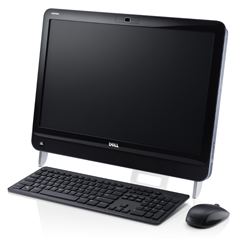
The Dell Inspiron One 2320 looks very similar to the previous Inspiron One 2305-both of which are based on a 23-inch 1080p multi-touch display. But the new version is smaller and nearly an inch thinner, and Dell has revamped the internals starting with Intel’s second-generation Core i5 and i7 processors. The Inspiron One 2320 starts at $950 with a 2.50GHz Core i5 quad-core, 6GB of memory, a 1TB hard drive and DVD burner. Step-up models include a faster processor, 8GB of memory, Nvidia GeForce discrete graphics, a 2TB hard drive and a Blu-ray writer. The older 2305, which is still available starting at $700, is based on AMD Athlon II dual- and quad-core processors.

Dell’s 23-inch all-in-one for small businesses has also received a refresh. It looks similar to the Inspiron One-and is based on a 23-inch display-but it is slightly larger and has fewer configuration options. The Vostro 360 starts at $700 with a non-touch display, Core i3 dual-core, 2GB of memory, a 500GB hard drive and DVD burner. Higher-priced models include a multi-touch display and more memory. In a blog post, Dell’s David Chen listed other options including Core i5 processors, hard drives up to 2TB and a Blu-ray player, but those do not seem to be available yet on Dell’s Vostro 360 product page.

Though better-known in the U.S. for TVs and smartphones, Samsung has been making a push with PCs. Its laptops have gotten solid reviews and the company recently released its first all-in-one desktop, the Series 7. Samsung gets high marks for a fresh design that places all of the system components in the base leaving a thin, 23-inch 1080p display that folds all the way flat. The Series 7 also uses surface acoustic wave (SAW) touch sensing, rather than capacitive touch, to track two input points at once, and has Samsung’s own Touch Launcher software. The Series 7 starts at around $1,000 with a low-voltage Core i3 dual-core processor, 6GB of memory, a 1TB hard drive and a slot-loading DVD burner that sticks out of the front of the base. The step-up model has a faster processor and more memory, but the Series 7 is missing a few options usually found in $1,000-and-up all-in-ones such as discrete graphics and Blu-ray. CNET’s Rich Brown just gave Samsung’s Series 7 an Editors’ Choice award.

Like Samsung, Toshiba has recently branched out from laptops and started offering all-in-ones in the U.S. The DX730 Series, which has a 23-inch touchscreen, is available directly from Toshiba and will soon be available at Best Buy. The DX735-ST5N01 from ToshibaDirect is $1,000 with a low-voltage Core i5 dual-core processor, 6GB of memory, a 1TB hard drive and DVD burner. The step-up model adds a Core i7 quad-core processor and costs $1,100. Best Buy will be selling what appear to be the identical configurations-only with 4GB of memory rather than 6GB-for $900 and $1,000, respectively. In August, Toshiba announced the DX1210, which has the same basic design but with a smaller display–a 21.5-inch touchscreen. Oddly this system costs a bit more at ToshibaDirect ($930) than the 23-inch model with an identical configuration from Best Buy.

HP has been pushing its TouchSmart PCs for years, and now the company is doubling down on all-in-ones. Last month it announced seven new all-in-one products creating what it claims is the “largest all-in-one portfolio in its history.”

The budget HP Omni series, which does not have touchscreens, includes the 20-inch Omni 120 and 21.5-inch Omni 220. The Omni 120 starts at $400 with AMD’s low-power E-Series dual-core processor or $500 with Intel’s Pentium G620 dual-core processor. Though it is part of the same family, the Omni 220 has a completely different, cantilevered design which makes it look like an iMac in black. It starts at $800 with a Core i5 quad-core, 6GB of memory, a 1TB hard drive and a Blu-ray player. The Omni all-in-ones also have an impressive menu of configuration options including faster processors, hard drives up to 2TB, and AMD Radeon or Nvidia GeForce discrete graphics.

The HP TouchSmart consumer line include three new models: the 20-inch TouchSmart 320, 21.5-inch TouchSmart 420 and 23-inch TouchSmart 520. All of them have multi-touch displays. The TouchSmart 320m is based on AMD’s A-Series processor (also known as Llano) with Radeon HD graphics. The base $600 model has a dual-core processor, 4GB or memory, a 500B hard drive and a DVD burner. The TouchSmart 420t is based on Intel’s Sandy Bridge and starts at $700 with a Core i3-2100 dual-core, 4GB of memory, a 750GB hard drive and DVD burner. The TouchSmart 520 comes with either the AMD A-Series, starting at $800, or Intel’s second-generation Core processors starting at $900.

HP has updated the existing TouchSmart 600 series, which is also based on a 23-inch display but has a different design. These start at $1,100 and up and use Intel’s standard-voltage processors up to the 3.40GHz Core i7-2600 quad-core. Like the Omni series, the TouchSmarts have loads of configuration options including many processor choices, up to 8GB of memory and hard drives up to 3TB. Most models also have AMD and Nvidia discrete graphics options and the 23-inch models are also available with a Blu-ray writer.

HP has a confusingly long list of business all-in-ones too, but there are only two new ones: the simple HP Pro 3420 with a standard 20-inch display and the more upscale TouchSmart Elite 7320 with a 21.5-inch touchscreen. Both are based on Intel’s second-generation Core processors. The Pro 3420 has a basic design and starts at $660 with a Pentium dual-core processor, 2GB of memory, a 250GB hard drive and a DVD burner. The TouchSmart Elite 7320 uses the same design as the new consumer TouchSmart models. It starts at $850 with the same basic specs, but with a faster Core i3 dual-core processor.

Lenovo is the other major Windows player here with both IdeaCentre consumer and ThinkCentre business all-in-ones. Of course, the iMac, which got Sandy Bridge processors and Thunderbolt I/O back in May, is still the one to beat and the only major all-in-one that extends up to 27-inches.

Microsoft Windows 8, which is due sometime next year, is designed around tablets but it could also have a big impact on all-in-ones. Custom touch solutions such as Samsung’s Touch Launcher and HP’s TouchSmart may be redundant once developers begin building HTML5 and Javascript apps for Windows 8’s Metro-style interface. But the overall user experience should be much better and more consistent with Windows 8.

More recent coverage of new all-in-ones:

Kick off your day with ZDNet's daily e-mail newsletter. It's the freshest tech news and opinion, served hot. Get it.

John Morris is a former executive editor at CNET Networks and senior editor at PC Magazine.

Disclosure

John Morris

John Morris is a former executive editor at CNET Networks and senior editor at PC Magazine. He now works for a private investment firm, which may at any time invest in companies whose products are discussed in this blog, and no disclosure of securities transactions will be made. No investment advice is offered in this blog. All duties are disclaimed.

Biography

John Morris

John Morris is a former executive editor at CNET Networks and senior editor at PC Magazine. He now works for a private investment firm, which may at any time invest in companies whose products are discussed in this blog, and no disclosure of securities transactions will be made. No investment advice is offered in this blog. All duties are disclaimed.

Related Discussions on TechRepublic

Did you know you can take part in these discussions with your ZDNet membership?
33
Comments

Join the conversation!

Just In

Now, here's an idea...
YepThatsMe 17th Oct
What is needed is... (famous last words, I know):

A standard connector/dock that would come in all HDTVs and all-in-ones that allows you to swap out the CPU/RAM/OS/HD in a standardized "brain box". That way, if you want to use your 55" HDTV as a computer display from across the room, you could buy the box with whatever specifications you could afford and just plug it in. Your Bluetooth keyboard/mouse would talk to the box via the TV to the box. Networking could be built into the box, or part of the display.

Likewise, if you had a new, top of the line all-in-one with a fantastic touch display and wireless keyboard/mouse, you could swap out the "brain box" if the specs become outdated for your use, or if there was a meltdown.

The converse would also be true: if you had your display die but the "brain box" was fine, you could plug the box into your new display.

At this stage of the evolution of computers, the peripherals may be the most customized and permanent component, since they are becoming the more expensive part of the package. If an upgrade were as simple as swapping out the brain box for $3-400, you wouldn't have the problems of obsolescence of the whole unit. The only thing lacking is standardization, so that every brain box would fit every peripheral just by plugging it in.

Just my 2?? worth.
All in one desktops are overpriced for what you get 99 times out of 100.

The hardware in them is usually inferior to the hardware in other computers, both laptop and desktop.
@Lerianis10

As a techie, I agree with you.

Yet, as the opening states, one in three desktops sold is now an all-in-one. I had no idea it was that high.
0 Votes
+ -
Not very practical
jscott418 10th Oct
@Lerianis10
When your hardware is outdated you not only have a computer to replace but a monitor also. Many times these All in ones use mobile CPU's and GPU's which many times are not as fast as their true desktop ones.
0 Votes
+ -
@jscott418 With the trend to ever larger displays, many people ARE already replacing the monitor when they replace their computer.
rt3rwe
Wow. The excitement is electric. One snark-stamped petulant post whining about trade-offs. The implication being someone is screaming to the cosmos that it's finally time to have the cheap, good-looking, easy-to-move, nice-to-look-at hardware-awesomed computer.

And the rest is spam. Oddly enough, I did have to write a thesis this weekend. Before you chalk that up to the Invisible Hand, I'm kidding.

These look nice in photos and the price is good. I am looking for something in this price range that I can run FreeBSD on, so I appreciate the round up.
The best all-in-one desktop is iMac. No doubt about it !!!
If you need Windows, just install Bootcamp or Pararel Desktop.
All in ones seem horrible from a consumer and IT standpoint. They are overpriced compared to buying a tower and monitor. And its not as easy to open one up and replace the faulty hard drive or upgrade the memory. They are just more aesthetically pleasing.
@avatoin Do you expect to be doing this within the useful life of the system?! The components are pretty reliable these days, it seems unlikely you'll need to. However for a lot of users not having "the box" is a major advantage. The days when people added expansion cards of a system are drawing to an end, and the expansion of NAS even into the home mean putting in a drive is becoming uncommon.

Upgrading the memory is usually pretty simple (it is on an iMac - I doubt these PCs are much different). So why does the average consumer NEED a minitower?
0 Votes
+ -
@avatoin An all-in-one is also a major plus for apartment dwellers who don't have much space to spare.
@avatoin Well I've been saying that about the Mac all-in-ones for years. But if 1 in 3 PC sales is truly an all-in-one PC, then people must like them! They certainly look a lot more modern than the average Tower. Although the not-so-average tower still remains the choice for me wink
0 Votes
+ -
Bling
Shadeburst 10th Oct
Bling
0 Votes
+ -
Apple concepts validated
theo_durcan 10th Oct
all the way along. as a power user all in ones is not my cup of tea, but for mom, kids, and others is good value. I agree (I suspect) that those Dells must be sub-par in term of build quality, not the case for Apple where they have been building this kind of systems for years and ironed most issues about diverting from standard sizes & parts.
If it doesn't run Ubuntu then toss it in the trash..Too much overhead running any other OS..Or are you listening to all the same BS from the previous 2 decades ?/??
0 Votes
+ -
Apple concept validated
theo_durcan 10th Oct
all the way along. as a power user all in ones is not my cup of tea, but for mom, kids, and others is good value. I agree (I suspect) that those Dells must be sub-par in term of build quality, not the case for Apple where they have been building this kind of systems for years and ironed most issues about diverting from standard sizes & parts.
@theo_durcan I'm not so sure about that - I still witness awful overheating issues with the latest Apple lineup. But I certainly get your point - like with Smartphones, Apple has the jump on the competition
0 Votes
+ -
@theo_durcan not only Apple, but Compaq from way before...
These are nice for some situations but I find that most of the time they are essentially laptops when it comes to the parts. I have never been a fan of going totally integrated as the cost of repair/replacement is high and it can be difficult to upgrade them. I know some will say that no one upgrades their computer but I find that if you talk with the computer owner they are simply just confused on what they can do.

If you are looking for space saving and machine that will never need to move then fine but I find that a laptop is more practical and if you want a larger screen you can get a 22" for about $99 these days. I have seen many college kids do just that. Have a monitor in the dorm room so when they are at their desk they can have dual monitor capability but the option to disconnect and be mobile.
0 Votes
+ -
I'm still not past their calling this an "All-In-One" yet.

Where's the rest?
0 Votes
+ -
:
ttopams 11th Oct
UGG Outlet

UGG Boots Outlet

UGG Boots On Sale

cheap ugg boots

discount ugg boots

ugg zappos

UGG Classic Short Boots

UGG Classic Cardy Boots

UGG Sandra Boots 5449

genuine ugg boots


Other About Men's WOMEN'S KIDS' blog

About newuggsshoes.org blog
0 Votes
+ -
:
corrionmarco 11th Oct
UGG Boots

UGG Boots For Sale

UGG Boots For Cheap

cheap ugg boots

kids ugg boots

discount ugg boots

UGG Men's Boots 5854

genuine ugg boots

ugg boots official website

discount ugg boots


Other About Men's WOMEN'S KIDS' blog

About cheapestuggsale.org blog
0 Votes
+ -
CLEANING :
burlingttamm 11th Oct
UGG Boots

UGG Boots For Sale

UGG Boots For Cheap

cheap ugg boots

kids ugg boots

Ugg Bailey Button Triplet

ultra short ugg boots

short chocolate ugg boots

UGG Fringe Cardy

UGG Jimmy Choo


Home |
Log In |
Register |
Shopping Cart |


HOME
F.A.Q
RETURN POLICY
SIZE
CLEANING
FEEDBACKS
ABOUT US
CONTACT US


<!-- Home  
CLEANING


CLEANING


Clean the Sheepskin Boots
Hand wash only. DO NOT use a washing machine. To clean your sheepskin boots, you'll need a mild sheepskin cleaner like Woolite or the Australia Sheepskin Cleaner, or you can also try using an all-natural cleaner which is safe for wool and other delicates. Be sure to dilute your cleaner in cold water according to the instructions - for Woolite, two tablespoons for every two cups of water; for Australia cleaner, mix it with water at a ratio of one to one, and for an all-natural cleaner like Ecover Delicate Wash, only a third of a capful with about 1/2 liters of cold water.

It is also said that you can even use a diluted mild shampoo. Be very careful here - you are not allowed to eliminate all the natural oil which is a part of your sheepskin boots.

Next, use a cloth soaked in cold water to dampen the outside surface of your boots, being careful not to thoroughly soak through the entire sheepskin. Apply a small amount of your cleaner to a sponge, and gently scrub the entire area in small circles. For tough stains or hard to reach nooks, try using a toothbrush - not to damage the material. Rinse off all the cleaner with your cold, wet cloth.


Dry the Sheepskin Boots
Stuff your sheepskin boots with recycled paper towels to allow your boots to keep their shapes, and leave them to dry in a clean, warm place and let them dry naturally for at least 24 hours. NEVER dry your sheepskin boots in direct heat or sunlight, which can cause the sheepskin to pucker or crack. Once the footwear is dry, lightly brush them with a very soft suede/nubuck brush in one direction only.

How to Deodorize Sheepskin boots?
Now, what if you got a bad case of the smelly dogs? Well, there are solutions here. Once your boots are dry, sprinkling a couple of tablespoons of baking soda inside then giving them a shake and letting them sit should kill any funky odors overnight. Be sure to gently brush the outsides of your boots with a suede brush to restore the pile, and you're good to go. These sheepskin boots can last nearly a lifetime. /div

Other About Women's Bailey Button Triplet1873 UGG Classic Cardy 5819 UGG Classic Mini 5854 UGG Classic Short 5825 UGG Classic Tall 5815 UGG Nightfall 5359 UGG Sundance 5325 UGG Tassel Boot Short 5835 UGG Ultra Sh blog

About cheapestuggsale.org blog
ugg

ugg boots

ugg boots sale

ugg boots on sale

uggs

wholesale ugg boots

ugg bailey button cheap

Kid UGG Boot On Sale

ugg bailey button boots

ugg clearance


<!-- Begin Comm100 Live Chat Button Code --

Other About UGG Nightfall Boots, UGG Boots On Sale, Discount UGG Boots,ugg nightfall outlet blog

About uggbootssalenew.com blog
0 Votes
+ -
:
allensteeuge 11th Oct
canada goose

canada goose outlet

canada goose trillium

canada goose expedition parka

canada goose

canada goose for cheap

canada goose jackets

canada goose sale

canada goose canada

Canada Goose Mens Snow Mantra Parka


Other About Mens Womens Kids Gloves Outlet blog

About cheap-canada-gooses.org blog
0 Votes
+ -
Connection Problem
abonjaym 11th Oct
canada goose

cheap canada goose

canada goose expedition

canada goose expedition parka

canada goose

Canada Goose Womens Chilliwack Parka

canada goose jackets

Canada Goose Mens Expedition Parka

Canada Goose Womens Chilliwack Parka

canada goose discount


div style="width: 730px; background-color: #ffffff; margin: auto; padding: 10px; border: 1px solid #cacaca;"

Other About blog

About newcanadagooseoutlet.org blog
tera gold

buy tera gold

cheap tera gold


Email: Password:
Register! Lost Password?

FAQ | Contact Us | about us


Home » Currency » Shopping Cart


Promo Code: Your Codes If you get our eGift for discount rewards, you'll be able to enter the code before checkout.


Your Items Quantity Unit Price Total Price


Subtotal: $0.00
Promotional Savings: $0.00
Membership Discount: $0.00


$0.00 Total:


US Dollar Euro British Pound input type="hidden" name="amp;products_id" value="128436". They want cars that will make U-turns, and maybe even do somersaults, all in the push of one button from the other side of the room. Whew! That is quite a bunch of demands. Of course, you can't really blame the kids as the toy manufacturers trip over each others' feet in making cooler and more happening toys

Other About Gold, online game, Game Gold, Egrich, Egrich.com blog

About egrich.com blog
canadagoose

canada goose

canada goose outlet

canada goose online

goose down

snow mantra

canada goose gloves

trillium parka canada goose

snow mantra

canada goose jacket chilliwack


<!--bof-header logo and navigation display--

Other About Canada Goose Expedition Parka Mens Down Jacket Red [10029] Canada Goose Down Gloves Canada Goose Kids Parka Canada Goose Mens Expedition Parka Canada Goose Mens Snow Mantra Parka Canada Goose Mens Yor blog

About linkcanadagoose.com blog
They do seem a little high priced, one can get a good desktop tower for much less. Even a good laptop for half what these are going for. All they apparently are good for is space saving.
just hook a monitor and keyboard to a a laptop-no matter cost/cpu. Much cheaper/user friendly to replace a laptop than one of these all in 1's! Disconnect the laptop and away you go. Try doing that with these "new" bricks. HEY! Isn't history repeating itself????
0 Votes
+ -
ugg

ugg boots

ugg boots outlet

ugg boots online

ugg boots cheap

Chestnut UGG

discount ugg roxy tall

UGG Nightfall Boots

uggs sale

ugg bailey button triplet boots


Welcome! Log In or
Register

Checkout


US Dollar
Euro
GB Pound

Canadian Dollar
Australian Dollar


0 CART_ITEMS_CN in cart


Home
News
New Products
Featured Products
Specials
Register


<!--       


Categories

Canada Goose Down Gloves
Canada Goose Mens Expedition Parka
Canada Goose Mens Snow Mantra Parka
Canada Goose Mens Yorkville Parka
Canada Goose Womens Chilliwack Parka
Canada Goose Womens Expedition Parka
Canada Goose Womens Solaris Parka
Canada Goose Womens Trillium Parka
Canada Goose Discount


Home  :: 
Specials


<!--  


Home


Home
::
Conditions of Use
::
Shipping
::
Privacy
::
Site Map


Welcome to our canada goose stroe in which the canada goose jackets and canada goose coat are the most popular.

The latest and the best Canada goose monopoly are here,
they have been praised highly, we sincerely hope

that you can have a satisfactory harvest.
we hope you can go shopping on our website happily!


Other About Canada Goose Down Gloves Canada Goose Mens Expedition Parka Canada Goose Mens Snow Mantra Parka Canada Goose Mens Yorkville Parka Canada Goose Womens Chilliwack Parka Canada Goose Womens Expedition Pa blog

About uggbootsupdate.com blog
0 Votes
+ -
Now, here's an idea...
YepThatsMe 17th Oct
What is needed is... (famous last words, I know):

A standard connector/dock that would come in all HDTVs and all-in-ones that allows you to swap out the CPU/RAM/OS/HD in a standardized "brain box". That way, if you want to use your 55" HDTV as a computer display from across the room, you could buy the box with whatever specifications you could afford and just plug it in. Your Bluetooth keyboard/mouse would talk to the box via the TV to the box. Networking could be built into the box, or part of the display.

Likewise, if you had a new, top of the line all-in-one with a fantastic touch display and wireless keyboard/mouse, you could swap out the "brain box" if the specs become outdated for your use, or if there was a meltdown.

The converse would also be true: if you had your display die but the "brain box" was fine, you could plug the box into your new display.

At this stage of the evolution of computers, the peripherals may be the most customized and permanent component, since they are becoming the more expensive part of the package. If an upgrade were as simple as swapping out the brain box for $3-400, you wouldn't have the problems of obsolescence of the whole unit. The only thing lacking is standardization, so that every brain box would fit every peripheral just by plugging it in.

Just my 2?? worth.

Join the conversation!

Formatting +
BB Codes - Note: HTML is not supported in forums
  • [b] Bold [/b]
  • [i] Italic [/i]
  • [u] Underline [/u]
  • [s] Strikethrough [/s]
  • [q] "Quote" [/q]
  • [ol][*] 1. Ordered List [/ol]
  • [ul][*] · Unordered List [/ul]
  • [pre] Preformat [/pre]
  • [quote] "Blockquote" [/quote]
ie8 fix

The best of ZDNet, delivered

ZDNet Newsletters

Get the best of ZDNet delivered straight to your inbox

Facebook Activity

White Papers, Webcasts, & Resources
ie8 fix