The ToyBox

Ricardo Bilton & Gloria Sin

'The more painful the UI is, the more satisfied users are.'

By | March 26, 2010, 10:51am PDT

Summary: Can a poor user interface actually be a selling point for a product? For financial information services company Bloomberg, it can.

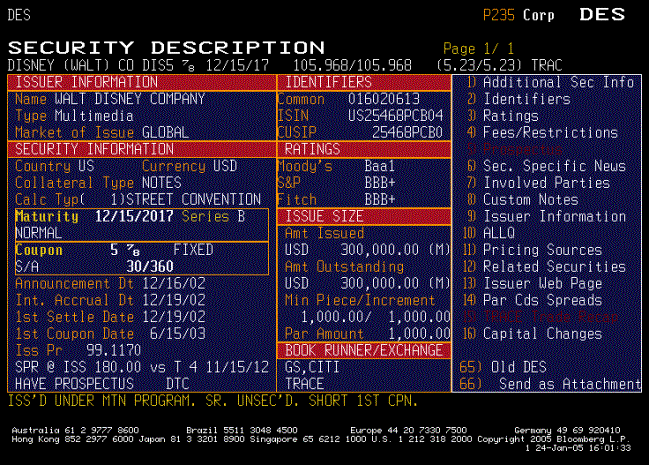
Can a poor user interface actually be a selling point for a product?

For financial information services company Bloomberg, it can. The company’s iconic data-spewing terminals offer streams of info in yellow and orange text on a black background, among other design no-nos.

But when a global design firm attempted to revamp the terminal in 2007, they discovered that Bloomberg’s users were very, very attached to its poor usability.

Want to know more? Read the rest on SmartPlanet’s Smart Takes blog.

Kick off your day with ZDNet's daily e-mail newsletter. It's the freshest tech news and opinion, served hot. Get it.

Topics

Andrew J. Nusca is editor of ZDNet and SmartPlanet.

Disclosure

Andrew Nusca

Andrew J. Nusca does not hold any investments in the technology companies he covers.

Biography

Andrew Nusca

Editor

Andrew J. Nusca is an editor for ZDNet and SmartPlanet. As a journalist based in New York City, he has written for Popular Mechanics and Men's Vogue and his byline has appeared in New York magazine, The Huffington Post, New York Daily News, Editor & Publisher, New York Press and many others. He also writes The Editorialiste, a media criticism blog.

He is a New York University graduate and former news editor and columnist of the Washington Square News. He is a graduate of the Columbia University Graduate School of Journalism. He has been named "Howard Kurtz, Jr." by film critic John Lichman despite having no relation to him. He lives in his native Philadelphia with his wife, cat and Boston Terrier.

Follow him on Twitter.

Related Discussions on TechRepublic

Did you know you can take part in these discussions with your ZDNet membership?
48
Comments

Join the conversation!

Just In

No, I think you're wrong
still not nice 28th Mar 2010
So does having a "fancy GUI" and "not that productive" conducive to one another?

I admit, I'm the first to frown on excessive, needless eye candy, but that's really no excuse for being stuck with a 1980 DOS-like interface.

Things have to change over a period of time. It's all a matter of where it goes...
0 Votes
+ -
Explains how MS gets away with it
itguy08 26th Mar 2010
XP is Horrible by default.
So is Vista.
Win 7 is decent but by no means good
Office 2007 is a usability NIGHTMARE.
0 Votes
+ -
Oh really? I thought the Apple users were the fanatically devoted crowd. Aren't they supposed to be the most satisfied users?

Or are you admitting MS customers are the most satisfied (sticking to the headline of this story?) Please don't try to talk out of both orifices at once.
0 Votes
+ -
Pointing out that crummy UI's sell. MS's UI's are crummy yet they sell.

It's only recently that people are seeing there is a better way than the Crapware that is Windows and Microsoft. This trend will continue.

Looking at the IT industry it runs in cycles. MS had its run at the top and the tide is declining for them. It will be a long slow road but they will end up an also-ran.
0 Votes
+ -
What did they do?
rjohn05 26th Mar 2010
What did Microsoft do to piss you off?
0 Votes
+ -
Selling Vi$ta
still not nice 28th Mar 2010
What a rip off.
0 Votes
+ -
sad
0 Votes
+ -
Old versions of MS software
gcomputeronet@... 26th Mar 2010
So if XP (assuming Win XP) is Horrible and Win 7 is decent, but Office 2007 is a usability nightmare what is Office XP? I beg to differ, Office 2007 is a good step in the right direction and Office 2010 looks to be even better. Office 2000 and Office XP are not great interfaces now, though they were fine at the time. User interfaces have evolved over time, for which I am glad. I would rather not have to use several keyboard combinations or a command-line prompt when two mouse clicks would work. UIs will continue to evolve as new hardware provides new ways to interact with computers (touch screens, webcams, microphones, etc.).
0 Votes
+ -
The "hiding" of menu options was/is DUMB, DUMB, and DUMB.

The ribbon is a waste of space and time.

The replacing of the file, edit, view, etc menu with the Office Orb is a nightmare. How are we supposed to know to click there?

I could go on and on.
0 Votes
+ -
As a mac user...
rjohn05 26th Mar 2010
Apple ain't nothin to write home about.
0 Votes
+ -
As a (dummy) Mac User
MacNewton 28th Mar 2010
Sometime everyone needs to ask for help, most of us know how to use
Apples "Finder" Did you know, They have Books for dummies!

http://ca.dummies.com/search.html?query=mac

After you had a some time reading it, let us know how you made out!
  • Flagged
0 Votes
+ -
I disagree
paul2011 26th Mar 2010
Hiding menu options is great. If I do not use menu option I do not want to see them every time I click on the menu.
Ribbon is nice too. Office orb is nightmare? happy Just click it once and you know it is there.
I do not see problems there at all.
0 Votes
+ -
Or get an Apple iPad
MacNewton 28th Mar 2010
The UI in the iPad is made for people that can't use a Mac or a PC. It's
really simple to use, just tap the App icon and your on your way.

But For you, a "iPad for Dummies" book may be helpful
  • Flagged
0 Votes
+ -
Don't knock it
still not nice 28th Mar 2010
The UI in the iPad is made for people that can't use a Mac or a PC.

Which is great for seniors.

Oh that's right...you'll never be a senior. You'll die young, instead.
0 Votes
+ -
For Word the ribbon is WONDERFUL
wolf_z 27th Mar 2010
Once you get used to it the ribbon offers two huge advantages.

1) It allows you to apply the most common styles with a single click. This is a huge advantage if you use styles (and if you don't, you don't know how to use Word properly). Not to mention the "hover over style" to preview...

2) It *easily* exposes all Word's enormous functionality to the user.

I don't understand the hate for the ribbon, really. At worst it's a neutral change. You have to learn it, but the ribbon is the idealized version of the "all functions exposed" ideal that Apple's been pushing since 1984.

And yes, hidden menu items was a dumb idea, the exact *opposite* of the ribbon constantly exposing everything.
0 Votes
+ -
Ribbons are wonderfully slow
Bruizer 27th Mar 2010
If you don't know how to use Word, ribbons work. If you know what you are
doing they do nothing but slow you down and take tons of screen space.
0 Votes
+ -
Slow you down? Quite the opposite
wolf_z 28th Mar 2010
For very common functions (Save, Bold/italics/underline, Search, Replace, etc) there are keyboard shortcuts--which have not changed since the earliest days of Word.

The ribbon is a mouse motion away for everything else. How, exactly, does this slow you down?

Styles are FAR faster in 2007 than they were in 2003, especially because A) multiple styles are presented as mouse targets and B) each of those mouse targets are far larger than the single small target available in 2003. Since you normally use less than 5 styles in a typical document, ALL your styles are nice large targets for a swoop and a click.

This is slower? happy

And again, "tons of screen space" is relative. If you're on a netbook, sure. If you're on a 22" LCD monitor, not so much. happy
0 Votes
+ -
Please do go on, actually.
CobraA1 Updated - 27th Mar 2010
"The 'hiding' of menu options was/is DUMB,
DUMB, and DUMB."

The menu options were DUMB, DUMB, and DUMB.
Designed in the early days for word processors
with small feature sets and for systems with
very little graphical capability.

Today, it's very different. The modern word
processor has become very complex, with a large
number of features, and we have systems with
far more powerful graphical capabilities.

"The ribbon is a waste of space and time."

Nope, it isn't. It's far more task oriented,
and the ribbon does a far better job of making
visible many useful features of Office.

"The replacing of the file, edit, view, etc
menu with the Office Orb is a nightmare. How
are we supposed to know to click there?"

Take a look at Office 2010. They changed that.
Yeah, the orb was a bit of a mistake.

"I could go on and on."

Please do. So far, you've described one feature
Microsoft fixed, and the rest seems to be hand
waving and vague generalities. It would be
really nice to know specifically what your
major complaints are.
0 Votes
+ -
Office 2010 ain't out yet
still not nice 28th Mar 2010
And yeah, the orb blows...

Take a look at Office 2010. They changed that.
Yeah, the orb was a bit of a mistake.
0 Votes
+ -
@gcomputeronet
Axsimulate Updated - 26th Mar 2010
I disagree. I have a computer here at work that has Office 2007 installed and even though I went through several classes at a local college on Office 2007, I still think it is very poorly designed and greatly hinders my productivity. It seems no matter what I'm doing in a document, the option I need is buried in a different tab. What I find really, really bone headed dumb, is the is no "text" tab, instead it's called "Home". Not only that, the ribbon gobbles up all kinds of screen real estate. I could go on and on, It's frustrating. It's almost like using Word 6 on the Mac back in 1994. Crappy!
0 Votes
+ -
What, are you using a netbook?
wolf_z 27th Mar 2010
"Not only that, the ribbon gobbles up all kinds of screen real estate."

I can see on a 600 pixel high screen it would be a problem, but I'm using an inexpensive 22" screen with 1680x1050 resolution, and don't even notice the real estate the ribbon claims.

As for your complaint of "being constantly on the wrong tab" you do know the ribbon responds to the scroll wheel, right? Just hover over the Ribbon and scroll up (left) to return to the Home tab. Just a good shove of the scroll wheel gets you there, the ribbon doesn't wrap around, no matter how far you scroll up it stops at home (or View if you scroll down (right)).

Ergonomically this is very fast and fluid.

The other tabs aren't used that often, and even when they are they're just an easy mouse-motion+scroll up/down away.

"It seems no matter what I'm doing in a document, the option I need is buried in a different tab."

See above. Plus, you must have a *really* strange working pattern if you're constantly changing tabs.

"Buried" implies a function is difficult to reach, and with the ribbon, that's just not true.

Word 2007 isn't Word 2003. You use it differently, the same way you don't use a circular saw the same way you do a hand-saw.

Learning the ribbon isn't hard, it's just a matter of retraining your muscle memory and learning a couple of new motions.

Also--if you don't have a mouse with a scroll wheel, get one. This is 2010, mice are cheap and scroll wheels are nearly universal. There's a reason for that...
0 Votes
+ -
What kind of workflow do you have?
CobraA1 Updated - 27th Mar 2010
"It seems no matter what I'm doing in a
document, the option I need is buried in a
different tab."

Generally speaking, the tabs are task based -
if you're reviewing the document, you're gonna
be in the review tab. If you're creating
reference material like an index or table of
contents, you're gonna be in the references
tab. Most of the time, you should be focused on
the single tab until the task is done.

I think it's better than trying to dig through
some deep menus and dialog boxes.

If there's one or two operations you use
outside of the normal task flow that interrupt
you a lot, you can add them to the Quick Access
Toolbar - that's what it's there for.

All I have to say is, you've got to have a
workflow that is really out of the ordinary for
it to be a big problem. Office 2010 will
probably work better for strange workflows, as
it's gonna be a lot more customizable than
Office 2007.

"What I find really, really bone headed dumb,
is the is no 'text' tab, instead it's called
"Home"."

"text" sounds like a very strange name for that
tab. "format" might be a better name, as most
of the controls in it are related to formatting
the text.

The point of the naming scheme that Microsoft
chose is really to describe a task, an action -
not the thing it is working on.

In that light, "home" is a reminder that it's
the place to go for most normal tasks like text
formatting and copy/paste.

Maybe it's not the best name - but I think
"text" would be a really poor name for that
tab, as it's not related to any sort of task or
action.

"Not only that, the ribbon gobbles up all kinds
of screen real estate."

Hint: Double click a tab. The ribbon will go
away.
0 Votes
+ -
Too Much Change ...
Ludovit 27th Mar 2010
The biggest problem I find with Office 2007 is the enormous amount of change ... the average user has to pretty much re-learn everything they knew about office and where to find things ...

Microsoft should have built in a transition feature like Excel 4 had with Lotus 123 ... you could ask the system how to do something, and it would show you - it wouldn't actually do it for you, but would show you where to find what you were looking for ...

There have been thousands of lost man hours due to people having to re-learn Office ...

Ludo
0 Votes
+ -
You can go to help
LiquidLearner 28th Mar 2010
and it will show you both the old and new way of
doing something. So it has what you asked for.
After one year of using ribbons, I can think of little good to using them. For a
casual user, I see some benifit but see none for people that actually use Word.
The screen area they waste with negative benefit is staggering.

Intilli-menus are also a basterdization of UI design but you could turn that on
off.
0 Votes
+ -
1. Click Cntrl+F1 and ribbon goes away. Click Cntrl+F1 and Ribbon
comes back.
2. Double click on current (active) tab and Ribbon goes away, double
click again and it comes back.

"There is a thing called Internet and you could search for the answers
most of the time for most of the technology problems instead of
complaining." For every issue there is a solution and all you need is
patience to resolve it. After all it is st*p*d technology created by
humans and will have choices that may not taste everyone.

--Ram--
0 Votes
+ -
Not good enough
still not nice Updated - 28th Mar 2010
You could turn-off ribbon too if you want

That's only a partial solution.

For instance, in Office 2003, I'm a shortcut kinda of a guy.

Case in point:

For "Insert" it's Alt+I (underscored) to bring up the menu, then down arrow (or underscore key) for whatever option you want.

In Office 2007 it's Alt+N to bring up the Insert ribbon. Then you hit the underscored key corresponding to the floating letter above each option.

I can live with that, except why change the primary keyboard shortcut from Alt+I to Alt+N to bring up the Insert options? Why not have keep the underscores consistent with 2003?

It's primary shortcut changes like this that p!ss me off the most. Besides, I have to use it for work so don't give me any of that "you don't like then don't buy it" bull$h!t.
0 Votes
+ -
Please explain . . .
CobraA1 27th Mar 2010
Please explain . . . how Win7 and Office 2007 are
"nightmares."
0 Votes
+ -
Seems like you would want to walk this line of thought carefully as the producer of the horrible interface. New users would be put off by this product, so competitors could make more efficient, easier interfaces and take the new users. They should build new interfaces, but allow users to pick either interface, much better for the long term.
0 Votes
+ -
I agree with you completely.
Rama.NET Updated - 27th Mar 2010
SparxSystems used this technic and their product "Enterprise Architect"
sells fast. They have created so many UI views predefined and you could
pick from one of those to suite your taste and choices. happy
--Ram--
Remember this 7 years from now when everyone from your banker getting rich off your investments to your momma are using software with Microsoft Word Ribbons and other Microsoft products. It takes a while but complicated UI eventually become understood and then people begin to expect it. Look at craig's list.
0 Votes
+ -
Guess you didn't get the memo
itguy08 26th Mar 2010
Windows marketshare is declining. Not fast but very slowly.

That in itself is significant.
0 Votes
+ -
Don't you think 35 years
WinTard Updated - 26th Mar 2010
for the other guys to prove themselves is sufficient to capture better than 5.12% of the world market share?

At these rates, it will be year 3000 before anything happens...

Oh and ever hear of stock markets *popping* their bubbles? What, the dotcom burst, the real-estate burst, hmmm, wonder what's next?

Overvalued stocks' stockholders should heed notice...

~~~~~~~~~~~~
Those who cannot learn from history are doomed to repeat it.
~ George Santayana

wink
0 Votes
+ -
So not true, just look at the linux UI's.
0 Votes
+ -
k...
Scratchi 26th Mar 2010
Ok, looking...got KDE 4.4.1 installed on my Gentoo box, got the wobly windows, rotating cube, transparency effects and a whole lot more then Windows Aero or OSX have to offer. And when I'm done playing with that, the system works better then Windows and OSX too!!

Stop bashing linux because you don't know how to use it. Linux has more interface options then any OS out there, it just take a bit of time setting it up for your needs.

And if you want a server with low overhead, then it's best to have no gui and just a basic cli.

I'm used to seeing a lot of negative things about linux on this site, but your comment is just fail.
0 Votes
+ -
Ok...
Loverock Davidson 26th Mar 2010
it just take a bit of time setting it up for your needs.

Exactly, it takes time to do everything in linux. There is no simple process for it. But that's besides the point, lets look at it from a UI standpoint. Ubuntu had a poop brown theme no one could stand, now they got a purple Barney theme that people can't stand. They switched buttons around. People generally don't like linux. So this whole article just doesn't hold any water because the linux UI is absolutely terrible and people can't stand it. There is nothing satisfying about that.
  • Flagged
0 Votes
+ -
why ubuntu?
Scratchi 26th Mar 2010
you picked the shittiest distro out of the bunch. look at opensuse out of the box; looks a lot better then ubuntu.

yes it takes time, and yes most things in linux do. and if you take the time, it works better then Windows or OSX. i took the time to compile kde, put together my CUSTOM theme in Gentoo; and it does not look like Ubuntu brown. i'm very satisfied with it...for work and play.

if you don't want to take the time to get it done right, i'm not sure if the pretty windows or osx ui will save you when you need to do something outside your browser or office suite. had you taken the time to poke around in gnome, kde or whatever you used in linux (i assume gnome since you said ubuntu), you'd see that it actually came a long way in the last few years.
0 Votes
+ -
Well I understand from where you come
Rama.NET Updated - 27th Mar 2010
but most of the computer users are not geeks like you and I and they
don't want to take time to tune everything. They expect most of the
things out of the box. Thats where OSX and Windows shine, because they
are COTS and the business behind it put a lot of time into User
Experience design and yes good number of times they fail but on the
other side when there is no control on UX you will get a lot of options
and where average Joe wouldn't appreciate it.
--Ram--
0 Votes
+ -
Competency...
Spikey_Mike 27th Mar 2010
... Repetition is likely how LD learns. Since she has no friends (how could she?), nobody is around to show the click-by-click steps to install and configure Linux.

It's no wonder that LD doesn't like Linux, apparently somebody played a joke on her and gave her Mepis (per numerous recompile the Kernel assertions). What a cruel joke too, as LD isn't capable of grasping new concepts outside of rote memory through repetition. Again, as evidenced by her many posts.

I've installed and configured Linux for folks with very limited PC experience - USING Linux is easy and installing/configuring is getting easier and easier (Linux MINT!), but for LD, she is lost, as nobody is there to configure the machine for her. Perhaps she needs to buy a Dell with Ubuntu pre-installed, then she'll realize that Mepis is but a distro and not what every linux looks like.

This is what happens when you're a know-it-all - nobody wants to play nice with you and it's hard to get anyone to show you new things over and over so you can 'learn'.

No, LD, competency is not your strong suit. You'd make a much better lawyer than tech, as it's all too easy to despise you.
0 Votes
+ -
AS/400
voyager529 Updated - 26th Mar 2010
We have one at work. It's been in use for over
25 years. Many of the people who work here have
been here for over a decade, and all know how
to use the AS/400 menu and command systems.
They are among the least intuitive interfaces
ever designed, but once it's a learned skill
(i.e. "muscle memory"), everyone was just fine
with it, and waning them off it was, at best, a
challenge.

Once something becomes muscle memory, even
positive change is viewed as a negative. I
didn't know where anything was in Microsoft
Access anyway, so the Ribbon was very helpful
to me there. I *did* know where virtually
everything was in Word, and thus was more
resistant to the change. The difference: I had
no muscle memory of procedures in Access.

This isn't about technology, it's about
psychology.
Joey
0 Votes
+ -
AS/400
Bill4 26th Mar 2010
The problem isn't so much the AS/400 as it is the ancient programs (from JDE, PeopleSoft, and such) some organiations like to run forever. IBM's AIX is probably behind those. The AS/400 will also run right along on Linux or some versions of Windows. The IT people who support these things really like this user-friendless crap. This is from long experience as a user.
what nonsense. just because they liked a UI that is not update does not mean it is a bad UI. Look at the screenshot and the amount of data it has and refreshes. The Bloomberg UI probably does its job by giving a lot of data and refreshing evey 'x' seconds pretty well. for a stock trader having to click multiple times while a stock price chances means a lot of $$.

besides getting used to a new UI might mean lost revenue for the stock traders that they are scared of. All that this piece of information reveals is that change is difficult and costs money. happy
0 Votes
+ -
UI, what UI
jorjitop 26th Mar 2010
I have used Bloombergs for more than a decade and never even thought about the UI. It works for what it is meant to do, and once you learn it, it needs no change.

A user-friendly UI may be faster to learn, or more intuitive for some people, but once you have learned it, you don't even think about it.
0 Votes
+ -
What's wrong with black background? ...
alokgovil 26th Mar 2010
... and orange/yellow text?

Could you please also expand on "other no-nos"

That the manual is long (80 pages) is no indication of a bad GUI.
0 Votes
+ -
Explanations.
CobraA1 27th Mar 2010
"What's wrong with black background? ...
... and orange/yellow text?"

When there's a lot of light, your iris becomes
smaller, and the eye becomes more like a
pinhole camera, which makes for a sharper image
and less eyestrain (don't need to use the lens
of the eye as much).

In a person with 20/20 vision, this is not
really a concern unless reading very large
documents. But with people with less than
perfect vision (and frankly, a large amount of
our population does not have perfect vision),
it can become a real issue.

"That the manual is long (80 pages) is no
indication of a bad GUI."

Actually, it very much can be. The cornerstone
of making a good UI for the general public is
making it so what it's easy to navigate without
having to refer to any documentation.

That being said - financial traders are not the
general public, and that's why Bloomberg isn't
making a UI for the general public.

But - for software that is designed for
the general public, yes you really do want to
create a UI that doesn't need a manual.
Because, frankly, the general public just
doesn't read manuals.
0 Votes
+ -
I would much rather use an application with a GOOD UI than one with a UI as poor as this Bloomberg application. I don't think that it was really about the UI, I think it's about that some people have to be pulled, kicking and screaming, into the new century at every single turn because they supposedly don't like 'change'.
0 Votes
+ -
Nope, you are wrong
Rama.NET Updated - 27th Mar 2010
UI design is not about having a fancy GUI, it is about user experience.
which is, how easily a particular set of users or target users would work
on their business instead of learning about the User Interface. So, even if
I have a fancy GUI that pleases my eyes and is not that productive is a
waste because I might lose most important business and productive time
if that fancy GUI doesn't serve me well. A simpler UI is always much much
preferred than fancy and ultra modern GUI having a lot of visual effects.
That may suite well for entertainment software but not for business
software.
--Ram--
0 Votes
+ -
No, I think you're wrong
still not nice 28th Mar 2010
So does having a "fancy GUI" and "not that productive" conducive to one another?

I admit, I'm the first to frown on excessive, needless eye candy, but that's really no excuse for being stuck with a 1980 DOS-like interface.

Things have to change over a period of time. It's all a matter of where it goes...
0 Votes
+ -
Sorry, but you are completely wrong.

The fact that people refuse to change something ugly because they are too lazy to accept change is not the same as being satisfied with a crappy UI. Laziness and complacency is in no way equivalent to user satisfaction.

What is really amazing is that someone that is supposed to be intelligent can see that simple and very obvious fact.

Join the conversation!

Formatting +
BB Codes - Note: HTML is not supported in forums
  • [b] Bold [/b]
  • [i] Italic [/i]
  • [u] Underline [/u]
  • [s] Strikethrough [/s]
  • [q] "Quote" [/q]
  • [ol][*] 1. Ordered List [/ol]
  • [ul][*] · Unordered List [/ul]
  • [pre] Preformat [/pre]
  • [quote] "Blockquote" [/quote]
ie8 fix

The best of ZDNet, delivered

ZDNet Newsletters

Get the best of ZDNet delivered straight to your inbox

Facebook Activity

White Papers, Webcasts, & Resources
ie8 fix