Build a cheap, overclockable PC

Summary: I've had a number of enquires from readers who want to build (or buy) a cheap yet powerful PC. Can it be done? You bet! What components will you need to buy? Read on!
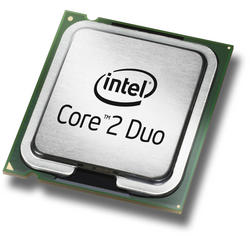
I've had a number of enquires from readers who want to build (or buy) a cheap yet powerful PC. Can it be done? You bet! What components will you need to buy? Read on!
One of the cheapest (and best) ways to get your hands on a powerful PC is to make sure that it's built around a CPU and motherboard configuration that allows it to be overclocked. Overclocking is highly desirable because it allows you to tap into extra power for free.
When it comes to overclocking the best CPUs can be found in the Intel Core 2 Duo LGA775 range. Here's what's currently available along with current pricing (from Newegg):
- E4300 1.8GHz - $169
- E6300 1.86GHz - $184
- E6400 2.13GHz - $222
- E6600 2.4GHz - $314
- E6700 2.66GHz - $512
All these CPUs overclock well but for the price the E4300 1.8GHz (Allendale) processor offers excellent value for money. With very little tweaking at all (boosting the core voltage to around 1.4 to 1.465V) it's possible to get this $169 CPU purring at 3.0 - 3.1GHz and need nothing more than the stock cooler. Very impressive indeed and one heck of a boost up from the stock 1.8GHz.
However, to overclock this CPU up to this level and still keep things stable you will need a decent motherboard. Three that spring to mind are the ASUS P5B ($131.99), the ASUS P5N32-E (108.99) and the Gigabyte GA-965P-S3 ($107.99). You might be able to get away with a cheaper board but these may not offer the voltage stability that the CPU will need when overclocked. I'm not going to say that you couldn't overclock the CPU to a high level with a lower cost board, but if I was building a system with overclocking in mind, I wouldn't skimp on the board.
So, an E4300 CPU and a motherboard that'll allow you to squeeze out all the power the processor has to offer will set you back about $280.
To that I'd add at least 2GB of good quality RAM, something like Kingston, Crucial or OCZ. I particularly like the Platinum series RAM from OCZ because you are allowed to push use a VDIMM of 3.0V ± 5% without invalidating the lifetime warranty, but this comes at a price. Whatever you buy, just make sure that it's backed by a good warranty that allows you to return the RAM if it doesn't work out in an overclocked system.
From that point on, what you add to the system is up to you. You need a chassis, a PSU, a hard drive, a graphics card (spend less than $100 and you'll be doing your system a massive disservice) and an optical drive.
No matter what extras you choose, you're bound to end up with a system that's powerful and can take anything you throw at it.
Thoughts? How would you complete the system? What tweaks would you make? What do you think of overclocking?
Kick off your day with ZDNet's daily email newsletter. It's the freshest tech news and opinion, served hot. Get it.
Talkback
Overclocking is interesting
I suppose if you don't mind the risk, it might be interesting to see what difference there is, but, I'll stay out of the passing lane thanks.
(Can over-clocking be done on a dv2000z AMD Turion64X2 1.6Ghz?)
[1] You wan't to insert a general _disclaimer_
It used to be dodgy ...
Cooling...Is there something...
I'll do a post on cooling tomorrow
ok, cool!
Would this cooler wrk for over clocking???
Thanks jon_j5
Beyond that
Today many more safety margins are built in compared to those earlier times. Most CPU's are built with very nice performance overheads, with more consistency today than in the past it seems. In earlier days, it was much more a matter of good fortune, and if the gods were looking kindly upon you with your lucky little chip. Most motherboard makers now design their BIOS's so they'll will simply reset themselves once you cross the safety threshold, sometimes automatically without even having to clear (jump/short) and reset the CMOS (BIOS settings memory) on the board. The voltage and clock controls are all on simple menus, not complex mix-n-match jumper grids. Ahhhh those good ol' memories... throw a slotket in for good (painful) measure. :)
A good overclock can generally be accomplished with a stock cooler (heatsink + fan) and good case air flow (preferably with the use a TAC or CAG style box), but if you really want to push it up, better cooler combos should be considered [Zalman to name just one]. If you get into water cooling solutions, you're really going hog wild. To me that amounts to overkill. Did one once but never again since it is hard to justify the extra cost and effort. Though it's true, they look cool as heck and you do get certain "bragging rights" in the neighborhood once you pull one off with kick butt results. But they are for the most part poor economic values in the end, considering all that goes into doing one right, and for the hardcore enthusiast. If our primary rigs lasted 7 or 8 years instead of say 2 or 3, this might be different.
Hey you can even do it on a Linux box, in fact [i]it's so easy even a caveman could do it.[/i] Even one like you D. ;)
A few points
George Ou still doesn't seem to care for the idea of building everything on top of an Asus board (if I read his last comments right), though my experiences say that isn't a well rendered judgment (for reasons I cited earlier). They can be had generally for $25 to $50 more than the cheaper boards out there, and are often worth every extra dollar when all factors are considered. It's only their top of the line premium boards that get really pricey, the ones that come with every bell and whistle aimed at would-be gearheads. Those ones are sometimes overkill, unless you have the loot. But to each their own, only a word to the wise: be careful scrimping too much on the quality of the mainboard or PSU, as therein lies the base of all successful turbocharge efforts (outside of finding a nice CPU candidate, like these C2D pups).
As I see it, it isn't until you own an Asus or Abit mobo that you come to see why they are the OC'ers favorites, and have been for years. Just about every imaginable control tweak avails itself in their BIOS modding menus. Few other boardmakers can match their liberal voltage allotments or fine-tuning arrays, or the quality components they incorporate (good example: extra margined capacitors). That stated, there ARE lots of other makers that are also turning out some fairly good OC boards at this point, some remarkably priced, only they still run in the shadow of the innovation leaders, Asus and Abit. Proving if nothing else, imitation remains the sincerest form of flattery. ;)
Though your article is pretty much spot on Adrian, one point I might take exception with would be regarding the RAM. High quality RAM can't be beat it's true, and definitely helps when reaching for the ultimate throws coupled with stress stability. But I have found many of the "value" line models - at least from the better manufacturers - often do the job quite satisfactorily, with a good cost savings. It is one of the areas I tend to look at for the best "dollar value" savings. Corsair, Kingston, OCZ, Micron, Crucial, Mushkin all seem to overbuild even their economy sticks so that they can be really pushed hard. Some even insanely. :) Many of the quality-maker value lines carry lifetime guarantees just like their premium class brothers, though they won't employ sweet extras like heat spreaders or top of the line wafer specs. As for 1GB versus 2GB, user preference at best. More RAM is always nice but the OC itself could care less.
One more thing. A lot of folks put all kinds of make-or-break emphasis in stress testing their OCs, but after following this path for years, it is no longer of do-or-die importance to me. Though this will provide a good stability guarantee and helps pick up existing weak spots, it also typically robs you of 15-25% of the overall throw unless you use the highest quality parts across the board. I have found that in the end, what matters more is what 'everyday use' will quickly determine: if the operating platform doesn't freeze or reboot randomly, the BSODs are non-existant, heat is under control (noting that OC's will always run higher than non-OC's), and little telltale OS errors don't crop up unexpectedly (outside of the "normal" Windows ones). If they do, adjust and tweak down or as you move along.
I know this advice can't and shouldn't be recommended per se, but it's what I do nowadays -- and I regularly get fantastic clock throws along with top notch system performance, for myself and clients who want real barn burners. As I've stated before, if you're running 'mission critical' platforms or servers, you shouldn't be overclocking anyway (or mildly at best). As for your own PC or private workstation, my attitude is go for the gold and max it out for all it's worth. You'll likely only pull 2 or 3 or maybe 4 years out of the pup as your "prime-timer", so why not run it hard for that relatively short time span? All my rigs run redlined, few with conventional safety margin testing (except for client models), and I've yet to discover any data corruption or other apparent errata. A few have been flat out screamers. As for high-end gamers, this last bit of advice should be disregarded. Loop stress test up front to cut to the chase!
PS. I asked you and George this earlier on another thread but never heard anything -- what does CPU-z indicate your E6300 and E6400 models to be, Conroes or Allendales? There is some genuine confusion over which they really are [or maybe I'll query Spooner]. I swear I saw an E6300 in a review some months back as an Allendale (per a CPU-z screen). I know the E6600 and up with the 4MB caches are definitely Conroe cores, and the E4000 series are definitely Allendales, but what about those E6x00 2MB L2 models??? Anyone running one, kindly post!
RAM. + Vista not good for OCs
I think it should be mentioned that using more than two sticks of RAM will negatively effect your overclock. Sometimes severely.
So plan on a maximum from the start. 2 GB would be a good idea for something like Vista.
Speaking of Vista, it seems it is more sensitive to OCs than XP. Tests using dual-boot systems have shown Vista BSOD'ing or failing to boot at the same OC settings as XP.
Concur
[i]Speaking of Vista, it seems it is more sensitive to OCs than XP. Tests using dual-boot systems have shown Vista BSOD'ing or failing to boot at the same OC settings as XP.[/i]
This is what concerns me. I've yet to jump on the Vista bandwagen myself but am about to (have no choice really), but so far from what I have glimpsed and read, it doesn't look as encouraging as it was with the earlier WinOs's - W2K or WXP or W03WS. If so it'll be a bummer, for as I've said before, I'll take redline performance over "optimum stability" (equates to reduced speed) as long as I never notice instability or errata after the OC. That's the name of the game. In fact I won't even compare the two (been there, done that). Some prefer to play it safe, but what I want is a platform that functions FAST. Period. System optimization and overclocking provide the ideal way.
can I overclock?
Not so fast
Secondly, does the mobo in question carry an Intel branding, or is it one that is embedded with an Intel chipset? Big big difference. Right up until but a few months ago, Intel pretty much locked out overclocking on their boards. Period. End of story (short of using cheesy software overclocking utilities that rarely amount to much more than a maddening tail chase). A <few> of their mainboards could overclock to a max of 4% by enabling the "burn-in mode" in the BIOS. Whoopee. They finally did an about-turn with their Bad Axe 2 board introduced roughly 3 months ago. Yup, the bastards finally saw the light, after all these years. I'm sure they ultimately realized they were losing too much business to their partners (and competition) who run their grade A chipsets.
As for overclocking in general, any BIOS-capable motherboard with a halfway decent CPU is worth overclocking, even if just mildly. That's assuming it's a PC or personal workstation. Many big name branded PCs do not offer these controls in their proprietary BIOS settings. Also laptops in general tend to be trickier business, due to cooling considerations and (again) BIOS lockouts from many makers. Mission critical platforms and servers are even less desirable, where rock solid dependability is the name of the game.
I don't see over-clocking as ...
Doesn't seem like a very productive gamble to me.
Not a gamble ...
It's a new day yesterday
As for knowing if your system becomes unstable, ha! You'll know, as it will be readily apparent. But then you simply need to ramp things down a bit to correct this. When you first get into OCing and are all thumbs, you should be prepared for a few "scary" moments that may occur when things burp up on you (call 'em misfires). But unlike the old days, where finger-crossing, recalculations and a bit of troubleshooting were required as the way out, today safety parameters in the BIOS configuration pretty much flush out any improper attempts and will reset the system for you. If not, at most you will need to reset the board yourself via the CMOS jumper, per what I mentioned above.
Caveman easy, as Linius Dietrichus likes to say. ;)
CPU temp is only half the story
Good cooling helps, but is not the essence of what the problem is. Semiconductors built for long life under extreme current densities (microwave power transistors, for instance) often use gold metallization. The heavier atoms stay put (and gold conducts better than aluminum).
That said, I used to overclock till I had a system croak long before I was finished with it. I think you are OK with goosing things 25% or 33% over normal, but anything beyond 50% is definitely a throw of the dice. I never overclock an important system. But games? If you have the $$$ to waste, go knock yourself out.
I used to feel like that ...
GPUs are a different matter though.
modest
My parameters
Other factors also have a certain say in the overall mix and achievement rate, from the motherboard and BIOS, to the PSU and RAM and HDD and graphics card used. This naturally presumes there is a healthy and optimized OS platform in place to begin with to help keep bumps and jolts to a minimum. More often than not, it comes down to the weak link in the system.
Those are my long held parameters. All percentages assume solid stability to boot once accomplished.
Correct!