madison

Hardware 2.0

Adrian Kingsley-Hughes

Build your own Home Theater PC (HTPC) ... for under $600!

By | February 2, 2010, 7:36am PST

Over the past few weeks I’ve had dozens of requests from readers wanting me to put together a parts list for a kick-ass, low-cost Home Theater PC (HTPC). Well, here you go!
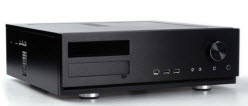
Before I go on, first let me explain briefly what a HTPC is and how it differs from a regular PC. Basically, an HTPC (sometimes called a Media PC or Media Center) is a PC that’s specifically designed to playback music and video. Also, since it’s an entertainment system, you want to be able to control the PC remotely, and you want to keep noise down to a minimum.

What I’m going to outline here is an entry-level system that’s going to be able to handle all the basic tasks that you’d expect of an HTPC system. It’s going to be able to handle HD resolution video (1080p and 720p), cope with streaming video, upscale DVD, ad will even be good for playing games, as long as you’re not too greedy when it comes to resolution. It’s also going to have plenty of storage space so you’ve got plenty of room to store your ever-growing library of media.

OK, let’s get going!

Processor

One of the key factors to building a successful HTPC is to pick a processor that’s powerful enough to handle the demands placed on it by the tasks it has to carry out, but not so powerful that you’re having to add powerful fans to have to cool the thing off.

For this built I’ve chosen an AMD Athlon II X2 255 Socket AM3 part. This is a 3.1GHz dual-core CPU, but far more importantly than that, it has a TDP of only 65W. This means less heat is produced when it’s running, which in turn means less cooling, and it also means you can cram more components into a smaller chassis.

Price: $80

Motherboard

Now that we’ve chosen the CPU, it’s now time to choose a motherboard to match it. There are several consideration to take into account.

First, size. Ideally, you want your HTPC to have a smallish footprint, along the lines of a VCR, so it’s best to choose one with a micro-ATX form factor. Also, it’s a good idea for the motherboard to have an on-board graphics processor (GPU) and support for HDMI. Oh, and to match the processor, this needs to be a Socket AM3 board.

With all these requirements in mind, I’ve chosen a Gigabyte GA-MA785GMT-UD2H board. Highlights of this board include:

  • AMD 785G chipset
  • ATI Radeon HD 4200 GPU
  • HDMI
  • SATA support

Price: $90

Next –>

Adrian Kingsley-Hughes is an internationally published technology author who has devoted over a decade to helping users get the most from technology.

Disclosure

Adrian Kingsley-Hughes

All opinions expressed on Hardware 2.0 are those of Adrian Kingsley-Hughes. Every effort is made to ensure that the information posted is accurate. If you have any comments, queries or corrections, please contact Adrian via the email link here. Any possible conflicts of interest will be posted below. [Updated: February 23, 2010] - Adrian Kingsley-Hughes has no business relationships, affiliations, investments, or other actual/potential conflicts of interest relating to the content posted so far on this blog.

Biography

Adrian Kingsley-Hughes

Adrian Kingsley-Hughes is an internationally published technology author who has devoted over a decade to helping users get the most from technology -- whether that be by learning to program, building a PC from a pile of parts, or helping them get the most from their new MP3 player or digital camera.

Adrian has authored/co-authored technical books on a variety of topics, ranging from programming to building and maintaining PCs. His most recent books include "Build the Ultimate Custom PC", "Beginning Programming" and "The PC Doctor's Fix It Yourself Guide". He has also written training manuals that have been used by a number of Fortune 500 companies.

Adrian also runs a popular blog under the name The PC Doctor, where he covers a range of computer-related topics -- from security to repairing and upgrading.

Talkback Most Recent of 109 Talkback(s)

  • Dell Zino HD
    Adrian, what do you think of the Zino? I was eyeing it mostly because of it's compact size and decent reviews. Even with the upgrades it's a bit lighter on the HD and CPU, but still comes in cheaper.
    ZDNet Gravatar
    pdskep
    2nd Feb 2010
  • Dell Zino HD
    I am building a system around the Dell Zino. I have bought the Zino and it is a great little box. Very quiet!!! I got the Windows 7 option and I loaded it with Ubuntu in a dual boot setup. I had to upgrade my stereo to handle HDMI so that should be counted in the cost. I ordered the Onkyo HT-RC160 for a cool $300. I haven't figured out the question of boxee versus xbmc.

    Re. ripping DVD's in Linux: Use Thoggen for a GUI program. It rips it into a non-propietary format (Ogg video). You can convert it to other formats but for the most part you won't need to.
    ZDNet Gravatar
    mathphud
    3rd Feb 2010
  • RE: Build your own Home Theater PC (HTPC) ... for under $600!
    @mathphud It's been over a year since you've built your Zino HD, how do you like it so far? I'm looking at getting into the Windows 7 HTPC scene but not sure what route I want to take. I've had a couple friends recommend Mac Mini's but I think they're a little pricey for the hardware you get and I'm not a huge fan of OS X. I think I've come down to going with a Dell Zino or some other pre-built system, but I haven't totally ruled out building my own. Adrian, if you were to build an HTPC today what hardware would you put in it? (just wondering if you would change anything since the time you have written this).
    ZDNet Gravatar
    ryanjames1996
    9th Aug
  • RE: Build your own Home Theater PC (HTPC) ... for under $600!
    I only see one thing that you forgot to mention in this basic HTPC build. Although not a requirement, why not add the option of a QAM/ATSC tuner card in there to take advantage of the "record TV" function built into the Windows 7 home premium and above? I know I am in the middle of my little HTPC build (funny enough I used almost the exact same parts as your article before even reading it!) and one of the best add-ons I made was the TV tuner card so that I could create my own DVR system. Now I will just need to put in an extra hard drive...
    ZDNet Gravatar
    Super_Geek
    4th Oct 2010
  • RE: Build your own Home Theater PC (HTPC) ... for under $600!
    @nick@... I would say that Adrian's exclusion of a tuner from the overall build is both an inexcusable omission and a *serious* punt. The fact is, the *only* tuner really capable of delivering a good HTPC experience at the moment is one that supports multiple channels (watch one thing, record something else) + HDTV + cablecard. Right now, that means you'll either be trying to track down a couple now-discontinued ATI USB HDTV tuners or you'll be buying a Ceton InfiniTV 4. The InfiniTV 4 lists at $399, which knocks the current system North of $1k. A decent HTPC under $1k is a myth - It simply can't be done.
    ZDNet Gravatar
    chunkyIPA
    28th Dec 2010
  • I'm wondering what additional features HTPCs really have anymore?
    @nick@... I have been thinking about a HTPC for several years now, but have never been able to put together the features/functions I want. I recently upgraded my DishNetwork receiver, and got a new Vizio TV, and now I'm wondering what do I need a HTPC for, exactly. I get Netflix, Pandora, Flickr and more with the Yahoo widgets built into the TV. The Dish receiver has a built-in Slingbox and large capacity (and expandable via USB) and is a DVR.

    I usually prefer to watch TV and web surf at the same time, so usually a laptop is better.

    Is the point of a HTPC to do those things because other providers don't offer them, or to make do with existing components as long as possible, or to get some other functionality?

    Also, I noticed a number of Blu-ray players were building in similar functionality.
    ZDNet Gravatar
    caspianhiro
    29th Dec 2010
  • Price with Ubuntu 9.10 Linux and Boxee.tv: same as w/no O/S
    Save your coin.

    Try running the nicely configured box Adi speced out with:

    Ubuntu 9.10 Linux : $0.00
    Boxee.tv : $0.00

    Bottom Line: $590.00

    Can't go wrong with Linux and Boxee.tv

    Update: You'll find a nice feature matrix for the most popular Media Center Apps here.
    ZDNet Gravatar
    D.T.Schmitz
    2nd Feb 2010
  • Problem is this unit has a ....
    ... BluRay drive and you won't be able to watch the movies in Linux.
    ZDNet Gravatar
    ShadeTree
    2nd Feb 2010
  • Boxee.tv doesn't rely on BluRay
    But you can rip a copy of the movie from BluRay with the following linux terminal command:

    $ dd if=/dev/cdrom of=/path/to/movietitleBlueRay.iso

    That iso is playable with Mplayer or editable with tools like Handbrake.

    fyi,
    https://help.ubuntu.com/community/RestrictedFormats/BluRayAndHDDVD

    Whether it is 'legal' to do so or not is a separate question and another blog.

    It would seem to me though that 'Fair Use' should allow the purchaser of a BluRay DVD the right to rip it for their own personal use (preserving the DVD as backup).

    Do what you want with Linux! wink
    ZDNet Gravatar
    D.T.Schmitz
    2nd Feb 2010
  • Why go through all the trouble
    and possible illegalities of ripping Blu-Ray to DVD to use it with a Linux-based HTPC when all one has to do is install Windows 7 instead? No ripping required.
    ZDNet Gravatar
    Pete "athynz" Athens
    2nd Feb 2010
  • I didn't recommend BluRay in the start of my thread.
    But for those who want to use BluRay with Linux, contrary to current mythology, you can.

    My recommendation was/is Ubuntu and Boxee.tv: $0.00
    No BluRay required.

    If you want to go even cheaper, take a look at D-link's Boxee router.

    ZDNet Gravatar
    D.T.Schmitz
    2nd Feb 2010
  • No but you did says Ubunto Boxee ...
    ... was equivelant to the Windows box and it is clearly not. It does not have the same capabilities
    ZDNet Gravatar
    ShadeTree
    2nd Feb 2010
  • ZDNet Gravatar
    D.T.Schmitz
    2nd Feb 2010
  • Here is why
    We use the Viewsonic VMP-70 media player set top. I ripped our DVDs to hard drive for two reasons:

    Nice to have then all available without having to fumble with disks and the infuriatingly slow disk "loading" times.

    Second, losing all the stupid ads, promos and self-indulgent start-up menus so we can just watch the damn movie without pushing a bunch more buttons!

    Don't have Blu-Ray yet, all the Java possibilities scare me away as my wife can't deal with DVD menus as it is, more "options" is not helpful!

    If I could rip Blu-Ray to hard drive and just play it, then it might become viable for us. OTOH upsampled DVD leaves me questioning the need for Blu-Ray. At least until we upgrade to that 83" set my wife has her eye on.
    ZDNet Gravatar
    wkulecz
    2nd Feb 2010
  • P.S. you can rip BluRay to your HD
    Google or read my threads.
    ZDNet Gravatar
    D.T.Schmitz
    2nd Feb 2010

Talkback - Tell Us What You Think

Formatting +
BB Codes - Note: HTML is not supported in forums
  • [b] Bold [/b]
  • [i] Italic [/i]
  • [u] Underline [/u]
  • [s] Strikethrough [/s]
  • [q] "Quote" [/q]
  • [ol][*] 1. Ordered List [/ol]
  • [ul][*] · Unordered List [/ul]
  • [pre] Preformat [/pre]
  • [quote] "Blockquote" [/quote]
Click Here

The best of ZDNet, delivered

ZDNet Newsletters

Get the best of ZDNet delivered straight to your inbox

Facebook Activity

White Papers, Webcasts, & Resources