First look at Windows 7 build 7048

Summary: Windows 7 has come a long way since the Beta 1 bits that were released back in January. Let's take a look at the latest build to escape into the wild.
Windows 7 has come a long way since the Beta 1 bits that were released back in January. Let's take a look at the latest build to escape into the wild.
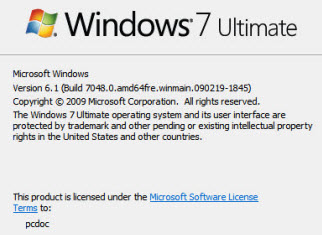
The build I'm looking at here is 7048 and this has the build number of 7048.0.090219-1845, and what's significant here is the build date stamp, 090219-1845, which translates into 19th Feb 2009, 6:45pm. Compare this to the Beta 1 which has a build date from Dec 2008.
Gallery: Windows 7 build 7048
So, what's new?
Well, first off you'll notice from the screen captures than the Send feedback link on the title bar of the applications is now gone. This is normal as the code heads towards release candidate stage.
We also have a new raft of icons. Sure, these are cosmetic tweaks, but they do help the look and feel of the OS.
Over the past few days it also emerged that it's possible to remove IE8 from Windows 7.
Here's an image showing the entire tree of the Turn Windows features on or off screen expanded (warning, image is quite large).
There's also a revamped Remote Desktop Application, although there's no difference in how the application works.
The OS also benefits from many other cosmetic tweaks.
Is this the Release Candidate build? No, it's not, and the way you can tell is because the UAC flaw discovered soon after Beta was released is still present in this build.
My guess is that the RC build will be finalized second or third week this month, and will be released to the public early April.
Kick off your day with ZDNet's daily email newsletter. It's the freshest tech news and opinion, served hot. Get it.
Talkback
8 Years Ago
been released a full decade ago. The RAM requirement was 128 MB.
Then this isn't the OS for you!!
Seriously though, this whole "I can run this OS on 10 year old computer" thing is a ridiculous argument. When I was using Gentoo not that long ago, I was able to install a full working OS that used less than 64 MB of RAM. I see no reason why this wouldn't still be possible with the latest version of Gentoo. Using your argument then, Gentoo is a better OS than OS X. So when are you switching?
Argument?
Gotcha
The OS X of eight years ago is not the OS X of today.
Windows 2000:
133MHz Pentium
64MB of RAM
Windows XP:
233 MHz Celeron
64MB of RAM
http://www.microsoft.com/windowsxp/sysreqs/pro.mspx
Both have OS X's minimum requirements beat. I assume you had a purpose for your post but I'll be darned if I can tell what it is.
Generations
Mac to OSX. Windows has gone from DOS to Windows 3.1/95/98 to
NT/2000/XP, then to Vista/7. OSX may not be "the same" and the
original, it not a generational shift either. That's probably why it's still
called OSX. Do you disagree?
The generation that Mac users are using now, and presumably will be
for the next 3 years, is the very same generation that we were using
in 2001. That must mean we're behind right? A Windows user would
have to be using Windows NT or 2000 or XP for the next 3 years with
all their "virtuously low system requirements" to be using the same
generation of OS as the Mac user. And long may you be happy with
that. Sorry if a charmed look back at OSX's original system
requirements puts you up in arms.
My point is, our next gen experience started in 2001 concurrent with
NT etc. As time bears out, this generation for Apple has had longevity
and continues to. 8 years of freedom from bit rot and malware need
not even factor into the conversation for Snow Leopard to further
extend our 3rd generation and deliver, at the very least, complete
technical parity with Microsoft's 4th. My point? What's up with that? Is
it possible we got it right the first time, back in 01?
Do enjoy your registry cleaners well into the next decade.
So you had no point. My mistake.
same FUD.
Adrian...
Not had that problem here ...
I've seen that happen
If you buy budget bits, some of your 1s will actually be 0.99 and won't work as well.
;)
Or extra!
Thanks
Grab a Linux live CD and do the following:
1. Boot the CD to the desktop.
2. Open a command windows.
3. Type "sudo dd if=/dev/zero of=/dev/hda count=8" (you may have to substitute "sda" for "hda" depending on the drive type in your system).
4. Restart the Windows installation process.
remove or hde IE 8?
I don't see how Microsoft is allowing IE to be removed if it is an integrated part of Windows.
Remember the argument that removing IE would break Windows? So now with Windows 7 they rewrote Windows core separate of IE?
Probably hidden although
IMHO I don't understand why people care about Internet Explorer and whether you can uninstall it - if you don't like it then don't use it, its pretty simple!
Indeed...
RE: First look at Windows 7 build 7048
I'll admit I am a Linux user, but the public beta of 7 gave me hope for Windows, yet all of the resources MS has are giving us new icons....
I hate to say it, but I'm likely to stay a Linux user.
Another typical ignorant trolling reply....
the only new thing in the build? Pay attention
to previous 7000 builds release notes.
The Windows Release Process
They almost certainly do have a fix for the UAC bug. But if you've ever been in a large company building a product that will go to millions of people, things work quite differently than a start up.
First, before MS releases a branch for testing they must have it go through extensive testing. They probably had the core code in this branch locked down before the original beta was released.
The UAC bug is almost certainly going into the RC branch, not an interim branch. This would allow them to test it with their big RC releease.
OK..
Well- that makes sense, but it also makes me wonder if that bug is pretty major. If it isn't, then why not put the patch in the beta.
But- you are certainly correct that I don't think like large companies do (or for that matter, often understand them).