Hardware 2.0 - Best software applications/tools/utilities

I regularly receive emails from readers asking me for a list of the software tools and utilities I use regularly.
Well, you asked for it, so here it is! Here's a list of my favorite applications, tools and utilities.
Check out the full image gallery here.
Virtual CD
You might be thinking that Virtual CD is just another example of a tool that allows you to mount .ISO CD images on your system. Well, you'd be right. It also lets you create .ISO files and burn them to disc. OK, nothing special so far. Where Virtual CD differs from similar utilities such as Daemon Tools or Virtual CloneDriveis that Virtual CD allows you to create virtual CD and DVD burners on your system. This allows CD burning applications to see the drive as a valid disc burner and write data to a virtual disc that you can then store as an image.
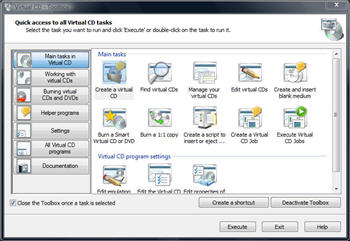
Why might you want this feature? Well, one use for it that I'd found is a quick way to burn a backup on an iTunes library without going through the physical disc stage. That's just one use for this tool. Once you have a virtual CD/DVD burner on your system, you'll wonder how you managed without.
Virtual CD has some other cool features. One feature that I use regularly is its ability to make an .ISO image of a folder or collection of files from the right-click in an explorer Window.
One negative that I have of Virtual CD is that it can seem overwhelmingly complicated initially, offering a myriad of options and settings. However, if you work through the help file you'll soon figure out what does what.
Excellent utility that I couldn't do without. Also, as far as I'm aware, one of a kind!
Virtual CD - Single license $39.95
Fraps
If you're a gamer who obsesses over frame rates then you should be familiar with Fraps already. Fraps has a number of uses, but the one that most people seem to be away of is its ability to display (and record) the number of frames per second you are getting in a game.
But Fraps does a lot more than display frames per second. Another handy Fraps feature is the ability to capture stills and video from games. Yeah, OK, not many people want to do this, but if you do, then Fraps is the tool for you.
Fraps - Freeware version available/Single license $37
Next -->
7-Zip
I used to be a huge fan of WinZip, but in recent years I've found the tool to be bloated and annoying. I tried several alternatives (including WinRAR) but in the end I settled on 7-Zip simply because it was fast and lightweight.
7-Zip is fast and easy to use, and has the added advantage of being able to compress files to a high ratio. The interface is somewhat basic but I'm happy to overlook that since it does what is says it does well.
7-Zip - Freeware
BlogJet
I don't compose any of my blog posts online because a single browser lockup (or accidentally hitting the back button) means that I'm back to square one. I'm much happier composing my posts offline and to do this I use an excellent WYSIWYG called BlogJet.
I've been using BlogJet now for years and it's an application that in all that time hasn't given me any trouble whatsoever. It also makes composing blogs posts easy - adding images, YouTube videos, and files is a snap. It also has powerful features such as a spell checker and auto replace.
BlogJet isn't free and there are free alternatives (such as Windows Live Writer) but I keep coming back to BlogJet.
BlogJet - Single license $39.95/Family license $69.95
AnyDVD
Does DVD copy protection or region coding get in your way? It does with me, so I've invested in a copy of AnyDVD HD. This tool works in the background and automatically removes the region encoding and copy protection present on a DVD movie as soon as it's inserted into the drive. Not only that, but it allows you to skip FBI warnings and trailers that otherwise you are forced to sit through.
I don't use AnyDVD because I'm up to no good, I use AnyDVD because without it there are discs which I've legally bought which I can't play on my PC without it.
AnyDVD - 1-year subscription: €49, lifetime: €64/AnyDVD HD - 1-year subscription: €63, lifetime: €109
CDBurnerXP
I believe that burning a CD or DVD should be easy. My disc burning needs used to be handled by Nero, but over the years this applications has become bloated with far too many features for my liking (or maybe the applications has just shifted markets and left me behind) and I've now moved CDBurnerXP.
Note: Despite the name, CDBurnerXP works on Vista too.
With CDBurnerXP I can easily create CDs and DVDs, including Blu-ray and HD-DVDs, as well as creating and burning .ISO image files. On top of that, CDBurnerXP is quick and simple to use thanks to the well laid out interface.
CDBurnerXP - Freeware
Next -->
Softros LAN Messenger
It's great being able to communicate with different PCs on a network. I used to think that i could get away with using IM to do this, but I prefer to have something that's not pack full of annoying stuff like nudges and winks and that sort of nonsense. I need something that's more business like.
Softros LAN Messenger is a small and easy to use application that allows me to chat with users on other PCs, as well as send and receive files. It's simple to set up and even simpler to use. It just works!
Softros LAN Messenger - Single license starts at $10.95
UltraEdit
UltraEdit is Windows Notepad on steroids. Yes, it's a text editor and you can use UltraEdit simply as a replacement for Notepad, but UltraEdit is a lot more than that. It's an HTML editor. It's an advanced PHP editor. It has a built-in FTP/SSH/Telnet client. It offers syntax highlighting and code folding for the programmer. It supports files bigger than 4GB. It supports file encryption. And that's just scratching the surface!
UltraEdit is a huge application but even when you only use a small fraction of the features it offers (as I do) it still manages to feel easy to use. I've been using UltraEdit for years now and couldn't dream of switching to another text editor.
It might seem wierd to you paying for a text editor, but UltraEdit is an application that has never let me down. It just works!
UltraEdit - Single license $49.96
Foxit Reader
A few years ago I gave Adobe Reader the shove and moved to Foxit Reader. I expected all kinds of compatibility issues but these didn't materialize and over time I became attached to this simple yet powerful PDF viewer. I can't remember coming across a single PDF file that it hasn't been able to open.
Foxit Reader is small, it's fast, it's reliable and it's free!
Foxit Reader - Free (optional Pro pack $39)
VMware Workstation
For me, being able to run multiple operating systems on a single PC is not only a time saver, it saves me on desk space and on set up time. For me, the virtualization tool of choice is VMware Workstation. It is pricy and there are free alternatives but for me the price tag is insignificant compared to what this single application has saved me in the long run.
I use VMware Workstation for a number of tasks - testing out patches, testing beta software, checking the effects of malware on the OS, easing migration issues. I can have multiple OSes open simultaneously and create snapshots of the system for easy rollback at any time. I can even network the virtual systems together if I need to. This is truly a fantastic application.
VMware Workstation - Single license $189
<< Home >>