How to ... install Ubuntu 8.04 on a USB flash drive
Summary: From the Hardware 2.0 mailbag: Can you install Ubuntu on a USB flash drive?Yes, yes you can. Here's how.
From the Hardware 2.0 mailbag: Can you install Ubuntu on a USB flash drive?
Yes, yes you can. Here's what you need:
- Ubuntu 8.04 Live CD
- USB flash drive (4GB+)
If you don't have an Ubuntu 8.04 Live CD then you'll need to download the .ISO file and burn one.
Full installation gallery here
Before we go any further I think that it's important that I point out the dangers associated with this process. Specifically, if you make a mistake and install Ubuntu onto your system's hard drive then not only have you lost data, but you've become a Linux user. You need to make sure that you choose the right drive.
Tip: If you want to eliminate the chance of overwriting one of your hard drives then you can physically disconnect them before booting from the Live CD.
Note: Back up the data on your USB flash drive if you don't want to lose it!
Here's the process:
- Boot up off the Ubuntu Live CD.
- Kick off the Ubuntu install process.
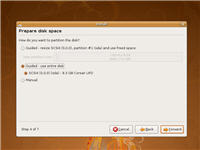
- Word your way through the guided install until you get to the Step 4 - Prepare disk space. Here make sure to choose Guided - use entire disk.
Note: I've only got one drive displayed - all others have been disconnected. - Carry on working your way through the install until you get to Step 7 - Ready to install. Here click on the Advanced ... button. Under Advanced Options make sure that Install boot loader is checked and from the Device for boot loader installation drop down box make sure to choose the correct drive to install the boot loader onto - this is of critical importance if you still have your hard drives fitted! When you're done click OK and continue with the install.

- Now it's mostly a matter of playing the waiting game as Ubuntu is being installed on your USB flash drive.
- When the process is done, remove the Live CD and reboot.
Note: If you disconnected your hard drives, now is a good time to reconnect them! - Remember that to make use of your Ubuntu-powered USB flash drive on a PC you'll need to use the BIOS or boot loader to choose the option to boot from USB devices.
Note: If you have VMware Workstation installed then you can create your Ubuntu-powered USB flash drive from the comfort and safety of a virtual PC - also, since you can boot up off the Ubuntu .ISO file, you don't need to burn a CD!

Enjoy!
Kick off your day with ZDNet's daily email newsletter. It's the freshest tech news and opinion, served hot. Get it.
Talkback
Good tip
For years now my advice to people trying out Linux is to disconnect their normal system disk and use one that they can "throw away" -- not so much because there's really much chance of getting it wrong and doing any damage, but because it's such a huge anxiety reducer.
RE: How to ... install Ubuntu 8.04 on a USB flash drive
So maybe you could word it as a piece of mind step and not a preventive step. The way it written now makes one think Linux will install without user intervention. ]:)
True ...
...
RE ... nothing to be scared
You just gave the definition of FUD ;)
Must tech writers who don't understand Linux, will intentionally or unintentionally sprinkle in some FUD.
Good job `dre
]:)
Non-Linux users???
Caution: Linux = addictive fun
One remark: I think that a 4 GB USB flash drive is a little too cramped for an Ubuntu installation. The standard installation already uses more than 3 GB, and there's the swap space to consider.
I recommend therefore using an 8 GB USB flash drive. Then you won't have to fear file fragmentation as well, because if you give Linux (any Linux, not just Ubuntu) at least 25 % free space on the root partition, fragmentation stays in the realm of 0,5 %.
Explanation:
http://geekblog.oneandoneis2.org/index.php/2006/08/17/why_doesn_t_linux_need_defragmenting
Greetz, Pjotr.
better yet
A cheap 2.5" external 80 gig can be had for 60 bucks. (I found a 120 on clearance for 70) May not be as small as a jump drive, but it fits in a shirt pocket.
Same instructions. Disconnect every other drive you have except it.
Is it persistent?
The method here requires a normal install to be able to handle massive hardware changes between boots. Can it do this now?
And more importantly, is this method persistent, or does it reset after each boot, like a live CD?
Twice yes
And it's "persistent", because (unlike a LiveCD), a USB thumb drive is writeable.
RE: How to ... install Ubuntu 8.04 on a USB flash drive
i've been planning on actually doing this for awhile, just waiting for price drops on the usb thumbdrives.
but one question, does it behave like a livecd where you dont get to keep your data? in which case you need another drive of some sort.
also, which thumbs drives are best for this type project?
You keep you data: thumb drive is writeable, unlike a LiveCD.
Can You Do This With Windows?
Can you do this with LINUX? LOL! Ok, stop kiding me
LOL HECK NO FOR SURE!
RE: How to ... install Ubuntu 8.04 on a USB flash drive
Install defaults
Add the advanced step to screen gallery
RE: How to ... install Ubuntu 8.04 on a USB flash drive
Why USB Drive?