Is Vista's Windows Experience Index fatally flawed?

Summary: Is Vista's Windows Experience Index system rating tool fatally flawed?
Windows Vista has some complicated system requirements, especially when it comes to memory and graphics card performance. In an attempt to try to simplify things for user and buyers, Microsoft has bundled a utility into Vista called Windows Experience Index. The idea is that the Windows Experience Index examines key areas of the PC and assigns them a score between 1 and 5.9 and then uses this as a basis for a system rating (in fact, currently the lowest score is rounded down and used as the index). But is Vista's Windows Experience Index fatally flawed?
The Windows Experience Index examines five key areas of the system:
- Processor
- Memory (RAM)
- Primary hard disk
- Graphics
- Gaming graphics (memory)
Here is the score that my Vista system got when I initially installed Vista Beta 2, Build 5456:
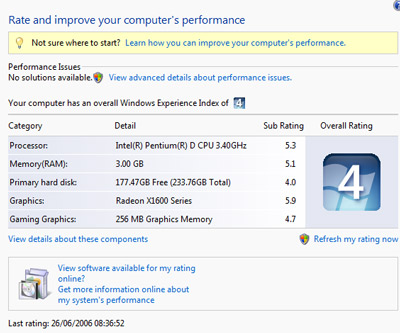
But here's the score it got today:

In that time, nothing has changed on the system yet the score has dropped from a healthy 4 to an average 3. Now I don't really care about this score, but if it's supposed to give me a base score for the system, surely the number should be static. I can't find any reason why the score dropped, apart from the fact that the tool has changed the score that it gives to the system RAM.
OK, but that's not the only beef that I have with output generated by the Windows Experience Index.
- 32-bit Windows can only access 4GB of memory (in fact, 4GB is the total address space accessible under a 32-bit OS, so the amount of RAM that the system sees will be less than that), why is the score that my system, which has 4GB of RAM installed, not higher? This seems to indicate that the scoring scale for 32-bit and 64-bit versions of Vista will be based on the same scale, which doesn't make sense given that both the RAM requirements and maximum system RAM for 32-bit Vista is different to 64-bit Vista.
- Why does the Windows Experience Index only look at the capacity of the primary hard drive? Surely the total hard drive capacity of the entire system should be considered.
- Why are there two scores for graphics considered? Why not consider the graphics card and memory as one unit since there isn't all that variation in graphics RAM?
- No consideration is given to optical drives installed.
- No consideration given to networking capabilities.
While I think that Vista's Windows Experience Index is a step in the right direction, I really can't see the number outputted being of much use to anyone. Why? Because it's too simplistic. A single factor can skew the scoring such that the score in meaningless. You could have a PC with a powerful CPU, bags of RAM and a monster graphics card, and put those in a system that has 250GB hard drive (not a particularly shabby amount of space) and get a poor index rating as a result.
To be honest, I can't see the score that the Windows Experience Index generates being good for anything - it's certainly no good as an indication of what kind of hardware or software a system can run, and it's no good an as indicator as to whether a system can run Vista with the Aero Glass interface. It's also so vague that it's useless as a buying guide. Microsoft might release a tool at some point that allows users to enter different system configurations and get the Windows Experience Index score, but that information is no more useful.
But what about the sub-rating scores? Surely they're useful? Not really, unless hardware and software manufacturers actually start to use these numbers, which I don't see happening any time soon because it's easier and more accurate to use plain system requirements. But what about games? Will they adopt the scheme. No way! Games have some of the most complicated system requirements of all software sold, and they routinely list supported CPUs and graphics chipsets. There's no way that they are going to start simplifying these requirement listings because it's the equivalent of shooting in the dark.
So what use is the Windows Experience Index? Short of providing a tidbit of trivia about the system, it's meaningless.
Kick off your day with ZDNet's daily email newsletter. It's the freshest tech news and opinion, served hot. Get it.
Talkback
The WHY is somewhat logical..
I tend to agree, but if you think about it a bit, it makes sense from the OS's perspective.
Where does Windows default as the location for ALL file saves? C:\Users\UserID\Documents or a subfolder under that.
Windows (and programmers who write Windows apps) assume the lowest common denominator - the typical sub-average, technically challenged, slightly technophobic user who can barely run Word and type up a document. Where's he going to save it? The Default Location.
A power user will know to change the document's location - and how to do it. But that's not your garden variety user.
Case in point. Several months ago, a client of mine called me and asked me for help - his hard drive was out of space (mostly due to his kid dumping his iTunes collection on the C: drive). The computer is a Sony VAIO laptop that was about 4 yrs old. It has a 20 GB hard drive in it. Sony, in their infinite lack of common sense partitioned the hard drive into two partitions. C: - the root drive - was partitioned into an 8 GB partition while the E: drive was partitioned into the balance of the disk's space - about 11 odd GB.
Sony's reasoning is that when you connect your Sony camcorder and set it to download your videos to it, the software transfering the video would be configured automagically to dump it to the empty, big partiton. It would also not cause issues with the OS partition. Of course, they're ASSUMING (and we all know what that gets you - makes an A$$ out of U and ME) that you would have a Sony camcorder and that you would download videos to it.
I was able to catch the fact there was a second partition immediately - just by looking at Windows Explorer. But they never did check into that. The E: partition was as empty as the day it was formatted. 11 odd GB was going to waste because it was something outside of their realm of experience.
The point is - while you, and I and most power users KNOW those other drives exist, most who fall short of that level of expertise won't even bother to look until their C: partition runs out of space.
Yeah, I buy that .... but
The scores just feel arbitrary to me ...
Still..
One More Thing..
Because graphics memory CAN be changed. Motherboards with built in video can have the amount dedicated to video changed, usually in the BIOS. Some stand alone video cards (AGP or PCIe) will allow you to upgrade the RAM on board as well.
But again ...
I just don't get it!
Some of the questions are not so good
Video and main system RAM do different things, and the amount of each has a different impact on system performance. Therefore, they [i]absolutely[/i] [b]should[/b] be considered separately.
Finally, the presence of optical drives and network access are both irrelevant to system performance. They might have relevance to system [i]usability[/i], so it's arguable that they're relevant to "experience" understood very broadly. But that relevance depends largely on what you're going to use the system for. I haven't used the optical drive on my main system for six months. It could not work at all, and not only would it not matter, I wouldn't know it. Similarly, if you don't use the network all the time -- e.g., if you're into standalone gaming, or you only have dialup (wake up, dude, that's still a LOT of people) -- then networking hardware is completely irrelevant to your "experience."
windows exsperience index
Get informed, please.
Look at this blog by the Windows Vista Team: https://209.34.241.68/windowsvista/pages/458117.aspx
They describe in detail what is being rated and how. It may just be that your RAM timing is different before, thus being slower now. That explains the worse rating...
Hmmm
Educateing the masses
It is this drive to educate its end user I believe that Microsoft has created the windows experience index, at the moment it is vary basic but does tell the end user a little about their system without over extending them, it gives the end users some fundamental knowledge to grow from, instead of ?throwing? information at them, which means a lot to very few, they will soon begin to piece together how a computer works, runs, and operates. Eventually due to this process users of all levels will see how different peripherals can change the usage of their computer. Knowing that Microsoft have done this, I believe, with only one end result in mind, educating there users, and thus with there users more educated and involved they will branch out into more demanding fields and want more products, of which they can purchase from Microsoft.
On the hole I think the windows experience index is accurate enough for most users to use as a simple benchmark, and at least it is one most people can be expected to understand. When the knowledge base of the end user?s becomes greater so will the sophistication of the windows Experience index, as i believe is true for all Microsoft?s products and software, but while there is still such a huge gap between the levels of users you cannot expect Microsoft to only cater for high end users. If they did, they wouldn?t get that ?wow? factor they want from the masses now would they
RE: Is Vista's Windows Experience Index fatally flawed?
At the end of the day, a good system should be balanced. Microsoft recognise this with the index. By setting it to the lowest performing components value, it ensures no nasty surprises for the end user.
The differences in your systems performance could be
due to different drivers. I had this issue when updating my graphics card driver - i actually got a lower score after it updated!
Theres also 2 numbers for the graphics as its measuring different things. One is 2d desktop performance and one is 3d performance.
And as others have said, the memory and hard drive numbers are based on speed. A bit of research could have saved you writing this article!
next time do some research