Playing music severely degrades network transfer performance in Vista

Summary: Playing music while transferring files across a network severely impacts performance.
[UPDATE - Read part 2 of this post here]
In the interests of complaining rather than whining about Vista I though it would be interesting to document this bug/feature in Windows Vista that I heard about earlier today.
Basically, here's how the bug is being described on a computing forum by a forum member going by the name of dloneranger:
background - M2N32-SLI DELUXE, 5600+ cpu, 2Gb ram, dual boot system xp and vista
on xp the network speed was between 30-50% on vista it was stuck at just over 5%
so I followed all the advice about disabling autotuning etc, tried setting all the differerent lan driver settings, played with the tcp window size, latest drivers etc .... none of it made a bit of difference, I was still stuck on 5% usage <grrrr>
until.... I stopped playing music... doesn't matter what I play back music with, if it's playing or paused the lan speed seems to be locked at the 5% stopping playback or quitting the player lets the file copy go to the 30-50% instantly
oddly, if I play a video, the lan transfers go up to 10%
playing an mp3 and video at the same time gives the same 10% and the usage stays the same even if the video is closed
after that the lan is limited to 10% when any audio/video programs are playing (as soon as they're closed it jumps back up to 30-50%, start them and it's down to the 10% again)
I can see it's not cpu usage, as it happens even while the video/audio is paused
In summary - not a clue why it happens , but I've seen this behaviour on a few different machines now
As you could imagine, I was skeptical that playing music would have an effect on network transfer speeds - so I decided if I could see the phenomenon for myself. Interestingly enough, I could. Quite easily.
Here's the deal. The system I tried this on is a Pentium 950D rig with a Marvell Yukon 88E8062 PCI-E IPMI Gigabit Ethernet controller.
Here's a test transfer of a 650MB Linspire ISO from another PC on my network onto mine (both PCs have gigabit Ethernet adaptors):
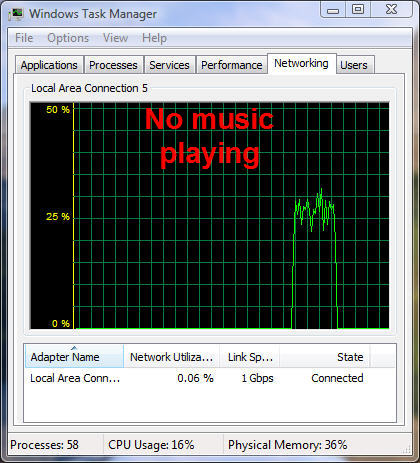
As you can see I'm getting about 25% on average. OK, now with Windows Media Player 11 running and playing a Vista-supplied sample audio file (Symphony No. 3 in E-flat major, Op. 55, 'Eroica' - Scherzo- Allegro vivace) here's what I saw:
This time I'm getting half the performance that I was before without the music playing. As a consequence the file took twice as long to transfer. Just to make a point, here's a single screenshot showing transfers of the same file with both music playing and later without:
Here's what happens when you start playing a music file WMP 11 while a network - as you can see the transfer speed drops almost instantly:
Something really odd happens when you stop WMP 11 during a file transfer. The transfer stops dead for a few seconds before resuming at full speed:
Here's another screen grab showing how readily repeatable this phenomenon is:
I guess the moral of the story is, don't play music while transferring files across a network.
Let's see if complaining rather than whining has any effect on how fast these bugs are fixed ...
UPDATE
A few people have asked if I have the latest performance and stability updates from Microsoft (specifically KB938194-x64, KB938194-x86, KB938979-x64 and KB938979-x86) installed. Yes, this system has them installed:
Kick off your day with ZDNet's daily email newsletter. It's the freshest tech news and opinion, served hot. Get it.
Talkback
Workaround found
Well, you can get at least a partial workaround by starting a video playback and then pausing it.
Another workaround
Thats a pretty bad bug! Does vista have Qos
I know xp had reserves if you left qos enabled..
If not QoS, it will be very bad publicity
http://blogs.msdn.com/wndp/archive/2006/08/09/WiFi-QoS-Support-in-Windows-Vista-part-4.aspx
however, the QoS limit is not nearly as flat as Adrian sees in his monitor.
TripleII
Adrian is this after the stability and performance patches have been ....
KB938194-x64
KB938194-x86
KB938979-x64
KB938979-x86
Yes
Interesting!
I told you people!
Shut up, fool. (nt)
Re: I told you people!
have you tried running it under Wine
Quickbooks 6.0 apparently worked with Wine:
http://appdb.winehq.org/appview.php?iVersionId=868
Quickbooks Pro 2004 is supported by crossover:
http://www.codeweavers.com/compatibility/search?name=quickbooks&company=&medal=&date_start%5B1%5D=1&date_start%5B2%5D=1&date_start%5B0%5D=2000&date_start%5B3%5D=0&date_start%5B4%5D=00&date_end%5B1%5D=8&date_end%5B2%5D=25&date_end%5B0%5D=2007&date_end%5B3%5D=16&date_end%5B4%5D=51&search=app
PC miler is apparently untested with crossover:
http://www.codeweavers.com/compatibility/search?name=pc+miler&search=app
There could be an equivalent to Quickbooks, less likely to be an equivalent to PC miler for linux.
Get a Life Linux Idiot
All the Linux and Mac users combined are only 1% of the PC world, please get a grip.
Vista users are only 0.0005% of the PC world
He has a point. Ubuntu doesn't do this.
Essential questions.
You wrote:
Symphony No. 3 in E-flat major, Op. 55, ?Eroica? - Scherzo- Allegro vivace
And with your expectation of computer failure, wouldn't Beethoven's response to Napoleon's decision to become Emperor be more appropriate?
I wish ...
Adrian - the cause of your woes....
http://talkback.zdnet.com/5208-11535-0.html?forumID=1&threadID=37011&messageID=680828&start=-9909
Which says (in part)
....processes, they were controlled by Windows, using a cooperative thread switching mechanism driven by messages passing through the master message pump.....the overhead of any GUI operation increases (composition layers, alpha blenders, geometry managers, shaders, renderers). While the desktop itself (Explorer) is a program, the GUI is still full of bottle-necks, and it all still passes through the message pump, which is single threaded......I see no indication that any of the bottle-necks that I fought in NT 4.0 and XP have been successfully addressed in Vista. All they've done is to add new ones and more traffic through the old ones.
Architectural differences
So -- if I understand this correctly -- this is one side of the widely-debated question of, "do you run the graphical interface on top of the operating system or the operating system on top of the graphical shell?"
In order to get maximum user-interface responsiveness, Microsoft has chosen to run the user shell as its own mini-OS, complete with scheduler and the rest just follows from that decision?
Pretty much...
Not only does all Windows GUI traffic have to pass through the message loop, but there is more and more traffic jamming up this bottleneck. The Office app.s are also designed to work with this and so any major OS redesign at a low level will kill all Windows apps. They are not structured to survive without hooking into the message loop.
Now, the last low-level Windows programming I did was some years ago and I assumed that they had changed the *entire* architecture, but it seems that they CAN'T change it. They are stuck with this malformed hob-goblin riding on their shoulder until it breaks beyond repair.
No wonder *nix OSs shoulder the load better - they can truly multi-process and multi-thread in complete independence of each other.
It also explains Adrian's problem. Any time intensive process will hog the loop forcing those behind to "queue" up. Since network transfers are usually quite efficient in terms of processor load and time, they are out of the loop quickly and the resource hog (video/audio/etc) is back in.
Finally, remember that Windows has always been cooperatively processed rather than pre-emptively. *nix is preemptive - a process HAS to give up its slot after a certain period or interrupt. In cooperative processing, the process has to hand control back when *it* is done. That is why when a Windows process goes Whirr-Clunk it usually takes the whole PC with it.
I disagree as the root cause
There is a software limit working extremely effectively to throttle the network traffic with a FRIM limit for unknown reasons.
The silence outside of Adrian's blog is deafening. I put an educated guess as to the why the limit exists in the follow up simply because you can't get such perfect limiting without software doing the job.
TripleII
P.S. XP must have fixed some of the pre-empting (or at least better emulated it), but pre XP, I told anyone using Windows do as many things as you want at the same time, just do them sequentially.
who ever wrote that article doesn't know a darn thing about multi threading
the lowest entity of execution in windows is a thread. a thread can be background thread or Foreground thread.
a foreground thread is one that has window handle associated with it. you can use windows message pumps to do IPC if you like but nobody has ever recommended that. It has always been better to use sockets,shared memory or named pipes.
in fact any given application can have more than one GUI thread if it chooses to do so. Message pump is just a way to establish standard on what can be passed through PostMessage API or SendMessage API.
Most applications use IO completion ports or alertable IO or overlapping IO for their high through put I/O.
There is no need to have a message pump to hadve thread communication going. message pump is a way to pose messages syncronoulsy or asyncrounsly to a GUI thread.