Windows 7 build 6956 vs. Windows XP SP3
Summary: Several of you have asked me to add data for Windows XP to my Windows 7 vs. Windows Vista benchmark post. Well, you asked for it!

Several of you have asked me to add data for Windows XP to my Windows 7 vs. Windows Vista benchmark post. Well, you asked for it!
Rather than build this into a large post, I'll just post the data here. For any background check out the original post.
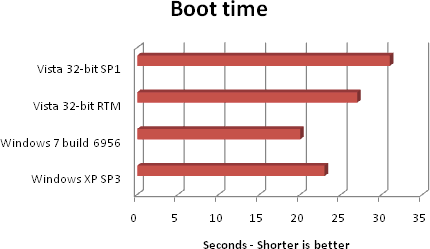
Bottom line: Windows 7 build 6956 beats Windows XP SP3 in each of the tests.
Kick off your day with ZDNet's daily email newsletter. It's the freshest tech news and opinion, served hot. Get it.
Talkback
RTM vs SP1
I can only comment on the boot time and Passmark tests. The boot time differences aren't significant to me. But, how do you get any of the builds to boot so fast? I'm pretty good at getting fast boots on a very capable machine, but nothing like what you can.
The differences you show for the Passmark tests also would be insignificant (and likely unnoticeable) to me. This observation probably would generalize to the Passmark subtests for me.
Still, I am very interested in the Passmark difference for "fully-patched" Vista RTM and Vista SP1. Can you account for this difference? Did you patch beyond what is available in SP1? Does your use of "fully patched" imply that RTM was updated for both all security and all functionality fixes. Also, was Vista SP1 a slip streamed version?
As I recall, fully-patched does not imply "same as" SP1. If true, then, controlling for what I was getting at in the prior paragraph, it seems to me that the worse than RTM result for SP1 must be a function of the incremental "fixes" contained in SP1. Do you have any insightful thoughts?
Best, Znod
Puzzling
Probably Not Better
Like you, I remain puzzled.
Best, Znod
These performance differences...
Does Windows 7 only come in 64bit instruction set version?
To clarify ...
I See
Best, Znod
The way a boot time benchmark ought to work
Alternative Characterisation of Your Idea
Best, Znod
Agreed
Boot-time timing
I've found the same
One interesting thing I've noticed about 7 is it gives you more info about what it's doing with memory and what is being cached rather than your memory disappearing into a void. After an hour or so Task Manager shows all the memory in use but if you go to Resource Monitor, which got some love, it clearly shows that the majority of memory is all being used for cache and can be freed up instantly for additional applications.
So far, with 20 tabs, WoW, Vent, Media Player 12 and a handful of other apps, as well as my daughter's profile running with 3 tabs and a Dreamscene background I've yet to hit any sort of performance hickup or slow down. It really is amazingly fast. It smokes Vista in real world use without question, and I liked Vista's performance.
RE: Windows 7 build 6956 vs. Windows XP SP3
The same for Windows if you don't patch.
Kernel only
No, not kernel only:
[i]something that has always bugged me about Windows (that stupid, stupid registry).[/i]
It has nothing to do with the registry. Like UNIX it has everything to do with replacing files that are in use.
Yes, kernel only
I suspect your screenshot is due to the "dumbing down" of some Linux distributions due to Windows users migrating.
Windows refugees tend to panic when you say "open a terminal and type /blah/blah/evolution-data-server restart"
Which is all that's required.
Windows folk *expect* a reboot is needed.
I should add a caveat though- kernel modules will require a reboot as well (as I'm about to install a new nVidia 64 bit beta driver).
LOL! The denial is strong with this one!
Did you happen to notice what one of the updates was? It
was an important OS library file. And the reason the reboot
is recommended, much like Windows, is to ensure the
updated version will be used. One doesn't have to reboot
either one if one don't want to use the just updated file(s).
They'll both work just fine.
Likewise the same applies to kernel updates. You don't
have to reboot after installing a new kernel. The system
will continue to run just fine. But, like libc, if you want to
use the new version you've got to reboot.
Umm...
Yes, Centos (being a Red Hat clone) is very "dumbed down".
Not that there's anything wrong with that. I run Kubuntu, which is just as dumbed.
For an experienced user, restarting applications (which is what evolution data server is- it's not part of the OS, just so you know).
Actually...
That install definitely does not require a restart. It's just
dumbing down for CentOS.
GLibc never requires a restart. You can use the updated version
of any package that you installed by restarting the application
you want to use it. On Linux it is possible to restart every
program running in a terminal (SysRq+Alt+K has this
functionality). The result will be every program depending on
it will be restarted.
Xorg is very important. Though, updating it also doesn't
require a restart. You only need to restart the actual
application, in this case X with Ctrl+Alt+Backspace.
In addition, you don't necessarily have to restart to change
kernel's. It has been possible for quite a while to change
kernels without rebooting.
The thing you will need to reboot for is two-fold: Changing
hardware and flashing your BIOS.
@bryantrv: Can't argue with fact so you attack the messenger.
It's exactly as I said it is: If you want to use the new library you need to close everything that relies on it so the old one can be released and the new one used. The easiest way: Restart. That's why it's recommended. But wait, that's exactly how it is in Windows too! As I said...no need to restart in Windows if you don't want to. It will continue to use the previous files...just like UNIX. There's no difference between the two. They work identically.