ie8 fix
madison

Zero Day

Ryan Naraine, Emil Protalinski and Dancho Danchev

Getaway day: How to secure your laptop for holiday travel

By | July 3, 2008, 7:24am PDT

Summary: It’s getaway day and as we prepare to hit the road, trudge through airport security and snag that car rental, spare a thought for the valuable data that travels with you on that trusty old laptop. According to a recent study by the Ponemon Institute, more than 637,000 notebooks vanish each year in mid-to-large airports. With some [...]

How to encrypt data on your laptop for holiday travelIt’s getaway day and as we prepare to hit the road, trudge through airport security and snag that car rental, spare a thought for the valuable data that travels with you on that trusty old laptop.

According to a recent study by the Ponemon Institute, more than 637,000 notebooks vanish each year in mid-to-large airports.

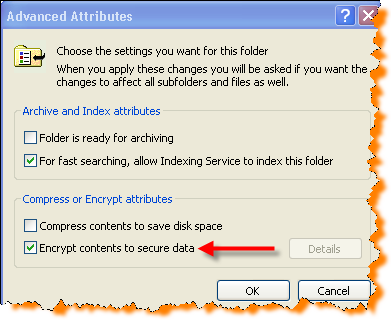
With some help from Microsoft,  I’ve put together a list of instructions (click on image at left for gallery) on how to encrypt files or folders in Windows XP and Windows Vista.

[ GALLERY: How to encrypt data on your laptop ]

In addition to encryption, which I highly recommend, be sure to protect your laptop with a strong password and back up your information before hitting the road

If you are travelling through a US airport, you already know about having to remove your laptop from your bag to go through the security scanner. Richard Stiennon has some really good advice on how to make sure you don’t misplace your laptop in the midst of trying to find your shoes, best and cellphone:

  1. Place your laptop in the first bin you put on the belt of the X-ray machine. You should put your laptop bag in front of it.
  2. Put the bin with your shoes, belt, purse, wallet, etc. right behind your laptop. And your carry-on  bag last.  The first thing you should do on the other side is put your laptop in its bag before the other luggage crashes into it and dumps it on the floor. Your other stuff separates it from the person behind you and in front of you.
  3. Mark your laptop!  Put a sticker on it.  I know people hate to do this. But you should identify your laptop in such a way that you can quickly identify it.  There are lots of Dell computers our there. I have almost picked up the wrong laptop on many occasions.  DO NOT TAPE YOUR BUSINESS CARD TO YOUR LAPTOP.  Do not become a target by letting potential laptop thieves know just how valuable your laptop may be.  My favorite marker for my Dell Latitude is the white Apple sticker I got with my iPod.
  4. If you lose your laptop contact the TSA immediately. Call the airport. Take action. I bet in 99% of the cases you can get it back.

Kick off your day with ZDNet's daily e-mail newsletter. It's the freshest tech news and opinion, served hot. Get it.

Topics

Ryan Naraine is a journalist and social media enthusiast specializing in Internet and computer security issues.

Disclosure

Ryan Naraine

The most important disclosure is of my employment with Kaspersky Lab as a member of the global research and analysis team. Kaspersky Lab is a global company specializing in anti-malware and secure content management technologies. I do not own stocks or other investments in any technology company.

Biography

Ryan Naraine

Ryan Naraine is a journalist and social media enthusiast specializing in Internet and computer security issues. He is currently security evangelist at Kaspersky Lab, an anti-malware company with operations around the globe. He is taking a leadership role in developing the company's online community initiative around secure content management technologies.

Prior to joining Kaspersky Lab, Ryan was Editor-at-Large/Security at eWEEK, leading the magazine's and Web site's coverage of Internet and computer security issues and managing the popular SecurityWatch blog, covering the daily threats, vulnerabilities and IT security technologies. He also covered IT security, hacker attacks and secure content management topics for Jupiter Media's internetnetnews.com.

Ryan can be reached at naraine SHIFT 2 gmail.com. For daily updates on Ryan's activities, follow him on Twitter.

Related Discussions on TechRepublic

Did you know you can take part in these discussions with your ZDNet membership?
16
Comments

Join the conversation!

Just In

Microsoft Backdoor?
lance.e.king@... 7th Jul 2008
I'm definitely keener on using TrueCrypt for encrypting my data than using Microsoft's built-in tools. I remember when XP first came out, there were concerns on the part of law enforcement that the encryption features it provided might prove insurmountable. At the time, a Microsoft representative was quoted as saying something to the effect: "No problem. We've got that covered."

I would be surprised if Microsoft doesn't have a "master key" that would unlock any data encrypted by their own software. Regardless of whether I have anything to hide (I don't), I'm not about to lock up my data when I don't know who else holds the key to the vault.
0 Votes
+ -
Not for Vista Home Premium!
Pookie12 3rd Jul 2008
Why not tell people that this does NOT WORK (encryption radio button grayed out) in Vista Home Premium - only suckers who paid for M$ for the Ultimate or business/enterprise editions!
0 Votes
+ -
TrueCrypt
CobraA1 3rd Jul 2008
Well, there are programs like TrueCrypt that work as well (if not a lot better) for encryption.
0 Votes
+ -
Microsoft Backdoor?
lance.e.king@... 7th Jul 2008
I'm definitely keener on using TrueCrypt for encrypting my data than using Microsoft's built-in tools. I remember when XP first came out, there were concerns on the part of law enforcement that the encryption features it provided might prove insurmountable. At the time, a Microsoft representative was quoted as saying something to the effect: "No problem. We've got that covered."

I would be surprised if Microsoft doesn't have a "master key" that would unlock any data encrypted by their own software. Regardless of whether I have anything to hide (I don't), I'm not about to lock up my data when I don't know who else holds the key to the vault.
This does NOT WORK in Vista Home Premium - only Ultimate, Enterprise and Business editions!
0 Votes
+ -
A better way.
TripleII-21189418044173169409978279405827 3rd Jul 2008
You are heading out for holiday travel, leave it at home. Heck, when I travel on leisure, I rarely even turn on the cell phone.

TripleII
0 Votes
+ -
I couldn't agree more!
MyBlueRex 4th Jul 2008
Provided the alarm in your house is working well happy
I observe that in the process of encrypting a file / folder with this technique, there is no using a passcode. If your laptop disappears, and realizes that a file / folder is encrypted, why can't they simply decript the file / folder by reversing the process? I am obviously missing something.
0 Votes
+ -
I'm missing something ? !
martha22 3rd Jul 2008
I observe that in the process of encrypting a file / folder with this technique, there is no using a passcode. If your laptop disappears, and realizes that a file / folder is encrypted, why can't they simply decript the file / folder by reversing the process? I am obviously missing something.
0 Votes
+ -
delete me
Hallowed are the Ori Updated - 3rd Jul 2008
delete me
0 Votes
+ -
Yes you are...
MyBlueRex 4th Jul 2008
The "passcode" you refer to is an encryption key calculated from your logon user account - which is not your name or anything like that, its your GUID to be technical.

This is why you don't need to enter a 'passcode' or similar.

The files you encrypt are "tied" to your logon account, thus if you log onto your PC as someone else, they would not be able to access your encrypted file.

Obviously Microsoft has to allow for mutliple people logging onto the same PC, which is why they have done this.

As XP uses this particular method of file encryption and it is pretty basic, Microsoft dramatically improved this process within Vista. Just "yet another dramatic and invisible improvement" they added to Vista that most people don't know about.
0 Votes
+ -
isn't a good solution for my laptop - right ? I am the only user for my laptop, so I have intentionally avoided the downtime of logging on. Is there a solution? Or, look somewhere else ?
0 Votes
+ -
TrueCrypt
Hallowed are the Ori 3rd Jul 2008
It's easy to use, and it's free.

http://www.truecrypt.org/
0 Votes
+ -
TrueCrypt.
CobraA1 3rd Jul 2008
You can get full drive encryption using TrueCrypt, BTW.

I've also used a metal plate designed to resist tampering on my laptop:
http://www.stoptheft.com/

That, along with contacting the TSA immediately, can really work in your favor.

In addition, buy one of those security locks - and oh, yeah, never ever let it out of your sight, not for a second.
0 Votes
+ -
In reply to Pookie12...

You are correct, this is a feature that businesses required, thus you will find this feature in the *business level* versions of Vista.

This is nothing new - there are numerous features in XP Professional that you cannot find in XP Home.

So nothing has changed with Microsoft's thinking or actually, more precisely influenced/controlled by, the various huge businesses they deal with.

Also, if Microsoft included this feature in every version of XP or Vista, then the various software manufacturers would take Microsoft to court for being a monopoly. It REALLY is as simple as that.
0 Votes
+ -
Who Cares About The Article
itanalyst2@... 4th Jul 2008
Who's the hot blonde in the pic?
0 Votes
+ -
Back up the EFS key
Earthling2 5th Jul 2008
There is a risk of losing all encrypted files if the EFS key becomes unavailable. Back up your EFS key as soon as you create the first encrypted file. One way to do this is described here: http://netsecurity.about.com/od/quicktips/qt/efs.htm.

EFS is not bullet proof: different weaknesses can be found here: http://en.wikipedia.org/wiki/Encrypting_File_System.

EFS has been available since Windows 2000 and a lot is written about it. I am quite surprized at the level of research done for this article. Not only it forgets to mention that this feature won't work for home editions of Windows, but it also, more importantly, doesn't warn about a potential disastrous results of losing the EFS key.

Granted, you mention the backup but who does this regularly? And is there a guarantee that the files are backed up unencrypted, because if they are backed up encrypted and the EFS key is not available, you'll lose the files anyway. Here is more about back up and recovery and links to more info: http://technet.microsoft.com/en-us/library/cc512680.aspx

Other advices, such as uniquely marking the laptop are quite good though. Thanks.

Join the conversation!

Formatting +
BB Codes - Note: HTML is not supported in forums
  • [b] Bold [/b]
  • [i] Italic [/i]
  • [u] Underline [/u]
  • [s] Strikethrough [/s]
  • [q] "Quote" [/q]
  • [ol][*] 1. Ordered List [/ol]
  • [ul][*] · Unordered List [/ul]
  • [pre] Preformat [/pre]
  • [quote] "Blockquote" [/quote]
ie8 fix
Click Here
ie8 fix

The best of ZDNet, delivered

ZDNet Newsletters

Get the best of ZDNet delivered straight to your inbox

Facebook Activity

White Papers, Webcasts, & Resources
ie8 fix
ie8 fix