ie8 fix
madison

Build your own Windows Home Server for only $380

By | February 14, 2008, 9:13am PST

Summary: I’m a huge fan of Microsoft’s Windows Home Server OS, the very capable and easy-to-use consumer server software. But the only Windows Home Server-based hardware I’ve had a chance to play around with is the HP MediaSmart Server EX470, which contains just one 500GB hard drive and costs a whopping $599. The MediaSmart, essentially a [...]
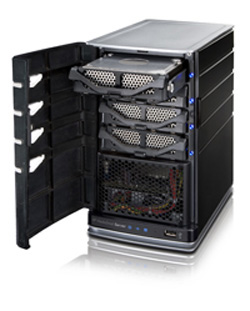
I’m a huge fan of Microsoft’s Windows Home Server OS, the very capable and easy-to-use consumer server software. But the only Windows Home Server-based hardware I’ve had a chance to play around with is the HP The easy (and cheap) way to build a Windows Home ServerMediaSmart Server EX470, which contains just one 500GB hard drive and costs a whopping $599. The MediaSmart, essentially a minicomputer powered by a 1.8GHz AMD Sempron processor and 512MD of RAM, is an awesome product. For those who can afford it.

For those who can’t, the February issue of Popular Mechanics has a barebones article on how to build your own Windows Home Server. The gist is that, since the hardware requirements are so low, you can use most any old PC to create your own home server. Once you set it up, the headless device won’t require a keyboard or monitor, so you can tuck it away (or as away as it can get when connected to your router via Ethernet).

The article also suggests that intrepid do-it-yourselfers can build a server from scratch, and more cheaply by using Ubuntu rather than the Windows OS. I wouldn’t go that route, however, because the Windows OS is surprisingly robust and easy to use—one of the few Windows OSs that is great right out of the box, on the first try. And many people have an old PC and parts laying around.

I have a seven-year-old Dell Dimension tower that works well but never gets any love, thanks to my newer Vista and Mac notebooks. So I’m thinking of building my own Windows Home Server. I checked Newegg.com, and I found Western Digital Caviar 500GB Ultra ATA hard drives for $105 each, and the Windows Home Server OS for $170. Any good home server should have two hard drives (unlike the MediaSmart EX470, which has only one 500GB drive), so two drives would set me back $210. Add the cost of the OS, and I could build my own for $380. By comparison, a dual 500GB drive server from HP, the HP MediaSmart Server EX475, costs almost twice as much at $749.99.

Granted, it won’t look as slick as HP’s MediaSmart devices, but it should work just as well. And as DIY projects go, it’s pretty straightforward.

Kick off your day with ZDNet's daily e-mail newsletter. It's the freshest tech news and opinion, served hot. Get it.

Topics

Disclosure

Rik Fairlie

http://blogs.zdnet.com/fairlie/?page_id=100

Biography

Rik Fairlie

For the past 15 years, Rik Fairlie has covered technology and the business of technology for numerous publications and Web sites, including CNET, PC Magazine, Computer Shopper, Family PC, and Mobile Computing. He has also published tech stories in The New York Times, Frequent Flyer, and Travel & Leisure. Rik has served as editor in chief of Computer Shopper and managing editor of Mobile Communications. ///

88
Comments

Join the conversation!

Just In

How computer savvy are you?
bbbaldie_z 28th Jul 2008
My Fedora 6 backup machine (running on a Dell GX-1 from 1999) has dual drives and automatically backs up all of my data plus the entire contents of my home folder (redundantly) .

The backups are set up on my Ubuntu desktop machine.

I run two Windows VMachines that write to a Linux shared folder, again on my Ubuntu desktop. That's backed up to the server as well.

This enables me to run my 2K and XP Vmachines with NO VIRUS/SPYWARE PROTECTION WHATSOEVER! I regularly restore the machines from snapshots. They were built with the latest service packs. If I want to install a new program, I restore, then install, then test, then take a new snapshot.

Windows actually doesn't suck too badly without every file having to be scanned on access for viruses.

Of course, the Windows machines get used less and less, one holds the only way I can use an obscure scanner, the other lets me run Dreamweaver and Paint Shop Pro. I'm weaning myself off of DW, and am determined to master the Gimp before it's over.

I ran Windows from 1993-2007. It took me a couple of days to get productive with Ubuntu. It took me at least that long to get productive with Windows 3.1.

WHS may be perfect for noobs who only know drag and drop. But it's really in your own best interest to invest a little time and learn the FOSS movement's safe, secure, FREE, reliable couterparts.
0 Votes
+ -
I Can Do The Same With Ubuntu
itanalyst 14th Feb 2008
And pay nothing.
0 Votes
+ -
Then please do
Michael Kelly 14th Feb 2008
This product is for those who either are too lazy (or don't have time) to deal with the setup required, or for those who want better out-of-the-box integration with Windows clients. If Windows integration isn't important to you and you don't mind spending the time it takes to set things up, then certainly Ubuntu is a viable choice.
0 Votes
+ -
This isn't out of the box however
voska1 14th Feb 2008
This is building your own Windows Home Server. For me if I'm going to build my own box I'd use Linux and MythTV instead. Now if I'm looking for an out of the box solution I'd pick Windows Home Server.
requiring different sets of skills. You can throw the hardware together in half an hour if you know what you are doing. And if all you are doing is taking an old computer and throwing in a new hard drive that will take maybe 10 minutes (less than that if you are using an external hard drive for your data). To configure Linux and MythTV even if you do know what you are doing you'd need at least two hours, and you still would not get the entire Windows integration that Windows Home Server provides. And if you aren't familiar with Linux it might take upwards of a week to figure out the new system and get everything configured.

Each solution has its different advantages, but I would see most people going for the Windows Home Server route even if it costs them a few more bucks, because most people would rather spend a few dollars and know what they are getting than spend a lot of time on something that may not turn out right in the end.
0 Votes
+ -
Does Linux
BroGnorik 15th Feb 2008
Automatically back up all data on my computers, and fully restores the system in case of a crash? That is what Windows Home Server is about, cluster backups of Windows PC, with the ability to restore everything, the OS, Programs you have installed.

If you are talking about your personal documents, then yes Linux is great. WHS is a nice idea that actually works as it said. HP added a lot of crap and built it around media, but that is not what WHS is about.
0 Votes
+ -
How computer savvy are you?
bbbaldie_z 28th Jul 2008
My Fedora 6 backup machine (running on a Dell GX-1 from 1999) has dual drives and automatically backs up all of my data plus the entire contents of my home folder (redundantly) .

The backups are set up on my Ubuntu desktop machine.

I run two Windows VMachines that write to a Linux shared folder, again on my Ubuntu desktop. That's backed up to the server as well.

This enables me to run my 2K and XP Vmachines with NO VIRUS/SPYWARE PROTECTION WHATSOEVER! I regularly restore the machines from snapshots. They were built with the latest service packs. If I want to install a new program, I restore, then install, then test, then take a new snapshot.

Windows actually doesn't suck too badly without every file having to be scanned on access for viruses.

Of course, the Windows machines get used less and less, one holds the only way I can use an obscure scanner, the other lets me run Dreamweaver and Paint Shop Pro. I'm weaning myself off of DW, and am determined to master the Gimp before it's over.

I ran Windows from 1993-2007. It took me a couple of days to get productive with Ubuntu. It took me at least that long to get productive with Windows 3.1.

WHS may be perfect for noobs who only know drag and drop. But it's really in your own best interest to invest a little time and learn the FOSS movement's safe, secure, FREE, reliable couterparts.
0 Votes
+ -
Sure you can.
GuidingLight 14th Feb 2008
Easilly sets up the drives, backups, every lat little thing.
Then just load the included Ubuntu client tool disk onto your Ubuntu desktop and let the automation begins!

Oh, wait, So you can't do that?

Then why did you just say you could?
0 Votes
+ -
Silly Argument
DannyO_0x98 14th Feb 2008
Reportedly the Popular Mechanics article included instructions for Ubuntu. I also
note the interesting adverb "surprisingly" applied to the Windows product's
adjectives when he discussed why he went W instead of U. From this distant
vantage, it looks to be a matter of whether one would prefer more time or $170 in
one's pocket. By the way, since Mr. Fairlie has at least one Mac, the (impressive)
auto backup feature of WHS is a neutral point of comparison between it and
Ubuntu.

Now I would critique the title of the article. Mr. Fairlie has budgeted $380 dollars
to upgrade a superfluous server to WHS. That's still a good deal.
0 Votes
+ -
Not silly at all
GuidingLight 14th Feb 2008
And I have been doing the same thing with Windows Server 2003, so I have no need for WHS

My point is that Ubuntu is not "surprisingly simple" to do. It can do it, as can a standard Windows/Server system, but for the average home user to plop this on a spare system and load the client tools on his machine and all the capabilities that it gives them easily surpasses that of a Linux box.

That is where WHS vs Windows Server/Linux Server differ, beyond the cost, which at 130.00 in not alot to many people interesetd in this

(BTW: My borther in law, who has allways run a Linux server for years was, quite honestly, blown away by the absolute ease of installation and use of WHS he actually purchased it.)
0 Votes
+ -
Average home user would buy it
voska1 14th Feb 2008
They probably wouldn't build a server to do it.
0 Votes
+ -
Which is about the same worth...
Hallowed are the Ori 14th Feb 2008
...as your post. (j/k)

Honest. 'Cause I'm now an official Linux convert.

Ask me why.
0 Votes
+ -
Why? (nt)
SpikeyMike 14th Feb 2008
.
0 Votes
+ -
And the answer isss.....
Hallowed are the Ori 14th Feb 2008
Trojan.SilentBanker.
0 Votes
+ -
silly user
Narg 15th Feb 2008
Stay off "those" websites, and you won't get Trojans.
0 Votes
+ -
Uh-huh....
Hallowed are the Ori 15th Feb 2008
Stay off "those" websites, and you won't get Trojans.

If you honestly think the only way you can get a trojan is to visit warez or porn sites, I hope you have a really, REALLY good AV program and firewall installed. wink
0 Votes
+ -
I bet you can't
DevGuy_z 14th Feb 2008
I want to see you have an automatic web based backup that manages duplicate files across all clients. Single click adding a drive to a volume.

I suppose all these things WOULD actually be possible if you had the time to create the Web front-end and write a backup that offers the capabilities of WHS.

If time was money, I'll bet you'd be out a grand before you could get close to an apples to apples implementation.
0 Votes
+ -
Oops meant for Itanylst
DevGuy_z 14th Feb 2008
for Itanylst
0 Votes
+ -
I bet you can't!
DevGuy_z 14th Feb 2008
I want to see you have an automatic web based backup that manages duplicate files across all clients. Single click adding a drive to a volume.

I suppose all these things WOULD actually be possible if you had the time to create the Web front-end and write a backup that offers the capabilities of WHS.

If time was money, I'll bet you'd be out a grand before you could get close to an apples to apples implementation.
0 Votes
+ -
Question
voska1 14th Feb 2008
Does the WHS back up utility work for a Mac? If not then you point is moot.
0 Votes
+ -
re: Question
M.R. Kennedy 14th Feb 2008
Voska:

"Does the WHS back up utility work for a Mac? If not then you point is moot."

At this time, remote backup support in WHS is limited to Windows XP and Vista. There is a possibility that MS may extend backup support to OS X at a later date. I think the Linux crowd is SOL, though.
0 Votes
+ -
WHS is a great backend
BroGnorik 15th Feb 2008
for Leopard's time machine, so no WHS automatic back does not work for Mac, but Time machine can store the backsups on WHS.
0 Votes
+ -
Time Machine on WHS
M.R. Kennedy 15th Feb 2008
BroGnorik:

"WHS is a great backend for Leopard's time machine, so no WHS automatic back does not work for Mac, but Time machine can store the backsups on WHS."

Kindly correct me if I'm wrong, but I was given to understand that Time Machine requires a dedicated external USB or Firewire HDD in order to work correctly, and it will not work with an external HDD connected through the AirPort Extreme.

I do know that via Windows, one can map and log to a HDD connected to a WHS box. (I did this while testing the WHS RC, even though I had the Connector software installed.)

Given that WHS automatically adds any newly installed or attached HDDs to its storage pool, how would one get Time Machine to access an external HDD that's tied to a WHS box?

Enquiring minds...
0 Votes
+ -
Need to use Samba ...
MisterMiester 15th Feb 2008
You would use Samba since you can map the USB drive on the Windows box to the OSX box, then Time Machine should see the Windows drive as just another local directory.
0 Votes
+ -
One more thing ...
MisterMiester 15th Feb 2008
When you plug the external HDD into the OSX box it just becomes another mount point, so you would just need to either change the mount point in the Time Machine software or just symlink from the external HDD mount point to the Samba directory.

I've never used Time Machine, but I believe one of these options would work. happy
0 Votes
+ -
Another Point
voska1 14th Feb 2008
I'd probably buy a Windows Home Server before actually building one myself. If I'm going to go through the trouble of building my own server to install the WHS software one I'd just save the $130 and put Linux on it instead. Because if I'm building it I'm doing it to save money but if money isn't a problem I'd just buy the thing from HP.
0 Votes
+ -
Linux GUI Backup, take your pick ...
MisterMiester 14th Feb 2008
As for adding a drive to a volume with a *nix system you only add the directory since there are no drive letters. So if I wanted to backup the machine in the spare bedroom I would point to user@spareroom:/.

Not one click, but then again with Linux I don't need to backup the entire system, only the important files since the rest can be restored from disk or image rather quickly.

Also you can backup Linux, Windows, Solaris, or OSX. How any different operating systems can you backup with WHS?

If I need help installing a Linux server system I can always buy a book on how to set one up:

http://www.amazon.com/Ubuntu-7-10-Linux-Unleashed-3rd/dp/0672329697/ref=pd_bbs_sr_2?ie=UTF8&s=books&qid=1203051039&sr=1-2

Still cheaper then $130.00, but you may have to shell out the same amount for a WHS book if you're not proficient with Windows:

http://www.amazon.com/Microsoft-Windows-Home-Server-Unleashed/dp/0672329638/ref=pd_bbs_sr_1?ie=UTF8&s=books&qid=1203050865&sr=1-1

Anyway here is a short list of rsync Web interface frontend and/or GUI tools. There is a terminal based backup tool thrown into the list (rsyncbackup), but it's based on editing scripts and runs as a crontab in the background. Most are available through your favorite distro's repositories so adding them is a quick install with aptitude or synaptic:

Source:
http://www.debianadmin.com/rsync-backup-web-interfacefrontend-or-gui-tools.html

grsync

Grsync is a GUI for rsync, the command line directory synchronization tool. It supports only a limited set of rsync features, but can be effectively used to synchronize local directories.

Downloads and Documentation

http://www.opbyte.it/grsync/

Backup Monitor

Backup Monitor is an rsync backup front-end with a Web interface, which emails reports with an attached summary or logfile. Its configuration system is simple to use and can back up single servers or entire server farms from a single machine. Custom email tags can be used to sort responses in your mail reader.

Downloads and Documentation

http://sourceforge.net/projects/backupmon/

QSync

QSync is a Qt-based frontend to the rsync file transfer utility, with an emphasis on initial ease-of-use, but also with the ability to be just as powerful as rsync itself. It will eventually support many, if not all, of rsync?s many options.

Downloads and Documentation

http://transamrit.net/projects/qsync/

Zynk

Zynk is a graphical user interface / GUI for rsync with some special features.

Downloads and Documentation

http://hanez.org/zynk.html

rsyncbackup

rsyncbackup is a handy tool for scheduled backups using rsync. rsyncbackup lets you easily setup multiple source folders and destinations, both locally, on your iPod or external firewire disk, or at a remote destination using ssh. rsyncbackup has no GUI, but is based on editing configuration files. The script is meant to be run in a crontab, so user interaction is not neccesary. Basic terminal skills are required to use the program.

Downloads and Documentation

http://rsyncbackup.erlang.no/

TKsync

TKsync is for syncing files and directories over encrypted SSH tunnels with rsync. It was created with the intention to give a WinSCP like user interface to rsync

Downloads and Documentation

http://www.shove-it.de/tksync/releases/tksync-0.2.1.tar.bz2
0 Votes
+ -
re: Linux GUI Backup, take your pick ...
M.R. Kennedy 14th Feb 2008
MisterMeister:

"As for adding a drive to a volume with a *nix system you only add the directory since there are no drive letters. So if I wanted to backup the machine in the spare bedroom I would point to user@spareroom:/."

WHS doesn't use drive letters, per se. It adds each HDD (internal or external) to a storage pool. And it does this automatically when a new HDD is added. When connecting to WHS from a client machine (using the supplied Connector software), the drives are not seen directly. The user sees the Public folders, his private folders, and folders that other users have marked as "shared".

WHS automatically performs its backup duties, though the logged-in user can order a backup of that specific client machine at any time.


"Not one click, but then again with Linux I don't need to backup the entire system, only the important files since the rest can be restored from disk or image rather quickly."

WHS backs up each client machine fully initially, then automatically backs up any changed files on each client every night, between 12am and 6am. No muss, no fuss. A restoration application (on CD) is supplied so that a client machine that needs it can be restored by booting from the CD.


"Also you can backup Linux, Windows, Solaris, or OSX. How any different operating systems can you backup with WHS?"

As I told Voska (further down the line), WHS' nightly backup only supports Windows XP and Vista at this time. MS may add OS X backup at a later date.

But considering that you mainly use *nix, WHS wouldn't be terribly useful to you.
0 Votes
+ -
WHS backup sounds nice, but ...
MisterMiester 15th Feb 2008
WHS backs up each client machine fully initially, then automatically backs up any changed files on each client every night, between 12am and 6am. No muss, no fuss. A restoration application (on CD) is supplied so that a client machine that needs it can be restored by booting from the CD.

You can do the same think with Linux and OSX even with a GUI frontend by running the initial backup then running rsync as a crontab every night at interval times for incremental control. It's not as automatic, but you do have a good amount of control over the process. As for a restore CD, all the mainstream Linux distros have the tools available on the liveCD to partition the drive and restore the boot sector.

Anyway with *nix in reality you don't really need a "server" if at least once of your desktop machines is a Linux or even OSX box. With adequate drive space these machines can easily be turned into mini-servers with all of the available open source and commercially available tools.

Remember *nix based systems are very scalable and were built with networking as primary usage. You don't need a separate OS for client/server operations, just different configurations and tools.
0 Votes
+ -
This paragraph may say it all?
GuidingLight 15th Feb 2008
running the initial backup then running rsync as a crontab every night at interval times for incremental control. It's not as automatic, but you do have a good amount of control over the process. (ect)

To those who run Windows machines at home, what sounds easier, running the initial backup then running rsync as a crontab every night at interval times for incremental control, or just loading a client software Cd onto your Windows machine?

I have easilly been doing everything that WHS does, or that your Linux setup does, using Server2003.

The point here is these people are no more going to run out and start messing with something like a Linux Sevver then they would a Windows server. It has never been whether this OS or that OS can do the same thing, it is about whether the average home user wants to spend their time and money trying to figure out how to do these things with Windows or Linux Server, now that WHS is here.
0 Votes
+ -
Well it depends ....
MisterMiester 15th Feb 2008
If you have a homogeneous environment and are comfortable with WHS limitations, such as no backup support for OSX, Linux, or even Playstation 3, then by all means use WHS, but I think that the market segment for this type of product is narrowly defined.

It's a Windows product for a Windows environment, others need not apply. I just believe that more people with a little bit of technically knowledge would be better served by using Linux or even OSX as a server option, especially if you have a mixed environment which seems to be the trend these days.

Sure their is an additional learning curve if you have never used Linux, but there is a similar learning curve if you've never used Windows also. You just have to ask yourself do you enjoy learning new ways of doing things or just like to throw money at the problem?

Seems to me like a personal choice to me, not an issue of how easy or difficult each system is to install and admin. happy
0 Votes
+ -
re: WHS backup sounds nice, but ...
M.R. Kennedy 15th Feb 2008
MisterMeister:

"You can do the same think with Linux and OSX even with a GUI frontend by running the initial backup then running rsync as a crontab every night at interval times for incremental control. It's not as automatic, but you do have a good amount of control over the process. As for a restore CD, all the mainstream Linux distros have the tools available on the liveCD to partition the drive and restore the boot sector.[i/]"

Presuming that the person interested in setting up some kind of server is not terribly familiar with *nix commands and CLI switches, WHS does hold an advantage in this case. The initial and subsequent backups are truly automatic (WHS sets them up and performs them with no user interaction required) and there's no CLI involved at all.

As for performing restorations, if the boot drive in the client PC is replaced (due to catastrophic failure), WHS can restore the last good backup to that client PC via the WHS Restoration CD. Can this be done with a *nix installation?

"Anyway with *nix in reality you don't really need a "server" if at least once of your desktop machines is a Linux or even OSX box. With adequate drive space these machines can easily be turned into mini-servers with all of the available open source and commercially available tools."

Again presuming that the user isn't "fluent" in *nix, how much trouble would it be for them to set up a *nix server which could be used for backups as well as being a device for streaming media content to client PCs or media extenders from a central location? This is one of WHS's strengths--you no longer have to store your video, music, picture, and document files on the client PCs, leaving that much more space on the clients.

"Remember *nix based systems are very scalable and were built with networking as primary usage. You don't need a separate OS for client/server operations, just different configurations and tools."

For those people who primarily use Windows at home (remember, the product is named "Windows Home Server), a *nix server is going to be of little interest to them. And, since WHS is based on Win SBS Server 2003, it's pretty scalable itself. Many SBS 2003 add-ins will work with it, and there are already a number of add-ins written specifically for WHS.

WHS is dead bang simple to set up and administrate, which is the main idea behind it. You simply do not need to have IT or server experience in order to use it. I know that from personal experience, since I have neither an IT or server background. It's win-win, and could easily be a killer product for those who could really use it.

I really wish that Microsoft would do more to advertise and illustrate its ease of use and the advantages it has for the home user who already has a LAN and several connected Windows PCs.
0 Votes
+ -
Some additional notes ...
MisterMiester 15th Feb 2008
As for performing restorations, if the boot drive in the client PC is replaced (due to catastrophic failure), WHS can restore the last good backup to that client PC via the WHS Restoration CD. Can this be done with a *nix installation?

Like I stated you would drop in a Ubuntu LiveCd to partition the drive, restore the boot sector, then restore the last known backup over the network. You can also do this for Windows just as easy using the LiveCD. So why do I need this "Restoration CD" again?

Again presuming that the user isn't "fluent" in *nix, how much trouble would it be for them to set up a *nix server which could be used for backups as well as being a device for streaming media content to client PCs or media extenders from a central location? This is one of WHS's strengths--you no longer have to store your video, music, picture, and document files on the client PCs, leaving that much more space on the clients.

That's the entire reason, you do not need to set up a complete server when a desktop Linux or OSX box with an adequate drive can act as the "server", especially for backups if they run at night. How big are these nightly backups going to get if you have media? 2-3 terabytes, maybe more? It could get ugly real fast.

If you want just a central location for all of your files and to server media or whatever just buy a NAS or set up a RAID box it makes much more sense then using a full blown server.

And, since WHS is based on Win SBS Server 2003, it's pretty scalable itself. Many SBS 2003 add-ins will work with it, and there are already a number of add-ins written specifically for WHS.

I can have all of the tools readily available for a Linux server deployment right at my fingertips. Not some/b] SBS 2003 add-ons that may or may not work with WHS or wait for some WHS add-ons that may or may not appear.

As for scalability, that's a joke right? There is no comparison. Linux runs on cell phones all the way up to massive server farms and supercomputers. Now that's scalability.

WHS is dead bang simple to set up and administrate, which is the main idea behind it. You simply do not need to have IT or server experience in order to use it.

Once again the same setup can be obtained using a NAS or RAID box without the expense. You can locally backup the machines or even through the network for increment backups with something similar to Time Machine or Time Vault. This setup would be a lot better for the "average" user then using WHS.

As for more technically knowledgeable people you would be better off using a Linux or OSX box as a server. It's not that difficult to setup and would work much better in a mixed network environment.
0 Votes
+ -
Re: re: WHS backup sounds nice, but ...
Another Canadian 18th Feb 2008
I concur with you, as I have reused an old PC to do that and got many more mile from it like that.

I now and do stream directly to the TV in the living room my recorded tv show and finaly unclother my personal HD of my PC an finaly you now could justify the use of bigger HD in one central location that benefit to all the family so no one could said wow I wish I had I bigger HD now my kids have plenty room for their games installation and the rest go on the server and today I just bought a "My book" HD enclosure of 1 TB and voila plenty of space was added to my WHS in a matter of sec provided you waite for load balancing and ready go more tv recording and picture to save.

I just love it the way it is, simple and just work what not to love and for the other that complain that it is only for microsoft well ask aple to do the same wink I know linux do it also for free but I never asked to have it free also.
You are running at home with your own private home network. Why the hell do you need to do a "web based backup"?? Even if you work in a corporation why would you want to use a slow, error prone backup system (all it takes is a bit loss during transfer)??

A normal person would use a simple script (no need to write it ... there are thousands for free on the web) that is 1000 times faster and more effective than a dumb web page that will have to use FTP to do the job.

Only a person with little to no computer knowledge would even think that a "web based backup" is a good idea.
0 Votes
+ -
"Web based" just means you use a web browser. If a web page is inside your LAN it downloads just as fast as any other file (including a script file) of the same size. And the files transfer just as fast. I don't know what protocol gets used in the file transfers, but it does not have to be FTP or HTTP. The web page just configures the systems, just like you use a web page to configure your router.

I use webmin to do similar tasks on my Linux network. That's every bit as web based as this is.
0 Votes
+ -
web base config != web base backup
wackoae 15th Feb 2008
There is a huge difference between web base configuration and a web base backup. He was talking about backup with would mean using a slow FTP protocol to do a backup.

A configuration is just the editing of mostly text files, with a simple command to re-read the file at the end of the transaction.

A BACKUP is the transfer/copy of a large amount of data into a storage device.
0 Votes
+ -
Windows Home Server Question
voska1 14th Feb 2008
I've got 2 PCs at home with two separate account on each PC with my personal settings. Does the WHS allow for a single sign on and roaming profiles?
0 Votes
+ -
re: Windows Home Server Question
M.R. Kennedy 14th Feb 2008
Voska:

I'm not quite sure what you're getting at. With WHS, there are no "roaming profiles", at least not that I'm aware of. While I was testing the WHS Release Candidate, I created several test accounts (along with my own main account) using two separate PCs, my Vista box as well as my XP notebook.

Note that the test machine did have a monitor and keyboard installed, though they are not necessary. The first time you log on, you create the main "Administrator" account. I used the local WHS console to create the main account, but used the client machines (logging in on the main account) to create and mamage the test accounts. After that, when I wanted to test one of the accounts, I used its login name and password from one of the client PCs.

So far as WHS is concerned, it doesn't matter which client PC on the LAN you are using to connect to it. Remember, WHS is a subset of WinSBS 2003, and in that respect, logging in from different PCs works precisely the same way. You are, however, limited to a total of ten (10) accounts with WHS.
0 Votes
+ -
Windows Home Server Question
dteifke@... 19th Feb 2008
Yes it does. I was involved with the Beta program of WHS. I have 4 systems. 3 that are in a workgroup and 1 in a domain.
You just have to make sure the systems are in the same IP subnet. You don't technically log into the WHS. The client that's installed to each workstation is ported to the WHS.
You would set up accounts on the WHS for file sharing.
I had the backups running wirelessly in 802.11b and they worked great. I did the initial backup wired and then subsequent incrementals ran wireless. My daughter and my son both lost hard drives on their laptops. I put in the new hard drive, booted from the WHS Client CD and in 15 minutes they were restored to the point from the night before.
I installed the WHS software on an old Dell Celeron system and it worked great!
0 Votes
+ -
BEWARE CORRUPTION
bmgoodman 15th Feb 2008
I recommend that anyone considering buying/building/using Windows Home Server takes a look at the WHS forum (forums.microsoft.com) and pay heed to all the posts about data corruption. Don't let MS downplay this like they have done since December. Data corruption is a SERIOUS problem with WHS that hasn't been resolved. The WHS team says it's their #1 priority, but that's little consolation to people who have lost data on a supposedly redundant server. Seriously, I never would have built one now had I known how bad this corruption could get. And don't get me started on all the various error messages that come up, sometimes daily that the SYS volume is failing. This product has potential, but it's clearly version 1.0 stuff. Caveat Emptor!!
0 Votes
+ -
Ummm
BroGnorik 15th Feb 2008
That was clearly in the Beta, but now that WHS is out of Beta the corruption of data does not exist. It was fix before the final release.

Never use a Beta product on a computer with data you actually want to keep.
0 Votes
+ -
Corruption of data is true for released WHS
JK of Seattle 15th Feb 2008
The WHS forum has a posting as of Jan 21 2008 alerting all of the data corruption issue. The corruption occurs by using apps (gallery, etc. ) on the files stored on WHS, not to backups.
0 Votes
+ -
More than they let on
bmgoodman 15th Feb 2008
Log some serious time in the WHS forums and I think you'll be convinced that the corruption issue is NOT limited to the situations that MS claims. There are MANY scenarios where user data will get borked.

And this is a problem with the final release code of WHS! Had I realized the problem was MUCH more prevalent that MS said, I wouldn't have begun this little project. Now that I've sunk in my $$$, it's too late to realize that my $150 Linksys file server hasn't ever corrupted a file in 2 years while my $800 WHS can corrupt multiple files daily no matter what I do. THANKS, MICROSOFT.
0 Votes
+ -
re: More than they let on
M.R. Kennedy 15th Feb 2008
bmgoodman:

"Log some serious time in the WHS forums and I think you'll be convinced that the corruption issue is NOT limited to the situations that MS claims. There are MANY scenarios where user data will get borked."

And anyone who modifies archive files on any server across a LAN, whether it's being served by WHS or some other product, is a fool. Copy the file to the client machine, modify it there, rename it, and then save it back to the server. Problem solved.
0 Votes
+ -
Long live the slug
JK of Seattle 15th Feb 2008
My unslung (5W power!) has been running for 3 years now without a hiccup. MS should at least have sent an alert to registered users. When Ms fixes the corruption issue the WHS will be a "great" product. The current add-ins open up alot of flexibilty to the user. A single point of access to: WOL any machine, remote desktop access, serving media, imagine opening it up to all gaming platforms and OSs! No need to be a tech expert, just run with it.
0 Votes
+ -
Let's settle down, people
muzhik 15th Feb 2008
I remember all these arguments when this product first came out. I was one of the beta testers for WHS, so I was used to the product. When it came time to either build a full system and load Linux or get WHS, I decided to go with WHS for one big reasons: simplicity. I cannot recall the last time I had to bring up the WHS monitoring system; and I REALLY can't remember when I had to "remote console" into the server itself to see what was happening.

If you've got Mac or Linux systems at home, then you won't get a lot of the advantages that the Windows systems have, but you can still connect to the server and share files that way. The backup system works wonders, and I'm waiting for them to release it as a separate product.

Can a Linux system do what WHS does? Maybe, but it will involve using a lot of separate products to do so, and some fancy script writing to make it look seamless to the user. I'm still waiting for one of the Linux die-hards to actually put their money where their keyboards are and actually do it.

For those who are talking about a $130 difference between the build-it-yourself and the HP MediaSmart server, look again. That MediaSmart server price is for just one 500Gb drive. The $380 price for the DIY server includes two-500Gb drives. The MediaSmart server with two drives is $370 more than the DIY price.

One thing to consider when looking at DIY with an old PC: if you're thinking of using this as a media server, even if it's just for music and not for video, you should probably use a dual-core processor. You should also look at your power requirements, and how much power your old PC draws both at idle and at full load. The WHS is considered to be an always-on device, and those old power supplies weren't really built for efficiency. There's a third-party add-on to WHS that will automatically shut down the server at a time you specify; you may want to look into getting that.

As for the corruption issues, the only issues I've seen confirmed are ones involving the latest and greatest Microsoft software (Word, Excel, Resistance-Is-Futile, etc.) If you're using older versions of the Microsoft products, or if you're using non-MS software (i.e., OpenOffice), you should be just fine.

Let the wild rumpus begin!
0 Votes
+ -
Wait no longer ...
MisterMiester 15th Feb 2008
I'm still waiting for one of the Linux die-hards to actually put their money where their keyboards are and actually do it.

Amahi is a Linux Home Server distro based on Fedora 8 and does come with all of the normal tools for server use:

http://www.amahi.org/

I think that WHS does have a place in the market if you have a homogeneous network environment (Windows only) and are willing to stay under the Microsoft shackles ... excuse me umbrella, but with today's different devices and platforms I just prefer the scalability and the control that Linux offers.
0 Votes
+ -
That is great
GuidingLight 15th Feb 2008
I just prefer the scalability and the control that Linux offers

Good point, but how much scalability does a home user want or need? Not many who would purchase WHS are looking to cluster a supercomputer together in their basements.
0 Votes
+ -
It's there if you need it ...
MisterMiester 15th Feb 2008
That's the point, it's there if you need it. With the different devices and platforms coming into the marketplace I need the flexibility that Linux offers me.

Let's give a poor car analogy, it's like driving a F40 Ferrari. If the speed limit is only 75 MPH why do you need to have a car that goes 200 MPH? The answer is simple, it's there if you need it.

BTW the F40 was built for speed, not comfort. No carpets,no door handles, plastic windows, and takes specialized techs to work on the engine. Linux does run on the world's fastest supercomputers, so a supercar analogy is a pretty fair comparison. wink

Join the conversation!

Formatting +
BB Codes - Note: HTML is not supported in forums
  • [b] Bold [/b]
  • [i] Italic [/i]
  • [u] Underline [/u]
  • [s] Strikethrough [/s]
  • [q] "Quote" [/q]
  • [ol][*] 1. Ordered List [/ol]
  • [ul][*] · Unordered List [/ul]
  • [pre] Preformat [/pre]
  • [quote] "Blockquote" [/quote]
ie8 fix
Click Here
ie8 fix

The best of ZDNet, delivered

ZDNet Newsletters

Get the best of ZDNet delivered straight to your inbox

Facebook Activity

White Papers, Webcasts, & Resources
ie8 fix
ie8 fix