How to disable WGA notification

Microsoft's Windows Genuine Advantage (WGA) anti-piracy tool has angered a lot of people and rightfully so in my opinion. Fellow ZDNet bloggers have explained the details of the software along their concerns. Ed Bott wrote Microsoft presses the Stupid button and lists the stupid mistakes, starting with "it should never have been included with Critical Updates". I agree with that and all his points.
I don't have a problem with Microsoft checking to see if the OS is legal -- once. But why over and over?David Berlind asked Does Microsoft's new WGA disclosure fall short?. The answer to that question is a resounding Y.E.S. Berlind also is concerned, along with many others, that users are "becoming Microsoft's guinea pigs" because the software is in a pre-release test stage. He devotes an entire blog post to the subject. He also posted a most informative image gallery of the WGA installation process.
The other huge concern with WGA is that it phones home daily, or each time you boot up the machine. In fact, some, including Lauren Weinstein, have gone so far as to question if it is spyware. Weinstein got a response from Microsoft on that one, which is posted here. It was never entirely clear to me exactly what information was being sent back to Microsoft. Microsoft responded saying they will change the software so that it checks in only every 14 days instead of each boot up and by the end of the year it will stop pinging Microsoft. Update: I found this link that tells what information is sent to Microsoft.
I don't have a problem with Microsoft checking to see if the OS is legal -- once. But why over and over? Once my machine has been validated, why is it necessary to check repeatedly? Microsoft posted the answer to that question here.
A: The pilot version of this software periodically contacts Microsoft after validation. The software checks whether a newer settings file is available and downloads the file if one is found. The settings file gives Microsoft the ability to update how often reminders are displayed and to disable the program if necessary during the test period. Unlike validation, which sends system information to Microsoft, this operation is limited to the download of the new settings file. No additional information is sent to Microsoft.
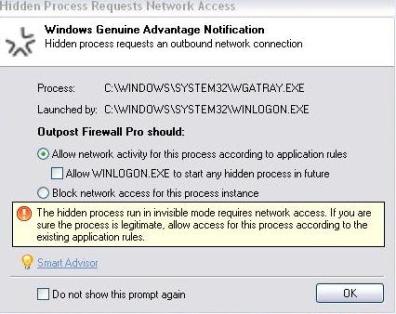
Let me make the distinction between the Genuine Advantage validation and the Genuine Advantage notification. The notification is what people are objecting to -- being bugged with notifications and the frequent phoning home. If you want to disable this behavior, there are a number of ways to accomplish that. My Digital Life has posted 15 ways to disable and remove the WGA notifications, so take your pick. I didn't remove it on my machines, but I did disable it so I'm no longer bothered by it. Initially I was blocking it with my firewall. You can see here that Outpost Pro asked for permission each time to allow wgatray.exe to access the network because it was launched by Winlogon as a hidden process.
Each time I got this warning, I chose to block it. But I found a better long term solution that's easy and doesn't have any harmful repercussions. I downloaded and ran Autoruns from SysInternals, clicked on the Winlogon tab, and unchecked WgaLogon as seen in this screenshot.
Apologies for the small image but the space is limited. You can click here for a larger view. Now WGAtray.exe no longer starts up with Windows and no longer wants to phone home. It can be re-enabled simply by checking the adjacent box. I like this method because you, the user, are in complete control. Eventually the Genuine Advantage Notification won't be an issue, but for now, this is the best workaround I've found and doesn't involved altering or cracking the software or using tools by unknown coders.