Avoiding the iCloud storage gotcha

Summary: Storing your App data to Apple's iCloud is very convenient. A little too convenient maybe. Find out how to manage your iCloud backup data before you spend money on storage you don't need.
I excitedly upgraded to iOS 5.0 the day it was first available and have been 90% satisfied with my decision to do so. There are a few issues with it, however. One is that you'll find that some of your previously purchased Apps don't work. Another is that a few of your settings weren't kept or were replaced by newer versions that have been moved or renamed. But, the biggest 'gotcha' of all is,...wait for it,...iCloud.
Please don't misunderstand me. I wanted iOS 5. I wanted iCloud. I couldn't wait, in fact. And, this coming from the guy who takes a very conservative approach to support and personal computing. I'm never the first to jump onto a new version, new gadget or new service pack.
This time I did. And, I'm not sorry that I did, but I'd say proceed with caution if you haven't made the trip yet.
During the iOS5 setup phase, you're asked whether you want to use iCloud for backup, which also untethers you from iTunes for updates and backups. Of course, if you want to backup and restore from iTunes, you can choose not to use iCloud at any time.
I chose to use iCloud for my iPhone 4 and for my iPad. My reason was a simple one and one I would use again should the wizard reappear on another device: I don't want to be tethered to iTunes or any particular computer. I don't really like iTunes. I think that there are better delivery models available.
Cloud-based delivery models.
And, yes, I know that "Cloud" is a dirty word to many of you but to you I have to say, "Sorry" and "Get with the program."
I digress. Back to my iCloud gotcha.
I had only used iCloud twice. Once for my iPhone 4 and once more for my iPad during the iOS 5 setup. But, a few days after the upgrade, I received a system message that my iCloud was almost full and that I need to purchase some space or I won't be able to perform additional backups.
Wait, what?
But, I have only used iCloud once for each device.
Due to my suspicious nature, I smelled an Apple-scented scam afoot and so I investigated further.
Let me put your mind at ease before I go any further to say that there was no scam and there was no fault on Apple's side nor mine. However, you should be aware of how your iCloud space is used. Apple's iCloud storage App did exactly what it was supposed to do. The problem was that I just didn't know how well it performed its assigned task: Backing up my wife's videos to iCloud.
You see, my wife subscribes to some religious-oriented videocasts by Beth Moore. She's purchased six or seven of the videocasts and each one consumes just over a half gig (GB) of space on the iPad. That's no big deal for my 32GB model.
The problem was that I didn't know that her video backup was causing my free 5.0 GB of iCloud space to be virtually useless to me.
Here's how I solved the problem and how you can setup what does and does not get backed up to your iCloud account.
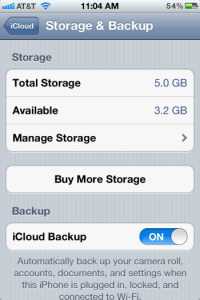
On your iDevice, open Settings, iCloud and then to Storage & Backup (scroll all the way down to see Storage & Backup). Check out your Total Storage (5.0 GB) and the amount available to you. Mine currently is 3.2 GB as you can see in Figure 1.

Figure 1: iCloud Storage Summary
Tap Manage Storage to see how much space each of your iDevices uses. See Figure 2.

Figure 2: iCloud Storage Used per Device
To see details about what is backed up on each iDevice, tap the device. Figure 3 shows some details of my iPhone's backups.

Figure 3: Device-specific App Storage
You can see how much space each App uses and choose which App data to backup using this interface. To see all Apps, tap the Show All Apps selection at the bottom of the list (not shown). If you want to exclude a particular App's data from future backups, slide its selector to the Off position. That App's data will no longer be backed up to your iCloud account.
You also have the option of deleting your backup (option not shown in Figure 3). To do so, scroll down until you see the option Delete Backup and delete your backup from iCloud for this device.
Make your changes and allow your iCloud backup to proceed normally.
If you find that, at some future date, that you need more storage, you can purchase it "in App" as shown in Figures 1 and 2 above. Pricing for iCloud's additional storage isn't cheap. As you can see in Figure 4, it's quite pricey but still less than Dropbox by comparison.
Figure 4: Additional iCloud Storage Pricing
Hopefully, in the future, someone will develop an App that allows you to select your Cloud provider of choice for your iDevice backups.
Until then, you'll have to manage this iCloud 'gotcha' on your own.
Do you use iCloud for your iPhone, iPad, iPod or other Apple devices? Why or why not?
Talk back and let me know.
Kick off your day with ZDNet's daily email newsletter. It's the freshest tech news and opinion, served hot. Get it.


Talkback
Not sure why Apple does not want your wife to keep videos off-iCloud count
If the religious videos are bought from iTunes, then there is no expense for Apple to exclude their size the same way they exclude music and applications.
Maybe in some iCloud update in the future Apple will resolve this annoyance. Then your wife would be able to store as many gigabytes of iTunes videos as possible without it being accounted as part of 5 GB iCloud space.
Think Apple doesn't want to get sued by movie studios...
RE: Avoiding the iCloud storage gotcha
sdfsdf
Wholesale Clothes Rack Wholesale Carabiner http://www.chinawholesaletown.com/wholesale-TelePhone/ Industrial Supplies
Wholesale Bookmark Safety Products http://www.chinawholesaletown.com/wholesale-Mirror/ Pen
Wholesale Bangle Wholesale Glove http://www.chinawholesaletown.com/wholesale-Scissors/ Tape Measure
Fishing Supplies Wholesale Candle http://www.chinawholesaletown.com/wholesale-Advertising-Material/ Radio
Wholesale Stationery Inflatable Products http://www.chinawholesaletown.com/wholesale-Name-Card-Holder/ Raincoat
Christmas Gifts Outdoor Leisure Products http://www.chinawholesaletown.com/wholesale-Money-Bank/ Recorder Pen
Wholesale Glove Recorder Pen http://www.chinawholesaletown.com/wholesale-Pedometer/ CD Holde
Wholesale Earphone Wholesale Flashlight http://www.chinawholesaletown.com/wholesale-Computer-Accessories/ Hair Products
World Cup Products Water Bottle http://www.chinawholesaletown.com/wholesale-Beauty-Equipment/ Voice Recorder
Wholesale lable Reflective Safety Vest http://www.chinawholesaletown.com/wholesale-Patient-Care/ Inflatable Products
CD Holde Wholesale USB Flash Drive http://www.chinawholesaletown.com/wholesale-Cap/ Writing Instrument
Wholesale Golf Products Flash Gift http://www.chinawholesaletown.com/wholesale-Writing-Instrument/ Arts Crafts
Wholesale Playing Card Wholesale Wallet http://www.chinawholesaletown.com/wholesale-Keychain/ Pom Poms
Wholesale Mp3 Promotional Gifts http://www.chinawholesaletown.com/wholesale-Thermometer/ Bookmark
Wholesale Mobile Phone Consumer Electronics http://www.chinawholesaletown.com/wholesale-Poncho-Raincoat/ Men Beauty Care
Money Clip Wholesale Cards http://www.chinawholesaletown.com/wholesale-Scale/ Belt
Valentine Gifts Wholesale Halloween Gift http://www.chinawholesaletown.com/wholesale-Tie/ Muslim Products
Wholesale Ruler Valentine Gifts http://www.chinawholesaletown.com/wholesale-Hair-Products/ Crystal Gifts
Wholesale Coaster Wholesale Magnifier http://www.chinawholesaletown.com/wholesale-Camera/ Mirror
Wholesale Mug Wholesale Mat http://www.chinawholesaletown.com/wholesale-Shoes/ Toys
Wholesale Cup Wholesale First Aid Kit http://www.chinawholesaletown.com/wholesale-Safety/ Bottle Opener
Wholesale Pedometer Wholesale Bangle http://www.chinawholesaletown.com/wholesale-Gift-Box---Display/ Consumer Electronics
Wholesale iPod iPhone Muslim Products http://www.chinawholesaletown.com/wholesale-Pet-Supplies/ Helmet
Safety Products Patient Care Products http://www.chinawholesaletown.com/wholesale-Money-Bank/ Sport Support Products
Silicone Products Sport Items http://www.chinawholesaletown.com/wholesale-Lady-Beauty-Care/ Ashtray
Wholesale Tellurion Mouse Pad http://www.chinawholesaletown.com/wholesale-Scissors/ Thermometer
Wholesale TelePhone Wholesale Keyboard http://www.chinawholesaletown.com/wholesale-Speakers/ Binoculars
Wholesale Tie Wholesale Radio http://www.chinawholesaletown.com/wholesale-Candle/ Poncho Raincoat
Book Light Wholesale Glasses http://www.chinawholesaletown.com/wholesale-Bookmarks/ Silicone Products
Flash Gift Home Appliances http://www.chinawholesaletown.com/wholesale-Photo-Frame/ Halloween Gift
RE: Avoiding the iCloud storage gotcha
???Get with the program.???....
To this I say
"All your Information are belong to us" -sincerely the US Govt.
!!!Bodazapha From your keyboard to Gods workgroup!!!
"Get with the program?"
How much coke you doing a day Ken?
"It's Clouds Illussions you Install, there really are no clouds, at all" .
Uh...ok archaic kewl term...Word up G.
Meh.
RE: Avoiding the iCloud storage gotcha
Managing my iCloud settings is almost a full time job
Still, I'm glad to have the option but you highlight a very important gotcha: iCloud doesn't "Just Work". It needs a lot of babysitting.
RE: Avoiding the iCloud storage gotcha
If you want everything backed-up without thinking about it, just buy more storage and let 'er rip. If you want to pick and choose (babysit?), then pick and choose like any other backup app. Simple.
RE: Avoiding the iCloud storage gotcha
Exactly. Why would you store anything on any local device? Get it all into the cloud, dude. Then you won't need iCloud or any other backup.
Because we live on planet earth
Why not keep everything in the cloud? Because here on earth we have something called bandwidth caps! So, if I want to watch the last season of burn notice, I need them cached locally and downloaded via wifi or direct connection. The cloud is a great addition, but it is no replacement yet.
RE: Avoiding the iCloud storage gotcha
I upgraded the OS on my iPhone 4 to iOS 5 and started using iCloud and have not had any issues nor did I notice anything unusual or changed as far as settings... do you have a specific list of apps or settings?
RE: Avoiding the iCloud storage gotcha
No, I don't have a specific list. Still working through them. Some people have reported issues with iSSH. Our problem was with the LifeWay App Breaking Free. I had to uninstall and reinstall. That usually fixes the iOS 5 upgrade problem.
Not so much don't work
But have some hey restrict your save options.
Example: iWorks
Saves are limited to iCloud and WebDav.
I can load from Dropbox, but no longer save there (iPad2)
Maybe I'm just not with the program
And I suppose my clinching grumpy old man question is why should I expose the religious video choices I've made to someone I don't know?
RE: Avoiding the iCloud storage gotcha
Is Data Counted More Than Once
RE: Avoiding the iCloud storage gotcha
Is it just available to view/download or already downloaded?