Cherry launches keyboard for Linux users

The Cherry CyMotion Master Linux keyboard has the Linux penguin logo, Tux, instead of the Windows start key and features 29 hot keys. The hot keys are configured for the Linux operating system and desktop applications, simplifying actions such as cutting, copying and pasting text, and moving between Web pages.
Cherry has produced the keyboard in cooperation with Linux distributor SuSE. Stefan Kummer, product manager at Cherry, said it decided to make the keyboard after talking to SuSE at the CeBIT trade show in March, and had suggested to SuSE that it made sense to design a keyboard specifically for Linux.
Kummer has already found some users keen to simply replace the Windows start key with Tux.
"Linux users don't want to have a Windows button. Three years ago we had a request from a customer to produce specially made keyboards which replaced the Windows logo with Tux, but had absolutely no extended functionality," he said.
Kummer said that there are no plans for future Linux configured products.
"We want to first see if the product is successful. The Windows market is bigger, but other manufacturers have yet to focus on the Linux market."
A UK spokesman for Cherry said that the keyboard will cost £29.99. It will be on sale from October.
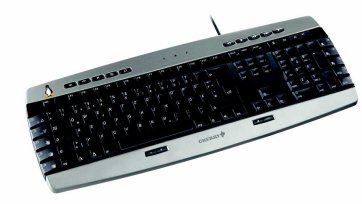
Cherry CyMotion Master Linux keyboard