'ZDNET Recommends': What exactly does it mean?
ZDNET's recommendations are based on many hours of testing, research, and comparison shopping. We gather data from the best available sources, including vendor and retailer listings as well as other relevant and independent reviews sites. And we pore over customer reviews to find out what matters to real people who already own and use the products and services we’re assessing.
When you click through from our site to a retailer and buy a product or service, we may earn affiliate commissions. This helps support our work, but does not affect what we cover or how, and it does not affect the price you pay. Neither ZDNET nor the author are compensated for these independent reviews. Indeed, we follow strict guidelines that ensure our editorial content is never influenced by advertisers.
ZDNET's editorial team writes on behalf of you, our reader. Our goal is to deliver the most accurate information and the most knowledgeable advice possible in order to help you make smarter buying decisions on tech gear and a wide array of products and services. Our editors thoroughly review and fact-check every article to ensure that our content meets the highest standards. If we have made an error or published misleading information, we will correct or clarify the article. If you see inaccuracies in our content, please report the mistake via this form.
Lenovo ThinkCentre M92z review

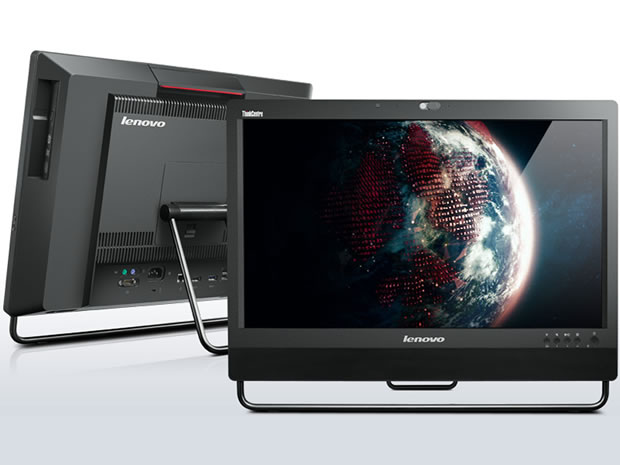
Lenovo ThinkCentre M92z
pros and cons
- 23in
- matte IPS screen with good viewing angles
- DisplayPort in and out
- Power-frugal
- Quiet in operation
- Non-vPro Core i3 CPU
- Integrated graphics
- Moderate performance
- Editors' review
- Specs
Lenovo's ThinkCentre M92z All-In-One Desktop is a business-class stablemate of the hybrid SME/consumer ThinkCentre Edge 92z that we examined recently. Built around a 23in. screen, the ThinkCentre M92z can be configured with a full set of security and manageability features: our relatively low-end review unit was missing a few options, though, including a vPro-compliant processor and the touch-screen that could render the system fully Windows 8-ready.
Design
The ThinkCentre M92z is a matte-black system with a PC's innards built onto the back of its 23in. screen. It conforms to the standard layout, with a selection of easily accessible ports on the left, an optical drive on the right and further ports at the back.
Our review unit came with a height-adjustable stand that allows for plenty of tilt and swivel, so you should be able to arrange the screen at a comfortable angle whether you're sitting at a desk or using the system in kiosk mode.
The screen itself is a matte-finish IPS unit with a resolution of 1,920 by 1,080 pixels. It sits, slightly recessed, within a 3cm bezel — with an extra 4.5cm at the bottom for the stereo speakers and monitor controls. Viewing angles are good, and there's plenty of brightness at the 100 percent setting. We had the regular screen, but a touchscreen option is also available, which will be of more interest to anyone planning to run Microsoft's imminent Windows 8 OS.
The ThinkCentre M92z is no designer system, but it looks smart enough in an understated way — apart from the outbreak of no fewer than six (wonkily applied) vendor stickers on the bottom right-hand corner:
Our review unit came with an old-school, clacky USB keyboard and a wired USB mouse. Wireless options are available.
Features
The ThinkCentre M92z that we were sent for review was powered by a low-end second-generation Intel Core i3-2120 processor running at 3.3GHz. This is not vPro-enabled, which may rule this particular model out for many businesses. However, third-generation Core i3/i5/i7 CPUs with vPro are also available. For memory our system had 4GB of 1600MHz DDR3 RAM, expandable to a maximum of 16GB. Graphics are handled by the integrated HD Graphics 2000 GPU (a discrete AMD Radeon HD7650 GPU is also available) and the OS is Windows 7 Professional 64-bit.
Top ZDNET Reviews
Storage comes in the form of a 500GB Seagate SATA III (6Gbps) hard drive spinning at 7,200rpm; HD options go to 1TB, while SSDs are available in 128GB and 64GB capacities — the latter as an mSATA card.
Wireless connectivity is catered for by an Intel Centrino Wireless-N 2230 module, which supports single-band (2.4GHz) 802.11b/g/n Wi-Fi and Bluetooth 4.0. Wired Gigabit Ethernet networking is supported too, naturally.
There's a decent set of ports and slots dotted around the system. On the left is a pair of USB 3.0 ports, audio in and out jacks and a card reader for SD-compatible media. The right-hand side has a tray-loading optical drive, while the back has the power input, an Ethernet (RJ-45) port, DisplayPort in and out, and four USB 2.0 ports. The DisplayPort connectors allow the 23in. screen to be used as a regular monitor, or a second screen to be attached.
Lenovo makes much of the ThinkCentre M92z's suitability for communication and collaboration — one of the aforementioned stickers proclaims the M92z's Microsoft Lync certification, for example. In the middle of the top bezel is an HD webcam with a sliding cover so you can ensure it's not going to operate when you don't want it to, a dual-array microphone helps optimise audio quality, and there's a convenient pair of volume (up/down) controls on the right hand side of the screen. We made video calls with the bundled Skype application, and can confirm that the camera, mic and speakers all perform very well.
Performance & power consumption
The Windows Experience Index (WEI) for the ThinkCentre M92z is a moderate 4.6 (out of 7.9), the WEI corresponding to the lowest component score. As usual, this is for the integrated graphics — specifically Graphics (Desktop performance for Windows Aero). Memory (RAM) (Memory operations per second) and Primary hard disk (Disk data transfer rate) both scored 5.9, Gaming graphics (3D business and gaming graphics) registered 5.8 and Processor (Calculations per second) led the field with 6.6:
This isn't stellar performance by any means, particularly on the graphics front. However, there are plenty of options available for boosting speed if necessary: upgrading the RAM to 8GB or beyond; specifying a faster CPU; specifying discrete rather than integrated graphics; and/or fitting an SSD rather than a conventional hard drive. All of these upgrades will boost the cost, of course.
Running the demanding Cinebench 11.5 CPU and GPU benchmarks shows that the Core i3/HD Graphics 2000/4GB ThinkCentre M92z lags behind Dell's Core i5/HD Graphics 4000/8GB OptiPlex 9010, as you'd expect. Note, though, that Lenovo's AIO is some £400 (ex. VAT) cheaper than the Dell unit we reviewed.
When it comes to disk performance, the ThinkCentre's 500GB SATA III 7,200rpm Seagate hard drive is quicker than the Dell's, using the ATTO Disk Benchmark (129MB/s write and 130.3MB/s read versus 106.3MB/s write and 115.7MB/s read respectively):
The ThinkCentre M92z is pretty power-frugal for a 23in. system, its lower spec combining to deliver similar power draw (41.6W-67.5W) to Dell's 21.5in. OptiPlex 9010 (37.4W-71.1W) when running various workloads:
Lenovo's AIO system is also admirably quiet in operation, even when running demanding workloads.
Conclusion
The ThinkCentre M92z is a good-quality business-grade 23in. all-in-one computer that's particularly well suited to video communication. To get the most out of it, though, you may need a better-specified model than the entry-level system reviewed here.