Microsoft's security report shows Windows 7 is safer

Summary: The 64-bit version of Windows 7 is the least likely version of Windows to be affected by malware, with 2.5 infections found per thousand PCs, and Windows XP SP2 the most likely, with 19.
The 64-bit version of Windows 7 is the least likely version of Windows to be affected by malware, with 2.5 infections found per thousand PCs, and Windows XP SP2 the most likely, with 19.3 infections found per thousand PCs. However, since this shows 98 percent of XP SP2 PCs as uninfected, it's not a good reason to panic. Oracle's Java is the most common attack vector, ahead of HTML/Script (mainly malicious iFrames) and the operating system. The adware JS/Pornpop, which serves pop-under porn advertising pages, is now the most prevalent bit of malware.
The numbers and charts come from Microsoft's Security Intelligence Report Volume 10, which covers the second half of 2010 in an 88-page PDF report. They are based on running Microsoft's Malicious Software Removal Tool (MSRT) as part of the Windows Update process, which means that hundreds of millions of PCs running pirated copies of Windows are excluded.
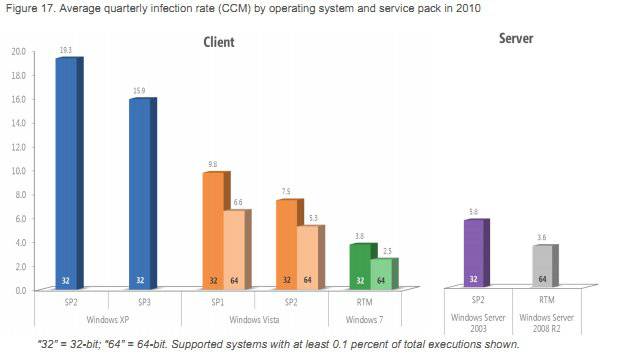
The operating system chart shows that Microsoft has got progressively better since the malware debacles that afflicted the early days of Windows XP. The customers who are still on XP SP2 have the highest incidence of infections with 19.3 found per thousand PCs, The numbers fall to 7.5 and 5.3 for Vista SP2, then to 3.8 and 2.5 for Windows 7 RTM. In each case, the 64-bit version does better than the 32-bit code. As Microsoft points out, the 64-bit versions "still appeal to the more technically savvy", which helps. So does the 64-bit version's PatchGuard, which the anti-virus industry tried to stop.
Another factor, of course, is that malware is a commercial business and attacks only the most profitable targets. Currently that's probably users with pirate or out-of-date copies of Windows XP, since the vast majority of attacks are aimed at exploiting security holes that have already been patched. (For those not paying attention, it's important to apply patches for CVE-2010-1885 and CVE-2010-2568.) There's relatively little financial incentive to attack more malware-resistant operating systems, but that is changing with the rapid adoption of Windows 7. Indeed, the infection rate for 32-bit Windows 7 jumped by almost a third compared with the first half of the year.
Microsoft sees increased security as one reason for upgrading from XP to Windows 7 and, in truth, there are several of those. However, the reduced incidence of malware infections (including adware) may be overstated. There is clearly a big drop from 15.9, scored by XP SP3, to 2.5, for 64-bit Windows 7. Still, in terms of PCs found "clean", it's only a reduction from 98.4 percent to 99.75 percent. The vast majority of people who are smart enough to use Windows Update will not have malware infections removed by MSRT whether they use XP SP3 or Windows 7.
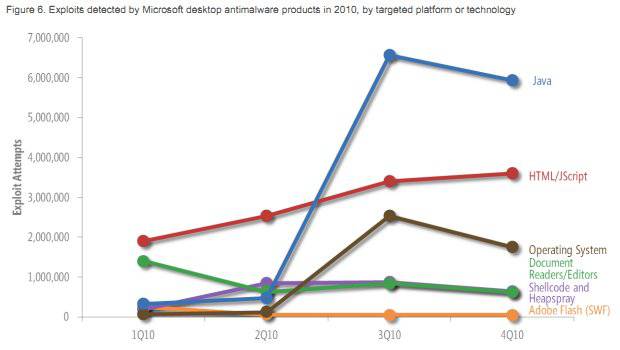
In terms of exploits classified by their target platform or technology, Oracle's Java remained the market leader. Microsoft notes (page 19):
"Malware written in Java has existed for many years, but attackers had not focused significant attention on exploiting Java vulnerabilities until somewhat recently. In 3Q10, the number of Java attacks increased to fourteen times the number of attacks recorded in 2Q10, driven mostly by the exploitation of a pair of vulnerabilities in versions of the Sun (now Oracle) JVM, CVE-2008-5353 and CVE-2009-3867. Together, these two vulnerabilities accounted for 85 percent of the Java exploits detected in the second half of 2010."
There was also a dramatic rise in the number of exploits targeting Microsoft's browser, Internet Explorer. Microsoft adds: "Most of these exploits targeted CVE-2010-0806, a vulnerability that affects Internet Explorer versions 6 and 7 running on versions of Windows earlier than Windows 7."
The free report also covers topics such as email, spam, phishing, malicious websites, and document-based exploits. There are maps of Global Infection Rates, which show that South Korea was the worst place for malware, with 40.3 computers cleaned for every thousand MSRT executions. After that came Spain (33.2), Turkey (32.8), Taiwan (24.3), and Brazil (20.8). Large countries with low infection rates included the Philippines (3.1), India (3.8), and Japan (4.4).
Kick off your day with ZDNet's daily email newsletter. It's the freshest tech news and opinion, served hot. Get it.
Talkback
I've seen a (genuine) Windows XP SP3 with automatic updates running Firefox 4, Java 6 r25 and a malformed fileserve.com ad / fileserve.com url, infect a machine with the Rogue Antivirus tool, with no user intervention, just by going to the url - so it best not to be too complacent. The machine had to be wiped, and recovered from an Acronis backup (System Restore point had been cleared too) It even managed to apply corrupt driver problems to the keyboard, which prevented the user logging in on reboot (though this may have been a consequence of being unable to shutdown the system once the rogue Antivirus kicked in)
> the version of Microsoft's Malicious Software Removal Tool (MSRT) will also be out
> of date, and therefore would fail to recognise new forms of updated malware,
There's a new version of MSRT every month, and it's part of the download. Can you point me to some factual evidence that it's "out of date" on XP SP2, please?
> so it best not to be too complacent
Agreed. There's usually a major security problem beween the chair and the keyboard. They're also the ones who sometimes claim they didn't install rouge spyware, even though they always, or almost always, did ;-)
here's a new version of MSRT every month, and it's part of the download. Can you point me to some factual evidence that it's "out of date" on XP SP2, please?
Jack, if your running XP SP2, and not XP SP3, you haven't got automatic updates enabled (otherwise you'd be running XP SP3). MSRT isn't automatically updated if your running XP SP2, therefore the version your running won't have been updated to recognise the latest malware. How can you have the latest MSRT, but not XP SP3?
It's their prerogative, of course, to set the parameters of their own report, but in typically sneaky Microsoft fashion, they have not done this. I can find no mention of other operating systems anywhere in the report; not even to discount them! Not in the "Scope" section. Certainly not in the report's title. "Windows" and "operating system" are used as synonyms. It's as if non-Microsoft operating systems simply don't exist, which is, of course, what Microsoft would prefer.
This is underhand in the extreme and I'm afraid that Jack's reporting of it does nothing to clarify the situation.
In any case, anyone running Windows XP SP2, and who is connected to the Internet, is not acting very sensibly.
The standalone program MSRT executable (.exe) doesn't self update, once installed - its a single self-contained file. The existing standalone executeable (.exe) is overwritten/replaced once a month with the help of Automatic Updates - its not like an antivirus tool that runs as a service, that automatically downloads new threat tables by itself - the existing standalone MSRT executable is updated by simply being overwritten once a month with a newer version, based on the Automatic Update settings for the machine - if these are set to manual, the tool will only detect known threats at the time the tool was installed, due to the threat detection tables being built into the executeable, and not constantly updated within the program via the internet, when it is run.
If you installed the MSRT tool in August 2008 along with SP2, via Automatic updates, then set the Windows Updates to manual, to prevent installation of SP3. The version of the MSRT tool running on your machine today, would still be an out of date MSRT Aug 2008, able to detect known threat types dated before August 2008. A machine running Windows XP SP2, wouldn't have automatic updates applied, because if it did it would be running Windows XP SP3.
MSRT is only as good as the day you installed it - if you turn off Windows automatic updates, and with new threats all the time, that means its detection abilities would be lower on a machine runinning out of date SP2, because its unlikely the MSRT tool would have been also updated - which was the point I was trying to make, regarding the infection rates.
> Jack, if your running XP SP2, and not XP SP3, you haven't got automatic
> updates enabled (otherwise you'd be running XP SP3). MSRT isn't automatically
> updated if your running XP SP2, therefore the version your running won't have
> been updated to recognise the latest malware. How can you have the latest
> MSRT, but not XP SP3?
The numbers in the chart are *specifically* the number of infections (poer thopusand PCs) removed by downloads of MSRT, and that includes the ones for XP SP2. Presumably it's also why there are no numbers for SP1....
> Support for Windows XP SP2 ended on July 13th 2010. Does this also mean that the
> Malicious Software Removal Tool will not be downloaded and run each month?
I would have thought so, but I don't have one to try. However, (a) there may have been one or more updates after July 1; and (b) MSRT is still being downloaded and run on 64-bit XP Pro SP2 because there was no SP3.
> In any case, anyone running Windows XP SP2, and who is connected
> to the Internet, is not acting very sensibly.
True, but the world is not short of people who don't have a clue, or simply haven't been paying attention...
This is why for personal recommendation, I've advised the use of Linux. I've personally deployed Linux (Fedora-based) PCs and over the past 2 years to friends and relatives, and I've had ZERO calls about viruses or malware. ZERO. While with the ones that still have Windows, I get calls about every 6-8 months to help clean malware or recreate Windows profiles, or in the worst case re-install Windows.
Any update can be hidden and not installed if you set Automatic Updates (Automatic) to manual 'notify me but don't automatically download or install them', including not automatically installing MSRT, alternatively, you could have it automatically installed and updated, with SP3 hidden or you can manually download the tool from
http://www.microsoft.com/security/pc-security/malware-removal.aspx
and run the standalone executable released that particular montn.
Choice is yours then.
Obviously there are no figures on how people set there Automatic Updates
With the current Windows Update forcing SP3, on automatic updates (Automatic) -
The most likely scenario (based on how Automatic Update works) is that a Windows XP SP2 machine does not have automatic updates enabled, therefore MSRT would be also out of date, in terms of updates. The most likely scenario of a Windows XP SP3 machine is that of automatic updates being completely 'Automatic', and therefore MSRT would be the latest.
The results / graphs obviously don't mention whether the version of MSRT was current or out of date, which would give very different readings (in theory/statistically), compared to a machine which ran the latest MSRT. (ie. the detection rate would be much poorer), whether these machines use a Windows Update Server, Enterprise or Consumer. (All of which would vary the result significantly)
Its basically pretty iffy data to be basing any analysis on, in my opinion, pure spin.
What would be more interesting is only the data of malware infections from Windows Machines which have Automatic Updates set to 'Automatic' with full internet connection in real world scenarios and finding out what level of malware is still getting through, as MSRT is updated to recognise new threats.
Conclusion: An 'out of date' Windows Machine without automatic updates enabled is simply a mecca for malware.
> MSRT is only as good as the day you installed it - if you turn off Windows
> automatic updates
That's not how it works. MSRT is not "installed", it's run on the fly as part of the Windows Update process. It's not really meant to protect you from malware -- users should install MSE, AVG, MBAM or whatever for that purpose -- it's just a bit of helpful hygiene.
> Conclusion: An 'out of date' Windows Machine without automatic updates
> enabled is simply a mecca for malware.
No, it's not. A lot of companies don't use automatic updates, because they test and install updates manually. A lot of PCs have the protection of (often free) anti-malware software.
It's not sensible to ignore critical updates but this is true of Windows, all Adobe softgware, iTunes, Mac OS X, all the browsers etc etc as well.
Yes - is aimed at being a minimum, basic form of malware protection, another reason to take its ability to detect all forms of malware with a reasonable level of skepticism, and not make assumptions regarding how well Windows defends itself against malware, using a very suspect data set from data, of varying Windows configurations of Window Update (some Auto,manual or other), no mention of what other products are also defending the machine (if any), whether MSRT is up to date or not. It's an extremely basic/crude 'spinable' data set being used by MS.
I know I should upgrade, although I need to clean up my hard drive so there is enough free space for SP3. Note that I do not depend on MSRT to keep my PC free from malware - I have an up-to-date antivirus installed also. Even Microsoft warns that MSRT is not a replacement for antivirus software.