How browsers and security software can keep you safer online

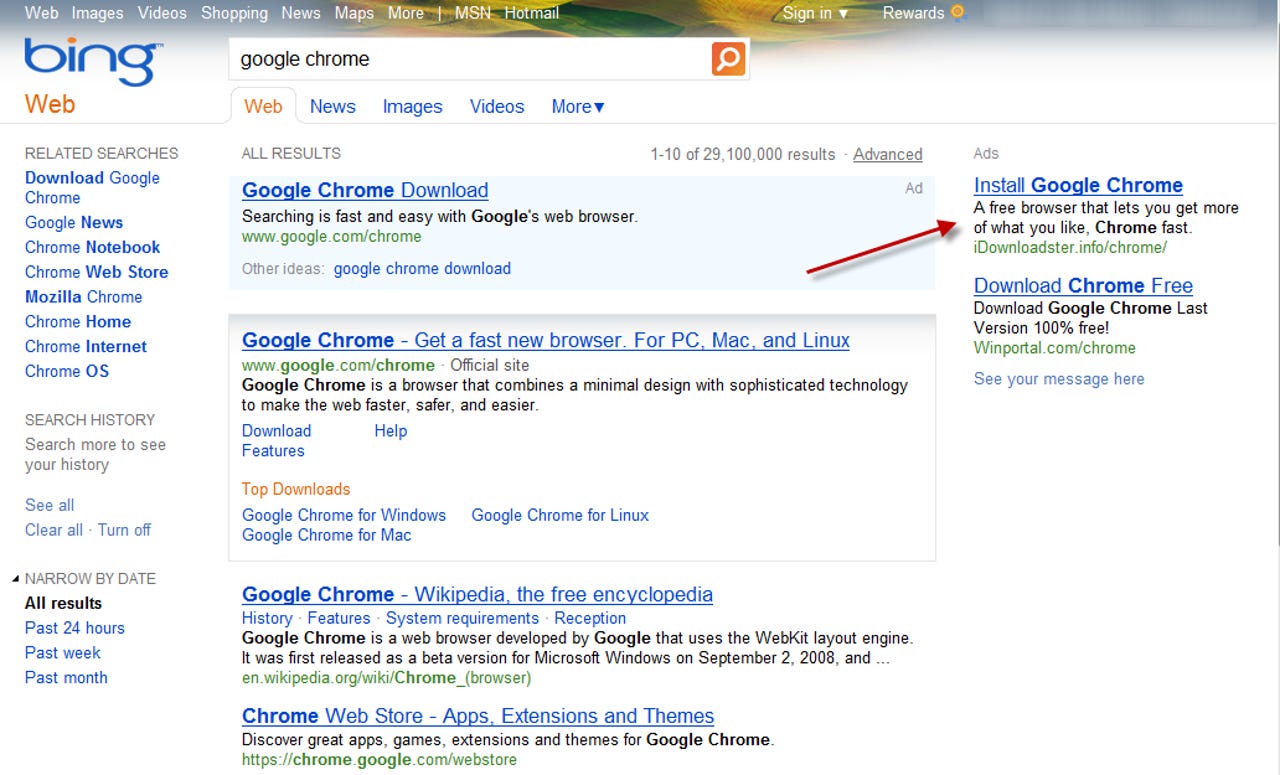
Online criminals have a seemingly bottomless bag of tricks to get you to click on a link that leads to an unsafe download. The link can come via e-mail, or in search results, or as part of a normal looking web ad, like the one shown here.
That link leads to malware, but there's no easy way to be certain of that just from looking at the URL.
How do you avoid being victimized?
For a more detailed discussion, see the companion blog post, Who makes the best Windows security software? Surprise ...
If you look closely at this page, you can spot tiny details that give it away as a fake, like the typos in the lower left corner. But most PC users lack the experience or the technical skill to make those determinations with confidence.
If you click the Download button in Internet Explorer 9, a prompt at the bottom of the window asks you to make a trust decision. Should you click Run? Should you run away? Or should you just ignore it?
For a more detailed discussion, see the companion blog post, Who makes the best Windows security software? Surprise ...
This is one reason to really like Internet Explorer 9: In this example, I clicked a link to download a legitimate-looking file. Microsoft’s cloud-based SmartScreen Filter identified this file as malware and prevented it from being downloaded.
The browser-based solution is effective even if you don’t have up-to-date antivirus software. SmartScreen Filter uses a web service to check the reputation of downloads and web sites, blocking those that are potentially dangerous.
For a more detailed discussion, see the companion blog post, Who makes the best Windows security software? Surprise ...
As the IE9 download manager shows, this piece of malware was blocked before it could be downloaded. That’s a significant improvement over conventional antivirus scanners, which have to download a potentially dangerous file before they can determine whether it’s safe to execute.
It’s possible to override the decision, but that’s not something a novice user is likely to do. And if you've configured the user with a standard account, they'll need an administrator's password to do so.
For a more detailed discussion, see the companion blog post, Who makes the best Windows security software? Surprise ...
Microsoft’s SmartScreen Filter doesn’t just scan files. It also keeps track of the reputation of websites. If you use Internet Explorer (version 8 or 9) to visit a domain that’s known to host unsafe software, your request is intercepted and you see this warning page instead.
Although it’s possible to bypass the warning, it’s neither easy nor wise to do so.
For a more detailed discussion, see the companion blog post, Who makes the best Windows security software? Surprise ...
When you initiate a download button using Internet Explorer 8, this modal dialog box appears. You can’t do anything else with the browser window until you make a trust decision.
The design of IE9 is an improvement over this one, because it allows the user topostpone (or ignore) the download request. That makes it possible to do further research, for example, without having to leave what might be a legitimate page.
For a more detailed discussion, see the companion blog post, Who makes the best Windows security software? Surprise ...
Internet Explorer 8 uses the same SmartScreen Filter checking as IE9. This warning appears when you try to download a file that’s known to be dangerous.
There's no way to override this decision here. The only option is to click Cancel and clear the dialog box.
For a more detailed discussion, see the companion blog post, Who makes the best Windows security software? Surprise ...
When you click a download button using Mozilla Firefox, you see a limited amount of information about the file. Your only option is to save it and then open it from the Download Manager.
Firefox uses Google’s Safe Browsing feature (which I discuss later) to block known unsafe sites. In my testing for this post, none of the sites that were actively delivering malware were blocked in any way by Firefox, nor did it do anything to prevent me from saving a malicious file.
For a more detailed discussion, see the companion blog post, Who makes the best Windows security software? Surprise ...
Should you run this file or not? Windows supplies the red icon to indicate that the file doesn’t have a digital signature. Firefox provides the file name and the name of the domain from which it was downloaded, but doesn’t supply any additional information to help you make an informed decision.
For a more detailed discussion, see the companion blog post, Who makes the best Windows security software? Surprise ...
Both Google Chrome and Mozilla Firefox use Google’s Safe Browsing feature, which is similar to the Microsoft SmartScreen Filter. This stark warning page (captured a couple months ago) is what you see if you visit a site that Google has identified and flagged as dangerous.
For a more detailed discussion, see the companion blog post, Who makes the best Windows security software? Surprise ...
Google allows you to check the status of a site using this online tool. In this case, though, the information is inaccurate. The site in question has indeed been serving up malware for more than 72 hours, but it hasn’t been visited by a Google crawler lately and thus gives an inaccurate clean bill of health.
For a more detailed discussion, see the companion blog post, Who makes the best Windows security software? Surprise ...
When you click a download link using Chrome, you might see a generic warning like the one in the lower left corner of this page. The warning doesn’t include any information beyond the file name that can help you make an informed trust decision about whether the file is safe or dangerous.
For a more detailed discussion, see the companion blog post, Who makes the best Windows security software? Surprise ...
Microsoft’s free program is an excellent example of how traditional antivirus software works. It relies on frequently updated definition files and then scans downloads to see if they match.
You can have a delay of several hours or even days before the signature files catch up with new strains of malware.
For a more detailed discussion, see the companion blog post, Who makes the best Windows security software? Surprise ...
The weakness of traditional antivirus software is that it’s always chasing the bad guys. In this example, Microsoft Security Essentials was able to identify a “Severe” threat and remove the dangerous file.
Unfortunately. that ID didn’t happen when the file was first downloaded and saved. The initial scan failed to detect a threat. The dangerous file was detected and quarantined fours hours later, after I manually updated the definition file and scanned again.
For a more detailed discussion, see the companion blog post, Who makes the best Windows security software? Surprise ...
Trend Micro Titanium Maximum Security does more than traditional antivirus software, including the ability to hook into the browser and block potentially dangerous sites. You can fine-tune settings for different types of users. Do you know someone who can’t seem to stay away from malware? Give them a standard user account and crank up the protection level to High.
For a more detailed discussion, see the companion blog post, Who makes the best Windows security software? Surprise ...
This Trend Micro Titanium option tags search results with an icon that indicates whether each one is safe or dangerous. The green Safe icon, with its white check mark, means a link is OK to click. The gray question mark means the page is untested.
This feature didn’t identify any known dangerous sites during my testing, but it did flag every deceptive ad I encountered in my many searches. The suspicious ads were flagged using the gray Untested icon.
For a more detailed discussion, see the companion blog post, Who makes the best Windows security software? Surprise ...
I hope you never see logs like these, which I built up during the course of testing deceptive ads on search pages. Each of these websites represents an attempt to redirect a legitimate click to a payload server that contains malware.
Trend Micro did an excellent job of blocking the threats I ran into during my testing. On a system with a naïve or technically unsophisticated user, every one of those blocked pages is a win, because it breaks the chain of social engineering.
For a more detailed discussion, see the companion blog post, Who makes the best Windows security software? Surprise ...
When Trend Micro decides to block a page, this is what you see. The experience is similar to what Microsoft’s SmartScreen Filter and Google Safe Browsing offer for browsers that support those features. The Trend Micro solution works with any browser, so that the warning is the same whether you’re using IE, Chrome, Firefox, or another browser.
For a more detailed discussion, see the companion blog post, Who makes the best Windows security software? Surprise ...
Norton Internet Security checks every executable file and program installer you download against its reputation database. In this case, it was easy to identify the program I bought and paid for from Adobe.
The View Details button at the bottom of the box makes it possible to learn much more about the download, as I show on the next page ...
For a more detailed discussion, see the companion blog post, Who makes the best Windows security software? Surprise ...
For files that are well known and trusted—such as major product releases from mainstream software companies—it’s easy to use variables like the file hash, digital signature, and source to calculate the file’s reputation. In this case there’s no question the file it legitimate. But if you want still more details, you can click that button in the lower right corner.
That takes you to a dialog box with more details, as I show on the next page ...
For a more detailed discussion, see the companion blog post, Who makes the best Windows security software? Surprise ...
One feature I like about Norton’s reputation-checking is that it’s not just limited to files you download. You can also use it to check any file that you don’t recognize. So if you see a program file or DLL whose name you don’t recognize, you can right-click and check the Norton File Insight menu.
In this case, the file is part of Windows Media Center, This technique is especially useful if you see a file in a Startup folder that sets off red flags. It's also extremely helpful when you’re downloading files or add-ons from small developers or open-source projects, where the download might come from a central site that isn’t well known.
For a more detailed discussion, see the companion blog post, Who makes the best Windows security software? Surprise ...
There’s nothing about the name of this file that is suspicious in and of itself. In fact, a conventional virus scan didn’t identify this as a dangerous or even suspect file. But before the download process Norton Internet Security was able to determine that it was a threat and blocked it, displaying its results with this discreet pop-up message.
For a more detailed discussion, see the companion blog post, Who makes the best Windows security software? Surprise ...
This detail screen indicates that “Very Few Users” in Norton’s very large worldwide community have seen this file. That’s a telltale sign of malware. To get past virus signatures, the authors code their package so that the server changes the file slightly every time it delivers a new copy—polymorphic code.
Generating new variations of their executable files allows the bad guys to slip past most antivirus programs, even those with signatures published just a minute or two earlier. But the very trick that makes it possible to evade the scanner makes it highly suspicious for the reputation engine. As the explanatory text notes, “There are many indications that this file is untrustworthy and therefore not safe.”
For a more detailed discussion, see the companion blog post, Who makes the best Windows security software? Surprise ...
This is another example of a polymorphic file that didn’t match any known signatures. But its source and the complete absence of a reputation made it so suspicious that the program felt confident in completely blocking it.
Notice the threat label in the caption: Suspicious.Cloud.2, which indicates that the reputation algorithm did automatically what a prudent, sophisticated user would do.
For a more detailed discussion, see the companion blog post, Who makes the best Windows security software? Surprise ...
This entry in the Norton log file is an example of the redirection scripts that the Russian Mac Defender gang used for sites that reached them via Microsoft Windows. Norton was the only solution I tried that blocked those scripts and thus disabled the familiar “virus scanning” screens designed to scare the victim into thinking their PC is infected.
For a more detailed discussion, see the companion blog post, Who makes the best Windows security software? Surprise ...