Photoshop Extended CS6
Photoshop CS6
As well as enhancing its classic image editing functionality, Photoshop CS6 expands what you can achieve without switching to another application, including tools for working with video, 3D and text.
Photoshop CS6, which lacks the 3D features, is in the Design Standard suite (£1,032 ex. VAT; upgrade from £219), while the fully-featured Extended edition is in the remaining three suites — Design/Web Premium (£1,509 ex. VAT; upgrade from £298), Production Premium (£1,509 ex. VAT; upgrade from £298) and Master Collection (£2,223 ex. VAT; upgrade from £397). Standalone prices are £556 (ex. VAT) for Photoshop CS6 (upgrade from £159) and £794 (ex. VAT) for Photoshop Extended CS6 (upgrade from £309). Photoshop Extended CS6 is also available via a Creative Cloud subscription (£38.11 ex. VAT per month on an annual contract).
User interface
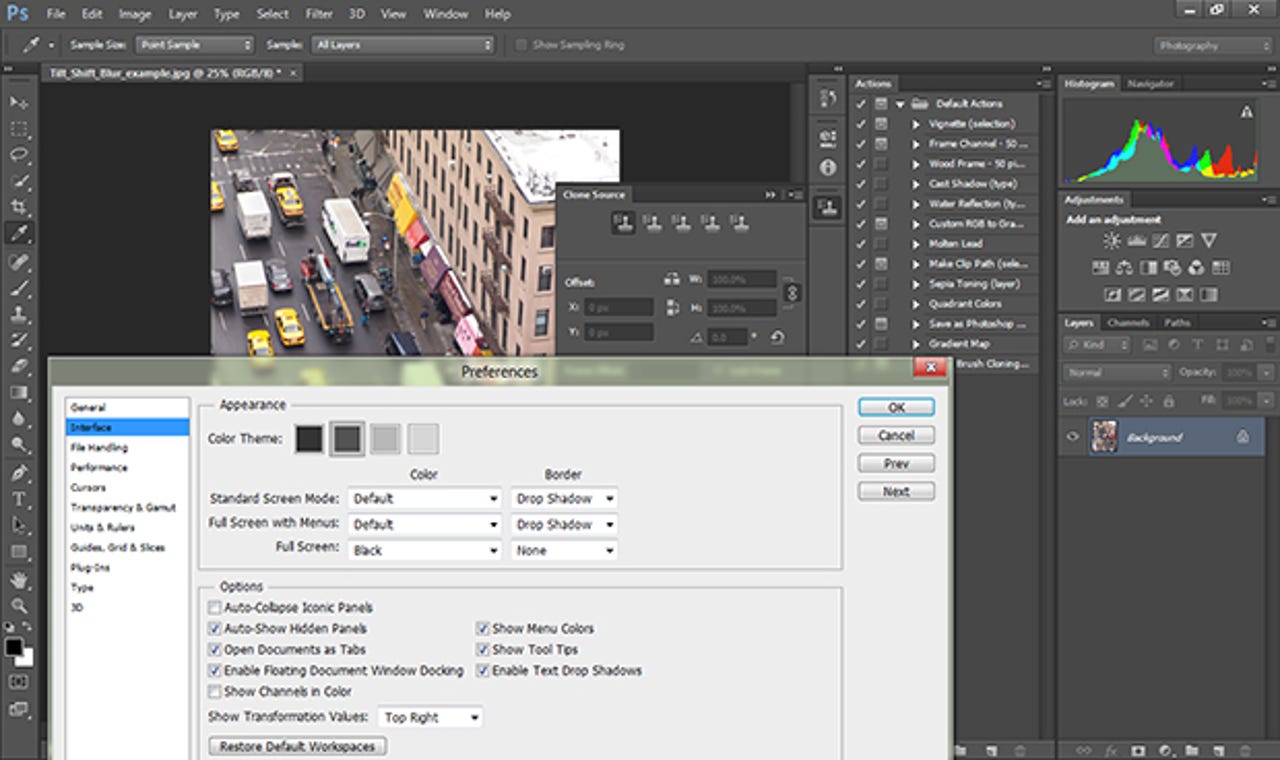
When you work with an application like Photoshop for hours at a stretch, the interface is important. Most of the programs in CS6 are getting the dark interface of Lightroom at least as an option; Photoshop gives you the choice of four background colours from black to dark grey. The icons for tools have all been redesigned to be larger, clearer and a little easier to recognise, and you can double up the icons in the toolbar to fit more on a smaller screen or keep them in a single column to make more room for photos.
There are more ways to arrange panels and palettes as well; you can drag them out of the well, dock them in a second panel area at the side, resize panels inside the well or overlap panels instead of lining them up. You can also switch the selection of tools on-screen quickly by choosing a different workspace from the Essentials dropdown.
Screenshots: Mary Branscombe/ZDNet UK
Working with layers
As you build up multiple layers in an image — especially if you’re using effects layers to modify the look of the image or text, and vector layers to create a complex layout — you need to be able to locate the layer you need quickly. The new Layer Filter toolbar in the Layers panel lets you filter layers so you only see pixel, text, adjust, shape or object layers in the list (you can combine choices so you can hide everything except images and the adjustments that work on them). If you have even more layers, you can filter by layer settings like mode and colour — and when you do, you can type in a custom search to get exactly the layer you want.
Faster cropping
The new crop tool in Photoshop CS6 is non-destructive, allowing you to revert to the original image at any time. That's important because as well as making it much easier to crop images to get what you want, you can adjust them at the same time. Grids are provided for layout aids like the golden ratio, rule of thirds, triangles, diagonals and the golden spiral. You can get the right size and shape using the list of aspect ratios to which you can constrain the crop, and you can add your own to list. You can straighten a photo while you crop it, to make the lines of the image fit the new edges. And if the image was shot at the wrong angle, the Perspective Crop tool lets you straighten and realign it. Those are major changes, so you need to be able to undo them if the effect isn't what you need.
Simple video editing
Photoshop can now edit video as well as still images. Open a video file and the Timeline panel appears at the bottom of the screen; use the '+' button on the timeline to add more video clips or still images you want to include (you can automatically pan, zoom or rotate still images to add interest as they play back). The basic video functions are simple: put your cursor at the beginning or end of a video clip and you get a trim handle that you drag to set which frame to start and end with — you see the frames in a small pop-up window. Drag images and clips that you want to rearrange, and preview the video with the playback controls; you can choose what to review by dragging the playback head icon to a specific point.
Video layers and transitions
There are a number of simple transitions you can add between video clips (or when you switch to a still image), including fades and crossfades. If you choose a cross-fade, Phootshop overlaps the images in the timeline. You can also add in an audio track — again, you can control how that fades in and fades out. Creating a text title or credits just involve clicking on the preview image with the Type tool. Video, still image and text clips appear in the Layers panel as well as the Timeline; you can rearrange them in either place when you want to group clips — for example to overlay a text title on the first few frames of your video. When you're done, you can export the video as H.264.
Simpler 3D
Photoshop CS6 Extended has much simpler tools for working with 3D objects than the previous version. You can isolate 3D elements in the Picture in Picture window, or work directly in the canvas. You can extrude flat objects like text to 3D shapes, drag items along all three axes to move and rotate them, drag handles on 3D objects to set the bevel of edges and the depth of planes directly — and the text stays editable. It's easier to define planes and perspectives in a photo, so you can position 3D models in a composite image. You can also position lighting sources and shadows to get the look you want by dragging them into position.
Paragraph styles and OpenType effects
If you're working with text in Photoshop, you can now create styles either for paragraphs or character styles that control individual letters and words. You can use styles in multiple documents for consistency. Photoshop also finally adds support for the extra features that have been in OpenType fonts for a while now; ligatures, ordinal numbers and fractions are useful more often than contextual and stylistic alternates, but if you're adding fancy text to a layout it's nice to have the options. The new Type menu brings the text tools together and the new type-rendering engine has much better anti-aliasing.
Simple vector shapes
The new Custom Shapes tool doesn't turn Photoshop into an Illustrator replacement or a CorelDRAW competitor, but if you're moving from editing images to creating artwork, the ability to add lines, shapes and objects for which you can set the stroke and fill is certainly useful. You can already put images inside text; now you can put images, colours and gradients inside shapes as well. We've used a gradient fill on the scissors and on the outline of the tick and a simple colour fill inside the tick. Features like this expand the range of what you can achieve without leaving Photoshop, which could boost your productivity.