Beware sophisticated Twitter phishing scams

As most ZDNet readers know, phishing scammers find ways to forge emails from legitimate sites, hoping to get your personal details such as name, social security number, password, and so on. These forged emails often appear to come from financial institutions, so the scammer can access your bank account.
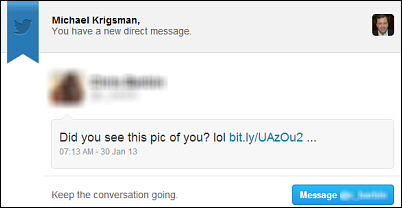
The latest variant of this scam uses a hijacked Twitter account to send out direct messages that appear completely legitimate. Then message contains a link that sends the recipient to a Twitter log-in page, which again appears absolutely real. However, in this case, that log-in page is actually hosted by identity thieves and not by the real Twitter company. In other words, it's a fake Twitter site.
Here is an image of a fake direct message I received this morning (the sender's identifying information is blurred):
When you click the link, it takes you to this page, which looks completely legitimate to the casual observer:
Although this page looks and feels entirely legit, it is not. If you enter your Twitter username and password into this site, you will become a victim of identity theft; the thieves will then control your Twitter account.
Protect yourself
You can take steps to help avoid falling prey to this kind of scam:
Do not click links within emails. If you don't click a link, then you can't get caught in the phishing web.
Look closely at any web address that asks you to enter personal information.
In this case, the page looks real but there are subtle signs of forgery. Here is a larger view of the page address:
(Screenshot by ZDNet)Although the site looks and feels like the official Twitter page, in fact it is not Twitter at all--look closely and you can see the spelling is not "Twitter" but "iwltter." The thieves cunningly chose a sequence of letters designed to mimic Twitter at first glance.
Consider the context of the message. Suspect any message that does seem right. In this case, I hardly know the sender so the message immediately looked out of context and suspicious to me.
Be especially careful on tablets and phones because the fake address may be almost illegible on the small screen of a mobile device. If you aren't absolutely certain of the source, then don't click the link. If necessary, go to a desktop computer where you can more easily see details of the address.
Phishing is a growing problem that you must take seriously. The scammers have become more sophisticated in mimicking legitimate sites, so give those links an extra level of scrutiny before you click.