iPod recording almost here
Summary: I've been complaining about one of the biggest deficiencies in the iPod for a while now - audio recording.

I've been complaining about one of the biggest deficiencies in the iPod for a while now - audio recording. The iPod is great at playing back music (although the interface is getting a bit tired) but it lacks in its ability to record.Before the dock-connector iPods were announced there were several methods of capturing audio with external adapters from Belkin and Griffin. Since the switch to the new iPod design, which lacks the four-pin remote port that third-parties attached to, there has been very little progress on this front.
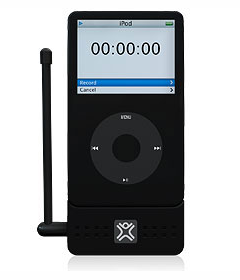
Recording to an iPod has countless uses from capturing lectures, conferences and interviews to recording live music and podcasts. Luckily this dearth of recording accessories is finally about to end.
XtremeMac's highly-anticipated MicroMemo voice recorder attachment for the iPod is scheduled to begin shipping in early July and they lowered the price to US$60. With MicroMemo you'll be able to record 16-bit audio at 22kHz and 44kHz with a single click. If you detach the included microphone you can connect any microphone with a 3.5 mm plug. It also features a
built-in speaker for instant playback without the need for headphones.
No word yet on Belkin's TuneTalk voice recorder, but Engadget reports that it will be available "this month" for around US$70.
Am I the only one that thinks that recording to an iPod is cool? Would you use it?
Kick off your day with ZDNet's daily email newsletter. It's the freshest tech news and opinion, served hot. Get it.
Talkback
I normally agree with most of your articles...
Apple did it right the FIRST time. No other MP3 player has as useful and simple an interface as the iPod.
Change for changes sake is silly, but I realize it's a maddening part of the Tech industry.
This one needs to be left alone.
What should be on your iPod MIA list is FM Radio. That, and WMV support is what is preventing me from purchasing my 3rd one.
What's wrong with the iPod interface
The screens are too easily scratched. Some menu options are poorly explained (Compilations, shuffle songs/albums). Sometimes the thing's too busy retrieving album art to be quickly responsive to clicks. Takes too long to turn the thing off, sometimes taking several attempts. Scroll speed should be configurable, takes too long to scroll through my full 60G machine's Songs menu. Can't see long album names (they don't scroll). Can't see other information about song (year, etc.). Lyrics could track as song progresses. Would be nice to be able to name playlists on device. Would be nice to be able to delete items on device (particularly podcasts, as is you have to remember which to keep and discard). Would be nice to rate podcasts. Would be nice to be able to change ordering of songs (alpha, length, track number). Would be nice to have duplicated songs (same exact track on both a greatest hits and a normal album) take up only one song's space. Would be nice to erase items out of a playlist on the device. Would be nice if, when you went to click a menu item, the menu didn't scroll up or down an item or two (I have large thumbs, I guess).
Yes, the device is pretty good. No, it's not perfect.
FM is dead
ipod UI is dated
it's just too hard to sort through a long list of artists or songs, making playlists is a joke, and the now playing screen is woeful. where is the full-screen album art? i would also like a customizable now playing screen to show me the ID3 tags that I want to see, i'd also like a pop-up keyboard for editing meta/data and keep notes (poor rip quality, cuts off at end, etc.) I'd also like the ratings to go from 0-10...
I could go on, but suffice it to say that the iPod UI has pretty much remained unchanged for five years.
- Jason
Creative Zen M
iPod advantage Over Zen
smemtcn 21 lze