The best smartphone for the Mac

Summary: There are numerous options when choosing a smartphone but Mac users need to consider compatibility issues before diving in.
Smartphones are definitely the wave of the future for mobile technologists. They offer real-time access to email, Web, IM, RSS and just about every other Internet application that matters. In fact, there's a movement afoot to replace some notebook computers with smartphones because of their ever increasing functionality.
There are numerous options when choosing a smartphone but Mac users need to consider compatibility issues before diving in. I've used several allegedly "smart" phones that were great in the field, but when it came time to connect them to my computer, a PowerBook G4, they couldn't have been dumber.
Take for example my Blackberry 7100t, it's a great phone that I've used for about a year, but there's no Mac software included. Same with Danger's Hiptop I & II (a.k.a. T-Mobile's Sidekick I & II). All of these great smartphones are amazing to use on the road but are essentially islands for Mac users with no way to synchronize or load software.
Granted, there are third party tools available from Mark/Space software (The Missing Sync) and PocketMac that bridge the gap and provide a solution for Mac users, but they're a little spendy (anywhere from $30 to $42) and they take some time to configure and tweak. Some users have reported problems where duplicate contacts and calendar entries were created using them.
That said, I have seen the light.
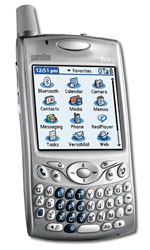
I recently purchased a Treo 650 from PalmOne (on the Verizon network) and I'm excited to be back on the Palm OS platform. The Palm OS has built-in support for the Mac and includes everything you need to sync right out of the box. Not an hour after unboxing the Treo I was syncing applications from my PowerBook flawlessly. A couple hours later I found three games that I love to play: Aces Texas Hold'em and Omaha (both No Limit) from Concrete Software and Eric Snider's BlackJack (what can I say, I moved just outside of Atlantic City) and installed them on the Treo without any problems.
One concern was my Mac-only business relationship management software (contacts and calendars) DayLite from Marketcircle. I was pleasantly surprised that they have a Palm conduit that works perfectly with the Treo. The DayLite conduit even allowed me to only synchronize a certain group of contacts with the Palm, while the other tools forced me to sync all 3,000 plus contacts that are in my database with my phone.
It's good to be back with a company that understands the value of the Macintosh. Mac customers should support companies like PalmOne and let them know that we do. Let's just hope that PalmOne's announcement of the Windows Mobile-powered Treo 700w in September doesn't mean death for a certain lil' handheld OS that we all know and love.
Kick off your day with ZDNet's daily email newsletter. It's the freshest tech news and opinion, served hot. Get it.
Talkback
Treo 650 missing EDGE / EDVO SOON !
software, as it would be very frustating to fall to the dark side.
The one thing Palm should incorporate in the new Treos is high
speed internet technology (EDGE/EDVO), and WIFI.
By the way Mark Space Missing Sync software is a must. It adds all
that Apple has missed in their Sync software, like syncing
birthdays, more than 4 phone numbers per contact, etc.
Other alternatives
very happy user of Sony-Ericsson's P900, which does not need any
software to work with the Mac. On top of it, i recently bought a
second hand Nokia 9500, at a very good price (400$). I knew it was
not supposed to sync with iSync, but remembered finding with
google a site describing how to sync some unsyncable Nokias. I
found a link to an executable that updated isync, sent a file to the
Nokia, and in 10 minutes, it syncs for Calendar and contacts!
Syncing Nokia 9300?
Syncing Nokia 9300?
Syncing Nokia 9300?
Treo 650 lacks some Bluetooth features
to implement bluetooth linking with the Mac Address book. This
feature was not present at all and I couldnt find any work around
online.
For me the final candidate was the Sony Ericsson (SE) p910a
which synced perfectly with my Mac Calendars and contacts via
Address book using iSync. The p910a Supports full internet
access and bluetooth modem abilities which until recently were
painfull to implement in the Treo world.
While you probably will not be able to walk into your local mall
and find the SE p910a, they are readily available on ebay,
amazon, as well as some 'High-End' mobile technology stores
and come in around the same price as the Treo in most cases.
If the flip open keyboard is a problem for you, Its good to know
that it can be removed and that SE includes the tools in the box
to do so. If the keyboardless 'grafiti' type Jot interface is not your
bag, you may want take a look at the upcoming SE p990 which
will have a form factor simmilar to the Treo.
The SE p910a uses the Symbian UIQ operating system for which
there are numerous aplications available to be downloaded and
'synced' (bluetooth file transfer) to your p910a to complement
the standard suite of software that comes preloaded on the
phone.
If you want all that bluetooth has to offer for your mac, consider
the Sony Ericsson p910a.
There is also a SE p910i international version available which
does not operate on the 850Mhz band like the p910a, americas
version, but uses the 900Mhz flavor common in Europe and
other distant lands.
Treo 650 lacks some Bluetooth features
to implement bluetooth linking with the Mac Address book. This
feature was not present at all and I couldnt find any work around
online.
For me the final candidate was the Sony Ericsson (SE) p910a
which synced perfectly with my Mac Calendars and contacts via
Address book using iSync. The p910a Supports full internet
access and bluetooth modem abilities which until recently were
painfull to implement in the Treo world.
While you probably will not be able to walk into your local mall
and find the SE p910a, they are readily available on ebay,
amazon, as well as some 'High-End' mobile technology stores
and come in around the same price as the Treo in most cases.
If the flip open keyboard is a problem for you, Its good to know
that it can be removed and that SE includes the tools in the box
to do so. If the keyboardless 'grafiti' type Jot interface is not your
bag, you may want take a look at the upcoming SE p990 which
will have a form factor simmilar to the Treo.
The SE p910a uses the Symbian UIQ operating system for which
there are numerous aplications available to be downloaded and
'synced' (bluetooth file transfer) to your p910a to complement
the standard suite of software that comes preloaded on the
phone.
If you want all that bluetooth has to offer for your mac, consider
the Sony Ericsson p910a.
There is also a SE p910i international version available which
does not operate on the 850Mhz band like the p910a, americas
version, but uses the 900Mhz flavor common in Europe and
other distant lands.
Treo 650 Wifi
Treo 650 Junk
ever had that I have returned 4 times for repair/replacement. Mic
fails. Speaker fails. Junk. Every time I have to wait for a new
phone I SWEAR I'll find a new one that works with Mac...but alas, no
such luck. I am tempted to go back to an organizer and separate
smartphone or one that needs 3rd party sync software. The phone
is great when it works. After 2 yrs on the market, the phrase, "Go
ugly early" no longer pertains!! No more excuses Palm T-Mobile
dropped Palm due to hardware reliability issues.
Treo 700p EVDO not compatible
G4 and it is not mac friendly unless your mac is running on a Windows platform.
Extremely disapointed because I really like the Treo 700p.
WinMobile Phones Don't Have PalmOS!
And the 750 and 700w are WinMo devices:
http://www.palm.com/us/products/smartphones/treo700w/index.html
The 700p has the PalmOS, runs only on Sprint/Verizon, and Palm says in the product PDF that it supports Mac OS 10.2.4?10.4 with USB port
http://www.palm.com/us/products/smartphones/treo700p/index.html
aqoqgtc 52 tdp