Another take on Vista vs. XP benchmarks

Summary: When I read my colleague Adrian Kingsley-Hughes’ epic account of his benchmark tests of Windows Vista SP1 versus Windows XP SP2, the first thing that struck me was how far apart his numbers were from those I was seeing. In fact, I went back and redid all my tests to confirm that I hadn’t missed anything along the way. They checked out completely. On my test bed, with only one exception, Vista SP1 was consistently as fast as or faster than XP SP2. Why the difference? I have a few theories.
As anyone who’s ever worked in a PC performance lab knows, the #1 rule of benchmarking is: Your mileage may vary.
I remembered that rule when I read my colleague Adrian Kingsley-Hughes’ epic account of his benchmark tests of Windows Vista SP1 versus Windows XP SP2 (Part 1 and Part 2). The first thing that struck me was how far apart his numbers were from those I was getting. In fact, I went back and redid all my tests to confirm that I hadn’t missed anything along the way. They checked out completely. On my test bed, with only one exception, Vista SP1 was consistently as fast as or faster than XP SP2, a result markedly at odds with Adrian’s findings.
I have no doubt that Adrian's tests and timings were accurate, just as mine were. So what’s the difference?
For starters, our test beds were very different:
- Adrian chose a desktop system with a first-generation Intel dual-core processor, the 3.4 GHz Pentium 950D. I chose a Dell Inspiron 6400 notebook with an Intel T2050 1.6 GHz Core 2 Duo processor. (I bought this system in December 2006, a few weeks after Vista was released to business customers. It originally came with XP SP2 installed on it, and I upgraded the system to Vista almost immediately.)
- I chose to use a dual-boot configuration, designing my tests carefully so that file copy operations with each OS were done between the same source and destination volumes to minimize the effects of disk geometry on performance. Adrian used separate hard drives for each OS and each file copy operation.
- I used a wireless 802.11g network connection. Adrian used wired Gigabit Ethernet connections.
- Neither of us performed any special optimizations to either configuration except to ensure that drives were defragmented.
For my test files, I chose the same two groups of files I had used in previous rounds of performance testing last year. The first consisted of two large ISO files, each containing the contents of a ready-to-burn DVD, with a total size of 4.2 GB. The second group is a collection of music files, just over 1 GB in size, consisting of 272 MP3 files in 16 folders.
As it turns out, the test bed I chose is one that matches nicely with a lot of real world business-class systems. Notebooks represent the majority of the PC market these days, and the 802.11g connection in this one is by far the most popular networking option on portable PCs. From a performance standpoint, it's neither a speed demon nor a slug. More importantly, this system's specs match those that Microsoft's engineers had in mind when they reengineered the file copy engine with Vista RTM and then with SP1. As Mark Russinovich notes in his detailed description of these changes, copies over high-latency networks such as WLANs are especially likely to benefit from the changes in Vista.
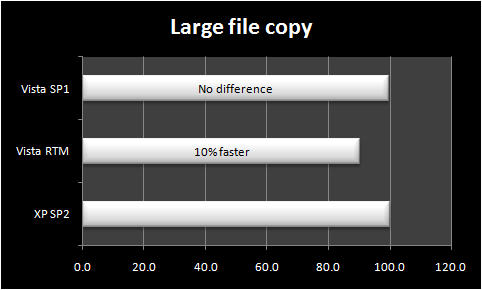
I ran each test multiple times and took the average of at least three tests. The graphs shown here are normalized, with Windows XP SP2 set to 100 and the results for Vista SP1 and Vista RTM charted proportionally.
Next -->
As you can see, several file operations were essentially identical between Vista SP1 and XP SP2 (other scenarios I tested but didn't chart, such as a copy from a local hard disk to an external USB drive, showed the same identical results). My numbers matched up with Adrian's only on the Zip test, which measured how long it took to stuff 1 GB of files into a compressed archive. Vista is slower at this task than XP.
Next -->
So, why did my results vary from those that Adrian reported?
One thing I noticed early on is that it’s easy to overlook the background tasks that Windows Vista performs immediately after the SP1 upgrade. These tasks are the same as those that occur after a clean install. When I first performed the small file copy test, for instance, I got wildly inconsistent results. Looking in Task Manager, which shows the amount of CPU usage associated with each running process, I didn’t see any active tasks. But as it turned out, the system was busy. I was able to explain the differences by looking at the Disk section in Vista’s Reliability and Performance Monitor, where I found that Vista’s Search Indexer, SuperFetch, and ReadyBoost were all using small but measurable amounts of disk resources as background tasks. The green lines indicate CPU and disk activity in the side-by-side graphs. Note that CPU usage is practically nonexistent, but each task was using a polite but measurable amount of disk resources; the collective impact was enough to steal as much as 10 MB/sec of disk performance.
When I re-ran the tests after making sure that these tasks were no longer running in the background, I got the consistent results shown here.
I agreed completely with a remark Adrian tossed off almost as an aside in the middle of Part 2 of his report:
[O]ddly enough, Vista SP1 felt more responsive [than XP SP2] to user inputs such as opening applications and saving files while the tasks were being performed (we tried this out on separate runs). Problem is that it’s darn hard to measure this end responsiveness without relying more on synthetic benchmarks.
My experience is the same. In fact, it appears that Vista’s designers have made a conscious choice to favor smooth, consistent performance over raw speed. The latter makes for more satisfying benchmarks, but it can also result in annoying performance glitches in day-to-day use.
So, was that the right design decision? Is file copying really a critical performance benchmark? If it takes me 10 seconds more or less to copy a group of files, I truly don't care. For mainstream business use, there's no practical difference between a job that takes 5:52 and one that takes 6:18, especially when the copy operation takes place in the background while I busy myself with other work.
Ultimately, the act of benchmarking file copy operations is distinctly unnatural. Both Adrian and I sat for hours clicking a stopwatch and staring at Windows Explorer windows as we waited for progress dialog boxes to close. We're both a little obsessive like that. Your mileage may vary.
Kick off your day with ZDNet's daily email newsletter. It's the freshest tech news and opinion, served hot. Get it.
Talkback
benchmarks
what i have problems with are the ui changes in vista and a few bugs that ms refuses to fix.
sometime i'd like get your take on what i think is wrong with vista's ui.
I have some gripes with Windows Explorer
What do you dislike about the UI?
here they are
thanks for the reply. these are in no specific order and some are minor and only hpeen once, but here they are:
1. forced to wait for performance test on first boot
2. forced to defrag all drives, unless command line used; No GUI (a little better in sp1, still no gui)
3. cannot drag custom toolbar from taskbar to desktop
4. cannot put menu bar on same line as toolbar in windows mail or internet explorer (only with reg hack)
5. when autohide is selected, cannot drag shortcut to taskbar without dragging it over start button area
6. takes more clicks to change date/time (3 instead of 1 double click)
7. takes more clicks to update time (5 instead of 2, 1 double click)
8. can?t right click on network icon to get properties
9. No network repair option, only diagnose and repair(whatever that does)
10. can?t change attachment/watched column widths in windows mail
11. mail column dividers are only 1 pixel wide, hard to drag
12. windows mail watched messages doesn?t work (they know and won?t fix).i use this a lot and it's the worst one for me.
13. entire row has focus when view files in explorer details view.
14. can?t right click on a folder to search, it has to be opened first..
15. no manual compact option in windows mail.
16. starting defrag recreates the deleted scheduled tasks without warning. (after i've intentionally deleted them)
17. windows mail autocomplete holds 29 addresses, instead of autocomplete from all contacts
18. folder views aren?t remembered.(they know and won?t fix)
19. folder layout flawed. To add menu, details, Preview and navigation, you have to go through the menu system 4 times. Click organize, then layout then the option you want. This has to be repeated 3 more times instead of being able to select any combination in one operation.
20. more clicks to check the network adapter status, connected time (5 instead of 2)
21. when opening a folder in explorer, you can no loner see the size in the status bar without selecting all of the file manually.
I'll add...
On the plus side, the file info bar at the bottom of explorer windows, which originally annoyed the hell out of me, I now find much more useful, especially now I am more au fait with tagging and rating files.
I'll add my voice to complaints about the networking interface as well. Bring back the XP wireless centre - much more intuitive!
Networking in Vista
But I CAN right click a folder and search it.
Vista and XP networking
Check you subnet masks
Vista and XP networking
Use a NAS drive
For the Windows part, I would recommend using filezilla. Windows XP may have problems seeing it if you just run the utility. Vista and 2003 server have no problem using the Linksys driver and utility CD.
Filezilla is also available with Linux as well. Using filezilla as a standard for all operating systems makes the user's experience much more straight forward.
You can download it here.
http://filezilla-project.org/download.php
Modern computers have permissions and security features that may not be compatible when different operating systems are used.
A NAS drive such as the Linksys costs about $200 if you factor in the cost of a SATA drive as well.
Check your settings in the .....
Help
I had a similar problem
You forgot...
Do you mean Vista?
Sometimes too fast!
Network UI
XP sp2 has the same bug...
Vista/XP networking problem
Microsoft Windows [Version 6.0.6000]
Copyright (c) 2006 Microsoft Corporation. All rights reserved.
C:\Users\Mike>cd ..
C:\Users>cd ..
C:\>ping MechTech
Ping request could not find host MechTech. Please check the name and try again.
C:\>ip
'ip' is not recognized as an internal or external command,
operable program or batch file.
C:\>ping 192.168.1.102
Pinging 192.168.1.102 with 32 bytes of data:
Reply from 192.168.1.100: Destination host unreachable.
Ping statistics for 192.168.1.102:
Packets: Sent = 4, Received = 4, Lost = 0 (0% loss),
C:\>ping 192.168.1.102
Pinging 192.168.1.102 with 32 bytes of data:
Reply from 192.168.1.100: Destination host unreachable.
Ping statistics for 192.168.1.102:
Packets: Sent = 4, Received = 4, Lost = 0 (0% loss),
C:\>ipconfig
Windows IP Configuration
Ethernet adapter mshome:
Connection-specific DNS Suffix . :
Link-local IPv6 Address . . . . . : fe80::fcc0:f3a1:8bb5:2f8c%8
IPv4 Address. . . . . . . . . . . : 192.168.1.100
Subnet Mask . . . . . . . . . . . : 255.255.255.0
Default Gateway . . . . . . . . . : 192.168.1.1
***Below are the results***
C:\>ping 192.168.1.102
Pinging 192.168.1.102 with 32 bytes of data:
Reply from 192.168.1.100: Destination host unreachable.
Ping statistics for 192.168.1.102:
Packets: Sent = 4, Received = 4, Lost = 0 (0% loss),
C:\>
Note: The destination host is the actual maching I'm using now, and has done the ping (This PC has Vista as it's O/S. Also to note It is saying there is no lost packets as well.
It's a feature ONLY found in Vista!
Get some exercise.