Can a Windows Home Server user find happiness with a Drobo?

When Microsoft unexpectedly announced that it was dropping support for its Drive Extender technology in Windows Home Server 2011, it inspired a collective scream from enthusiasts who had stuck with the platform for more than three years, through some decidedly bumpy times.
But at least one company saw Microsoft’s misstep as an opportunity. Data Robotics, Inc. marked the occasion by introducing its Drobo product line to the Windows Home Server community, complete with a special discount aimed directly at them.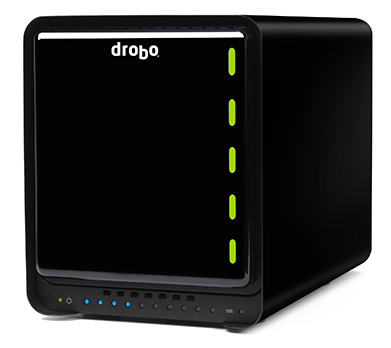
It was a smart move. Drobo CEO Tom Buiocchi describes the company’s mission as “trying to bring elegant ease of use to people who never dreamed they would have terabytes of storage.” That’s very close to the original vision for Windows Home Server.
So, can a Drobo really earn a place in a small office? That’s what I set out to learn for myself with some hands-on testing over the past few months. Here’s my report.
Drobo’s sleek black boxes are specifically designed to do everything that Drive Extender did. You can mix and match hard drives of varying sizes, old and new, to turn four or five drives into a single pool of storage. Data on that virtual volume is protected by a technology called BeyondRAID, whose fundamental premise is that hard drives will fail.
When (not if) that drive failure happens, the pool of storage rebuilds itself on the fly. To increase the amount of available storage, all you have to do is add a new drive or replace an existing one, without having to shut down the entire unit.

I tried one of the first-generation Drobo units four years ago, when they were brand new. That hardware showed tremendous promise in fulfilling the company’s vision, but its performance was marred by painfully high noise levels that made the device unusable in an ordinary office environment. (I wasn’t the only one who thought so, either.)
A lot has changed in the past four years, and when I heard the news about Drive Extender I decided to take a fresh look at Drobo’s offerings. Can Drobo’s technology replace Windows Home Server completely? Or is there room in the home (and home office) for both products?
The folks at Drobo were kind enough to send me one of their current Drobo FS units for review, and I purchased a Drobo S using my own funds. The two products look nearly identical, except for the connectors on the back (more about that in a bit). The elegant design is the same as I remember, as is the jet black finish.
Neither unit was whisper-quiet, but they’re nearly so. The noise level on each of the two units was well within acceptable limits, even when I stuffed each one with five drives of varying sizes and put them to work.
The Drobo FS ($699) is one of four products in the current Drobo Storage for Professionals product lineup. Connect it to a wired network using the Gigabit Ethernet on the back, and then subdivide its pooled storage into shares, with access rights for each share assigned to user accounts on the device. As a server, it can also host apps that handle some of the tasks that people use a Windows Home Server for.
The Drobo S, which costs $100 more, shares a similar chassis but is designed to connect to a PC using USB 3.0, FireWire 800, or eSATA connections. It doesn’t allow you to run any external apps.
Up next, a closer look at how Drobo works.
<-- Previous page
The Drobo units I tested are nearly identical boxes, roughly the size of a toaster (6” wide, 10” deep, and just over 7” tall). Made from black plastic and metal, with only the Drobo logo to provide a clue as to its purpose, each box looks handsome enough to keep out in the open. At eight pounds, before adding drives, it feels solid and sturdy, and a close inspection reveals an admirable commitment to fit and finish.
The basic idea behind Drobo is simple. As CEO Buiocchi explained it to me: “Think of it as a hard drive that never breaks and never gets full." Based on my testing, that description is mostly accurate. Overall capacity is limited by today’s maximum drive sizes, but you can upgrade over time, as hard drive makers roll out new generations of larger drives.
Over the past few months, I’ve tried a mix of new, high-capacity drives and older, smaller models pulled from the spares shelf in my office. Conclusion: it is ridiculously easy to expand the storage pool in a Drobo. To add or remove drives, pull off the front cover, which is attached with magnets. With the cover out of the way, you can see all drive bays—five in this case.
To add a SATA drive, slide it firmly into the bay (no drive caddies required) until it snaps into place. To remove a drive, push the release lever to the left; that disconnects the SATA connectors and pushes the drive out of the slot far enough for you to get a grip on it.
Here's what my setup looks like:

I initially set up each Drobo with a pair of drives, added drives until all five bays were full, and then started pulling out smaller drives and swapping in larger ones. As I added and swapped drives, the Drobo just kept running.
The only user interface on the box itself is a light to the right of each installed drive and a row of lights along the bottom. A green light next to a drive means the drive is working properly, red indicates a problem, and flashing green and yellow lights indicate that the Drobo software is busy configuring the storage pool and duplicating data (for protection) after you add or remove a drive.
The Drobo is specifically designed for hot swapping, so you don’t need to power down to add or remove a drive. The process of rearranging data can take several hours, depending on drive sizes, but I never lost network access to data files while the lights were flashing.
And as if to prove the “Drives will fail” mantra, during the course of testing I had one drive fail completely. That gave me a real-world opportunity to test Drobo’s resiliency. I didn’t lose any data, but I wasn’t able to access the rest of the volume until I physically pulled the faulty drive out of the Drobo and restarted. Adding a new drive in the now-empty slot, by contrast, made the new storage available immediately.
To set up the Drobo initially and to perform subsequent management tasks, you use a lightweight software utility called the Drobo Dashboard.
On the Drobo FS, you use the Dashboard to create user accounts, starting with an Administrator account. Then you create shares and assign access rights to those shares. I connected the Drobo FS to a gigabit switch in my office.
On the Drobo S, you create volumes that appear as drive letters on the locally attached PC. You can connect using eSATA, Firewire, or USB 3.0 (in a nice touch, all three cables are included). For my testing, I’ve been using a USB 3.0 connection courtesy of a PCI Express add-in card; the host machine is a three-year old Dell running Windows Server 2008 R2.
So, what do I think of the new and improved Drobo?
<-- Previous page
If all you need is a common pool of network storage, the Drobo FS is an excellent choice. It’s considerably more expensive than generic network attached storage (NAS) devices. But in my experience the extra cost is well worth it for the quality of the hardware product and its absolute ease of use. If you run an agency where a handful of creative types need fast and easy shared access to images and big document files, it’s a perfect fit.
I was much less impressed with the selection of apps available for installation on a Drobo FS from the DroboApps page. I suppose some people might want to run an Apache server or set up FTP access to the Drobo hardware, but doing so requires a fair amount of Linux experience. If you’ve got the chops for that, you probably want to set up a dedicated server.
A Drobo FS is especially useful in cross-platform environments. You can install clients for Windows, Mac OS X, or Linux, and the drive can be configured to serve as a Time Machine target for any Macs that might be on your network.
I looked for a DroboApp that offered backup capabilities, but there are none. Third-party software can fill in the gap, but it comes at a significant cost. I tried Altaro’s Oops! Backup, which worked fine with the Drobo. But it fell short of Windows Home Server’s superb backup capabilities. Licensing Oops! Backup for 10 PCs costs about $300, and it does nothing to make efficient use of space on the server. That’s one of the biggest strengths of Windows Home Server, which is able to detect duplicated files and store just a single instance of each one.
The biggest surprise turned out to be how well the Drobo S works with Windows Home Server 2011. For my tests, I used a spare PC with a single internal hard disk to serve as the system drive. I used the Drobo S (with four individual hard disks) as a second Home Server drive and pointed all the shared folders and computer backups to that location. The effect was just the same as if Drive Extender had never left the building.
Windows Home Server doesn't see the actual capacity of the drive. It thinks I have 16 terabytes of space available.
The Drobo Dashboard knows better, of course:
The advantage of that subterfuge is that I can add and swap drives on the Drobo and the Windows Home Server is never aware that anything has changed.
In all my tests, I found performance to be excellent. Drobo’s magic happens in the background and didn’t have a noticeable impact on file transfer times.
One quirk in the way the Drobo handles drives is worth calling out. Data redundancy comes at a price that is essentially equal to the largest drive in your array. Thus, if you use three drives—two at 1TB and another at 2TB—you’ll be able to store only 1.81 TB of data. In that configuration, the largest drive will have half its space “reserved for expansion.”
After a few months of use, I’m returning the Drobo FS review unit, but you’ll have to pry the Drobo S from my cold dead fingers. And I really hope the Drobo and Windows Server teams can put their heads together. If they can figure out a way to incorporate Windows Home Server and Small Business Server directly into the Drobo hardware, the result would be much greater than the sum of the individual parts.