Dear Adobe, can we please have a 64-bit Flash player?

In the TalkBack section of my earlier post on the sudden popularity of x64 Vista, a commenter makes a good point:
Flash is not yet 64 bit (at least not the last time I looked). We got a new PC last summer running Vista 64 bit and when you use IE and go to a site that uses Flash it will not work.
That’s true, and it’s the source of one of the minor annoyances in using 64-bit Vista. As I note in my reply, 32-bit IE is the default in Vista x64, presumably for this very reason:
Although there's a 64-bit IE, you have to go through some special steps to enable it as a default. Virtually everything opens in the 32-bit IE, which you can tell if you look in Task Manager.
You can find the shortcut for IE x64 on the All Programs menu:
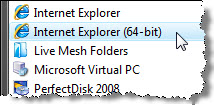
But if you use the IE shortcuts on the Start menu or the Quick Launch bar, or if you double-click a link or a URL shortcut, you get the 32-bit version of IE (or Firefox, which doesn’t even offer a 64-bit version for Windows as far as I can tell). All those *32 entries in this snippet from Task Manager provide the proof:
The single biggest blocker to using a 64-bit browser is the absence of a compatible Flash player. If you open the 64-bit version of IE and click Adobe’s Get Flash Player link, you get redirected to this TechNote:
Flash Player support on 64-bit operating systems
Issue: Adobe Flash Player is not supported for playback in a 64-bit browser. However, you can run Flash Player in a 32-bit browser running on a 64-bit operating system.
Reason: Adobe is working on Flash Player support for 64-bit platforms as part of our ongoing commitment to the cross-platform compatibility of Flash Player. We have not yet announced timing or release dates.
Solution: To use Flash Player to view Flash content on a 64-bit operating system, you must run a 32-bit browser.
That article was last updated on February 8, 2008, nearly six months ago. Not even a "we're still working on it." With the increased popularity of 64-bit Windows, someone needs to light a fire under the Flash development team.
Update 23-July 1:30PM: A commenter suggests that Flash 10 will eventually offer 64-bit support. Maybe, but that support is certainly not there today. I just downloaded and installed the latest (July 2008) Beta 2 build of Flash 10. It doesn't work with either IE7 x64 or a compiled 64-bit experimental build of Firefox 3.