Ease Windows 7 eyestrain with a bigger, blacker mouse pointer

Summary: If you're a Windows 7 user of a certain age, with cheap reading glasses stashed all over your home and office, this tip's for you. (And if it's not for you, send the link to your parents. They'll thank you for it.)
If you have the eyesight of a fighter pilot, you can skip over this item.
If, on the other hand, you are no longer a youth... If you have stashed cheap reading glasses all over your home and office... If you have ever asked a waiter for a flashlight so you could read the menu...
Then keep reading.
Big, high-resolution monitors are great. I love my 27-inch Dell UltraSharp and its 2560 x 1440 resolution. But all that desktop space can cause headaches, literally, when it comes to picking out a tiny white mouse pointer with a thin black outline. It's especially tricky when you're working with documents that have white backgrounds.
The solution? Replace the skinny white pointer with a big, bold black model.
Click Start and type pointer in the Windows search box.
Click Change how the mouse pointer looks, which should be near the top of the list, under the Control Panel heading. That opens the Mouse Properties dialog box, with the Pointers tab selected, as shown here.
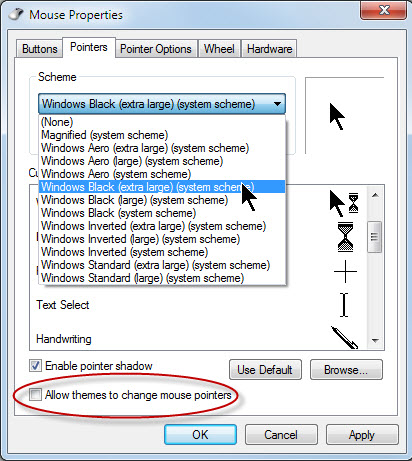
From the Schemes menu, choose one of the Windows Black options, Large or Extra Large. (If you're not sure, try each one out; it's easy to change.)
Before you click Apply or OK, clear the Allow themes to change mouse pointers checkbox, as I've done here. That will prevent you from accidentally changing back to a small, white, generic pointer.
A lot of my workspace is taken up with white backgrounds. This small change really makes a big difference in daily use.
If there's enough demand, I can share some other, similar techniques for making PC displays easier to read. Tell me in the Talkback section if you're interested.
Related posts:
- Ten tricks every Windows 7 power user should know
- Stay safe online: 5 secrets every PC (and Mac) owner should know
- Windows 7 and SSDs: Setup secrets and tune-up tweaks
- Cutting your system drive down to size
Kick off your day with ZDNet's daily email newsletter. It's the freshest tech news and opinion, served hot. Get it.
Talkback
RE: Ease Windows 7 eyestrain with a bigger, blacker mouse pointer
I will most certainly bring this up at our community's next computer club Q&A meeting (Saturday mornings). At 72, I may well now be above the average age of attendees on a typical day, but I'm not sure (we have one ex-POW from World War II, and he's not the oldest).
--John
This is outrageous
LOL
This might be the single greatest talkback ever.
He must be getting old
RE: Ease Windows 7 eyestrain with a bigger, blacker mouse pointer
You could at least have said how this was done in Linux since the early 1990s and explain how to do it in each version and fork ;-)
Thanks Ed, while I don't yet wear glasses I must admit that white cursor does disappear at times ;-)
Come on Dietrich
(Slaps Forehead) Yes Of course! Brilliant Man!
Take that Ed! :/
RE: Ease Windows 7 eyestrain with a bigger, blacker mouse pointer
That is not going to fix any eyestrain ....
Sadly, changing the background color to a darker color by itself doesn't fix the problem .... because the data being presented was "designed" for a white background. Most websites will force the display of text in black (which is barely visible, if any, on dark background colors) and many images are specifically "designed" to look right on white.
The best people can do is use a utility like F.lux (http://stereopsis.com/flux/) which automatically dims the brightness of the display based on time of day. That way, at least you get less eyestrain when using a computer/laptop at night.
RE: Ease Windows 7 eyestrain with a bigger, blacker mouse pointer
I wish there's a black version of the Aero Mouse Pointer.
RE: Ease Windows 7 eyestrain with a bigger, blacker mouse pointer
Here you go: http://www.neowin.net/forum/topic/491036-cursors-windows-aero-vista-rtm/
RE: Ease Windows 7 eyestrain with a bigger, blacker mouse pointer
Apple sued Microsoft over this alleged IP theft
Apple lost in a court of law. Therefore, the alleged theft never happened.
MS did not steal Apple's GUI. A court of law stated this to be true.
RE: Ease Windows 7 eyestrain with a bigger, blacker mouse pointer
which was absconded before that from xerox...
RE: Ease Windows 7 eyestrain with a bigger, blacker mouse pointer
And yes, more tips like this one.
RE: Ease Windows 7 eyestrain with a bigger, blacker mouse pointer