ie8 fix
madison

How to set up a new PC in one easy session

By | September 22, 2008, 5:15pm PDT

Summary: Fellow ZDNet blogger Jason Perlow recently wrote about his long weekend setting up a new PC for a friend, Over the years, I’ve done this process dozens of times for business clients, family members, friends, and neighbors. I’ve got the process down to a series of checklists, all built around some core principles. In this post, I explain how I use this opportunity to get rid of clutter, get a fresh start, and involve the PC owner in the process so they learn some valuable skills along the way. Here’s a step-by-step account of how I set up a new PC.

Fellow ZDNet blogger Jason Perlow helped a friend and colleague buy a new PC and migrate her data and settings from the old machine (Windows XP) to the new one (Windows Vista). He documents the process in The New Adventures of Christine’s Old PC.

I tip my hat to Jason for his dedication to a friend, but as someone who has been doing this for years, I shook my head at the way he turned what should be a straightforward procedure into a weekend-long geekfest, complete with the transformation of the old, slow, obsolete, spyware-ridden computer into a virtual machine on the new one. In my opinion, that’s overkill for everyone involved. (Update: Jason defends his approach in this follow-up post.)

Over the years, I’ve done this process dozens of times for business clients, family members, friends, and neighbors. I’ve got the process down to a series of checklists, all built around some core principles. First, this is a great opportunity to get rid of clutter and get a fresh start. Second, the best way to transfer data from the old machine to the new one is by physically attaching the old hard drive to the new PC. Anything else, as Jason discovered, is likely to bog down. And finally, spending time upfront figuring out what needs to be transferred and what doesn’t can save hours of time and headaches later.
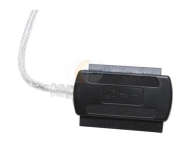
SATA/IDE to USB adapter

Jason brought along a huge USB hard drive and a thumb drive. I agree that a USB flash drive can be useful for some small tasks, but I prefer to skip those intermediate transfers whenever possible. Trying to do large-scale data transfers with USB flash drives and cables can be problematic, especially on old, slow, problem-plagued machines, as Jason discovered. Why spend hours moving tens or hundreds of gigabytes of data from the old machine to a USB drive only to have to do it again with the new PC? Skip the two-step and do what I do: bring along a SATA/IDE-to-USB converter. Newegg sells Syba’s version of this device for around $20 including shipping. I own a couple and can recommend them without hesitation. An external power supply feeds the DC connector on the drive, and a two-headed adapter lets you connect any SATA or IDE drive directly to a USB port on the new PC. While the contents of the old computer are transferring to a folder on the new PC, you can tackle other tasks.

But before you do any of that, sit down in front of the old PC and talk to the client about what they want to accomplish with the new system. The steps in this phase are designed to make sure you don’t get stumped somewhere along the way with a detail you overlooked.

I start by sitting down in front of the old PC with the client. And yes, I make them do this with me, because it’s a great way for me to learn what they think is important and for them to learn that the inner workings of their computer are not a mystery. Here’s what we do:

  • Open the Programs window from Control Panel and take inventory of all installed software on the old PC. Decide which programs you want to install on the new machine and which ones will be replaced or completely scrapped. Make sure you verify that the old programs are compatible with the new hardware and OS and that there are no known installation or upgrade issues.
  • Create a new folder on the client’s desktop and call it NEW PC. You’ll use this folder to store drivers, program updates, and exported settings that can’t be easily copied as files from the old PC.
  • For programs that will make the leap from old PC to new, gather installation media. If installation of any program requires serial numbers or other information to complete installation or activation, write that information down in a text file and save it in the NEW PC folder. If any programs you plan to install require updates or patches, download them and save them in a subfolder of the NEW PC folder.
  • Write down login information for e-mail accounts and other online services. Save this information in a text file in the NEW PC folder.
  • If you need to use custom settings to connect to the Internet or to a local area network, write down those settings and save them in the NEW PC folder. This is most common for notebooks, where setting up a wireless connection requires that you enter a network encryption key.
  • Take inventory of external hardware (scanners, printers, MP3 players, and so on). Verify that any device you plan to connect to the new computer is compatible with the new hardware and operating system. If necessary, download the latest driver and any required support files and save them in the NEW PC folder.
  • Find all digital media (photos, music, home movies, etc.) that the client considers valuable and make a note of their location. Consolidate them in a single folder with subfolders, if possible.
  • Identify all digital music that the client has downloaded or purchased. If any of them are from the iTunes Music Store or another source that uses DRM, make sure that you know how to transfer licenses to the new PC. (For iTunes users, now is a good time to deauthorize the old computer.)
  • Open the client’s e-mail program and export the address book to a file that can be imported on the new PC. Save this in the NEW PC folder.
  • While that e-mail program is open, make a note of where e-mail messages are stored and in what format. If necessary, export the messages to a file and save that file in the NEW PC folder. (For Jason’s friend, this step wasn’t necessary, because the data was in an Outlook PST file. If she had used Outlook Express, I would recommend the procedure in this Knowledge Base article.)
  • Open the client’s preferred web browser and export all bookmarks to a file that can be imported on the new PC. Save this file in the NEW PC folder.
  • Burn the contents of the NEW PC folder to a CD or copy them to a USB flash drive. For this job, I actually prefer a CD, which can then be stuck in an envelope along with program disks and manuals in case the client needs it again later.

There. Now you can shut down the old PC, use the SATA/IDE adapter to connect its hard drive to the new PC as a USB drive, and begin selectively restoring your backed-up data and settings, taking advantage of this opportunity to clean things up thoroughly. Here’s the order in which I do things:

  • First, I remove all crapware and trial programs from the new PC. If the system came with an antivirus program and the client plans to use a different security solution, get rid of the old one first, before going even a single step further.
  • Set up the Internet/network connection and download all available Windows updates.
  • Set up the client’s e-mail on the new machine and verify that you can send and receive mail. I prefer to start with a completely clean inbox and leave the old mail in a separate PST (for Outlook users) or in an Old Mail folder for any other program.
  • Restore the e-mail address book from the old machine.
  • Reinstall the programs that you decided were worth keeping from the old machine. Be sure to install any updates or patches for each one, and then open the program and verify that you can create and save data files.
  • Set up your external hardware, using the drivers and support software you downloaded previously.

This is usually the point where I stop and do an image backup using Complete PC Backup from Vista Business or Ultimate. If this option isn’t available, I like Acronis True Image, which is available in a 15-day trial version. If the PC in question has a Seagate or Maxtor drive, you can download the free OEM version of Acronis’ software (Seagate DiscWizard or Maxtor MaxBlast 5, respectively).

Finally, I’m ready to begin moving data from the old system to the new one. You can use any of the third-party programs I listed in the previous paragraph to repartition the main drive on the new PC and then clone the old drive to the new partition. (This works best if the old PC has a relatively small hard drive and the new one has a much larger drive, which is likely to be the case with most consumers upgrading a four- or five-year-old PC.) I prefer to clone a drive rather than simply copy files, because it guarantees that every file from the old PC will be available on the new one, even obscure settings and data files buried in hidden subfolders.

Because the new PC has up-to-date antivirus software, you can scan the old drive for viruses before or after transferring data files. Then it’s a matter of identifying the user’s documents, digital pictures, and music, and putting everything in the right place.

And we’re done. Disconnect the old drive and put it back in the old PC. I usually leave the old system around for a week or two until the client is confident that the new system is working properly. Once it has passed muster, I return and wipe the old system clean, restoring the original operating system and getting it ready to pass along to someone who can use it.

That’s how I do it. This rarely takes more than a few hours, and when I’m done the client has usually learned some important skills along the way, making it more likely that they’ll be able to steer clear of trouble in the future.

So, what tricks do you use to make this chore faster and easier?

Kick off your day with ZDNet's daily e-mail newsletter. It's the freshest tech news and opinion, served hot. Get it.

Topics

Ed Bott is an award-winning technology writer with more than two decades' experience writing for mainstream media outlets and online publications.

Disclosure

Ed Bott

Ed Bott is a freelance technical journalist and book author. All work that Ed does is on a contractual basis.

Since 1994, Ed has written more than 25 books about Microsoft Windows and Office. Along with various co-authors, Ed is completely responsible for the content of the books he writes. As a key part of his contractual relationship with publishers, he gives them permission to print and distribute the content he writes and to pay him a royalty based on the actual sales of those books. Ed's books written prior to fall 2011 have been distributed by Que Publishing (a division of Pearson Education) and by Microsoft Press. As of November 2011, Ed is a partner in the independent publishing company Fair Trade Digital Exchange, which exclusively publishes his books.

On occasion, Ed accepts consulting assignments. In recent years, he has worked as an expert witness in cases where his experience and knowledge of Microsoft and Microsoft Windows have been useful. In each such case, his compensation is on an hourly basis, and he is hired as a witness, not an advocate.

Ed does not own stock or have any other financial interest in Microsoft or any other software company. He owns 500 shares of stock in EMC Corporation, which was purchased before the company's acquisition of VMware. In addition, he owns 350 shares of stock in Intel Corporation, purchased more than two years ago. All stocks are held in retirement accounts for long-term growth.

Ed does not accept gifts from companies he covers. All hardware products he writes about are purchased with his own funds or are review units covered under formal loan agreements and are returned after the review is complete.

Biography

Ed Bott

Ed Bott is an award-winning technology writer with more than two decades' experience writing for mainstream media outlets and online publications. He's served as editor of the U.S. edition of PC Computing and managing editor of PC World; both publications had monthly paid circulation in excess of 1 million during his tenure. He is the author of more than 25 books on Microsoft Windows and Office, including the recently released Windows 7 Inside Out.

Related Discussions on TechRepublic

Did you know you can take part in these discussions with your ZDNet membership?
107
Comments

Join the conversation!

Just In

Computer Repairs Melbourne
itsfixed 19th Nov
We had no problem transferring my user account and data from an old pc to a new laptop just using the Windows utility on the new laptop and home network router via the network adapters. It saves a lot of steps and lost data. Just start the "wizard" and follow the steps. MS must have screwed this up since this ACTUALLY WORKS!
Computer Repairs Melbourne
0 Votes
+ -
I'm a PC...
Mac Hosehead 22nd Sep 2008
But I seem to be missing a very handy application known as Migration Assistant on another OS platform. With this software I don't need to remove the drive from the old computer and applications and data are transferred seamlessly. It's too bad my creators haven't provided something to make this easier for ordinary people.
0 Votes
+ -
I've used Migration Assistant...
cfischer83@... 22nd Sep 2008
... Migration Assistant has it's own set of problems too, and honestly... it takes about the same amount of time as the stuff that Ed explains above. Just a different way of doing the same thing, but takes just as long.

Crash Different!
0 Votes
+ -
It takes more time if you include...
Mac Hosehead Updated - 22nd Sep 2008
Digging into a dusty computer to remove a hard drive, putting it into a USB interface and then putting it all back (something I've done plenty of times). I'm not saying it's trivial just it could be made easier for PC's. How about a start up procedure to make the old computer look like a big USB drive? (maybe need something in between)
0 Votes
+ -
If you're smart about it...
cfischer83@... 22nd Sep 2008
... you'll have a backups on an external hard drive anyway, and if you do it the way MS has been telling everybody since the beginning (i.e. save everything in your users folder) then you should be able to just plug that in, start copy/pasting the one folder while you install new apps, updates and drivers. I've done it 5 times recently and it went just as fast as the M.A. on OS X.
0 Votes
+ -
Typical.
Cayble 24th Sep 2008
I don't know how long it takes to extract a simple HD from the serpentine proprietary innards of a Mac, but if you have a clue you can often get one out of a PC in just a few minutes. Thumb screws on the side panel helps of course, but none the less, its not going to be a significant increase in time unless you own a Mac apparently.
0 Votes
+ -
Why do you assume I just work on Macs?
Mac Hosehead 24th Sep 2008
Most cases are easy to get into but some seem designed to frustrate. Some are so caked with dust inside you feel you should be using a filter mask. I think the overall point was that ease of transfer should be a design consideration for all OS's.
0 Votes
+ -
Yes, more time,..
arminw 25th Sep 2008
but I can go shopping, eat dinner or do all sorts of
other useful or fun things while the program does
all that stuff automagically.

The fix to all such rigamarole is to get a Mac and
be done with it. If you have the misfortune of
actually needing Windows for something, just
install your stuff in a Virtual Machine.

When you take a new Mac out of the box you need
only one piece of equipment to completely transfer
all or a subset of your old Mac data to the new
one. You are asked if you already have an older
Mac you want to transfer data from. That piece of
equipment is a firewire cable used to connect the
Macs to each other. After the new Mac recognizes
the old one, all data, settings, passwords,
bookmarks etc. transferred. After that is done,
anything NOT wanted is easily trashed. Macs,
unlike PCs don't NEED uninstall programs. Just
drag unwanted data, including PROGRAMS into the
trash. The Windows registry is STILl the biggest
headache ever created in any operating system.
Amen to that!
0 Votes
+ -
Not anymore, it isn't
Lerianis 13th Feb 2009
A lot of the problems with the registry (excepting that STUPID one with that gear?????.drv making CD/DVD's disappear) has been fixed in Windows Vista and Windows 7.

In fact, the biggest 'headache' for me in the registry is Microsoft Office and it's problems uninstalling if it's registry entries get damaged or deleted by accident. Then, it's a PAIN going through and deleting EVERY SINGLE MENTION OF OFFICE ONE BY ONE..... I was moved to TEARS the last time I had to do that, and couldn't reinstall the thing on Windows 7 (which I am running now!).
0 Votes
+ -
You must be a ....
ShadeTree 23rd Sep 2008
... a Mac hosehead if you didn't know that Vista has a migration assistant called Windows Easy Transfer. You don't need to remove the drive with it either. You might want to do a little more research before you spout off and show just how ignorant you are about the subject.
0 Votes
+ -
You are indeed correct...
Mac Hosehead 23rd Sep 2008
I have not had the pleasure of using the suggested software. Just how easy is it? Can an ordinary user accomplish the task without trepidation? Mr. Bott didn't seem to mention it. I use Migration Assistant often, application+data is transferred, and it's usually no worries. The worst you might run into is an application that needs upgrading.
0 Votes
+ -
Contributr
If this were about Macs...
Ed Bott 23rd Sep 2008
...then that would be a good solution. But we're talking about Windows.

I've used Windows Easy Transfer before. For some situations, it works well, but it does not transfer apps, only data and settings. On a system like this one, with multiple problems, I think the clean aproach I outline is greatly preferred.

See also:

http://blogs.zdnet.com/Bott/?p=497
0 Votes
+ -
The point I was trying to make is:
Mac Hosehead 23rd Sep 2008
MS should make this easier for PC's. The link to your previous post seems to validate this. I do agree that importing problems from the old PC is not desirable.
0 Votes
+ -
MS can't make it easier.
beoz 23rd Sep 2008
They'd end up sued. Windows is to open to be able to migrate every application, and they dare not support just a hand-picked few.
0 Votes
+ -
Transfered how? Between 2 computers?
AllKnowingAllSeeing 24th Sep 2008
then it's nice to have 2 full systems, monitor and all, ready at hand.
0 Votes
+ -
Please excuse my lack of comprehension,
Mac Hosehead 24th Sep 2008
I'm not sure of the point you are making but I think I agree.
0 Votes
+ -
Not so easy!
alokgovil 22nd Sep 2008
It's not that easy if you consider everything you may need to do to migrate. Here are some examples:

What about settings for those applications that do not allow the settings to be exported? Office 2007 is an example. Somehow previous office version has this feature, but now Microsoft wants to tie this feature to the Vista. Except that this new Vista feature won't pick up existing settings from Win XP!

What about 20 thousand problems you encounter in the process. I setup Vista Ultimate, only to learn that my partition manager applications won't work. And the new partition manager that came with Vista won't do the job (won't reduce Vista partition to less than 250GB on a 500GB hard-drive). It took me three weeks of Internet searching to figure this one alone! Another one: Migrating Outlook PST file from old machine to the new one was another head-ache. Took me 8 tries before I could connect to Hotmail via Outlook.

Maybe IT experts like you have solutions handy. Even though I am very computer saavy, software developers simply won't make things right and so keep on updating their stuff every few months, but that's a different story in itself. My previous PC was 7 years old, and even though it was running XP, guess how much things have changed since then.

This then brings to the next problem. So much changes in seven years, that it is no longer a simple question of which software applications need to be moved and which don't. There are new applications to be FOUND to replace old ones that do not work well on the new system, OR, do not satisfy the new requirements you may have (maybe that's why you upgraded your PC to begin with). The anti-virus I used to have used to be so good but sucks now. I needed to find a good replacement. It took two weekends just to figure that one out! Talk about applications, OS itself needs figuring out. How about figuring whether you want to install 64-bit Vista or 32-bit Vista. You need to spend countless hours figuring out whether drivers for 64-bit are available for your specific hardware, since if they are, 64-bit would be a better choice (if you do not agree, it will just exemplify my statement that there's a lot of time needed to figure this stuff out).

In the software world, there's load of stuff (read junk) that has been created. And people who create this stuff have lost the big-picture since 90% of the time they are just fixing problems they created to begin with. Just for example, all-famous tabbed browsing and Google Chrome enhancements to the same fix what Taskbar on Windows should have been like to begin with. It Taskbar were as friendly as tab bar is, who would need tabbed browsing and then all that followed!

The end-result, maybe 8 hour of time to migrate, but 80 hours to figure things out!

I did not add anything related to the hardware for the new PC since that would take it off-topic slightly. There are similar stories there as well though.

**My opinion does not necessarily reflect that of my employer**
0 Votes
+ -
Hotmail via Outlook
5044036d@... 23rd Sep 2008
Hello!

How could you connect to Hotmail via Outlook?

Do you have a paid Hotmail account?

Thanks!
0 Votes
+ -
Outlook now supports Hotmail natively
alokgovil 24th Sep 2008
I do not have any paid Hotmail account. You could access hotmail without paid account. Download a separate plugin from Microsoft called Outlook Connector. Search for it and you'll find it.
0 Votes
+ -
Too long to reads for, i want some video guide for that ,who can post some url for me ? thanks in advance!
0 Votes
+ -
A few things:

I have set up quite a few personal PCs and have never found software backups, partition managers, etc. to translate well between machines. A few issues to consider:

FAT 32 - the USB enclosure solution is a nice idea if you are on FAT 32. I put my XP Pro machine on NTFS for better hard drive usage and a new install of Win XP will not read the old NTFS drive. Hence I used a 3rd party FAT 32 format program to format a 100GB disk for backing up and transferring files. Others may need bigger drives wink

Transfer programs - I have yet to see one work well...ever. Always plan on moving and re-installing packages and files manually if you want to get it right the first time. Experimenting to find it fails and then re-starting from scratch is a major headache.

Programs - whatever you do, make sure you have any new program you buy archived on CD or DVD. If you download an upgrade through the Internet and forget to store it on your drive it will be quite a bit of work to get a new copy.

OS - If it is a new machine, I will commonly wipe out the OEM install and start from scratch. Inevitably there is a bunch of stuff on a machine I don't want, and there is typically a new driver available for some of the hardware.

Use System Restore points liberally - I create a restore point 'before' each individual application I install and before moving on personal files and settings. That way if there is a troublesome program I can find it easy. Further, use long restore point descriptions so you can find exactly where you want to be. I have found that the MS System Restore works surpsingly well...but I always back up my imporatant stuff before any restore attempt.
0 Votes
+ -
Don't get the FAT32/NTFS Part...
cgdams 23rd Sep 2008
Besides the fact that using FAT32 is bad idea altogether (it's slower, less effective and more prone to problems due to missing journaling functionality), i don't see why a new XP installation should not read an NTFS-formatted drive.

NTFS was the default format under XP from the beginning, so as long as XP has the drivers needed to read a disk, it will read it regardless of the used format. And that's especially true for actual USB drives, since the needed drivers are part of the OS.
0 Votes
+ -
NTFS
bhaydama 23rd Sep 2008
I don't have the technical reason per se but I believe it has to do with the security chosen. That was a part of the NTFS advantage. It's not so much that a new XP pro install wont read the old disk as I can't get access to the files from the old installation since they have been secured. If there is a way around this I would love to hear about it!
0 Votes
+ -
Contributr
Take ownership
Ed Bott 23rd Sep 2008
You need to take ownership of the files. The Takeown command will do it.
0 Votes
+ -
I recently picked up a copy for 80% off. It was cheaper than upgrading to Ultimate and has always worked flawlessly.
0 Votes
+ -
File dates and stuff
etherspy 26th Sep 2008
Amen!... I ditched Ghost for Acronis and never looked back. Ever tried ghosting a Lenovo HD to a larger one?.. doesn't work!! That famous blinking cursor in the upper left corner.

Arconis does it well and in 3/4 the time.

BTW, when moving files around, make sure if your client needs to have their data with the correct dates. This is very important in some business and the date usually defaults to the date that the encryption was stripped/it was copied from one machine to the other... not so good for legal issues.
0 Votes
+ -
Thank you.
Anton Philidor 23rd Sep 2008
That's a lot more sensible and a good checklist.

One alternative to consider, though.

Assume there's a lot of malware on the old device. Bringing the old computer material directly to the new computer makes it vulnerable. If not to what you do, then to what the "client" will do after you leave.

I prefer to avoid that by copying the entire drive to external storage with programs like Outlook Express Quick BackUp and settings transfer files already run. That way, only scanned materials need ever arrive on the new computer.

And it means the old device can be cleaned up more quickly. Which will probably be a lot of uninstalling because most people have lost or never received the CDs.

Two other quick observations: this is the time to update apps which are being carried to the new computer.

And YourUninstaller is going to be useful for removing crapware from the new computer and cleaning up the old. Too many Cannot read install.log errors, for one thing. And the registry on the old computer is going to be a mess without continuous cleanup.
0 Votes
+ -
Contributr
My response to Ed
jperlow 23rd Sep 2008
0 Votes
+ -
Magic Jellybeans for software keys
2copper 23rd Sep 2008
I highly recommend this freeware software. It scans the registry and gathers up many different types of CD keys that are needed to reinstall needed programs. Then print the output to a printer or PDF creator program.
0 Votes
+ -
Two things that might help.
1)Get a copy of Belarc Advisor, it makes a good checklist.
2) Try a USB-to-USB transfer cable. It's easier than opening up your old PC. (Unless your going Dust Bunny hunting.)
0 Votes
+ -
Ed, you have made some sensible points regarding your checklists and your methodology. Using a SATA\IDE-USB connector is a great idea. I prefer to reinstall all program applications fresh as copying application exe\program files across from an old hard drive does not always give you a desirable end result.
0 Votes
+ -
So much needless work...
Jeremy W 23rd Sep 2008
I switched over 220GB to a new Mac from a Toshiba XP. I did it
in a few hours using standard Mac switching software and a USB
drive onto which I loaded my files and emails over night.

I would never have gone through all this nonsense. It is just
another reason why, when it was time to upgrade, I did a REAL
upgrade to a much better computer.

Note also that my Mac did not come with the usual crapware of
Windows computers and I did not waste time on these anti-
virus software procedures. (What is a virus? Macs do not get
them.)

This whole tedious, elaborate procedure to move to another
Windows OS is so foreign to Mac users. We simply do not have
the time to waste on all this antediluvian, time consuming
nonsense.

Thanks again, Ed, for reminding me how great switching to and
using a Mac is!

Without your posts, I might forget how much I miss all that
Windows nonsense.

(Now, when did I defrag my hard drive last? Do I need to update
my anti-virus again? Should I switch to a new anti-virus? What
about cleaning my Registry? etc., etc.)

I am so happy that, as a Mac user, I own the computer, and not
vice versa.
0 Votes
+ -
I value Mr. Bott's posts.
Mac Hosehead 23rd Sep 2008
My computer is a dual boot Mac/Windows machine. I respect Mr. Bott's opinion on matters relating to Windows over any one else on this site. Rock On!
0 Votes
+ -
Yawn (nt)
chessmen 30th Sep 2008
No Text
0 Votes
+ -
Pavlov's dog is barking...
Hallowed are the Ori Updated - 25th Sep 2008
nt
0 Votes
+ -
You'd be believable
AllKnowingAllSeeing 24th Sep 2008
if you didn't come across as such a fake. Honestlly, not one of your posts that I have ever read sounds anywhere close to legit.

Work on it.
0 Votes
+ -
Current situation:
Jeremy W 25th Sep 2008
MacBook
2.2gb Intel Core 2 Duo;
4gb of 667gHz DDR2 Ram;
500GB Samsung HD ((HM500LI) {self installed in a
snap!};
OS (Ta-Da!): 10.5 updated this morning {also in a
snap!};
current status:
deliciously happy to be rid of Windows;
no viruses,
no anti-virus performance slow down;
no spyware,
no defragging,
no BSODs,
no WinRot and
none of all of the other dreadful third rate **** from
the Redmond bloatfarm.

I keep my Mac as clean of MSFT dung as possible.

Oh yes, did I mention that I had had 11 WinMobile
handsets from a Siemens SX66 to a AT&T tilt and none
ever worked right. (Ever try to access the internet on
WinMobile? Ever enjoy root-canal work?).

I now have an iPhone that provides wonderful 3G
service: internet; email, iPod (What's a Zune? Is that an
exotic African monkey disease?); fantastic free apps
that really work, etc.

If you gave me a computer with Windows Vista(ster) on
it, I would have to think of whom I hate most and send
it to him! (Of course, I'd send him a link to this blog so
he could "tweak" his Vista(ster) computer with all the
right settings and then get rid of all the crapware.)

Simple truth: I do not have the time to waste on third
rate trash; I do not use an outhouse; I do not drive a
Yugo; I do not do broken Windows any more.
0 Votes
+ -
Please.
Hallowed are the Ori 25th Sep 2008
Simple truth: I do not have the time to waste on third rate trash

Yet you manage to find the time to come here and post worthless off-topic garbage every time an article concerning Microsoft goes up.
Go back and re-read it and see how it applies to your response.
0 Votes
+ -
Contributr
Back in August you wrote what you said would be your "last post for 2008":

http://talkback.zdnet.com/5208-12354-0.html?forumID=1&threadID=50702&messageID=953849

Just couldn't stay away, could you?
0 Votes
+ -
Yes, you are right, Ed!
Jeremy W 26th Sep 2008
Every so often, after using my Mac for weeks without
problem, I think of what it used to be when I had XP
and suffered through BSODs daily or several times
daily or waited for 5-10 minutes to re-bootup after a
BSOD.

I think about wasting time (and $30-60/year) on anti-
virus.

I think of how much time I wasted on so many things
that I used to do when I had to suffer through broken
Windows.

I take a deep breath and wonder if anything has
changed for others.

I think of this blog with its endless hints, tweaks,
tutorials and study courses (often in multiple
segments).

I go here to see what, no doubt, will be the soon to be
past in computers.

Hello to all who commented so effusively!

Do you really think that most people want to put up
with all the nonsense that you guys spend your time
fighting?

Do you think the average use wants to waste 2-5 hours
cleansing his new computer of junk ware because the
hardware manufacturer could only reap a profit from
polluting his computer with trash because he got
squeezed to death having to install Bloatware that
millions of users detest?

Let me suggest that computer users, after the third
round of buying a Microsoft computer know the drill.
(Even a rat can find its way through a complicated
maze after three tries.) Many - a rapidly growing
number (38% year over year growth! vs. 2% growth for
Windows computers - do the math and know how
soon MSFT will be going no where) understand that
when they buy an econobox Toshiba or Dell or Acer,
that is only the first cost; then there are the costs of
crapware removal and anti-virus and de fragging and
re-orging and yearly OS reinstalling because of WinRot
and confused Registries, etc.

Simply, computer users are coming to understand that
precisely because of blogs like this, they ought to buy
a Mac.

With a Mac, you turn it on and it works. You do not
need crap cleanser and de fragging and registry
cleaner and all the other grossly stupid overhead that
MSFT imposes on users.

Yes, your initial cost on an MSFT PC may be cheap but
wiping crap out takes time, as does antivirus and all
the rest. The computer cost is minor when you figure
in YOUR time.

Then, increasingly, users realize that (TA-DA!!!) they
just do not want to put up with all the nonsense that
passes for received wisdom in places like this. They
can buy a computer that runs reliably for months and
does not nag them to death with UAC and other
dreadful nonsense that substitutes for intelligent
software writing.

Yes, Ed.

You are right.

I came back.

It was a sentimental journey to see what I am so
delighted to be missing. I had hoped in my heart of
heart that such places would be gone but just as the
sun rises each day, there will be MSFT crapware
computers and tweaks and tutorials etc. to serve them.

I wish you and your collaborators well. Keep it up and
enjoy your efforts. Remember, there were once
excellent buggy whip manufacturers and out house
construction companies, too.

Most of us have moved on to better things.

I know. I did. Believe me, I leave this blog with a smile
on my face. Good luck to all of you for you need it.

Good luck to all of you who toil in the Redmond fields.
0 Votes
+ -
Contributr
Yawn (nt)
Ed Bott 27th Sep 2008
...
0 Votes
+ -
But I just don't have the time...
BigBear67 29th Sep 2008
"I think of how much time I wasted on so many things
that I used to do..."

I'm thinking of how much time it took you to come up with this incredibly long rambling diatribe. Your time is clearly very valuable; you would never waste it on something trivial, would you?
0 Votes
+ -
Oh Cripes, who cares, who really cares?
Kromaethius 25th Sep 2008
Jeremy;

Who really cares? I don't and I own a MacPro Dual Quad Core. As mean as the machine is, it pales in comparison to the HP BlackBird 002 I own.

If I want to REALLY get things done and very reliable without the Mac BS, I scream on Vista x64 with Adobe CS3 and cannot wait for the final on CS4!

Mac sucks as bad as XP, and far worse than Vista x64... Oh and my Mac Pro will KILL your lame excuse for a Mac.

------------------------------------------------------

I don't know about the rest of you folks out here, I am tired as heck as to hearing all the lamed out excuses why Vista is suppose to suck. Yes, I deal into only the (very) high end PC spectrum. I am a professional graphics designer, web designer, and published author. I personally do not care to hear about the empty and consequently complaints about people attempting to run new software on old hardware.

Also, personally I cannot live with a machine under 4 gigs or less without SLI and RAID 5 -- Bargain computers regardless of the overprice MAC bargains we were just subject to by Jeremy's "public assistance" MacBook -- Really, I would keep these anorexic hardware listings to yourself and find a better job so you can afford a powerful PC -- After all, a Mac is a personal computer anyhow.

You get what you pay for in a PC (usually) and if you buy cheap, don't dare complain.
0 Votes
+ -
Should a high performance personal PC cost:
1) $600
2) $1000
3) $2000
4) $5000
5) $10000

When money is of little object, it doesn't really matter to you..., but as it matters to most of us. We will dare complain.

Maybe Microsoft should stop trying to market their "high end" software to use little people running anemic, older hardware. They should reserve their marketing to the high end users like you.
0 Votes
+ -
Well, I think they do in so many ways...
Kromaethius 25th Sep 2008
Microsoft does in so many ways such as "Recommended Hardware..." Though, they do market to the "Cheap Seats" in "Minimum Requirements." For the sake of Troll Bating, maybe they should make it quite and resoundingly clear, "For Public Assistant Boxes and those that gets their PCs at Wal-Mart..."

Maybe that's why Microsoft markets more than one or two versions of said Operating Systems.

I am looking forward to the day Microsoft ditches their backward compatibilities and kills x86 bit OS's entirely. Unless I missed my guess, Microsoft Windows Seven will be the last to support the "anemic" processors.

Instead of hearing the countless diatribes of "It runs like crap on my Pentium III and IV systems, too sluggish, I'm going back to XP, W2K Pro, or Windows 3.11."

We'll be hearing, "My God, Windows 8 will not run on my five year old K-Mart Bargain computer -- MS Sucks!"

In this day and age, there's a few other operating systems that can work on these less desirable PCs but you can't run the latest things on them, what about Linux, it's free and can run on these "bargain" systems -- So what you can't play the latest 3D DX10 games, and of course, you wouldn't want to install these games on the cheap boxes either, but that doesn't stop the winers from crying buckets about it.

It seems that it is becoming quite popular for people to complain about large operating systems attempting to run on these "basement bargains."

Do you expect a Yugo to handle like a Porche?

No of course not, that would be ridiculous, but in the PC world, that's what many expect. Sorry, a twin turbo Porche in a PC just starts getting my attention. My requirements, personal tastes, and all out performce in both hardware and software are very important to me.

I work hard, and I play hard. So you can complain if you want to, but stay off the Autoban, chances are your bargain PC won't be allowed on it in the first place.

I noticed that you have listed a price scale, nice, bargains would begin right around 1 and top out at around two. Low Midrange 2 to about 3. Midrange performance 3 and 4, High End right around 5. and that's for the great stuff.

Let's not even get into the cost of high quality production software, development suites and such...

As far as High End Systems goes, and OEMS, look at AlienWare, HP, and some others. You may get a better deal building your own. Adrian may have some high end builds to recommend for the "Do it Yourselfers" out here.

Upgrading has many of its rewards, but expect to pay the price and contrary to popular belief, XP to Vista x64 is a huge upgrade and don't expect your Bargain PC's to give you the satisfaction of driving around in a Porche, stick with the Volkswagon with a lesser required operating system and stay the heck off the track, you'll just keep getting in the way...
0 Votes
+ -
Peopel who use bad car analogies...
Sleeper Service 26th Sep 2008
...when comparing macs and PCs make Baby Jesus cry.
0 Votes
+ -
One doesn't need a high end PC to run Microsoft software. I have a $299 PC that runs Microsoft's software without any problems.
0 Votes
+ -
Computer Repairs Melbourne
itsfixed 19th Nov
We had no problem transferring my user account and data from an old pc to a new laptop just using the Windows utility on the new laptop and home network router via the network adapters. It saves a lot of steps and lost data. Just start the "wizard" and follow the steps. MS must have screwed this up since this ACTUALLY WORKS!
Computer Repairs Melbourne

Join the conversation!

Formatting +
BB Codes - Note: HTML is not supported in forums
  • [b] Bold [/b]
  • [i] Italic [/i]
  • [u] Underline [/u]
  • [s] Strikethrough [/s]
  • [q] "Quote" [/q]
  • [ol][*] 1. Ordered List [/ol]
  • [ul][*] · Unordered List [/ul]
  • [pre] Preformat [/pre]
  • [quote] "Blockquote" [/quote]
ie8 fix
ie8 fix

The best of ZDNet, delivered

ZDNet Newsletters

Get the best of ZDNet delivered straight to your inbox

Facebook Activity

White Papers, Webcasts, & Resources
ie8 fix
ie8 fix