ie8 fix
madison

IE9 FAQ: how to install, uninstall, and tweak the final release

By | April 12, 2011, 5:02pm PDT

Microsoft released the final version of Internet Explorer 9 four weeks ago. Since then, I’ve been using it steadily, and I’ve also been fielding a steady stream of questions from readers. Here are the answers to the questions I hear most often.

Which Windows versions does IE9 work with?

Internet Explorer 9 runs on Windows 7, Windows Vista, Windows Server 2008, and Windows Server 2008 R2.

I’m running Windows XP. Can I install IE9?

No. XP is officially out of the mainstream support phase and is not eligible for updates like this. Plus, many of the features are specifically tied to Windows features found only in later versions. IE boss Dean Hachamovich laid out the official explanation in his keynote address at MIX11: “Building a new browser for a 10-year-old OS doesn’t make sense. Building for the future of the web does make sense.”

Is IE9 really being “pushed” via Windows Update?

Not exactly. As I noted earlier this week, Microsoft has a consistent, well-defined policy for handling the release of a new Internet Explorer version. Two weeks after the final code is released to the web (RTW), it first appears on Windows Update. This is a staged rollout that goes first to Internet Explorer users who previously installed a pre-release version. Over the course of the next few weeks, it’s rolled out to a larger number of Windows users, and it should be generally available within two or three months of that RTW date.

Even then, though, the new browser is not automatically installed without your explicit consent. Although it is listed as an Important update, it is not selected for download. You have to visit Windows Update manually and click a check box to download it and start the installation process manually and accept a license agreement. That’s a far cry from Microsoft “pushing” IE9 onto your PC.

Where can I download the final IE9 version?

You can get it from Microsoft’s official download site. Choose your language, specify which Windows version you’re running (32-bit or 64-bit), and click Download.

I’m confused about the difference between 32-bit and 64-bit Internet Explorer. Which one do I need?

If you’re confused, join the club. Here’s the short explanation:

You should choose the installer that matches your version of Windows. For all Windows versions, regardless of whether they’re 32-bit or 64-bit, the setup program installs a 32-bit version of IE9 and makes that the default choice when you launch Internet Explorer. If you’re running 64-bit Windows, use the 64-bit installer. It installs the 32-bit IE code and also installs a 64-bit browser.

Even on 64-bit Windows, the 32-bit version of Internet Explorer is the default. For most users, that’s the correct configuration. Using the 32-bit browser is preferable, primarily because most add-ins aren’t available in 64-bit versions yet. (Adobe’s Flash Player, for example, is available as a beta release, code-named “Square.” It has not been updated since last November, whereas the shipping 32-bit version was updated in March 2011 to address critical security issues.)

Can I install over the IE9 beta or Release Candidate?

Yes, that is a fully supported installation scenario. You don’t have to uninstall pre-release builds. If you were running any interim builds, however, I strongly recommend uninstalling those builds first.

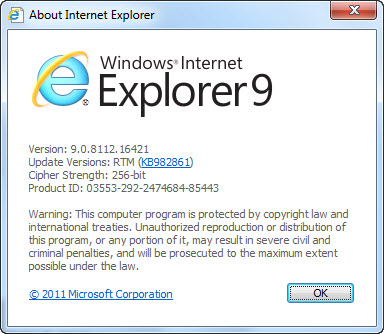
I’m running IE9, but I’m not sure whether it’s the Release Candidate or the final version. How can I tell the difference?

To check the version, click the Tools button (the “gear” icon) in the top right of the browser window, and then click About Internet Explorer.

The final version should say RTM.
How do I uninstall IE9? It’s not in the list of installed programs.

That’s because it’s considered an update to Windows, not a program. To find the uninstall link, open Control Panel, go to Programs and Features, and click View Installed Updates. (You can also type Installed Updates in the Start menu search box to find a direct link.) Scroll down to the Microsoft Windows section to locate the update. Or, to skip the scrolling, click in the search box and type Internet; that should filter the list to show the Windows Internet Explorer 9 link. Click that link and then click Uninstall. You’ll need to restart your system to complete the uninstall process, after which your previous version of Internet Explorer (IE8, if you use Windows 7) will be available.

See the next page for answers to questions about customizing and using IE9.

Page 2: Filtering ActiveX, making room for tabs, and more –>

Topics

Ed Bott is an award-winning technology writer with more than two decades' experience writing for mainstream media outlets and online publications.

Disclosure

Ed Bott

Ed Bott is a freelance technical journalist and book author. All work that Ed does is on a contractual basis.

Since 1994, Ed has written more than 25 books about Microsoft Windows and Office. Along with various co-authors, Ed is completely responsible for the content of the books he writes. As a key part of his contractual relationship with publishers, he gives them permission to print and distribute the content he writes and to pay him a royalty based on the actual sales of those books. Ed's books written prior to fall 2011 have been distributed by Que Publishing (a division of Pearson Education) and by Microsoft Press. As of November 2011, Ed is a partner in the independent publishing company Fair Trade Digital Exchange, which exclusively publishes his books.

On occasion, Ed accepts consulting assignments. In recent years, he has worked as an expert witness in cases where his experience and knowledge of Microsoft and Microsoft Windows have been useful. In each such case, his compensation is on an hourly basis, and he is hired as a witness, not an advocate.

Ed does not own stock or have any other financial interest in Microsoft or any other software company. He owns 500 shares of stock in EMC Corporation, which was purchased before the company's acquisition of VMware. In addition, he owns 350 shares of stock in Intel Corporation, purchased more than two years ago. All stocks are held in retirement accounts for long-term growth.

Ed does not accept gifts from companies he covers. All hardware products he writes about are purchased with his own funds or are review units covered under formal loan agreements and are returned after the review is complete.

Biography

Ed Bott

Ed Bott is an award-winning technology writer with more than two decades' experience writing for mainstream media outlets and online publications. He's served as editor of the U.S. edition of PC Computing and managing editor of PC World; both publications had monthly paid circulation in excess of 1 million during his tenure. He is the author of more than 25 books on Microsoft Windows and Office, including the recently released Windows 7 Inside Out.

103
Comments

Join the conversation!

Just In

RE: IE9 FAQ: how to install, uninstall, and tweak the final release
Gisabun 28th Jul
@relovick : MS won't fix it. If Quickbooks requires an older version, they'll have to fix their app to work with IE8 and 9 [and 10].
XP is officially out of the mainstream support phase and is not eligible for updates like this. Plus, many of the features are specifically tied to Windows features found only in later versions.

I wish users better understood these two statements. But alas, all they ever understand is that XP still has a greater (Shrinking) share, therefore IT MUST be supported!
@Cylon Centurion 0005 It is a shame, as I'd love to run IE9 on my work laptop and set it up for customers still using XP. I can imagine why it would be too much effort to make an XP-compatible version, but I'm not happy about it.

Really, I still think it's going to take quite a long time for XP to fall out of mainstream usage. Windows 8 will have to be incredibly desirable and lightweight to convince businesses and old-timers who prefer to stick to what they know!
@Imrhien: Windows 8 will have to be incredibly desirable and lightweight to convince businesses and old-timers who prefer to stick to what they know!

...would they want to upgrade to IE 9? This "reasoning" has always puzzled me. People want to retain Windows XP but want to upgrade everything else? Same thing happened with Vista. People wanted to use 10 year old hardware with Vista.

We continue to hear stories of people wanting to upgrade but not really wanting to upgrade. If you want to use the latest and greatest you'll have to upgrade to the minimum required to support that thing.
@ye This "reasoning" has always puzzled me. People want to retain Windows XP but want to upgrade everything else?

Sure... it's a lot less scary to upgrade a program, than replacing your OS. Imagine someone taking their PC to BB and asking the "Geek Squad" to upgrade their XP to Windows 7 and hearing... OK, we'll have to wipe your system to do it. Or better yet, you'll need a new PC...
0 Votes
+ -
@Badgered: Sure... it's a lot less scary to upgrade a program, than replacing your OS.

...it's unlikely there are significant numbers of people who refuse to upgrade from Windows XP and want to upgrade to IE 9. I suspect most Windows XP users wanting to upgrade to IE 9 will not have a problem remaining on IE 6, 7, or 8 when the learn Windows XP will not support 9.
@Imrhien
"I can imagine why it would be too much effort to make an XP-compatible version, but I'm not happy about it. "

They could, but since most of the really cool new features are not supported by XP, to the average user it would appear to be nearly identical to IE8, making it one of the most redundant software 'upgrades' ever.
@Imrhien

It is my hope that businesses won't be using XP past 2014. Heck by next year share should be insignificant.
@Imrhien

MS-DOS!
@Imrhien I think alot of businesses havent gone to windows 7 because vista was such a load of crap and alot of businesses have decided to stick with XP because of the mistrust Vista has engendered now here comes IE9 and XP users are left out in the cold and it just engenders more mistrust because Safari, Chrome and Firefox sure dont have issues running on different OSes....
0 Votes
+ -
KineticArtist said ...
mwagner@... 13th Apr 2011
@Imrhien ... "I think alot of businesses havent gone to windows 7 because vista was such a load of crap and alot of businesses have decided to stick with XP because of the mistrust Vista has engendered ... "

Frankly, I do't think so ...

Businesses who avoided Vista early on were businesses with limited IT experience. They made the right choice - not because Vista was particulalry bad (it really wasn't) but because third-party hardware and software vendors were not prepared for the demands of Vista. These ISVs had been violating published Windows programming practices for years, and it caught up with them when Vista started enforcing published XP programming practices.

It took a year for those ISVs to fix their stuff but by then the damage was done. Windows 7 was the beneficiary of these ISV efforts to finally fix their stuff.

Today, the only business XP hold-outs are of a mindset that they will never switch until something breaks. When that happens - they are going to spend a lot more time and money fixing what's broke than they would ever have spent if they had been phasing-in Windows 7 (with XP-mode, if necessary) over the last couple of years.

(Think of the ostrich with its head in the sand.)

As for the individuals (or even the mom-and-pop shop), they are used to buying a computer and using it (usually without upgrades) until the computer "breaks". There is nothing that will convince them - and it probably doesn't matter - at least not until they need to upgrade something. Then they will go out an buy a new computer, new peripherals, and new software all at the same time.
@Imrhien

The API's that are used in IE9 for GPU acceleration among other things are not built into XP nor would MS invest something along the lines of SP4 rebuild of a 10 year old OS just so IE9 could run.

A not for the editor, for the lazy people who don't know what version of IE9 they are running (Beta, RC, RTW) simple enough to say it is best to run RTW all they have to do is click the gear and if they see "feedback" in the list at the bottom they are using a non-RTW build.
@Imrhien ... and more importantly, stick to what WORKS! If IE9 et al provide nothing they need, what is the sense of updating? And don't give me that BS about it beign secure; it will NOT be any different than any of their past releases.
0 Votes
+ -
A bigger issue with "hanging onto XP"
destockwell 13th Apr 2011
@Imrhien, Badgered and others: So tell me, if "businesses and old-timers" are still running a ten-year-old operating system, on what must be at least three-year-old hardware, what do they do when they are forced to upgrade because their hardware breaks down...as it ultimately will? Are they all running frequent and complete backups so that when the hardware breaks they can migrate to their new systems without losing everything?
Aha...I thought not.
0 Votes
+ -
If you're on XP, just use something else! If Microsoft won't support it for long, go to another browser: since Firefox > IE8 (and 9 because of AdBlock Plus). It's faster, anyways.

And, it's not like Firefox is impossible to roll out to users: there's a way to set what Firefox can and cannot do, implement through a GPO script (though Group Policy doesn't include Firefox entries it has scripts that will copy the configuration file to where it needs to go). You can even tell it how to use extensions that you can roll out through that script anyways!

So anything else on XP is a pure waste.
@ye ...it's unlikely there are significant numbers of people who refuse to upgrade from Windows XP and want to upgrade to IE 9.

You're probably right... They probably wouldn't know it existed. It would be interesting to see a study on the number of XP owners who given the choice would "want" to upgrade their OS and/or upgrade their browser to more secure platforms knowing what's involved.
@Imrhien

I agree totally. Plus in my case, I have about $20,000 in software that will not work with an OS newer than XP.

Newer versions for Vista or 7 are not an option due to cost and or availability. Actually I have several critical applications where the new versions still do not work reliably on Win 7.

By in large, the only apps that work right are the MS ones. Everything else is spotty.
0 Votes
+ -
Here is the infinite arrogance of windoze
ScorpioBlue Updated - 13th Apr 2011
How do I uninstall IE9? Its not in the list of installed programs.

Thats because its considered an update to Windows, not a program.

AH, IT'S NOT A PROGRAM! It's an "update" to WINDOZE!

Here's where the old bundling habit never dies.
  • Flagged
@Cylon Centurion 0005 But alas, all they ever understand is that XP still has a greater (Shrinking) share, therefore IT MUST be supported!

I think it's probably more like "it's the OS I'm running, therefore it should be supported". Somehow I doubt the average user knows too much about OS shares, nor would they care.
@Badgered

True, true.
0 Votes
+ -
Correct
cornpie 13th Apr 2011
@Badgered That group of people will not upgrade their OS anyway. They have XP because that's what was on the computer when the bought it and when they buy a new computer, they will go with whatever version comes with that.
@Badgered ... I think it's more like "It doesn't offer me anything I need or even want. Why switch?"

I'm at IE8 now but stayed with IE6 without problems for a long, long time, refusing to fiddle with Vista or Vista+, err, excuse me, win 7.
I'm currently using XP on a win7 machine. Dell provided both sets of disks, 7 & XP Pro, so if MS does finally kill XP by say, 2020, I'll still have 7 ready to use unless I finish my split and have found a way to use a 'nix instead.
0 Votes
+ -
@cornpie, correct, but...
Cylon Centurion Updated - 13th Apr 2011
There are die hard XP lovers out there who simply refuse to upgrade, but need Windows yet for an application or two. It's these people you hear yelling and screaming that Microsoft has cut support for XP. They're not upgrading, and are appalled Microsoft won't support their lifestyle by releasing new software and (non) security updates for it.
These are the ones still running XP on core i7 machines, thinking they're "1337" for doing so.
0 Votes
+ -
The Centurion reminds us: XP is the antichrist!
klumper Updated - 13th Apr 2011
@Cylon Centurion
There are die hard XP lovers out there who simply refuse to upgrade, but need Windows yet for an application or two.

It's not a matter of refuse , but choose (as in, choose not to ). Big difference, no matter how you choose to characterize it.

It's these people you hear yelling and screaming that Microsoft has cut support for XP. They're not upgrading, and are appalled Microsoft won't support their lifestyle by releasing new software and (non) security updates for it.

Very few XP users are yelling or screaming over IE9. Moreover, MS has not ended support for XP, we're barely into the five-year extended support phase for both business and consumer editions of the OS. Nobody I know is appalled Microsoft "won't support their lifestyle" by releasing "new software" for XP.

Some may be disappointed with the IE9 cutoff considering it was likely doable for XP, but that's what Firefox, Chrome, Opera and other alternative browsers (beyond IE7/IE8) are there for - to take up the slack!

These are the ones still running XP on core i7 machines, thinking they're "1337" for doing so.

"1337" as opposed to mice on a treadmill? Most are simply trying to save a buck (which you blithely disregard), choosing to stick for now with Microsoft's most popular OS ever. Not everyone got bit in the ass by XP like you did as you entered the computing realm, yet you persist with your 'XP is the antichrist' schoolboy prattle. plain Ah to be a noob again.
0 Votes
+ -
Good rundown
klumper 13th Apr 2011
on Microsoft's latest and greatest.
0 Votes
+ -
Message has been deleted.
Loverock Davidson Updated - 14th Apr 2011
0 Votes
+ -
Message has been deleted.
mwagner@... Updated - 14th Apr 2011
0 Votes
+ -
Message has been deleted.
klumper Updated - 14th Apr 2011
0 Votes
+ -
Pat themselves on the back?
klumper 14th Apr 2011
@mwagner@...

It could just be that some individuals and businesses simply want to save a few hard earned bucks Marc, whether by choice or because they are in no position to choose otherwise. You did notice this persistent recession all around us, right?

To all the mice panting on their treadmill of choice: HELLOOOOOOOOOOOOOO
Great FAQ! Everyone should read this. I love IE9, its absolutely beautiful and works very well.
0 Votes
+ -
is utterly ridiculous. It's a simple web browser. Updating it should be just as simple.
0 Votes
+ -
It really is just as simple
cornpie 13th Apr 2011
@Michael Kelly The wholeout cry over "OMG do I use the 64 or 32 bit version" was BS to begin with. If you are someone that can't figure it out, then you are probably also someone who shouldn't care so just choose whatever Windows Update if offering and you will be fine.

The rest is just the same as getting used to a different version of any program. As far as displaying and using the toolbars ect, someone could just as easily have written a very similar FAQ for Firefox users upgrading to Firefox 4.
At least it's shorter than Mozilla's Firefox 4 FAQ (http://www.mozilla.com/en-US/press/faq/fx4/).

And updating it is simple.
0 Votes
+ -
And itWOULD be ...
mwagner@... 13th Apr 2011
@Michael Kelly ... if Microsoft didn't change all of the default settings without acknowledgement or explanation.
0 Votes
+ -
BLOG: Concise and to the point
TAPhilo 13th Apr 2011
Well done!
0 Votes
+ -
IE9 demands SP1 on Vista
pmansbach@... 13th Apr 2011
I haven't read this anywhere. But IE9 refused to install on my original Vista (with all critical upgrades). Since the SP1 install failed, it appears I can't use IE9 either.
@pmansbach@...

If I were you I'd start looking into the reason why you cannot update to SP1. Usually there is an answer if you know how to troubleshoot it. And usually there is an error code that can be Googled to help you out.
@Michael Kelly ... what happened and they will give you step-by-step instructions, and a full standalone download of Vista SP1 so you can fix it. Ignoring a problem like this invites problems down the road.
My problem with "upgrades" such as IE9 and W7 is that so many things are turned off and they require jumps through hoops to turn them on again. Such as QuickTabs and the RSS tabs in IE9, QuickLaunch and the abysmal search function in W7. Word 2007 also has issues like that, and the help screens are often less than helpful in trying to figure things out. If they can be figured out.
Maybe some people don't care about some of these missing or dysfunctional features, but some of us find that price is steep to transfer to the latest version.
You are all missing the point!
Upgrading IE 7/8 to 9 = FREE.
Upgrading XP to Vista/7 = $$$.
And, this is assuming no replacement cost of hardware to run Vista/7.
It's not about refusing to leave some OS they are comfortable with.
If MS *really* wanted to accelerate the phase out of XP they should make their upgraded OS free. We all know that will never happen.
0 Votes
+ -
Yeah
Michael Alan Goff 13th Apr 2011
It's like they're a business whose main goal is to turn a profit or something.
@mfine@... That's a good business model...let me know how that works for you.
0 Votes
+ -
The point is...
haugens 13th Apr 2011
@mfine@...
That is the core of the issue of why so many people are still on WinXP. Good call!
It's not just that it cost some money. Purchasing a new OS (from MS) will set you back about $200+. The problem is that you might gain nothing at all in performance. As seen in the past, upgrading Windows might just clog up your computer with a bunch of fluff that you really don't want anyway. Too often the new code uses too many resources due to sloppy programming and requires a new PC purchase in the long run when performance of your "upgrade" essentially strangles your PC.
As MS continues to make obsolete products which work great on the hardware of the time in which it was designed, more people are switching to Linux to get the most out of hardware that is still perfectly functional and powerful enough to do the job.
Not everyone wants or needs the computing power of an I7 processor paired with all the graphics capabilities, bells and whistles, with the Windows 8 and IE 9. Some people just want to keep up with their email and poke around on Facebook and there is nothing wrong with that. Feel free to leave them in the dust with the technology, but I think it sucks that they will be left without security updates for their software just because it is not state of the art.
0 Votes
+ -
@haugens

10 year old products? Wow, that's awesome. I thought MS was the only one who did that. Oh wait, they don't!

OS X continues to release fixes and new software that runs on OS X.1 right? They don't? Oh, nevermind. They get a pass, it's Apple. There is only a problem if Microsoft doesn't support their OS forever.
0 Votes
+ -
Oddly ... you missed the point!
mwagner@... 13th Apr 2011
@haugens ... What you describe are problems which hound XP to this day - but NOT Windows 7. The add-ons which bogged down your old XP box are not needed to keep Windows 7 performing well. On a 1GB system, XP SP3 ties up more RAM (at idle) than Windows 7. There is lots of free AV software and the free Windows Live suite makes it possible for the small business to do nearly everything they need to do.

If, as you say, "people just want to keep up with their email and poke around on Facebook", they don't need to upgrade from XP. They also don't need IE9 (the subject of this post) either.

They DO need to be aware that in 2014, security updates for Windows XP will cease. They also need to be aware that new software may not be compatible with XP as 2014 approaches and said software will expect a much more powerful machine than the one they have.
@haugens
No they will buy a $450 PC with multi-core, 4gb RAM and Win7 Home Premium. Anytime I get a support call for somebody on an older machine and I estimate that it will cost at least $200 to take care of thier problem, I get them into a new machine. That way Win7 costs about $20, well actually Win7 machines are cheaper than Linux machines because of the crapware payments. Then I charge to remove the crapware so the price is a wash.

FYI the boot time of Win7 32 Home Premium and Ubuntu notebook is the same on a couple of single processor Pentium laptops I have tested.
0 Votes
+ -
I call FUD!
Wolfie2K3 13th Apr 2011
@haugens
First off, you can find upgrades to Home Premium or Professional for FAR under $200. A quick check of Ebay will net you a full - not upgrade - copy for about $100.

Secondly, your comments with regards to "sloppy programming" and such, tells me you've NEVER used Windows 7, nor likely seen it running anywhere. When Microsoft was writing Windows 7, they went out of their way to streamline code and make it work better and more importantly - FASTER.

Third, If more people are switching to Linux, then how is it their market share keeps shrinking..? I believe I saw something about 9 months or so ago that had the peak market share at about 1.1%. Since then it's been a steady drop down to 0.7%. If what you're saying is true, then you'd think the share would actually be going UP.

Fourth... Linux has been around for what - 17 - 18 years now... Now seriously... Do they still produce security patches for old versions of the OS that was released in 2001..? More than likely, the bugs in question were fixed - in a newer version and the user would be directed to -- wait for it -- upgrade.
@mfine@... : No. Microsoft wants you to get away from XP. Why is it that no one complained when you couldn't install IE8 [and IE7] on Win 2000 but are bellyaching because IE9 on XP? It has always been MS's policy that for the last 5 years of an OS's life, there will be no updates to any components. Yes. MS shot themselves slightly in the foot as some XP users will switch over to another browser.
All I know is that the Release Candidate broke one of my favorite games. Once I uninstalled it, the game resumed functioning. Makes me scared to death to reload IE9.
@fnbush@... Errr. That's why it's a RC. You take your chances installing a beta/RC/preview on a "main" computer.
0 Votes
+ -
IE9 doesn't work with Javascript
bradalawrence@... 13th Apr 2011
hello,

Just a note, in IE9...old javascript doesn't work. I don't know whose fault this is...Microsoft or the makers of javascript. I say MS. But radio buttons with javascript no longer work with the new version of IE, unless you run it in compatibility mode. I have an app that I now have to recode and I guess Youtube is also having issues because they use radio buttons as well. Can't they every test these things before sending out releases?
@relovick : MS won't fix it. If Quickbooks requires an older version, they'll have to fix their app to work with IE8 and 9 [and 10].

Join the conversation!

Formatting +
BB Codes - Note: HTML is not supported in forums
  • [b] Bold [/b]
  • [i] Italic [/i]
  • [u] Underline [/u]
  • [s] Strikethrough [/s]
  • [q] "Quote" [/q]
  • [ol][*] 1. Ordered List [/ol]
  • [ul][*] · Unordered List [/ul]
  • [pre] Preformat [/pre]
  • [quote] "Blockquote" [/quote]
ie8 fix
ie8 fix

The best of ZDNet, delivered

ZDNet Newsletters

Get the best of ZDNet delivered straight to your inbox

Facebook Activity

White Papers, Webcasts, & Resources
ie8 fix
ie8 fix