Office Starter 2010 drops the crapware, adds ads

You've already seen most of Office 2010. It was released to manufacturing two months ago and has been widely available to Microsoft partners and anyone with an MSDN or TechNet subscription. (Check out "Office 2010: a deeper dive" for more details on what's in the full version.)
But the one Office 2010 version you probably haven't seen is the elusive Starter edition. Microsoft hasn't made review copies available to the press, but they did make the software available last week to partners who want to preinstall Office on new PCs for sale with Windows 7. I've had a chance to test a couple of new PCs with Office preinstalled. Here's what you'll see if you buy a new PC with this Office edition included.
For a detailed look at what's in Office Starter 2010, see my complete screenshot gallery.
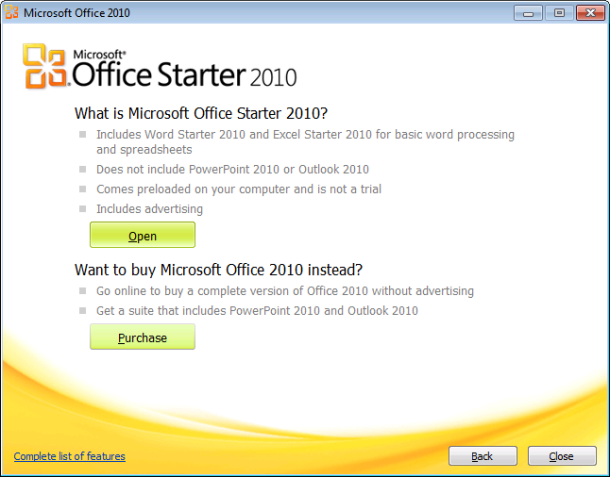
Office Starter 2010 includes only Word and Excel, in stripped-down versions designed to work well with basic documents but without access to advanced features. In fact, Microsoft pulls no punches in its communication with OEM partners, who have specific instructions set out in section 5D of the license agreement:
You will provide the following notice in a clear manner to End Users before they buy the Product (e.g, in technical specifications, advertisements, packaging and point of purchase materials):
"This PC is preloaded with reduced-functionality versions of Word and Excel that include advertising. It does not include PowerPoint or Outlook. Purchase an Office 2010 Product Key to activate full-featured Office software on this PC."
Reduced functionality? Advertising? It sounds like a horror show, but the reality is nowhere near as frightening as that description.
It's also a marked improvement over Office 2003 and Office 2007, which were typically installed as trial versions on new PCs and pretty much set the bar for the crapware category. If you accepted the trial for either of those editions, you got the full Office program to work with, but only for 60 days. After the trial period ran out, you had to pay to continue using the software. Office Starter 2010, by contrast, never expires. You can continue using it for as long as you own your PC.
So what's in Office Starter 2010? Let's get the mechanics out of the way right up front: As a retail customer, you can't buy Office Starter 2010 in a store or online. It's available only to PC builders who use the OEM Preinstallation Kit to install the Microsoft Office 2010 Single Image, which installs Starter edition but also provides the setup files for other Office versions. OEMs are encouraged to include a referral code with each preinstallation, so they can get a commission when users upgrade to a full Office version. They're also encouraged to install the Bing Bar (a browser add-on that works with Internet Explorer and Firefox), Windows Live Essentials, and Microsoft Security Essentials. (As my colleague Mary Jo Foley notes, OEMs gets a significant price break if they install the Bing Bar and Windows Live Essentials with Office Starter.)
An OEM can make the preinstallation process as easy or as difficult as they want. For low-volume installations, you can run a batch file and have Office ready to run for the first time in a matter of about 10 minutes. Or you can script the installation along with Windows 7 setup, adding branding, a referral code, and other custom settings. The first time an end user runs Office, they're given three options: activate Office with a key they've already purchased; go online to purchase a product key; or use Office Starter 2010.
Next page: What's included? What's missing? -->
<-- Previous page
The most obvious things missing from Office Starter 2010 are the other members of the Office family: PowerPoint and OneNote and Outlook, in particular. The installer adds a few new shortcuts in the Microsoft Office 2010 group on the Start menu. When you first start Office, it asks for your name and initials, downloads some installer files from the Internet, helps you set up Automatic Updates, and then opens Word with a "getting started" document.
If you've already used 2010, you might not notice the differences in Word immediately. The commands available on the Home, Insert, Page Layout, and Mailings tabs are virtually identical to those on the full Office versions. What's missing? Tabs containing commands for advanced features: References, Review, View, and Add-ins, to be specific. A few of the commands normally found on those tabs have been moved in Starter edition. The Spelling command, normally located on the Review tab, gets moved to the Home tab in Office Starter 2010. You can't review documents and track changes among multiple authors, nor can you build an automatically formatted table of contents. Among the features that are still present are the full set of new picture-editing tools in Office 2010. Interestingly, the notoriously difficult mail-merge feature is also intact in Word Starter.
Excel follows a similar pattern. In terms of formatting, data entry, and charting, you can do anything in Excel Starter that you would normally do in the full Office versions. The missing tabs in this case include Data, Review, View, and Add-ins. Thus, you can't insert comments into a worksheet, nor can you connect to an external data source or build a PivotTable. If you try to open a workbook that contains a PivotTable prepared using the full version, you see the results of the PivotTable, but you can't edit it or change its configuration. For that you'll need the full version.
[In the Talkback section, reader DVM provide links to two Microsoft-published articles that list features not fully supported in Word Starter and Excel Starter.]
The most interesting new feature in Office 2010—Backstage view—is essentially unchanged in Word and Excel Starter. You can view recent files, inspect document properties, use sample templates or download additional templates from Office.com, and turn any document or worksheet into a PDF file with one click.
So what's the catch? Just look on the right side of the program window, where you'll see a pane whose width is fixed at 210 pixels (including borders). It includes a skimpy selection of help links, but its real purpose is the square-format ad at the bottom of the pane. Currently, that square contains ads from Microsoft—encouraging you to upgrade to a full version, get free templates, and perform other Office-related tasks. But the license agreement makes it clear that that space could be turned over to third-party advertising at any time. (Custom ad settings allow you to opt out of personalized ads and receive generic ads only.) There's no supported way to make the ad pane disappear or to shrink it. If you're using Office on a smallish monitor and you open task panes for search, styles, and so on, you might find that you have to reduce the document magnification to see full pages without scrolling.
At least in terms of features, Office Starter is still an improvement over the corresponding Office Web Apps. The commands available in the web apps are extremely stripped down, and some graphics-intensive documents simply don't render properly on the web. I haven't seen any similar issues with documents I opened using the two Starter programs.
One of the most interesting features of the new package is a feature you won't find in any other Office edition. Using the Office Starter To-Go Device Manager, you can copy the files for Word and Excel Starter to a USB flash drive and take it with you on the road. (As the screen shot below makes clear, the installed files use less than 400 MB of space.) You can then use the flash key to run either or both programs on any Windows PC. You can save files just as you normally would; when you remove the flash drive it wipes all traces of your work from the guest PC.
Ultimately, Microsoft is hoping for upsells—lots and lots of upsells. Every time you turn around, you'll find a Purchase button—in the initial setup screens, on the Home tab in Word and Excel, and on the Info and Help tabs in Backstage view. But there are no nag screens—none at all—and no time limits. If you're willing to put up with a few ads and a working window whose width is constrained by the ad pane, you can do a surprising amount with Office Starter 2010.
Update 15-Jan: Microsoft's purchase page for upgrading from Office Starter has now gone live. If you click one of the Purchase buttons you're taken to this page, which allows you to purchase Office Home and Student 2010 for $120 or Home and Business (which includes Outlook) for $200, direct from Microsoft. The page also includes links to Microsoft partners like Best Buy, Amazon, and Walmart, where upgrades are also available, in some cases at a discounted price.