Vista Hands On #9: Use Vista for four months, free

Summary: Looking for real Windows Vista secrets? Everyone knows you can install Windows Vista in evaluation mode for 30 days and reset the countdown timer three times, giving you a free evaluation period of 120 days. The trouble is, you have to remember to type the magic command every 30 days or you're deactivated. Unless you know the real secret, which uses another Windows feature to automate the process. I've got the never-before-published details here.
As I pointed out in yesterday's Vista Hands On installment, you can install an evaluation copy of any Vista edition and use it for a minimum of 30 days without having to activate it. As several publications have already noted, you can renew this evaluation period a total of three times, extending the evaluation period to roughly 120 days. But this post contains a secret technique that no one has yet published: how to automatically "rearm" the trial period at the end of each 30 day period.
The not-so-secret technique is simple: Open an elevated Command Prompt window (type cmd in the Search box, right-click the shortcut, and choose Run As Administrator from the shortcut menu). At the prompt, type slmgr.vbs -rearm and press Enter. Restart your computer. Done.
The trouble with this technique is you have to remember to do it. If the 30-day deadline passes while you're away from your computer, you'll find yourself deactivated. Here's how to handle the task automatically:
1. Click Start and type task in the Search box.
2. Click the Task Scheduler shortcut and click Continue when you see the UAC prompt.
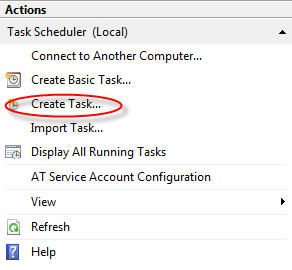
3. In the Actions pane at the right of the Task Scheduler window, click Create Task.
4. Open a Command Prompt window (it doesn't have to be elevated), and type the command slmgr -xpr. Make a note of the date and time when the initial grace period expires.
5. On the General tab of the Create Task window, give the task a name, click Run whether user is logged on or not, and select the Run with highest privileges check box, as shown here.

6. On the Triggers tab, click New and fill in the dialog box to create a One Time task using a date and time that is before the end of the initial grace period, as calculated in Step 4. Click OK.

7. On the Actions tab, click New. The default action in this dialog box is Start a program. Fill in slmgr.vbs for the name of the program and add -rearm in the Add arguments box, as shown here. Click OK.

8. Click OK to save the task. Enter your password when prompted (this is what allows the task to approve the UAC consent request on your behalf).
Repeat this process for the second and third rearm task, making sure to choose dates that are less than 30 days after the task you just created. As long as your computer is turned on when the scheduled date and time arrive, the task will run and you'll get your renewal.
Kick off your day with ZDNet's daily email newsletter. It's the freshest tech news and opinion, served hot. Get it.
Talkback
Version Question
I've tried that ...
Key is version -specific
complete re-install
Great, but what about the License Agreement?
After all, the RIAA is going after college kids and universities again, so who is to say Microsoft won't use this against us later?
Inquiring minds want to know!
racingmustang
The RIAA is only going after those college ...
That aside, though, Microsoft has clearly made this EVAL option available for a reason -- it makes it easier for them to offer on-line upgrades which lets them make some extra money without (1) sending the consumer back to the store, (2) sharing those added upgrade profits with a reseller.
The RIAA is going after...
[u]http://arstechnica.com/news.ars/post/20051130-5650.html[/u]
"But the RIAA has been wrong before, as it was in its 2003 suit against Sarah Seabury Ward, a sixty-something sculptor who was accused of downloading gangsta rap. The suit was eventually withdrawn, but the case (and others like it, including one against a dead grandmother) does shed some doubt on the RIAA's ability to correctly identify the infringing party."
I'll have a follow-up on this issue
Gregg's story is here: http://tinyurl.com/2t477n.
Thanks Ed!
racingmustang
Nice job, nice tip
What about Office 2007?
DR
Not to my knowledge
What's interesting about this ...
They're moving to "try before you buy" coupled with on-line product upgrades helps MS become more customer-friendly while reducing its dependency upon shrink-wrapped media -- AND its dependency upon the reseller channel to support upgrades.
Still a reseller channel
It's not "try before you buy"
Can you point me to a trial disc?
How are u getting FREE a CD to do this on?
I realize some will get it free on new PC, or free upgrade on new PC or laptop. So it's already been subsidized. What's the point in not activating it? It's already yours?
borrow one....
Actually, you were scooped on 2/15
Brian Livingston, author of the Windows Secrets series of books (very worthwhile) published this in his Windows Secrets free newsletter on 2/15/07, so your claim is incorrect and you're late to the game, with egg on your face. You might want to check out windowssecrets.com before making those sorts of claims in the future.
And credit where credit is due
Actually