Why you should care about automatic updates for Flash Player

If it seems like you’re being asked to install a new Flash Player update every few weeks, It's not just your imagination.
After a post-holiday lull, the Flash update machine kicked back into overdrive with a February 15 update, followed by another update 18 days later and yet another 23 days later. (I’ve got a complete list of Adobe's long history of Flash Player updates at the end of this post.)
Related:
- How many Flash Player updates is too many?
- Adobe's latest critical security update pushes scareware
- How secure is Flash? Here's what Adobe won't tell you
In general, each of these releases is in response to a serious security issue. Flash-based attacks are still among the most popular ways to infect PCs. A Kaspersky study from August 2011 highlighted the unfortunate role of Flash Player in the malware ecosystem:
For the very first time in its history, the top 10 rating of vulnerabilities includes products from just two companies: Adobe and Oracle (Java), with seven of those 10 vulnerabilities being found in Adobe Flash Player alone. Microsoft products have disappeared from this ranking due to improvements in the automatic Windows update mechanism and the growing proportion of users who have Windows 7 installed on their PCs. [emphasis added]
This is why the automatic-updating feature that Adobe has included in the 11.2.202.228 update, released this week, is so important. If you allow people to decide whether they want to install updates or not, a nontrivial number will just say no, because it’s a hassle. They will ignore prompts and warnings. They will continue using outdated software for which one or more critical updates is available.
The only way to get consistently high update numbers is to deliver and install those updates automatically. Chrome has been very successful with auto-updates. Firefox has moved steadily in that direction as well, and Internet Explorer will begin automatic version updates this year (security updates are already delivered automatically through Windows Update).
Unless you have a foolproof alternative update strategy, you should install this update and enable this feature right away. If you want to check the current settings, open the Flash Player Settings Manager in Control Panel and go to the Advanced tab, as shown here.
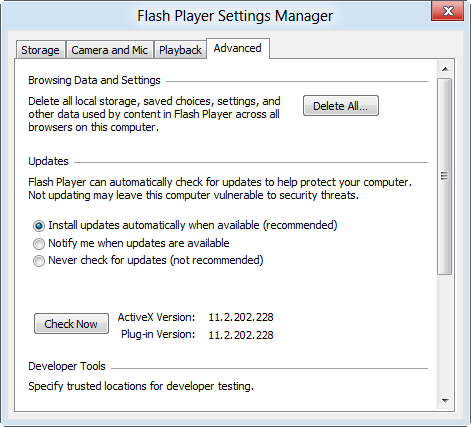
(I had to click a UAC prompt to get to these settings, by the way. I recommend that you set up employees and family members with standard user accounts. If you do, they won’t be able to tinker with auto-updates.)
If you’re not confident about Adobe’s updater, there’s a worthy alternative in Ninite Updater, which also checks for updates (security and otherwise) in other products that are frequently attacked, including Oracle Java, Adobe Acrobat, iTunes, and QuickTime. (For more details, see “My seven favorite Windows 7 utilities.”)
Thanks to Ninite Updater ($10 per PC per yearI saw this message yesterday and was able to apply all three of Adobe’s latest updates with two clicks.
Adobe Flash Player Updates - an updated list
Last October, I did a study of Adobe’s track record (How many Flash Player updates is too many?). The following list contains the most recent updates as of March 29, 2012.Flash Player 10 was released in October 2008. I can’t find any details about updates to the 10.0 release, so my census starts with version 10.1, which was released On June 10, 2010.The primary source is this list at adobe.com.
All of the following updates are for Windows; you’ll find minor variations in version numbers and release dates if you look at other platforms, although the general timeline is the same. In addition, Adobe is still releasing updates for Flash Player version 10, so there’s a corresponding 10.x update for each of the 11.x updates in the following list.
- Flash Player 10.1.53.64 – June 10, 2010 (10.1 initial release)
- Flash Player 10.1.82.76 – August 10, 2010
- Flash Player 10.1.85.3 – September 20, 2010
- Flash Player 10.1.102.64 – November 4, 2010
- Flash Player 10.2.152.26 – February 8, 2011 (10.2 initial release)
- Flash Player 10.2.152.32 – March 8, 2011
- Flash Player 10.2.153.1 – March 21, 2011
- Flash Player 10.2.159.1 – April 17, 2011
- Flash Player 10.3.181.14 – May 12, 2011 (10.3 initial release)
- Flash Player 10.3.181.16 (Windows only) – May 31, 2011
- Flash Player 10.3.181.22/23 – June 5, 2011
- Flash Player 10.3.181.26 – June 14, 2011
- Flash Player 10.3.181.34 – June 28, 2011
- Flash Player 10.3.183.5 – August 9, 2011
- Flash Player 10.3.183.7 – August 26, 2011
- Flash Player 10.3.183.10 – September 21, 2011
- Flash Player 11.0.1.152 – October 3, 2011 (11.0 initial release)
- Flash Player 11.1.102.55 - November 10, 2011
- Flash Player 11.1.102.62 - February 15, 2012
- Flash Player 11.1.102.63 - March 5, 2012
- Flash Player 11.2.202.228 - March 28, 2012
To repeat what I said last fall: Wow, that is indeed a lot of updates.
There have been 21 separate releases of the Flash Player for Windows in the past 22 months, since Flash Player 10.1 was officially released. There was a long gap between November 4, 2010 and February 8, 2011. Coincidentally, there was a nearly identical gap from November 10, 2011 to February 15, 2012. But the pace has picked back up.