Microsoft's big bet: Windows 8's 'too many cooks' problem

Microsoft has only a few months before it releases Windows 8, probably around October in time for Christmas holiday sales.
 The company knows full well how risky the new user interface is, and how controversial are the decisions it has made. In a recent blog post, Windows president Steven Sinofsky opened by explaining the "context" in which Windows 8 will fall in to.
Microsoft wanted Windows 8 to be different and its developers and staff all thought about what "different" could mean. Instead of reaching a compromise or a general consensus, Microsoft seemed to put everything in to please everyone --- but combined, the changes will likely please very few.
Microsoft took the opportunity to explain why it has approached the product in the way it did, while justifying its end decisions. Its attempt to develop an operating system around "converging computing trends" has made way for a "too many cooks" problem. Microsoft has bet most if not all of its chips on these trends:
- Connected all the time: the blend of mobile broadband with the high-availability of Wi-Fi.
- People, not files, are the center of activity: instead of writing and creating, people are more likely to read and socialise, through e-books and social networking.
- The rise of mobile PCs over desktop PCs: laptops are ubiquitous but tablets are increasingly on the rise. By this time next year, tablets could be just as prevalent as laptops. But the word "tablet" actually means "iPad".
- Content is on the PC and in the cloud: from iCloud to SkyDrive and Dropbox, some choose the cloud for all files and documents and others not so much. While major companies are using the cloud, many are unaware of the fact, or actively choose to avoid it.
As Microsoft tries to 'future-proof' Windows 8 against seemingly the world --- with those four points representing the modern shift in modern computing --- very few will find all four things will apply to them.
My argument is simple. Windows 8 has become a "Franken-system" of mish-mashed ideas, thoughts and concepts. Microsoft is desperately trying to make the forthcoming operating system a one-size-fits-all solution to everyone's troubles.
In doing so, the vast changes take too much away from the productivity side of Windows to the 'fun' side of Windows. I suspect enough people have twisted the arms of others to try and make Windows not only visually more appealing, but also more exciting and in touch with the person rather than the person's files. Windows comes close to looking unrecognisable from what it once was.
PCs are still more popular than tablets or iPads. Windows runs on more than 90 percent of all PCs today. Microsoft says we are culturally shifting away from productivity to socialisation. But we still need Windows to be productive. People still want Windows to be "Windows".
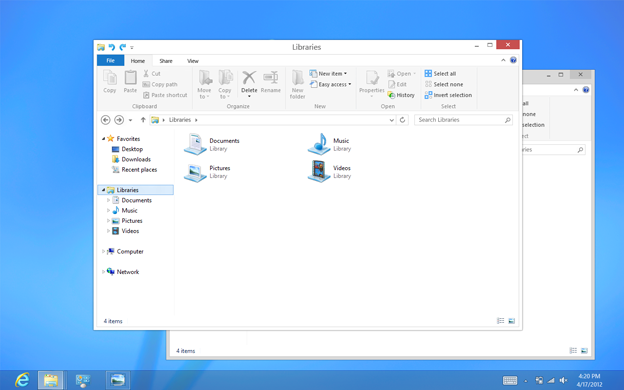
Microsoft has failed in its bid for consistency. From Windows XP to Windows Vista, the visual changes were clear and apparent. From blue windows to transparent windows: if you didn't see Aero, your computer wasn't up-to-date or capable enough. From Windows Vista to Windows 7, to Windows 8 --- from transparent windows to Metro opaque windows --- it's going to throw a lot of people off.
Microsoft may have shot itself in the foot when users eventually crack open Windows 8 only to realise there are no Aero transparent windows, and end up spending hours fumbling around trying to work out "why that driver hasn't worked."
Jensen Harris, Microsoft's director of program management for the Windows User Experience team, explained:
"In 2006, Windows Vista substantially changed the visual appearance of Windows, introducing the Aero visual style. Aero gave the appearance of highly-rendered glass, light sources, reflections, and other graphically complex textures in the title bars, taskbar, and other system surfaces [...] This style of simulating faux-realistic materials (such as glass or aluminum) on the screen looks dated and cheesy now, but at the time, it was very much en vogue."
Whose idea was it to jump back 10 years to the days of Windows XP's style themes? Microsoft wants Windows 8 to look modern, yet it feels as though we're travelling back in time and regressing to an operating system three hops ago.
As for Windows RT, the ARM-powered tablet version of Windows 8, Microsoft's bet in the tablet space is risky. It's already late to the game --- I don't need to tell you that --- and runs the risk of falling flat on its face as it tries to take on the likes of the iPad and less-popular Android tablets.
One of the troubles Microsoft will face is with the association of branding. Apple has disassociated the iPad from OS X. The two are converging but the two are separate operating systems with shared similarities. In Apple's case, it is the iPad twisting OS X.
Microsoft brings Windows 8 to both the PC and tablet in vastly the same aesthetic frame. Though the 'Windows 8' and 'Windows RT' names will differentiate the desktop from the tablet version, the two systems are arguably too similar with too few dividing factors.
Windows 8 won't be a complete disaster, but it won't be what Microsoft wanted it to be in the first place. Too many have stuck their oar in to claim what works best for users in this crazy day and age of shifting values.
Like an Obama campaign, Microsoft's word is "change". Change here, change that, change everywhere. With other operating systems, it's a slow build-up of development and evolution to shape the experience instead of drastically chopping away at huge chunks of the aesthetics with an axe or a machete.
$20 says Windows 9 looks remarkably similar to Windows 7. Any takers?
Image credit: CNET, Microsoft.
Related:
- Windows 8 will "disappoint": Analysts cut price targets on HP, Dell
- Windows 8 tablet hybrids: 'Compromises of convergence'?
- AT&T mobile chief: Windows 8 can boost Windows Phone
- Can Windows 8 tablets be priced low enough to compete with iPad, Kindle Fire?
- Windows 8: Does Metro actually work?
- Five ways to avoid Windows 8
- CNET: Upgrading a new PC to Windows 8 will cost you... $14.99
- Microsoft's Windows 8 upgrade offer: What's coming when
- Windows 8 Metro apps freshen up for Release Preview