ie8 fix
Click Here

Between the Lines

Larry Dignan, Andrew Nusca and Rachel King

My Google Chromebook has arrived: First impressions after an hour

By | December 9, 2010, 9:19am PST

Summary: My Google Chromebook landed via FedEx just about an hour ago. Naturally, I couldn’t resist firing that puppy up. Now this isn’t a full-blown review, but immediate impressions of what I liked and areas that are going to take some work to get used to.

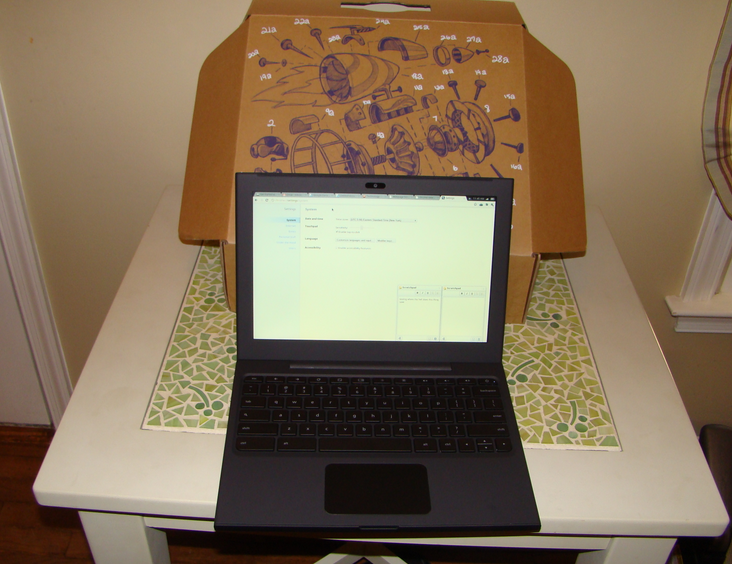
My Google Chromebook landed via FedEx just about an hour ago. Naturally, I couldn’t resist firing that puppy up.

Now this isn’t a full-blown review, but immediate impressions of what I liked and areas that are going to take some work to get used to. The ultimate judge of this thing will be handing it to my 7-year-old daughter. To her, the browser is the operating system.

Gallery: Google’s Chromebook: A brief tour

Here’s a stream of consciousness review. Engadget also served up a first take (looks like the FedEx truck came at the same time):

Hardware:

  • The actual hardware is non-descript and feels like it’s rubberized. The casing feels like something cut from Batman’s rubberized outfit.
  • The keyboard is simplified, but that could be jarring to some folks. For instance, the first thing I looked for was a print screen key. If you blog, print screen is your best friend. I couldn’t quite find this function, but downloaded a free screenshot app for Chrome. It kind of worked.
  • Printing. Hooking up a printer requires Google Cloud Print, which is in beta. The instructions were to go to a Windows PC go to www.google.com/cloudprint, fire up the Chrome browser there and hook up Cloud Print under options. The problem is that Cloud Print wasn’t an option. A few searches indicated that the Cloud Print option is in Chrome 9. The issue: I have the latest Chrome and it’s version 8 and change. Figuring this Cloud Print thing out ate up a good 20 minutes of my first hour. In fact I still don’t have it figured out. Update: Google Cloud Print works well when set up. Update: Biggest item is that you need a developer build of the Chrome browser for the PC attached to the printer.

Software

  • Chrome OS is basically a browser. If you know how to use Chrome, there’s nothing shocking with this Chromebook.
  • The app screen obviously promotes Google items such as Gmail. Getting started is much easier if you have a Google account. There is a guest mode I haven’t played with much.
  • Wi-Fi connectivity was a piece of cake. In addition, the Verizon connection works nicely, but you have to give a credit card number just for the free 100 MB a month service.
  • The Chromebook fires up very quickly. You almost giggle when you close the Chromebook and open it again.
  • If you live in Google Docs—I use it at work—the Chrome OS is easy. If you’re used to saving docs on a local drive and going through folders you’re in for a rude awakening.
  • Why is that a rude awakening? We’re conditioned to be able to poke around on an OS via file folders, start menus and application lists. With the Chrome OS you live in the browser window. There may be an ability to save on a local drive, but not entirely sure.

Bottom line: For a long-time PC and Mac user, the Chromebook is almost too simple. I want to poke around and see the innards of this PC. I almost feel caged by the browser window. What’s under the hood on this thing?

On the surface, that feeling is pretty illogical. I live in a browser at least 80 percent to 90 percent of the time so what’s the big deal? It’s that 10 percent where I want to roam through settings—even though I don’t know what half of them are for.

One thing is clear. This Chromebook is truly a network computer. For some folks that may be a tad jarring. I’m going to give this pup a few days, hand it off to some family members and return with further ideas. The big question in my mind is whether this Chromebook will change that initial feeling of unease after a few days.

Kick off your day with ZDNet's daily e-mail newsletter. It's the freshest tech news and opinion, served hot. Get it.

Topics

Larry Dignan is Editor in Chief of ZDNet and SmartPlanet as well as Editorial Director of ZDNet's sister site TechRepublic.

Disclosure

Larry Dignan

Larry Dignan has nothing to disclose. He doesn’t hold investments in the technology companies he covers.

Biography

Larry Dignan

Larry Dignan is Editor in Chief of ZDNet and SmartPlanet as well as Editorial Director of ZDNet's sister site TechRepublic. He was most recently Executive Editor of News and Blogs at ZDNet. Prior to that he was executive news editor at eWeek and news editor at Baseline. He also served as the East Coast news editor and finance editor at CNET News.com. Larry has covered the technology and financial services industry since 1995, publishing articles in WallStreetWeek.com, Inter@ctive Week, The New York Times, and Financial Planning magazine. He's a graduate of the Columbia School of Journalism and the University of Delaware.

For daily updates, follow Larry on Twitter.

Related Discussions on TechRepublic

Did you know you can take part in these discussions with your ZDNet membership?
118
Comments

Join the conversation!

Just In

Chromebook - First Impressions
PPacie 3rd Oct
I think that the article is good enough. It really describes the first impressions of a person who is buying a new device like that.

Tip:
'There may be an ability to save on a local drive, but not entirely sure.' -> Sure, Google lets you do it. You have 16GB SSD.

We described some other attributes here: http://www.chromelaptop.com

Hope you like them.
This is exactly the issue: "We?re conditioned to be able to poke around on an OS via file folder".

A lot of people think that is an necessity to be able to use a computer. It's not. It's a tough perspective to change quickly, but devices like this and the iPad are making headway with it.
0 Votes
+ -
@casadyc

Each application isolates its data from everything else, making cross application data manipulation impossible in most cases (unless the data resides in one of the iPad's media libraries).

Also, printing on the iPad is a joke. Apple slammed Microsoft over Vista's low compatibility with printers out of the gate in a TV ad, but it's 100x worse with the iPad, only supporting about 10 printers in total, all of which are brand new models.

I use an iPad as my mobile "computer" but I find that I still need a full computer to get around the limitations of it. I've learned to accept the limitations while I'm mobile, but most people can't do that because they want one computer - a laptop that can do everything. I own my own business and I have 3 systems at work that I use, and one system at home connected to a TV as a sort of media/game PC (which also has the iTunes stuff on it for the iPad - Air Video rocks BTW....it even kinda supports DRM content streaming). All of them are desktops. Sometimes I use the iPad as a remote console for one of them when I need to really use a computer. Pages on the iPad is alright, but Numbers has some major features missing. Getting the stuff I do in Pages to paper is not simple though: I have a Mac at the office, and I retrieve the Pages docs from iDisk (which costs extra money...iWork.com is free but in beta, and it mangles docs and takes too many steps) because I don't sync the iPad with the Mac, nor do I have iWork for the Mac. I print them out on a network-connected HP CLJ 2605. Printing over the network from the Mac is EXTREMELY slow too. It's not ideal. I'd like it if iOS printing worked with this printer, but it doesn't. The printer even supports Bonjour....
@Joe_Raby

Have you tried Printopia? It addresses all the limitations of AirPrint.

http://www.ecamm.com/mac/printopia/

Myself, I just put the "fix" on my MacBook to allow AirPrint to use it's shared printer which, in my case, is a Canon PIXMA MFC.
0 Votes
+ -
More like Google's Kin
LBiege 9th Dec 2010
Get ready for the same failure.
0 Votes
+ -
@jmiller1978
Joe_Raby 9th Dec 2010
@Joe_Raby

I tried AirPrint (for Windows) on the Windows Server Codename Aurora system that acts as the print server to the other PC's, and it comes up on the iPad, but it has a lock beside it. Someone in one of the Apple forums said the printer needs Guest access. I tried enabling the Guest account on the domain (something you shouldn't ever do), and it still shows the lock. The person also said that Apple is aware of the issue and is working on it - that's why the AirPrint printer sharing software for desktop systems hasn't been released yet. Apparently they aren't willing to turn this into even more of a beta test than it is right now.

It is a network printer, with a built in print server, with Bonjour enabled on the printer itself. The iPad only supports host-based printing though. It basically just feeds a print spool that has to exist on a computer. The iPad already communicates with computers, but it doesn't talk to printers because iOS doesn't have any printer drivers in it.

Also, none of the stuff I've tried so far is supported by Apple. I'm probably going to wait until a supported application is released that works on a Windows machine. I'm not recommending the iPad at all as a business productivity tool for any business that wants to edit documents meant for print because of the poor support so far. This is DEFINITELY a 1.0 product.
@Joe_Raby

Interesting points but what does it have to do with Google's Chrome OS netbook?
@DNSB "Interesting points but what does it have to do with Google's Chrome OS netbook?"
Nothing. Just another MS troll panning anything and everything not MS.

@jmiller1978 "Have you tried Printopia? It addresses all the limitations of AirPrint."
Nice of you to help, but I suspect he is more interested in bitching than fixing.

Is a computer as easy and intuitive to operate as a telephone or a television? No. Kudos to Google for making an effort to bridge that gap.
@casadyc
> A lot of people think that is an necessity to be able to use a computer.
> It's not. It's a tough perspective to change quickly, but devices like
> this and the iPad are making headway with it.

It certainly is if you want to understand what is going on with a computer, or to be able to fix errors and issues. The 'dumbing down' of computers and devices is only dumbing down the users, at a time when computer literacy is more essential than ever.
0 Votes
+ -
@lefty.crupps ... don't you think?

The difference is between a "tool" and an "appliance". A toaster is an appliance - it does a few things perfectly well.

An iPad is an appliance for consuming multi-media information, photos, print, video, audio. No more, no less.

A hammer is a tool and so is a computer. Neither has a dedicated function. They are are not interchangeable - any more than a toaster or an iPad are interchangeable.

The appliance requires far less knowledge than the tool does to use it properly.

As technologists, we sometimes forget that not everyone needs to know how to use a computer in order to read e-mail, or listen to music, or watch a movie, or play a game.

If you want to create content, however, you might find a computer, as a tool, far more useful than an appliance. Where the Chromebook fits into all this remains to be seen.
@casadyc True. We used to feel the need to poke around under the hood of our cars. I remember people complaining that their engine compartments were too cramped in more modern cars. I don't hear that anymore.

I don't hear too many people complaining that they can't browse the innards of their smart-phones either.
@dimonic A lot of people still poke around under the hood of cars. People love tricking out their machines, and changing oil yourself is generally cheaper than having somebody do it for you.

"I remember people complaining that their engine compartments were too cramped in more modern cars. I don't hear that anymore."

You don't? Well, I do, from the people who like to dig under the hood of their cars. Yeah, there's still people around who like doing stuff under the hood.

There's always gonna be power users for all fields, there's always gonna be those who want to push power to its limits.

And there are still problems with online apps:

-Offline caches are still as fussy as ever. If I'm offline, most of my online stuff still breaks, even the stuff that supports offline use.

-Latency and bandwidth are still a major issues. I still find plenty of places where browsing is painfully slow.

-Games are still mostly outside the browser, and 3D browser games still require a browser plugin. Totally online gamin is still a dream.

-Fully featured applications like Word still have no real equivalent online. The online word processors are still lacking many features of offline applications.

-Gmail's tags still suck.

-I still use Skype.

-Passing documents between different web apps is painful, even impossible without being able to at least save them temporarily to a local location.

-I'm a developer, so I have to use IDEs. I don't really know of anything online that will do the job.

-My instant messaging is still done via local apps.

-I still have some older tools, legacy apps, and utilities that are not available online.

-There's still issues of trust when it comes to online apps. Do I trust them? Will they stay in business? Do I know all of their key employees are trustworthy and won't abuse my data?

Sorry, but there are just too many issues with online stuff for me to be confident in it.
0 Votes
+ -
Smartphones you say?
dwoodeson 9th Dec 2010
@dimonic, you can mess with the innards of blackberries at a minimum (android too probably). I'm still struggling with the lack of tinkering that I can do with the new iPhone4.

On my BB, I could browse the entire file system from the device, or as a drive when connected to my PC via USB. I could look at file properties, move files, etc. There are deep configuration and setting menus that the iPhone4 lacks, and a lot of people even copy in/out entire OS images for testing and other reasons.
0 Votes
+ -
Sure you do.
ye 9th Dec 2010
@dimonic: I remember people complaining that their engine compartments were too cramped in more modern cars. I don't hear that anymore.

You hear it when they reach for their wallet.
@casadyc The OS uses Chrome 9 browser for its user interface, with app icons in its main window. The same interface as the forthcoming Chrome 9 browser for Windows, Mac OS X, and Linux.
http://www.techreign.com/2011/01/chromebook-from-google/
0 Votes
+ -
How come it took so long to get?!!! Sheesh
Dietrich T. Schmitz, ~ Your Linux Advocate 9th Dec 2010
nt
@Dietrich T. Schmitz, Your Linux Advocate : I think Google's acting in a restrained way, just as Apple did with the iPad (which was supposed to be ready in 2006).

That's basically what separates the men (Apple, Google) from the boys (Asus, HP, Acer and even Microsoft with WP7). You need to have all the pieces of the puzzle in place to avoid rolling out a fiasco nobody wants or cares (aka Windows XP Tablet PC and Windows XP Media Center).

All Linux Advocates know that that was the problem with desktop Linux. It was promoted and sold (e.g. Lindows) before it was ready for prime time. Today, only Ubuntu has garner any Desktop footing, but only on the enthusiast front.
@cosuna

Please tell me how it seperates the men from the boys? I'm pretty sure everyone of those companies didn't have everything working out of the gate...
@cosuna - your knowledge of technology history is woefully lacking.

Apple tried to build mobile hand-held computers known as the Apple Newton back in 1992/3 and were a dismal failure.

Google's handling (or mis-handling) and subsequent discontinuation of the Nexus One was a lesson to all who think that launching a phone handset is an easy thing to do.

The fact of the matter is that Google's new netbook is VERY late to the game and is horrifyingly limiting. They're falling into the same hole that McNealy dug Sun into in the late 90's and early 2000's: unless you live in a heavily urbanized area with affordable and available high-speed wireless internet connectivity, ChromeOS is not for you. For Google (and Sun before them), the all or nothing "you must be online" proposition is just too limiting for most consumers and most businesses right now. Perhaps in 20 years wireless internet will be sufficiently ubiquitous, but today, there's nothing compelling about what Google is offering. Everything you can do with their netbook you can already do on any other Windows/OSX/Linux netbook/laptop. But there are a million things that you can do on a netbook/laptop today that you cannot do on a lobotomized ChromeOS netbook.
0 Votes
+ -
bitcrazed, with one difference:
John Zern 9th Dec 2010
with Windows, Apple, Linux you have the choice of what to use and not to use.

from all I've been reading, this sticks you with what Google offers, need a google account to use it.

I've never known anyone that has to have an account someplace just to use their Windows, Apple, or Linux machines, but maybe I've missed something there.
@cosuna
I use XP Media Center qite a bit, so speak for yourself.
As for the subject at hand, i don't really care what Google does, it is none of my concern, I don't intend to jump on its bandwagon, I rarely use them for anything. I had to sign up for gmail to use my phone, but have been to my account once. I do not use it, I have two other services, as well as my work account. I haven't seen apressing need for anyone's tablet or netbook or e-reader as yet, maybe by the time I decide to get one they will work better.
3rd party software? Can I plug in my 3g device for connectivity? It requires a software launcher and driver to run.
3rd Party software may have to be handled through the Web Store ... https://chrome.google.com/webstore?hl=en-US
@dionne.nick@...
>It requires a software launcher and driver to run.
On Windows perhaps, but Linux generally doesn't use these baloney apps to handle networking.
@lefty.crupps ... WHUT? So Linux doesn't need drivers to control hardware devices? And Linux doesn't need software and apps to allow users to operate said hardware?

Wow. Linux truly must be magical after all. I'll go and reinstall all my machines immediately.

Or not.
@lefty.crupps i think you mean it already has the drivers in the OS and doesn't need the crappy software that came with it
0 Votes
+ -
Master Password...
billcheng 9th Dec 2010
My biggest issue with the Chrome browser is that it does not use a master password. So, I assume that the Chromebook would use the same browser. Does it use a master password to secure all my web login passwords? If it doesn't, where can I find out about exactly how it keeps my password safe? If it cannot manage my passwords safely, it's really a non-starter for me.
@billcheng From what I can tell the password is your google account. I need to play around with guest setting.
@Larry Dignan
Thats OK if you only use Google sites, but how does it store the password for all the OTHER sites you use?

i.e. what is the Roboform equivalent if I can't install Roboform?
@Larry Dignan

Chrome has Google sync feature syncs everything that the browsers stores remotely on Google Servers, including your passwords an usernames.
None of this data is accessable with out you Google password an user name. Alternate sync services may become available in the future.
I can see this can fill some voids, but I don't WANT to keep my data "in the cloud" (and am growing to even resent the term). -I- own it, it's -my- data. I've been doing computers for 30 years now, and am not afraid of making my own back-ups.
@David_A_Reed, I can't say I disagree about the ownership of the data, but having universal access to that data, whether on my phone, friends machine, kiosk, or other, sure is convenient. Setting this up without the (sorry) cloud is possible, but much more difficult.
0 Votes
+ -
Then let me access it from my home PC
LiquidLearner 9th Dec 2010
@dwoodeson

I'm okay with storing some things in online storage. But I want to keep lots of things here on my PC. Why not allow me to access both via the same service? Seems logical to me. My connection is fast enough to handle it without any real issue.

Of course I this already with an SSL VPN, but it's still not as convenient as something like Mesh, just without having to sync it online first.
0 Votes
+ -
I agree ...
mwagner@... 9th Dec 2010
@David_A_Reed ...

On-line vendors frequesntly change services and features. Storing your stuff in-the-cloud means that you data could be lost if the service is discontinued or changed in critical ways.

Or, a DDoS or other service provider outage could leave you dead in the water until their service is restored. This is why the enterprise will never move mission-critical data to any cloud not located in an enterprise-controlled machine-room.

Google may very well end up with legions of happy customers willing to store their personal files in a Google-controlled cloud but Google could also find themselves storing huge volumes of data (such as child pornography or pirated movies) for free and finding themselves with an unmanageable mess.

This is a huge gamble for Google. Whether they can pull it off remains to be seen.
0 Votes
+ -
LOL sorry we read at lunch and got a kick out of -
"The instructions were to go to a Windows PC go to www.google.com/cloudprint, fire up the Chrome browser"...just thought that was ironic.
0 Votes
+ -
@ItsTheBottomLine

"No drivers needed. It just works." - Steve Jobs on iOS printing

"If the printer isn't compatible with the iPad, I say, 'buy a new printer!'." - Me

http://www.youtube.com/watch?v=bobo86Ctnks

0:12
@Joe_Raby
Really .. You should investigate "Printopia". You can try it out for free. Sure, this utility is not free (it's ten dollars) but printing now is effortless on my home networked printers. It could save you the effort and time spent creating online rants. Just a suggestion.
@ItsTheBottomLine

Indeed, you might have 100 macs there, 2000 linux desktops, but you have to go out and buy a windows pc to print from your chrome book...lol
@ItsTheBottomLine:
It's beyond ironic--it's ludicrous!
0 Votes
+ -
So let me get this straight...in order to print from the Chrome OS you need a windows machine as well?? What are they thinking? That's just as bad is iPad only working with a handful of printers! Although atleast with iPad there are some great utilities that can be installed on a desktop computer to make AirPrint work with any printer connected to desktop...pretty much how Chrome works I guess. But still, this is definitly a gap that needs to be fixed with printing from ANY portable device. Why don't they just make it as easy as sending an email to your printer? All devices send email, make a printer that accepts emails and prints them for you....BOOM! problem solved!! @ItsTheBottomLine
0 Votes
+ -
Not the best idea
LiquidLearner 9th Dec 2010
@motoxer913

Then all your ink would be gone. Imagine getting spam and coming home from work to find the ink or toner empty and a stack of ads with a black man pleasing a women with a caption that says "this could be your wife if you don't buy extenze today!".
You left off the best feature -- NO CAPS LOCK KEY. (Sorry, couldn't resist.)
0 Votes
+ -
BILLY MAYS
Cylon Centurion 9th Dec 2010
@bradhansen@...

WOULD BE UPSET WITH THIS FACT!
@bradhansen@... I have SEVERAL customers that have antiquated apps that REQUIRE the use of caps throughout nearly every part of those apps! Not least of which to mention that having to have users hold down SHIFT to perform all caps in things like VIN numbers, and serials that include capital letters, again.. ANY concept like removing the standard caps lock is just plain stupid.

Its the users that are broken ... that can't turn OFF caps lock when they are typing someone .. so how about we fix the USERS rather than make such a change to industry standard QWERTY! (think along the lines of an engine mechanic having one clean-ish hand and one absolutely filthy hand, you want them typing with both hands looking up parts?)
0 Votes
+ -
WHat we need to do is . . .
JLHenry 9th Dec 2010
@TG2

Include typing classes in any basic computer training!!

I actually took a typing class in High School (Back in the stone age of the late seventies) on a manual typewriter. When I got my first computer in '82, I could actually type faster than the computer could read the input! (If I remember right, it had a 32 character buffer . . .)
Well, right now I don't want to keep my files in the cloud. I wonder if we went through the same thing when banks were introduced. "It's my money ... why would I trust a bank to keep it for me?" Over time, we may learn to feel comfortable leaving our files with service providers that we trust, but right now I want it on "MY Computer" and backed up on "MY hard-drive" and I'll use "MY flash-drive" to simulate the cloud.
@ChromeHuman

The difference is.......

It is my money that I put in my bank. In the Cloud it is my Clients information, it is the letter to my client, it is their information that I am placing in the Cloud.

That is the difference.
@jsjag You know that any encrypted file (128 bit or higher) is perfectly safe on any cloud... No one can read it except you. That is how Blackberry works.
@jsjag But that the same with investers money, it not my money it my client money why should I trust the banks with it.
@ChromeHuman That's why I'm giving this thing a few days, maybe weeks to see how it goes. A lot of habits need to be broken.
@Larry Dignan I want to give Google chrome OS a go, hoepfully I will get on one of the trials when they come to Britain.
0 Votes
+ -
I think that the article is good enough. It really describes the first impressions of a person who is buying a new device like that.

Tip:
'There may be an ability to save on a local drive, but not entirely sure.' -> Sure, Google lets you do it. You have 16GB SSD.

We described some other attributes here: http://www.chromelaptop.com

Hope you like them.

Join the conversation!

Formatting +
BB Codes - Note: HTML is not supported in forums
  • [b] Bold [/b]
  • [i] Italic [/i]
  • [u] Underline [/u]
  • [s] Strikethrough [/s]
  • [q] "Quote" [/q]
  • [ol][*] 1. Ordered List [/ol]
  • [ul][*] · Unordered List [/ul]
  • [pre] Preformat [/pre]
  • [quote] "Blockquote" [/quote]
ie8 fix

The best of ZDNet, delivered

ZDNet Newsletters

Get the best of ZDNet delivered straight to your inbox

Facebook Activity

White Papers, Webcasts, & Resources
ie8 fix