ie8 fix

Between the Lines

Larry Dignan, Andrew Nusca and Rachel King

Windows 8: Two new 3rd party apps using the new Metro UI

By | August 26, 2011, 1:26am PDT

Summary: With most developers around the world having to wait until BUILD to find out how to develop for Windows 8, some companies are already cranking out Windows 8 apps! See two of them here.

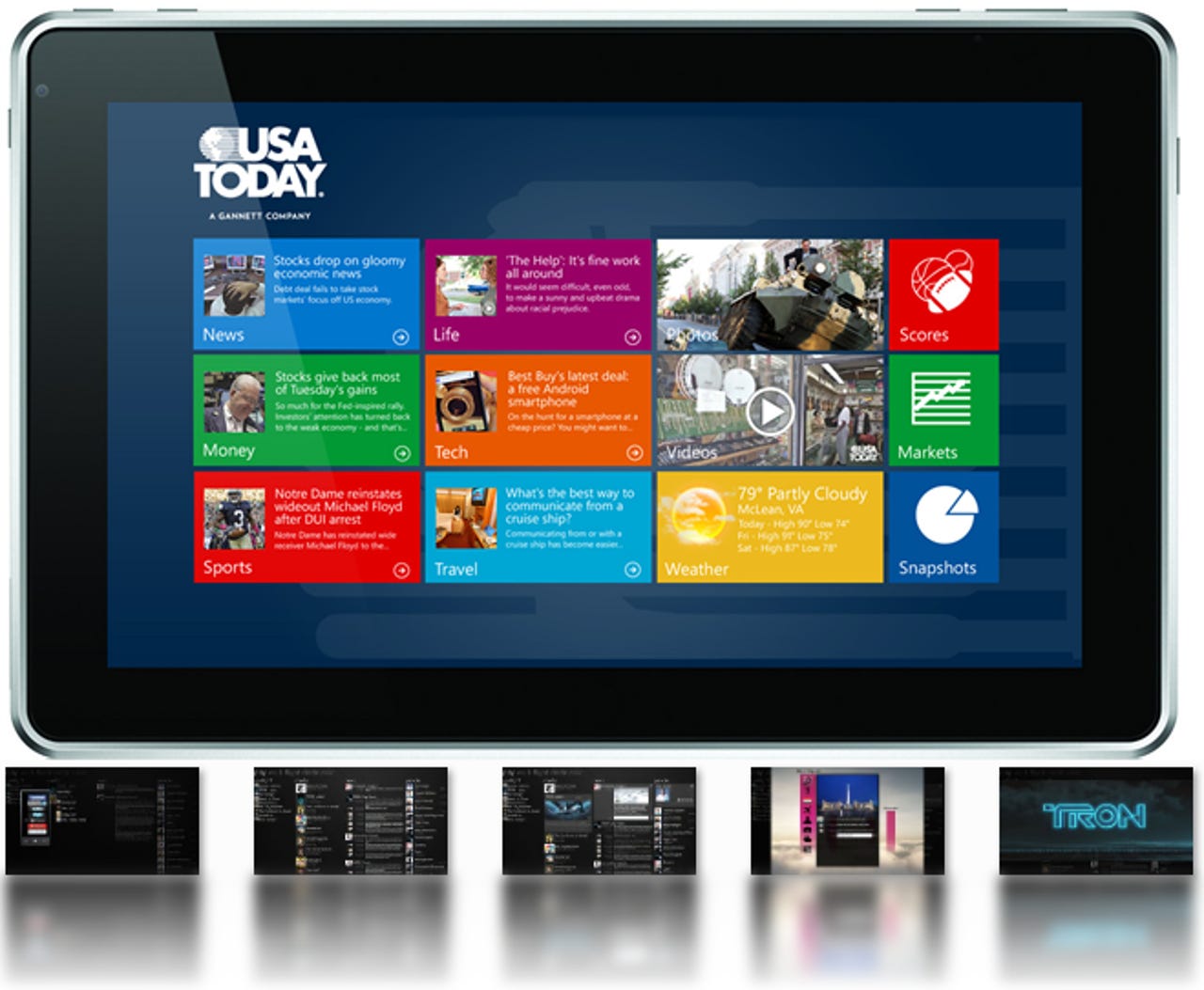
So far, all we’ve seen of applications utilizing Windows 8’s new user interface is what Microsoft has publicly demonstrated. But now, just 2-and-a-half weeks away from Microsoft’s BUILD conference, I’ve managed to unearth a couple of portfolios showcasing the first Windows 8 apps to be seen in the wild by 3rd party, non-Microsoft entities — one of them, being from USA Today. Click on the image below to view the gallery containing all the high-resolution images:

Windows 8 App Gallery

Windows 8 App Gallery

First, you have undoubtedly noticed that the USA Today Windows 8 app is being showcased inside of a tablet/slate device which contains a front-facing camera and a fair share of buttons along the edges. Though the device itself looks unfamiliar to me, perhaps one of you fine readers out there will recognize it. While I’m fairly confident this is just a mock-up image altogether, the fact that the designer has chosen to showcase the app as though it’s running within Windows 8 in a tablet/slate device is rather telling of where they see the trend heading.

To note, I discovered this image within the portfolio of Robbie Dillon, Art Director at USA Today. Alongside the Windows 8 app image, Robbie says the following:

In preparation for the Windows 8 release, this app is being built to take advantage of the touch-first, native environment of Windows 8, while retaining the look and feel of the Windows Metro UI and showcasing the content of USA Today.

Clearly, USA Today is looking to get their content in front of their readers on the Windows 8 platform in app form by the time the OS launches, but since this is just a prototype for the time being, the final tile layout could very well change (though it will probably look about the same). Likewise, it’s currently unclear as to if they plan on making this application available as a download from their site or from the Windows app store that Microsoft is supposed to launch around the Windows 8 RTM time frame.

Beneath the tablet/slate image is a series of five screen shots of a Windows 8 application sporting the Windows Metro UI. It appears to be a social application that’s specific to traveling, including connecting with those around you, the ability to quickly sync files/contacts/information to/from your Windows Phone, and the ability to watch movies in the app. (If you haven’t yet, make sure you click that image above so you can see all the images in the gallery in high resolution.)

The developer of this Windows 8 social traveling app concept is a company called Jetstream Software, a Microsoft Gold Certified Partner who has the following to say about their development with Windows:

Jetstream has worked extensively with each new Microsoft Operating system long before it is released. We’ve been building applications on Windows 7 since early betas. By the time most companies begin development on applications for a new operating system, we’ve been using it daily for months. We’ve learned the pitfalls, what works, and most importantly what does not.

Their WPF page also has some interesting multi-touch-based applications that may or may not be early versions of Windows 8 applications.

If you’re underwhelmed by what you’re seeing above, trust me when I say I’m right there with you. Personally, I can see this UI getting really boring, really fast — much like the OS X UI where everything essentially looks and feels the same, sans the core functionality of the programs you’re running. Then again, perhaps all we’ve really seen is but a fraction of what the OS is capable of where the new UI is concerned. I’m all for clean looks and streamlined productivity, but at this point, I’m really interested in seeing just how far someone can take the Metro UI to significantly differentiate their app from all other apps utilizing the same platform.

With Microsoft’s BUILD conference just around the corner, I have no doubt those answers and more are to come. Likewise, I rest assured knowing that a deluge of dynamic application demos will soon replace that of the static prototypes we’re left to flesh out from a bit of Google Fu.

What do you think of Windows 8 so far? Are you looking forward to it or do you think Microsoft is being a bit too ambitious? Let us know your thoughts in the comments below!

-Stephen Chapman
SEO Whistleblower

Related Windows 8 content here on ZDNet:

Kick off your day with ZDNet's daily e-mail newsletter. It's the freshest tech news and opinion, served hot. Get it.

Topics

Stephen is a freelance writer based in Charlotte, NC.

Disclosure

Stephen Chapman

Stephen Chapman is a freelance writer and content strategist. All work that Stephen does for ZDNet is on a contractual basis.

It is left to Stephen's discretion whether or not to accept assignments from prospective clients who discover him through ZDNet. Such endeavors have no association with ZDNet and, unless otherwise agreed upon, are kept separate and private in the interest of all parties involved. You may freely contact him for consulting, training, and/or public speaking inquiries.

While Stephen may accept complimentary passes, waived fees, payment, and/or covered travel costs to industry-related events (conferences, expos, etc.) as an attendee or a speaker, acceptance of such offers is not considered payment for, or exclusive guarantee of, any particular blog coverage of the event attended.

Biography

Stephen Chapman

Stephen is a freelance writer based in Charlotte, NC.
23
Comments

Join the conversation!

Just In

Amazingly beautiful
Cellus 28th Aug
Underwhelmed? are you serious? I'm surely not and this is not the full version of windows 8 can you all let them do their job and stop leaking stuff. Patience is key. The metro design language is a User interface meaning it can be applied anywhere not just on a phone. It's a UI (User Interface) not a MI (Mobile Interface) so calm down. Microsoft is cooking up something great I'm amazed at how well they can change the Metro UI from the phone to a computer. The Metro UI is great, beautiful and original i know Microsoft can evolve it and take it further. I hope this isn't just for tablets i hope for computers and laptops they'll let you choose between original and Metro because I'll dump the original so fast it'll make your eyes fall out. You say you can see this UI getting boring fast but in my opinion Windows 7 was nearly the same as vista when it came to looks so i got bored with the UI in less then a year. The windows 7 aero UI is a bit plain and really I'm hoping they'll dump Aero for metro. I've been following the windows build blog and i know Windows 8 WILL be better then windows 7. remember people patience is a key. Just talk to me after the BUILD conference.
Definitely looking forward to Win8, it's partly the reason I've not yet got a tablet.
@Jayton me too. I am excited carrying a tablet with Win8 OS
@iluvmsft mee too it looks groundbreaking
@Jayton Same for me!
When Metro is done right in an app...nothing and I mean nothing beats it. These apps look beautiful, elegant and equally functional...I cant wait to see more. I find it a little odd you would think it boring...Ive never seen a person suggest such a thing about an app you might use everyday such as this. Wouldnt any app become boring in its looks over time? For comparison sake lets look at the same app for iPad.
http://www.youtube.com/watch?v=oSLJyd5dI4A
I would get bored of that after 5 minutes...their's nothing outstanding about it, but more importantly, why comment on it at all? As long as it gets the job done, why would you complain?
@timotim I agree
0 Votes
+ -
I think the Win 8 USA today app ...
P. Douglas Updated - 26th Aug
@PriMinister,

... looks better than iPad USA app - based on what little of them I'm able to see.

Image 3 in the image gallery, of the Jetstream app looks boring, and appears to be little more than a straight transfer of the WP7 app to Win 8. Image 4 looks better, and shows the potential of what Win 8 apps can look like. Still, I think MS needs to show premiere and example apps, that exemplify design possibilities of Win 8 apps. Overall though, I think Win 8 apps have more potential - design-wise and functionally speaking - than iPad apps.
0 Votes
+ -
RE: Windows 8: Two new 3rd party apps using the new Metro UI
Return_of_the_jedi Updated - 26th Aug
If you look at Metro UI up close, you'll see prior art.
0 Votes
+ -
@Return_of_the_jedi
Congratulations! You are boring. And now classified on my ignore list.

~~~~~~~~~~
Fool me once, shame on you; fool me twice, shame on me.
{Wise idiom}
@WinTard You will not be missed.
I can't wait for Windows 8. That's great that they're not sitting around before developing. Having these now might get the train going for consumers.
I have been using a Windows Phone 7 for 9 months now, and I can assure you, the metro UI never gets boring. Ever.
@Ludacris1990
*cough*
"What Mosaic is not?
Mosaic is not an attempt to fully copy Windows 8 UI.
Of course it uses some ideas from Windows 8, just because we like them and we find it useful, but it doesn't mean anything and could be changed in the future.

Mosaic is in alpha stage and can work unstable"

From the same page, just in case you missed it.
@Rama.NET yep I know. I am co developer. Its just another example of an application that uses the Metro UI as base happy
I like it, Ludacris.

Excellent work.
The button placement is exactly the same.
@TheWerewolf, yes, it looks exactly like my HP Slate 500.
what I'm wondering is are these app's going to work on windows 7 if ur running a UI orogram??
I have Windows 7 on a Sony all-in-one touch screen and I am looking forward to Windows 8 and its touch capabilities. Will it go on a tablet and replace my iPad? we'll see, I am always open to new possibilities.
Looks just like an iPad, I guess Apple will sue Microsoft and block the sale since it looks "similar" when it is turned off.

Who has a patent or IP on the look of the LCD screen, that person/company is the real winner.

The look and feel of the device when it is turned off is B.S.
I want to see real applications, not just web apps/applets.
Let's see MS Office for Windows 8. Surely they at least have screenshots of it somewhere at MS by now, that you can ask for. Call em' up Mary Jo!
0 Votes
+ -
Amazingly beautiful
Cellus 28th Aug
Underwhelmed? are you serious? I'm surely not and this is not the full version of windows 8 can you all let them do their job and stop leaking stuff. Patience is key. The metro design language is a User interface meaning it can be applied anywhere not just on a phone. It's a UI (User Interface) not a MI (Mobile Interface) so calm down. Microsoft is cooking up something great I'm amazed at how well they can change the Metro UI from the phone to a computer. The Metro UI is great, beautiful and original i know Microsoft can evolve it and take it further. I hope this isn't just for tablets i hope for computers and laptops they'll let you choose between original and Metro because I'll dump the original so fast it'll make your eyes fall out. You say you can see this UI getting boring fast but in my opinion Windows 7 was nearly the same as vista when it came to looks so i got bored with the UI in less then a year. The windows 7 aero UI is a bit plain and really I'm hoping they'll dump Aero for metro. I've been following the windows build blog and i know Windows 8 WILL be better then windows 7. remember people patience is a key. Just talk to me after the BUILD conference.

Join the conversation!

Formatting +
BB Codes - Note: HTML is not supported in forums
  • [b] Bold [/b]
  • [i] Italic [/i]
  • [u] Underline [/u]
  • [s] Strikethrough [/s]
  • [q] "Quote" [/q]
  • [ol][*] 1. Ordered List [/ol]
  • [ul][*] · Unordered List [/ul]
  • [pre] Preformat [/pre]
  • [quote] "Blockquote" [/quote]
ie8 fix

The best of ZDNet, delivered

ZDNet Newsletters

Get the best of ZDNet delivered straight to your inbox

Facebook Activity

White Papers, Webcasts, & Resources
ie8 fix