madison

How to use Multi-touch in Android 2

By | March 2, 2010, 5:28pm PST

Summary: This is the first in a series of articles on developing multi-touch applications with Android 2.x. It is excerpted from Chapter 11 of the book “Hello, Android! (3rd edition)”, available in beta now at The Pragmatic Programmers.

This is the first in a series of articles on developing multi-touch applications with Android 2.x. It is excerpted from Chapter 11 of the book “Hello, Android! (3rd edition)”, available in beta now at The Pragmatic Programmers.

Introducing multi-touch

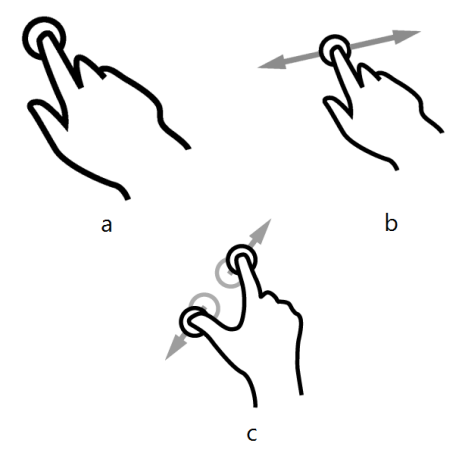
Multi-touch is simply an extension of the regular touch-screen user interface, using two or more fingers instead of one. We’ve used single-finger gestures before, although we didn’t call it that. In Chapter 4 we let the user touch a tile in the Sudoku game in order to change it. That’s called a “tap” gesture. Another gesture is called “drag”. That’s where you hold one finger on the screen and move it around, causing the content under your finger to scroll.

Tap, drag, and a few other single-fingered gestures have always been supported in Android. But due to the popularity of the Apple iPhone, early Android users suffered from a kind of gesture envy. The iPhone supported multi-touch, in particular the “pinch zoom” gesture.


Three common touch gestures: a) tap, b) drag, and c) pinch zoom. (Image courtesy of GestureWorks.com)

With pinch zoom, you place two fingers on the screen and squeeze them together to make the item you’re viewing smaller, or pull them apart to make it bigger. Before Android 2.0 you had to use a clunky zoom control with icons that you pressed to zoom in and out (for example the setBuiltInZoomControls() in the MyMap example). But thanks to its new multi-touch support, you can now pinch to zoom on Android too! As long as the application supports it, of course.

Note: If you try to run the example in this chapter on Android 1.5 or 1.6, it will crash because those versions do not support multi-touch. We’ll learn how to work around that in chapter 13, “Write Once, Test Everywhere”.

Warning: Multi-bugs ahead

Multi-touch, as implemented on current Android phones is extremely buggy. In fact it’s so buggy that it borders on the unusable. The API routinely reports invalid or impossible data points, especially during the transition from one finger to two fingers on the screen and vice-versa.

On the developer forums you can find complaints of fingers getting swapped, x and y axes flipping, and multiple fingers sometimes being treated as one. With a lot of trial and error, I was able to get the example in this chapter working because the gesture it implements is so simple. Until Google acknowledges and fixes the problems, thatmay be about all you can do. Luckily, pinch zoom seems to be the only multi-touch gesture most people want.

The Touch example

To demonstrate multi-touch, we’re going to build a simple image viewer application that lets you zoom in and scroll around an image. Here’s a screenshot of the finished product:


The Touch example implements a simple image viewer with drag and pinch zoom.

Continue reading: Part 2: Building the Touch Example >

Copyright notice:
This is an excerpt from Hello, Android 3rd edition, published by the Pragmatic Bookshelf. For more information or to purchase a paperback or PDF copy, please visit http://www.pragprog.com/titles/eband3.

Copyright © 2010 The Pragmatic Programmers, LLC. All rights reserved.

No part of this publication may be reproduced, stored in a retrieval system, or transmitted, in any form, or by any means, electronic, mechanical, photocopying, recording, or otherwise, without the prior consent of the publisher.

Kick off your day with ZDNet's daily e-mail newsletter. It's the freshest tech news and opinion, served hot. Get it.

Topics

Ed Burnette is a software industry veteran with more than 25 years of experience as a programmer, author, and speaker. He has written numerous technical articles and books, most recently "Hello, Android: Introducing Google's Mobile Development Platform" from the Pragmatic Programmers.

Disclosure

Ed Burnette

Ed Burnette is a Manager of Mobile Development at SAS. However the postings on this site are his own and do not represent the positions, strategies, or opinions of his employer.

Biography

Ed Burnette

Ed Burnette has been hooked on computers ever since he laid eyes on a TRS-80 in the local Radio Shack. Since graduating from NC State University he has programmed everything from serial device drivers and debuggers to web servers. After a delightful break working on commercial video games, Ed reluctantly returned to business software. He currently develops enterprise software for Android phones and tablets.

In his copious spare time, Ed writes and speaks about all kinds of technology and software. His most recent books include the Eclipse IDE Pocket Guide from O'Reilly and Hello, Android: Introducing Google's Mobile Development Platform from the Pragmatic Programmers.

Talkback Most Recent of 7 Talkback(s)

  • Multitouch bugs
    The problems you mention are not software issues, they are hardware
    issues. We are aware of these issues but unfortunately most of the
    problems cannot be fixed (at least reliably) in software.
    ZDNet Gravatar
    thinthalion
    2nd Mar 2010
  • ZDNet Blogger

    RE: How to use Multi-touch in Android 2
    I believe a lot of them could be addressed in operating system software. For example on my Droid Sholes I see debugging messages from the system about it dropping coords it thinks are wrong, but it seems to actually be dropping the good coords and keeping the bad. I've seen it give me move events with 2 pointers at almost the same coordinates instead of far apart like they are in reality, because according to the messages in LogCat it threw away the real coordinates for the 2nd finger thinking they were bogus. You can see this happen in the Touch example from the book (full source code is available at http://pragprog.com/titles/eband3/source_code) if you play around for a few seconds with lifting and dragging 2 fingers in different orders.

    (Sorry, that was meant as a reply to thinthalion's comment)
    ZDNet Gravatar
    Ed Burnette
    3rd Mar 2010
  • RE: How to use Multi-touch in Android 2
    Android 2.0? What's that? Oh that's right. It is that version that Google/TMO can seem to squeeze out of their tight you-know-whats!

    I love my MyTouch Android, but communication from Google and TMO about ANYTHING related to the OS is horrible. If something doesn't change, I might have to defect when the contract is up.
    ZDNet Gravatar
    djmik
    3rd Mar 2010
  • ZDNet Blogger

    MyTouch update
    From what I've heard, MyTouch 3g (Magic/Ion) phones are expected to get an upgrade to 2.1 eventually. You're not missing much, though. The more important upgrade is a hardware one to a higher resolution screen and faster processor like the Droid Sholes or Nexus One.
    ZDNet Gravatar
    Ed Burnette
    3rd Mar 2010
  • RE: How to use Multi-touch in Android 2
    Where can I download the example
    ZDNet Gravatar
    mobinauten
    3rd Mar 2010
  • ZDNet Blogger

    Downloading the example
    I was going to save the download link for the next post but since you asked, here it is:

    http://pragprog.com/titles/eband3/source_code
    ZDNet Gravatar
    Ed Burnette
    3rd Mar 2010
  • Image from SDCard - Not moving/zooming
    Hi there,

    I am running similar code in my app where the picture is from a file, rather than from drawable. It is falling into the correct case statements and the coords returned in dump seem to be ok but my picture doesn't change. Any ideas?
    ZDNet Gravatar
    spengilley
    30th Dec 2010

Talkback - Tell Us What You Think

Formatting +
BB Codes - Note: HTML is not supported in forums
  • [b] Bold [/b]
  • [i] Italic [/i]
  • [u] Underline [/u]
  • [s] Strikethrough [/s]
  • [q] "Quote" [/q]
  • [ol][*] 1. Ordered List [/ol]
  • [ul][*] · Unordered List [/ul]
  • [pre] Preformat [/pre]
  • [quote] "Blockquote" [/quote]
Click Here

The best of ZDNet, delivered

ZDNet Newsletters

Get the best of ZDNet delivered straight to your inbox

Facebook Activity

White Papers, Webcasts, & Resources