Nook for Android turns your Google smartphone into an ebook reader

Summary: A client I have been patiently waiting for is finally here and I can now take all of my Barnes & Noble content with me on my Google Android smartphones. Nook for Android is available now for free.
Software continues to enhance my mobile life and today I am extremely pleased to learn that all of my great Barnes & Noble Nook content can be downloaded and read on my Google Android devices. Nook for Android is available now in the Android Market for free and gives you full access to your Barnes & Noble ebook content with the added support of the LendMe loan feature. I immediately installed it on my new Samsung Vibrant and found it to be an excellent and fairly full featured ebook reader.
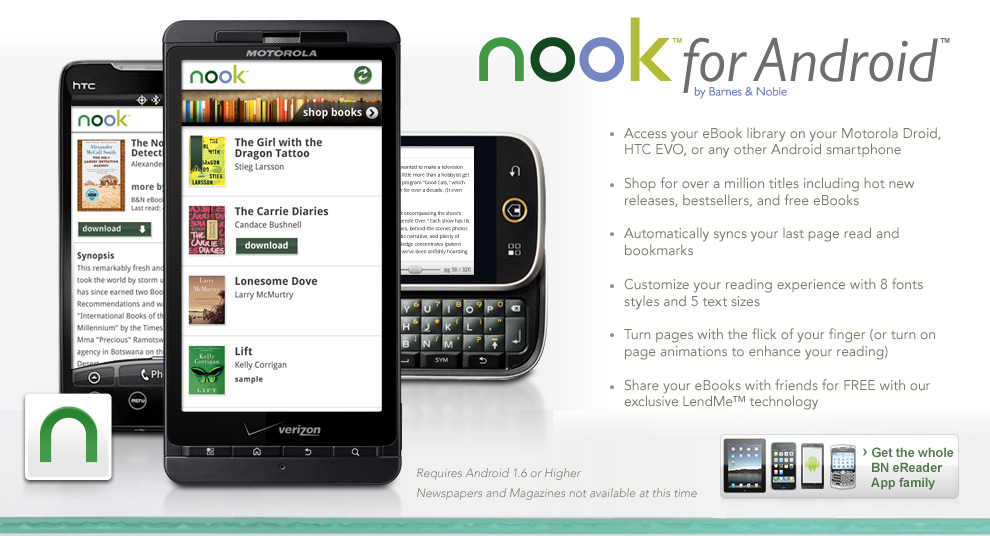
After signing into your account you will see ebooks in your library appear and you just need to tap download to get the books onto your Android device. You can read a summary of the book by pressing the i icon and press the menu button to manage how the books are sorted, filter titles, manage the page turn (animated or sliding), sync your bookmarks across the B&N network, shop for books, or view your account. The animated page turning is fantastic and supports page turns like a real book with differing levels of movement turning the page differently. When you go to shop for titles you are taken to the web browser to view the online store.
After opening up an ebook, you have menu options for font sizes (5 to choose from), font types (8 to choose from), go to a place in the book, view book details, sync your reading location and bookmarks, control the orientation, and go back to your library. Also, tapping on the center of the page brings up a bottom scroll bar to quickly move through the book. So far, I am really liking the client and like the font customization and sliding animation options.
You will also soon see a rebranding of the B&N eReader client found on the iPhone, iPad, etc. where these mobile clients will be known as Nook for xxx. This makes sense as Barnes & Noble tries to have a consistency across the ebook reading experience.
Kick off your day with ZDNet's daily email newsletter. It's the freshest tech news and opinion, served hot. Get it.
Talkback
RE: Nook for Android turns your Google smartphone into an ebook reader
<a href="http://cupu.web.id/blogger-nusantara-blogpreneur-indonesia/">Blogger Nusantara Blogpreneur Indonesia</a>
RE: Nook for Android turns your Google smartphone into an ebook reader
Problem with B&N eBook Readers
RE: Nook for Android turns your Google smartphone into an ebook reader
A welcome arrival but feels a little rushed
There is a Bookmarks tab that neither shows my current bookmarks NOR lets me create new ones. Why.
Text is too small on ToC, I should be able to use my trackball to choose items in lists.
Extremely sluggish (almost to the point of being unusable at times). Hopefully this improves with newer handset.
Where is my Daily and 'Reading Now'?
Can't jump back to the 'furthest read point' once you jump somewhere else. (But it gives you a slide bar to help you find it a little more quickly.)
Let?s hope the updates come in quick succession?
[currently using a mytouch w android 1.6 - vibrant is on the way]
eReading since 2004 - multiple formats even bigger problem now
Originally, I used the eReader format (.pdb) books from the eReader, Fictionwise, and other ebook websites plus occasionally a MobiReader book. I didn't buy as many MobiReader formatted books because I really, really hate the way that MobiReader uses its codes for preventing illegal copying of its books. The eReader format just needs my credit card name and number to verify my purchase. Plus the eReader format was used on at least a dozen other sites without any problems.
Then came .epub and every publisher having their own version. It is beyond irritating that I cannot read books from Amazon and Barnes & Noble on the basic .epub reader from Adobe but must download a publisher specific one. And, only Kobobooks (affiliated with Borders) has a reader that works on my Palm Pre.
I understand the need to prevent copyright violations and theft of books. I also understand that Amazon wants everyone to only buy Kindles and Barnes and Noble feels the same about the Nook. However, I just want to buy and read books wherever they are available.
NICE
RE: Nook for Android turns your Google smartphone into an ebook reader
Reading is an inefficient form of knowledge transfer
I can't imagine why anyone would want to stare at any kind of ebook reader device for any amount of time, unless it's a technical/reference book with good search, TTS, and dynamic output features (print/email selection, etc.).