ie8 fix
madison

Hardware 2.0

Adrian Kingsley-Hughes

Apple Magic Trackpad arrives

By | July 27, 2010, 5:54am PDT

Summary: Apple unveils the Magic Trackpad for desktop Macs - one of Apple’s worst kept secrets!

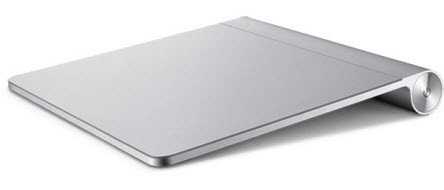
Apple unveils the Magic Trackpad for desktop Macs - one of Apple’s worst kept secrets!


Some highlights:

  • Magic Trackpad is just like the trackpad on the MacBook Pro — but bigger. It’s made with the same advanced touch-friendly and wear-resistant glass surface. But with nearly 80 percent more area, it’s the largest Multi-Touch trackpad made by Apple. So there’s even more room for you to scroll, swipe, pinch, and rotate to your fingers’ content. And since the entire surface is a button that clicks, you can use it in place of a mouse.
  • It fits in perfectly.
    Magic Trackpad features the same sculpted aluminum design as the Apple Wireless Keyboard, and side by side the two sit flush at the same angle and height. Go from typing to gesturing in one motion, or do both at the same time. How perfect is that?
  • Effortless wireless.
    Magic Trackpad works using Bluetooth technology, so you don’t have to deal with an annoying cable that dictates where you place it. Once you pair Magic Trackpad with your Bluetooth-enabled Mac, you’ll enjoy a reliable, secure connection up to 33 feet away. Magic Trackpad detects periods of inactivity, and it’s equipped with an on/off switch. Together these features help to conserve battery life, so you can keep gesturing for months at a time.

Supports click, scroll, swipe and rotate.

This will set you back $69.

Kick off your day with ZDNet's daily e-mail newsletter. It's the freshest tech news and opinion, served hot. Get it.

Topics

Adrian Kingsley-Hughes is an internationally published technology author who has devoted over a decade to helping users get the most from technology.

Disclosure

Adrian Kingsley-Hughes

All opinions expressed on Hardware 2.0 are those of Adrian Kingsley-Hughes. Every effort is made to ensure that the information posted is accurate. If you have any comments, queries or corrections, please contact Adrian via the email link here. Any possible conflicts of interest will be posted below. [Updated: February 23, 2010] - Adrian Kingsley-Hughes has no business relationships, affiliations, investments, or other actual/potential conflicts of interest relating to the content posted so far on this blog.

Biography

Adrian Kingsley-Hughes

Adrian Kingsley-Hughes is an internationally published technology author who has devoted over a decade to helping users get the most from technology -- whether that be by learning to program, building a PC from a pile of parts, or helping them get the most from their new MP3 player or digital camera.

Adrian has authored/co-authored technical books on a variety of topics, ranging from programming to building and maintaining PCs. His most recent books include "Build the Ultimate Custom PC", "Beginning Programming" and "The PC Doctor's Fix It Yourself Guide". He has also written training manuals that have been used by a number of Fortune 500 companies.

Adrian also runs a popular blog under the name The PC Doctor, where he covers a range of computer-related topics -- from security to repairing and upgrading.

Related Discussions on TechRepublic

Did you know you can take part in these discussions with your ZDNet membership?
11
Comments

Join the conversation!

Just In

Just an update
kenosha77a Updated - 29th Jul 2010
I purchased a Magic Trackpad today and tried it out on my system that includes an Apple Bluetooth Magic Mouse. Perhaps I was wrong in suggesting that the combination of a trackpad and mouse might be less than ideal. The combination is proving quite useful .. perhaps even ideal.

Its sort of cool having two multitouch control surfaces working at the same time and with the addition of the enhanced multitouch gestures afforded by the trackpad, working with images just became a whole lot more useful and "entertaining.".

Unfortunately, all it takes is money - the bane of all Apple products.
0 Votes
+ -
What's so Magic about it
bobiroc 27th Jul 2010
Does anyone other than me feel that Steve Jobs has an ego problem. Lately everything is magical.

To keep on subject though I think I would rather still use a mouse and leave the finger gestures to a touch screen.
0 Votes
+ -
Why not use both at the same time?
kenosha77a Updated - 27th Jul 2010
@bobiroc
Since I'm right handed, I would use my mouse on the right side of the keyboard and the Magic Trackpad on the left side.

All quick "detail or precision" cursor movements would be done thru the mouse interface while the "quick and grand sweeping" gestures that control pinching, rotating, quick page ups or downs and could be accomplished with the trackpad.

I'm not saying the combination is ideal .. just that it could work.

As for myself, I use Apple's Magic Mouse (there's that word again) with the "BetterTouchTool" multitouch plugin tool. Using that third party plugin allows Windows 7 type features such as window snapping (to full screen or one half screen width) and other multitouch options currently not offered thru Apple Magic Mouse software controls.
0 Votes
+ -
Just an update
kenosha77a Updated - 29th Jul 2010
I purchased a Magic Trackpad today and tried it out on my system that includes an Apple Bluetooth Magic Mouse. Perhaps I was wrong in suggesting that the combination of a trackpad and mouse might be less than ideal. The combination is proving quite useful .. perhaps even ideal.

Its sort of cool having two multitouch control surfaces working at the same time and with the addition of the enhanced multitouch gestures afforded by the trackpad, working with images just became a whole lot more useful and "entertaining.".

Unfortunately, all it takes is money - the bane of all Apple products.
0 Votes
+ -
RE: Apple Magic Trackpad arrives
CobraA1 27th Jul 2010
*yawn*

Right. In a world where everything is designed for the mouse, I'm gonna want to go back to the trackpad. Not.

These devices were designed to save space, not to provide the full functionality of a mouse.

I suppose it's probably a bit easier on the Mac to do this, as it doesn't use the right mouse button as much. But I'm still not sure that it's the best experience.
0 Votes
+ -
you suppose wrong
banned from zdnet 27th Jul 2010
@CobraA1
a mac user uses the right click as much as any pc user. get over your decade old bs.

unless we don't have any buttons anymore, we simply touch the right side. i really don't miss the cheap, plastic click of a glued together piece of junk, a simple, smooth touch will do.
0 Votes
+ -
RE: Apple Magic Trackpad arrives
CobraA1 27th Jul 2010
@banned from zdnet

I generally buy Logitech. Their mice are very nice. I generally prefer functionality over "ooh, it has a nice feel."

Not that Logitechs feel bad at all =). Mine is very comfortable, thanks.
0 Votes
+ -
RE: Apple Magic Trackpad arrives
pajcastle 27th Jul 2010
$69?
That's not so bad.
I was expecting $120.

If it works as well as my MBP touchpad, it will be swchweet!
I think there was once a touchpad,(can't remember the name now, but it was from the Newton age, I believe), it didn't have multigesture. Saw one on ebay once, it got bought by one of those Apple gadget archiver=collector people.
This looks like the modern version of that.

Cool!
*cue in the no-life nay-sayers and bashers now*
0 Votes
+ -
Magic? Boring!
trickytom2 27th Jul 2010
Sorry, this is just sad.
0 Votes
+ -
RE: Apple Magic Trackpad arrives
nothingness 27th Jul 2010
Touch pads are a pain to use, give me a good mouse any day.
0 Votes
+ -
RE: Apple Magic Trackpad arrives
dheady@... 27th Jul 2010
I'm already using the Magic Mouse and it's free form touch surface. Frankly not gripping a mouse will do wonders for my carpal tunnel. On the other hand I've never been a fan of the touch pad being used to double click or click and drag so I'm not sure how I'll like this. At least it will be to my right instead of the center.
As for everything being designed for a mouse...have you ever used a laptop's trackpad? I understand even on PeeCee laptops they've finally gotten away from trackballs and little rubber erasers stuck in the keyboard.
0 Votes
+ -
This sounds fantastic!
MSFTWorshipper 27th Jul 2010
I'm definitely getting one to go along with my wireless Apple keyboard!

Join the conversation!

Formatting +
BB Codes - Note: HTML is not supported in forums
  • [b] Bold [/b]
  • [i] Italic [/i]
  • [u] Underline [/u]
  • [s] Strikethrough [/s]
  • [q] "Quote" [/q]
  • [ol][*] 1. Ordered List [/ol]
  • [ul][*] · Unordered List [/ul]
  • [pre] Preformat [/pre]
  • [quote] "Blockquote" [/quote]
ie8 fix
Click Here
ie8 fix

The best of ZDNet, delivered

ZDNet Newsletters

Get the best of ZDNet delivered straight to your inbox

Facebook Activity

White Papers, Webcasts, & Resources
ie8 fix
ie8 fix